







OceanBase Database allows you to use partitioned tables to distribute data across partitions. You can distribute data of different partitions to different servers. You can use table groups to control the proximity between different tables in data distribution.
Partitioning
OceanBase Database can split the data of a table into different groups based on some rules. Data in the same group is stored in the same physical area. This area is called a partition. A table split in this way is called a partitioned table. In the MySQL mode of OceanBase Database, the tenant-level parameter max_partition_num specifies the maximum number of partitions supported for a single table. The default value is 8192.
For example, the following figure shows a table that consists of five partitions, which are distributed across two servers.
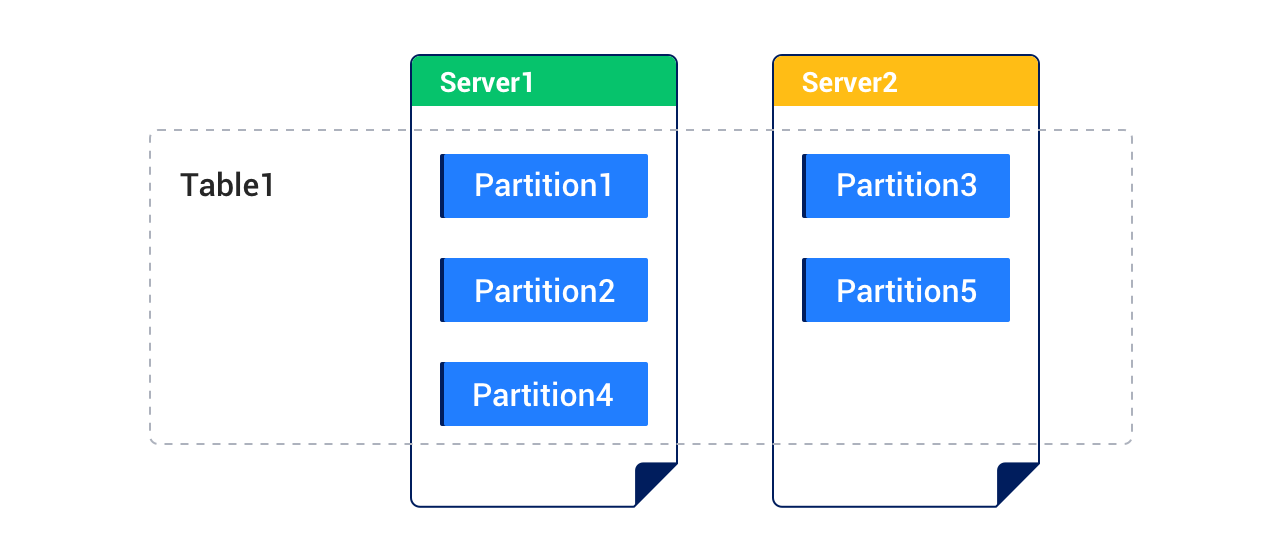
Each partition can be divided into subpartitions based on some rules. A table that contains both partitions and subpartitions is called a subpartitioned table.
In a table row, a column determines which partition the row belongs to. The set of data in this column is called the partitioning key. An expression that contains the partitioning key and that determines which partitions the rows belong to is called a partitioning expression.
- In MySQL mode, the partitioning key must be a subset of a primary key or a unique key if any. If a primary key exists, the partitioning key must be a subset of the primary key.
- In Oracle mode, if a primary key exists, the partitioning key must be a subset of the primary key.
The MySQL mode of OceanBase Database supports the following partitioning types:
RANGE partitioning
RANGE COLUMNS partitioning
LIST partitioning
LIST COLUMNS partitioning
HASH partitioning
KEY partitioning
Composite partitioning
RANGE partitioning
RANGE partitioning maps data to partitions based on ranges of partitioning key values that you set up for each partition when you define the partitioned table. It is the most common partitioning type and is often used with dates. For example, you can partition business log tables by day, week, or month.
In RANGE partitioning, the partitioning key must be of the integer or YEAR type. If a field of another type is used as the partitioning key, you must use a function for conversion. In addition, the partitioning key must be a single column.
RANGE COLUMNS partitioning
RANGE COLUMNS partitioning is similar to RANGE partitioning, but they are different in the following aspects:
In RANGE COLUMNS partitioning, the values of the partitioning key do not necessarily need to be integers. The following data types are supported:
All integer types:
TINYINT,SMALLINT,MEDIUMINT,INT(INTEGER), andBIGINTFloating-point types:
DOUBLE,FLOAT, andDECIMAL, including:DECIMALandDECIMAL[(M[,D])]DEC,NUMERIC, andFIXEDFLOAT[(M,D)]andFLOAT(p)DOUBLEandDOUBLE[(M,D)]DOUBLE PRECISIONandREAL
Time types:
DATE,DATETIME, andTIMESTAMPColumns of other date or time data types cannot be used as the partitioning key.
Character types:
CHAR,VARCHAR,BINARY, andVARBINARYColumns of the
TEXTorBLOBdata type cannot be used as the partitioning key.
You cannot use an expression as the partitioning key for RANGE COLUMNS partitioning.
The partitioning key for RANGE COLUMNS partitioning can contain multiple columns (column vectors).
LIST partitioning
Unlike RANGE partitioning and HASH partitioning, LIST partitioning enables you to explicitly control how rows map to partitions by specifying a list of discrete values for the partitioning key in the description for each partition. The advantage of LIST partitioning is that you can partition unordered and unrelated data.
In LIST partitioning, the partitioning key can be a column name or an expression. However, the data type of the partitioning key must be integer or YEAR.
LIST COLUMNS partitioning
LIST COLUMNS partitioning is similar to LIST partitioning, but they are different in the following aspects:
In LIST COLUMNS partitioning, the values of the partitioning key do not necessarily need to be integers. The following data types are supported:
All integer types:
TINYINT,SMALLINT,MEDIUMINT,INT(INTEGER), andBIGINTColumns of other numeric data types, such as
DECIMALorFLOAT, cannot be used as the partitioning key.Time types:
DATEandDATETIMEColumns of other date or time data types cannot be used as the partitioning key.
Character types:
CHAR,VARCHAR,BINARY, andVARBINARYColumns of the
TEXTorBLOBdata type cannot be used as the partitioning key.
The partitioning key for LIST COLUMNS partitioning cannot be an expression.
LIST COLUMNS partitioning supports multiple partitioning keys, whereas LIST partitioning supports only one partitioning key.
HASH partitioning
HASH partitioning applies to scenarios where RANGE partitioning or LIST partitioning cannot be used. HASH partitioning enables easy partitioning of data by distributing records over partitions based on a HASH function on the partitioning key. HASH partitioning is a better choice in the following cases:
You cannot identify an obvious partitioning key for the data.
The sizes of range partitions differ substantially or are difficult to balance manually.
RANGE partitioning can cause the data to be undesirably clustered.
Performance features such as parallel DML, partition pruning, and partition-wise joins are important.
In HASH partitioning, the partitioning key must be of the integer or YEAR type and can be an expression.
KEY partitioning
KEY partitioning is similar to HASH partitioning. KEY partitioning performs a modulo operation on the integer value obtained by applying the hash algorithm to the partitioning key, to determine the partition to which a specific row belongs.
KEY partitioning has the following characteristics:
In KEY partitioning, the values of the partitioning key do not necessarily need to be integers. Data types other than TEXT and BLOB are supported.
You cannot use an expression as the partitioning key.
You can use a vector as the partitioning key.
If you do not specify any column as the partitioning key, the primary key is used as the partitioning key.
Here is an example:
obclient> CREATE TABLE tbl1 (col1 INT PRIMARY KEY, col2 INT)
       PARTITION BY KEY()
       PARTITIONS 5;
Query OK, 0 rows affected
Composite partitioning
Composite partitioning partitions a table using one partitioning strategy and partitions each partition using a different partitioning strategy. It is suitable for business tables containing large amounts of data. Composite partitioning gives full play to the advantages of the two partitioning strategies that you use in combination.
Considerations
Take note of the following considerations if you use auto-increment columns as the partitioning key in MySQL mode:
In OceanBase Database, each value in an auto-increment column is globally unique but may not be incremental within a partition.
For a partitioned table that uses auto-increment columns as the partitioning key, insert operations may initiate cross-server transactions due to the lack of efficient routing. This degrades the performance.
Manage partitions
For more information about how to manage partitions, see Manage partitions (MySQL mode) and Manage partitions (Oracle mode).
Table groups
A table group is a logical concept. It represents a collection of tables. By default, data is randomly distributed to the tables in a table group. By defining a table group, you can control the physical proximity among a group of tables.
In OceanBase Database V3.x, a table group is a partitioned one and tables joining a table group must have the same partitioning type as the table group. This imposes limitations on tables to be added to a table group. In OceanBase Database V4.2.0 and later, after you define the SHARDING attribute, you can flexibly add tables with different partitioning types to a table group. You can also modify the attribute of a table group to prevent specific tables from being added to the table group. This makes table group management more flexible.
Table groups with the SHARDING attribute can be classified based on the attribute values.
Table groups with
SHARDINGset toNONE: All partitions of all tables in such a table group are aggregated on the same server and the tables can have different partitioning types.Table groups with
SHARDINGnot set toNONE: The data of each table in such a table group is distributed to multiple servers. To ensure consistent table data distribution, all tables in the table group must have the same partition definition, including the partitioning type, partition count, and partition value. The system schedules or aligns partitions with the same partition attribute to the same server to implement partition-wise join.Table groups whose
SHARDINGvalue is notNONEare further classified based on the actual attribute values.Table groups with
SHARDINGset toPARTITION: The data of each table in such a table group is scattered by partition. For a subpartitioned table in the table group, all subpartitions in a partition are aggregated together. Take note of the following partition requirement and partition alignment rule for tables in such a table group:Partition requirement: All tables must have the same partition definition. For subpartitioned tables, the partition definition, rather than the subpartition definition, is verified. Therefore, a table group can contain both partitioned and subpartitioned tables only if they have the same partition definition.
Partition alignment rule: Partitions with the same partition value are aggregated together, including partitions of partitioned tables and all subpartitions in the corresponding partitions of subpartitioned tables.
Table groups with
SHARDINGset toADAPTIVE: The data of each table in such a table group is adaptively scattered. In other words, data in partitioned tables is scattered by partition, and data in subpartitioned tables is scattered by subpartition in each partition.Take note of the following partition requirement and partition alignment rule for tables in such a table group:
Partition requirement: Tables in such a table group are all partitioned tables or all subpartitioned tables. If they are partitioned tables, they must have the same partition definition. If they are subpartitioned tables, they must have the same partition definition and subpartition definition.
Partition alignment rule: If all tables in such a table group are partitioned tables, partitions with the same partition value are aggregated together. If all tables in such a table group are subpartitioned tables, subpartitions with the same partition value and subpartition value are aggregated together.
References
- For more information about how to create, view, and manage table groups in MySQL mode, see Create and manage table groups (MySQL mode).
- For more information about how to create, view, and manage table groups in Oracle mode, see Create and manage table groups (Oracle mode).