






The deployment of OBKV-HBase comprises two parts:
Deploy an OBKV cluster: An OBKV cluster is actually an OceanBase cluster for a MySQL tenant. For more information about how to deploy an OceanBase cluster, see Overview.
Configure the OBKV client: The configuration of the OBKV client can slightly differ depending on whether you deploy your cluster in a public cloud or a private environment.
Deploy an OBKV cluster
You can select an appropriate product form, deployment solution, and deployment method as needed.
Select an appropriate product form
OceanBase Database is available in two forms: OceanBase Database Enterprise Edition and OceanBase Database Community Edition. At present, OceanBase Database Community Edition supports only the direct connection mode and OceanBase Database Enterprise Edition supports both direct connection and connection through OceanBase Database Proxy (ODP). You can select a product form as needed.
Select an appropriate deployment solution
OceanBase Database uses a shared-nothing architecture with multiple replicas to ensure zero single point of failure (SPOF) and system continuity. You can deploy an OceanBase cluster in a single IDC, dual IDCs, three IDCs across two regions, and five IDCs across three regions. OceanBase Database supports high availability and disaster recovery at the single-IDC, multi-IDC (in the same region), and region level. You can also deploy the arbitration service to reduce costs.
For more information about each deployment solution, see HA deployment solutions for OceanBase clusters.
Select an appropriate deployment method
Product form |
Scenario |
Recommended deployment method |
Deployment tool |
|---|---|---|---|
| OceanBase Database Enterprise Edition | Production environment | We recommend that you deploy the OceanBase cluster by using OceanBase Cloud Platform (OCP). For more information, see Deploy a three-replica OceanBase cluster by using OCP. |
OceanBase Admin Toolkit (OAT) and OCP |
| OceanBase Database Enterprise Edition | Non-production environment | You can deploy the OceanBase cluster by using the CLI. For more information, see Deploy a three-replica OceanBase cluster by using the CLI. |
oatcli |
| OceanBase Database Community Edition | Online environment | We recommend that you use OceanBase Deployer (obd) for standard deployment. For more information, see Deploy an OceanBase cluster through the GUI of obd. |
obd |
| OceanBase Database Community Edition | Kubernetes environment | We recommend that you deploy the OceanBase cluster by using ob-operator. For more information, see Deploy OceanBase Database in a Kubernetes cluster. |
ob-operator |
| OceanBase Database Community Edition | Quick experience scenario in an operating system that is not natively supported, such as macOS and Windows | We recommend that you deploy the OceanBase cluster by using a Docker image. For more information, see the Solution 3: Deploy OceanBase Database in a container section in the Get started with OceanBase Database topic. |
|
| OceanBase Database Community Edition | Quick experience scenario in an operating system that is natively supported, such as the Linux series | We recommend that you deploy the OceanBase cluster by using obd. For more information, see the Solution 1: Deploy OceanBase Database in a demo environment or Solution 2: Deploy an OceanBase cluster section in Get started with OceanBase Database. | obd |
Plan resources
Before deployment, you need to plan and prepare resources required for the deployment.
- For server configuration requirements, see Prepare servers.
Configure the OBKV client
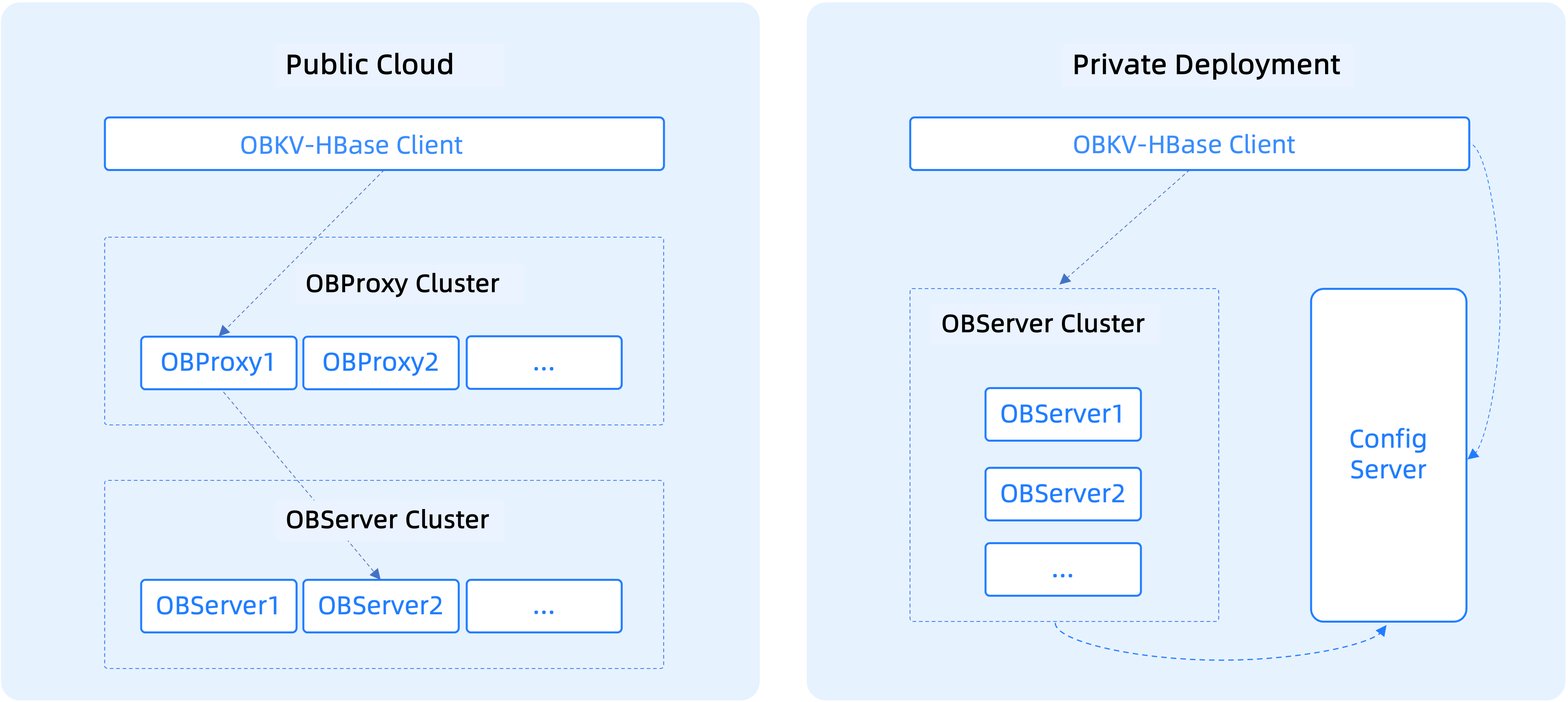
The following figure shows the differences when OBKV-HBase is deployed in a public cloud and in a private environment.
Direct connection mode
When you deploy OBKV-HBase in a private environment, you can choose the direct connection mode.
- The Config Server of OceanBase Database provides metadata registration, storage, and query services.
- The client of OBKV-HBase comes with the data routing feature. In direct connection mode, data is directly delivered to the destination data node.
- When the RegionServer list of an OceanBase cluster changes, the changes will be pushed to the Config Server. OBKV-HBase can obtain the RegionServer list from the Config Server in real time. Generally, OBKV-HBase can detect the changes in the RegionServer list by itself. If the client is initialized and the RegionServer list is offline, OBKV-HBase needs to access the Config Server.
Notice
You do not need to deploy ODP in direct connection mode.
Public cloud mode
When OBKV-HBase is deployed in a public cloud, network isolation exists between the business and database clusters. In this case, ODP is required to route messages.
Notice
When OBKV-HBase is deployed in a private environment, network isolation also exists between the business and database IDCs in some scenarios. In this case, you can also deploy ODP. Based on IP address mapping and the load balancer, business requests are sent to ODP. Then, ODP forwards the requests to the database.