







If you want a numeric column in a table to have unique and sequential values when the table is created, the column is called an auto-increment column. You can define the AUTO_INCREMENT attribute for the column, which is specific to MySQL tenants.
AUTO-increment columns
Attributes of an auto-increment column
An auto-increment column has three attributes, namely, the start value, the step value, and the cache size of the auto-increment values. These attributes are controlled by the following three tenant variables.
System variable |
Description |
|---|---|
| auto_increment_cache_size | Global variable that specifies the cache size of auto-increment values. The value range is [1, 100000000] and the default value is 1000000. |
| auto_increment_increment | Session variable that specifies the step value of auto-increment values. The value range is [1, 65535] and the default value is 1. |
| auto_increment_offset | Session variable that specifies the start value of AUTO_INCREMENT column values. The value range is [1, 65535] and the default value is 1. |
For more information about the configuration and system variables, see Overview.
Value hopping in auto-increment columns
In MySQL databases, an auto-increment column is a special attribute of a database table that can automatically generate a unique and incremental value for each row. As a distributed database, OceanBase Database usually distributes its tables across multiple servers. To ensure the performance of auto-increment columns in distributed multi-server scenarios, the values generated by auto-increment columns can hop, that is, skip certain values.
OceanBase Database supports the NOORDER and ORDER modes for auto-increment columns. By default, the ORDER mode is enabled. The two modes are described as follows:
ORDER mode: An auto-increment column based on a centralized cache. When this mode is enabled, the values of the auto-increment column globally increment.
NOORDER mode: An auto-increment column based on a distributed cache. When this mode is enabled, the values of the auto-increment column globally unique.
The following sections describe how the value hopping of auto-increment columns works in the two modes.
NOORDER mode
Tables created by specifying AUTO_INCREMENT_MODE = 'NOORDER' in OceanBase Database V4.x or earlier than V4.0.0 (which includes V4.0.0) are in NOORDER mode.
The internal mechanism of an auto-increment column in NOORDER mode is shown in the following figure.
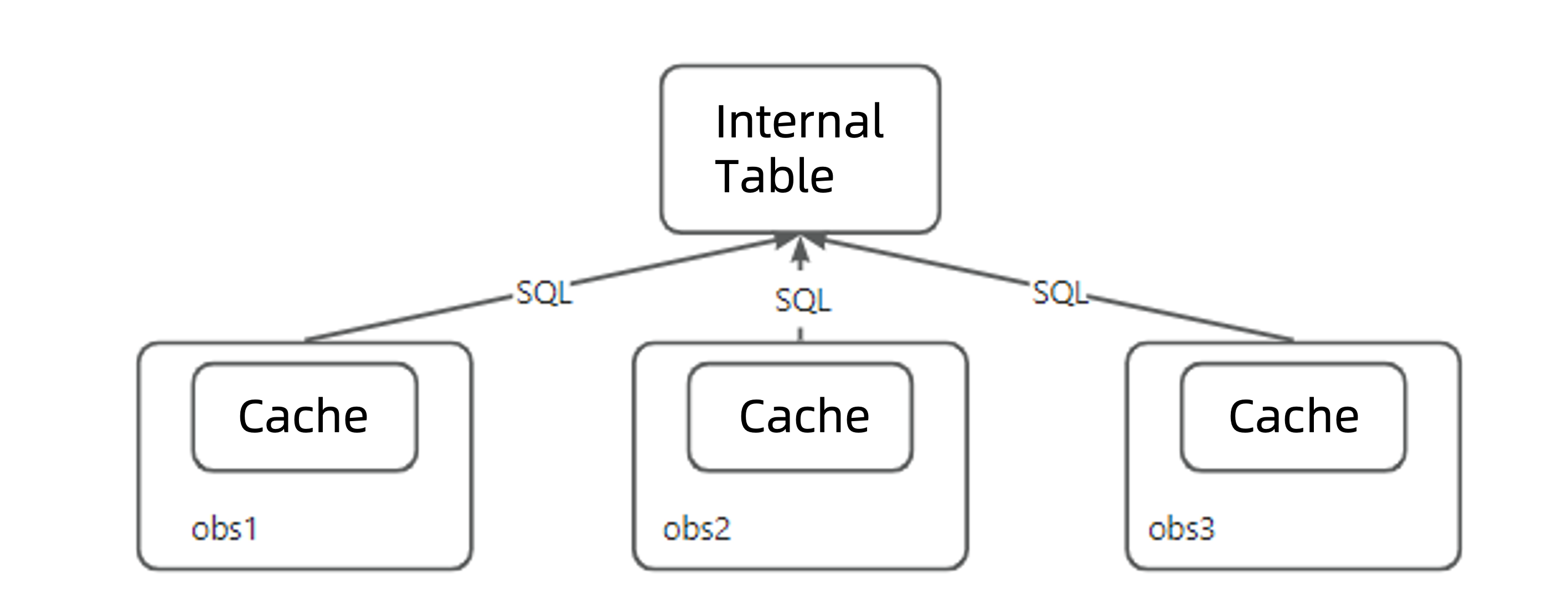
As shown in the preceding figure, an auto-increment column in NOORDER mode consists of the following two parts:
Internal table: persists the current used range of auto-increment values.
Cache: records a range of auto-increment values in the internal structure and is obtained by applying to the internal table.
Auto-increment columns in NOORDER mode on each OBServer node operate independently. Each node can apply for an auto-increment value range to the internal table and store the obtained range in the cache to accelerate the generation of auto-increment values. The following examples explain the reasons for value hopping in the NOORDER mode.
Scenario 1: Generation of auto-increment values across servers and partitions
Assume that the value of auto_increment_cache_size is 100. When OBServer1, OBServer2, and OBServer3, which are OBServer nodes hosting a partitioned table, receive the insert into values (null) request in sequence, the internal processing logic of the nodes is as follows:
When OBServer1 finds that it has no cache, it applies for an auto-increment value range [1,100] to the internal table and generates an auto-increment value 1.
When OBServer2 finds that it has no cache, it applies for an auto-increment value range [101,200] to the internal table and generates an auto-increment value 101.
When OBServer3 finds that it has no cache, it applies for an auto-increment value range [201,300] to the internal table and generates an auto-increment value 201.
OBServer1 uses the cache [2,100] to generate an auto-increment value 2.
OBServer2 uses the cache [102,200] to generate an auto-increment value 102.
……
In this case, the order of data inserted into the table is 1, 101, 201, 2, 102, .... As we can see, the auto-increment values hop.
Scenario 2: Insertion of a specified maximum value by using the INSERT statement
In a MySQL database, if you explicitly insert a specified value into an auto-increment column, subsequent auto-increment values generated by the database will not be smaller than the specified value.
In a distributed OceanBase scenario, if you insert a specified value that is greater than other values in the auto-increment column (namely, the maximum value), the OBServer node that inserts the value must synchronize the information about the insertion of the maximum value to other OBServer nodes and the internal table. This synchronization process is time-consuming. To avoid frequent synchronization caused by inserting the maximum value each time, the system will invalidate the current cache upon inserting a maximum value, and no synchronization is needed from the current value to the next cache value.
For example, assume that OBServer1, OBServer2, and OBServer3 are OBServer nodes hosting a partitioned table and that these nodes receive requests to explicitly specify the increment sequence (1, 2, 3, ...) in sequence. Assume further that caches are stored on these machines:
OBServer1 receives the value 1, invalidates the cache [1,100], re-applies to the internal table for a new cache interval [301,400], and synchronizes the value 101 to the internal table and other OBServer nodes.
OBServer2 receives the value 2, which is smaller than the cached values [101,200], and does not perform any operation.
OBServer3 receives the value 3, which is smaller than the cached values [201,300], and does not perform any operation.
OBServer1 receives the value 4, which is smaller than the cached values [301,400], and does not perform any operation.
……
If you use an auto-increment column to generate sequence numbers after inserting some values, the auto-increment values will hop. For example, OBServer1 directly jumps to the value 301 after it has generated the values 1 and 2 in the cache [1,100].
In a single-server scenario, the same phenomenon occurs when you insert a specified maximum value. Here is an example:
Create a table named
t1that contains an auto-increment column.obclient> CREATE TABLE t1 (c1 int not null auto_increment) AUTO_INCREMENT_MODE='NOORDER';At this time, the value of
auto_increment_cache_sizeis 100.Insert data into the table multiple times.
obclient> INSERT INTO t1 VALUES(null);obclient> INSERT INTO t1 VALUES(3);obclient> INSERT INTO t1 VALUES(null);Query the data in the table.
SELECT * FROM t1;The query result is as follows:
+-----+
| c1  |
+-----+
|   1 |
|   3 |
| 101 |
+-----+
As we can see in the query result, the auto-increment column jumps from 3 to 101.
Scenario 3: Restart or crash of a server
The cache of an auto-increment column is a memory structure. If an OBServer node restarts or crashes, any auto-increment value ranges that are not written back to the internal table will be discarded. As a result, these auto-increment values cannot be used again. For example, assume that the initial auto-increment value range on OBServer1 is [1,100] and that auto-increment values 1 and 2 have been generated. If OBServer1 crashes, after it restarts, the auto-increment value range on OBServer1 will change to [101,200] and the next auto-increment value will be 101. Therefore, the order of auto-increment values will be 1, 2, 101, ..., which indicates a value hopping.
ORDER mode
To address the issue of value hopping in auto-increment columns in scenarios such as multi-machine and multi-partition generation of auto-increment values and insertion of a specified maximum value through the INSERT statement, OceanBase Database introduced the ORDER mode for auto-increment columns in V4.x. This mode has become the default mode for creating a table, ensuring compatibility with MySQL databases.
The internal mechanism of auto-increment columns in the ORDER mode is shown in the following figure.
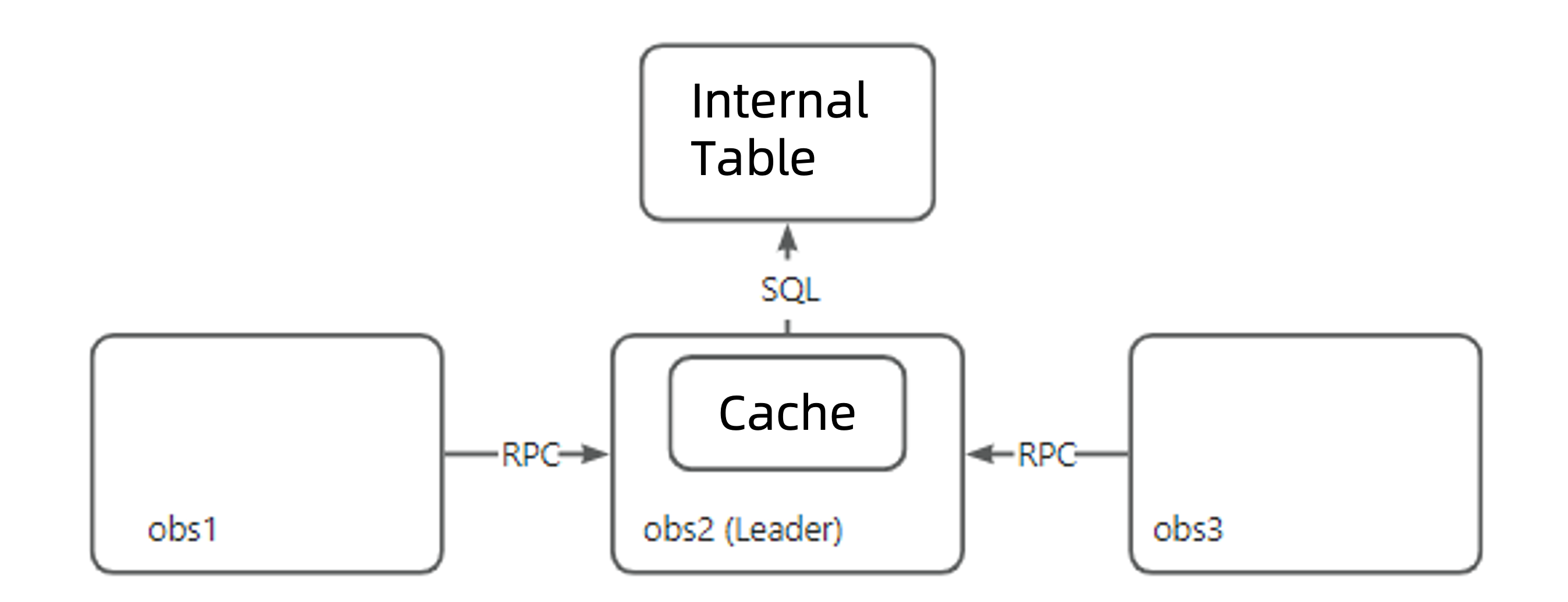
In the ORDER mode, the auto-increment service leader is elected from all OBServer nodes for the current cluster. OBServer nodes that do not serve as the leader send RPC requests to the leader OBServer node to request for auto-increment values. The leader OBServer node applies for auto-increment value ranges from an internal table as the auto-increment cache and then issues the requested values to the follower OBServer nodes.
For example, assume that the auto_increment_cache_size is 100. In a multi-machine and multi-partition scenario, when an insert into values (null) request is received in sequence by OBServer1, OBServer2, and OBServer3, the internal processing logic of these OBServer nodes is as follows:
OBServer1 finds that it is not the leader and sends an RPC request to OBServer2. OBServer2 applies for an auto-increment value range [1,100] from the internal table and returns the next value 1 to OBServer1.
OBServer2 finds that it is the leader and that there is an auto-increment value range [2,100] in the cache. It directly generates the next auto-increment value 2.
OBServer3 finds that it is not the leader and sends an RPC request to OBServer2. OBServer2 finds that there is an auto-increment value range [3,100] in the cache and returns the next auto-increment value 3 to OBServer3. ...
In the ORDER mode, the OBServer nodes request for auto-increment values from the leader. Therefore, in most cases, the system generates a continuous auto-increment value sequence, similar to the standalone scenario. However, in high-concurrency scenarios across multiple machines, the ORDER mode performs worse than the NOORDER mode.
The ORDER mode addresses the issue of value hopping in scenarios such as multi-machine and multi-partition generation of auto-increment values and insertion of a specified maximum value through the INSERT statement. However, in the case of a restart or crash of the server that serves as the leader or during switchover, value hopping can still occur.
Scenario 1: Server restart or crash
In the ORDER mode, the cache interval saved in the memory of the leader OBServer node is cleared when the leader server is restarted or crashes. As a result, the unused auto-increment values in the interval are not used and new cache intervals are applied for, leading to value hopping.
Note
In this scenario, value hopping occurs only when the server that serves as the leader is restarted or crashes. The auto-increment values are generated continuously on follower OBServer nodes even when they crash because these nodes do not save caches.
Scenario 2: Switchover
Assume that the initial cache interval of the auto-increment column on OBServer2 is [1,100] and that auto-increment values 1 and 2 have been generated. If a switchover occurs in the cluster, the conventional processing logic is as follows:
The switchover is performed to OBServer1, which applies for a new auto-increment value range [101,200] from the internal table and continues to generate auto-increment values 101 and 102.
After OBServer2 successfully restarts, the switchover is performed back to OBServer2, which uses the previous cache interval [3,100] and generates auto-increment values 3 and 4.
As a result, the auto-increment values generated from 101 to 3 are not incremental.
To avoid the issue of non-incremental auto-increment values, OceanBase Database clears the cache interval on the leader OBServer node during switchover. This causes value hopping.
Create an auto-increment column
If you specify an auto-increment column when you create a table, you do not need to specify the value of the auto-increment column in the INSERT statement. The OceanBase Database will automatically assign values to the column. If you specify a value for the auto-increment column in the INSERT statement, and the value is 0 or greater than the current maximum value, the OceanBase Database will use the next value of the auto-increment column to fill the column. If the specified value is smaller than the current maximum value, the calculation of the next value of the auto-increment column is not affected.
Note
If SQL_MODE is set to NO_AUTO_VALUE_ON_ZERO, the database does not generate an AUTO_INCREMENT value when you insert 0 into the column.
Create a table named t1 and specify column constraints
obclient> CREATE TABLE t1(id bigint not null auto_increment primary key, name varchar(50), gmt_create timestamp not null default current_timestamp);
Query OK, 0 rows affected

obclient> INSERT INTO t1(name) VALUES('A'),('B'),('C');
Query OK, 3 rows affected

obclient> SELECT * FROM t1;
+----+------+---------------------+
| id | name | gmt_create          |
+----+------+---------------------+
|  1 | A    | 2020-04-03 17:09:55 |
|  2 | B    | 2020-04-03 17:09:55 |
|  3 | C    | 2020-04-03 17:09:55 |
+----+------+---------------------+
3 rows in set
In this example:
You specified
bigintas the data type of theidcolumn.The
NOT NULLconstraint: The value of the column cannot beNULL.The
auto_incrementconstraint: Theidcolumn is an auto-increment column. Currently, only integer columns (excluding columns of theBOOLorBOOLEANtype) can be set as auto-increment columns.The
primary keyconstraint: Theidcolumn is the primary key column.name varchar(50): The data types of the data that can be inserted into thenamecolumn are character types (varchar).50indicates the maximum length of characters.Since the
idcolumn is an auto-increment column, you do not need to specify the value of the auto-increment column in theINSERTstatement. The OceanBase Database will automatically assign values to the column.
Insert a row into the t1 table and set the value of the auto-increment column to 0
obclient> INSERT INTO t1(id, name) VALUES(0, 'D');
Query OK, 1 row affected

obclient> SELECT * FROM t1;
+----+------+---------------------+
| id | name | gmt_create          |
+----+------+---------------------+
|  1 | A    | 2021-12-17 14:21:53 |
|  2 | B    | 2021-12-17 14:21:53 |
|  3 | C    | 2021-12-17 14:21:53 |
|  4 | D    | 2021-12-17 14:22:36 |
+----+------+---------------------+
As shown in the preceding example, if you specify a value for the auto-increment column in the INSERT statement and the value is 0, the OceanBase Database will use the next value of the auto-increment column to fill the column.
Insert a row into the t1 table and set the value of the auto-increment column to -1
obclient> INSERT INTO t1(id, name) VALUES(-1,'E');
Query OK, 1 row affected

obclient> SELECT * FROM t1;
+----+------+---------------------+
| id | name | gmt_create          |
+----+------+---------------------+
| -1 | E    | 2021-12-17 15:25:04 |
|  1 | A    | 2021-12-17 14:21:53 |
|  2 | B    | 2021-12-17 14:21:53 |
|  3 | C    | 2021-12-17 14:21:53 |
|  4 | D    | 2021-12-17 14:22:36 |
+----+------+---------------------+
5 rows in set
The preceding example shows that since the value -1 is smaller than the current maximum value of the auto-increment column, the calculation of the next value of the auto-increment column is not affected.
Insert a row into the t1 table and set the value of the auto-increment column to 10
obclient> INSERT INTO t1(id, name) VALUES(10,'F');
Query OK, 1 row affected

obclient> SELECT * FROM t1;
+----+------+---------------------+
| id | name | gmt_create          |
+----+------+---------------------+
| -1 | E    | 2021-12-17 15:25:04 |
|  1 | A    | 2021-12-17 14:21:53 |
|  2 | B    | 2021-12-17 14:21:53 |
|  3 | C    | 2021-12-17 14:21:53 |
|  4 | D    | 2021-12-17 14:22:36 |
| 10 | F    | 2021-12-17 15:33:28 |
+----+------+---------------------+
6 rows in set
The preceding example shows that since the value 10 is greater than the current maximum value (4) of the auto-increment column (id), the OceanBase Database will use the next value (10) of the auto-increment column to fill the id column when you insert a row into the t1 table and do not specify a value for the id column.
The query result is as follows:
obclient> INSERT INTO t1(name) VALUES('G');
Query OK, 1 row affected

obclient> SELECT * FROM t1;
+---------+------+---------------------+
| id      | name | gmt_create          |
+---------+------+---------------------+
|      -1 | E    | 2020-04-03 17:10:24 |
|       1 | A    | 2020-04-03 17:09:55 |
|       2 | B    | 2020-04-03 17:09:55 |
|       3 | C    | 2020-04-03 17:09:55 |
|       4 | D    | 2020-04-03 17:10:19 |
|      10 | F    | 2020-04-03 17:10:29 |
|      11 | G    | 2020-04-03 17:10:34 |
+---------+------+---------------------+
7 rows in set
Modify a normal column to an auto-increment column
OceanBase Database allows you to modify a normal column in a table to an auto-increment column after the table is created.
The syntax is as follows:
obclient> ALTER TABLE table_name MODIFY column_name data_type AUTO_INCREMENT;
The parameters are described as follows:
table_name: the name of the table to modify.column_name: the name of the column to be modified to an auto-increment column.data_type: the data type of the column to modify.Note
When you modify a column to an auto-increment column, you can also change the data type of the column, provided that the new data type supports auto-increment.
For more information about data types, see Overview.
Here is an example:
Create a table named
tbl1.obclient> CREATE TABLE tbl1(id bigint(10));Modify the
tbl1table to convert one of its columns to an auto-increment column.obclient> ALTER TABLE tbl1 MODIFY id bigint(10) AUTO_INCREMENT;
Set and change the auto-increment mode
You can specify the AUTO_INCREMENT_MODE parameter when you create a table to set an auto-increment mode for an auto-increment column, or you can change the auto-increment mode of an auto-increment column after the table is created. You can also use the tenant-level parameter default_auto_increment_mode to set the default auto-increment mode for auto-increment columns of tables in a tenant.
Note
If you do not specify an auto-increment mode when you create a table, the system will use the default mode ORDER specified by the default_auto_increment_mode parameter.
Here are some examples:
Set an auto-increment mode when you create a table.
obclient> CREATE TABLE tbl2(id bigint(10) AUTO_INCREMENT PRIMARY KEY, name varchar(50)) AUTO_INCREMENT_MODE='NOORDER';
Query OK, 0 rows affected

obclient> SHOW CREATE TABLE tbl2\G
*************************** 1. row ***************************
      Table: tbl2
Create Table: CREATE TABLE `tbl2` (
`id` bigint(10) NOT NULL AUTO_INCREMENT,
`name` varchar(50) DEFAULT NULL,
PRIMARY KEY (`id`)
) AUTO_INCREMENT = 1 AUTO_INCREMENT_MODE = 'NOORDER' DEFAULT CHARSET = utf8mb4 ROW_FORMAT = DYNAMIC COMPRESSION = 'zstd_1.3.8' REPLICA_NUM = 1 BLOCK_SIZE = 16384 USE_BLOOM_FILTER = FALSE TABLET_SIZE = 134217728 PCTFREE = 0
1 row in set
Change the auto-increment mode of an auto-increment column after the table is created.
obclient> CREATE TABLE tbl2(id bigint(10) AUTO_INCREMENT PRIMARY KEY, name varchar(50));
Query OK, 0 rows affected

obclient> SHOW CREATE TABLE tbl2\G
*************************** 1. row ***************************
      Table: tbl2
Create Table: CREATE TABLE `tbl2` (
`id` bigint(10) NOT NULL AUTO_INCREMENT,
`name` varchar(50) DEFAULT NULL,
PRIMARY KEY (`id`)
) AUTO_INCREMENT = 1 AUTO_INCREMENT_MODE = 'ORDER' DEFAULT CHARSET = utf8mb4 ROW_FORMAT = DYNAMIC COMPRESSION = 'zstd_1.3.8' REPLICA_NUM = 1 BLOCK_SIZE = 16384 USE_BLOOM_FILTER = FALSE TABLET_SIZE = 134217728 PCTFREE = 0
1 row in set

obclient> ALTER TABLE tbl2 auto_increment_mode = 'NOORDER';
Query OK, 0 rows affected

obclient> SHOW CREATE TABLE tbl2\G
*************************** 1. row ***************************
      Table: tbl2
Create Table: CREATE TABLE `tbl2` (
`id` bigint(10) NOT NULL AUTO_INCREMENT,
`name` varchar(50) DEFAULT NULL,
PRIMARY KEY (`id`)
) AUTO_INCREMENT = 1 AUTO_INCREMENT_MODE = 'NOORDER' DEFAULT CHARSET = utf8mb4 ROW_FORMAT = DYNAMIC COMPRESSION = 'zstd_1.3.8' REPLICA_NUM = 1 BLOCK_SIZE = 16384 USE_BLOOM_FILTER = FALSE TABLET_SIZE = 134217728 PCTFREE = 0
1 row in set
Set the default auto-increment mode for auto-increment columns of tables in a tenant by using the
default_auto_increment_modeparameter.obclient> ALTER SYSTEM SET default_auto_increment_mode = 'ORDER'; Query OK, 0 rows affected obclient> CREATE TABLE tbl3(id bigint(10) AUTO_INCREMENT PRIMARY KEY, name varchar(50)); Query OK, 0 rows affected obclient> SHOW CREATE TABLE tbl3\G *************************** 1. row *************************** Table: tbl3 Create Table: CREATE TABLE `tbl3` ( `id` bigint(10) NOT NULL AUTO_INCREMENT, `name` varchar(50) DEFAULT NULL, PRIMARY KEY (`id`) ) AUTO_INCREMENT = 1 AUTO_INCREMENT_MODE = 'ORDER' DEFAULT CHARSET = utf8mb4 ROW_FORMAT = DYNAMIC COMPRESSION = 'zstd_1.3.8' REPLICA_NUM = 1 BLOCK_SIZE = 16384 USE_BLOOM_FILTER = FALSE TABLET_SIZE = 134217728 PCTFREE = 0 1 row in set