







This topic introduces how to deploy ODP.
Prerequisites
The ODP RPM package is obtained and uploaded to the corresponding directory.
Background
The GUI varies based on different OceanBase Cloud Platform (OCP) versions. In this example, OCP V3.3.2 is used. For OCP of other versions, see User Guide of the corresponding version.
Procedure
In the left-side navigation pane, click OBProxy to go to the ODP page.
In the upper-right corner of the page, click Create OBProxy Cluster.
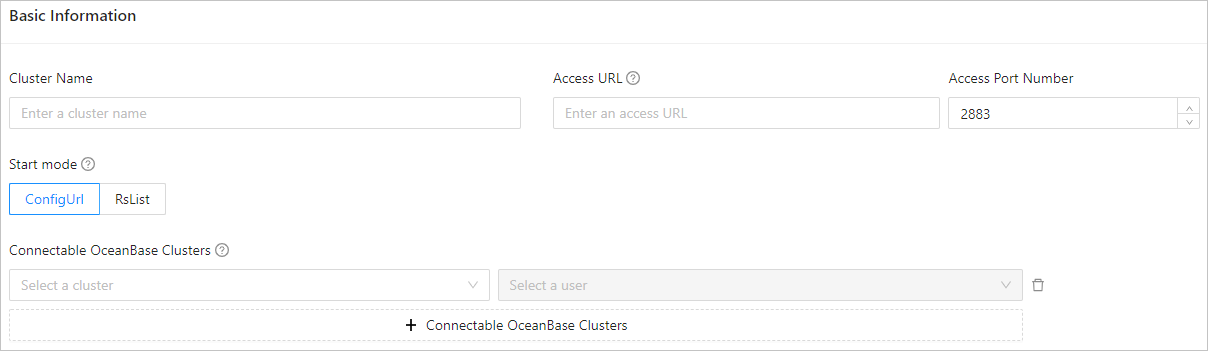
On the Create OBProxy Cluster page, specify the following information:
Set related parameters to specify the basic information. The following table describes the parameters.
ParameterDescriptionCluster Name The name of the cluster. You can specify the cluster name based on the business requirements. The name must start with a letter and can contain letters, digits, and underscores (_). Access URL The access URL of the ODP cluster. The access URL is only used to generate a connection string for the tenant. For a virtual IP (VIP) address, you must apply for the VIP and bind it to the ODP server. Port The port for accessing the ODP cluster. Default value: 2883. You must set the parameter based on the actual port of the VIP. Startup Method The startup method of the ODP cluster. Valid values: - ConfigUrl: specifies the multicluster startup method, where the ODP cluster can access multiple OceanBase clusters.
- RsList: specifies the single cluster startup method, where the ODP cluster can only access the OceanBase cluster specified when the ODP cluster is created. After an ODP cluster is created, no more connectable OceanBase clusters can be added.
Connectable OceanBase Cluster The OceanBase cluster that the ODP cluster can access. - This parameter is optional when you set Startup Method ConfigUrl. After the cluster is created, you can click Add Connectable OceanBase Cluster to add more OceanBase clusters.
- This parameter is required when Startup Method is set to RsList. Select the OceanBase cluster from the drop-down list.
Note
- If the password box contains the credentials of the proxyro user of the cluster, the proxyro user is selected by default.
- Otherwise, you can click Create Connection to create a connection credential for the proxyro user of the cluster.
(Optional) Set parameters on the Deploy OBProxy page.
If you want to deploy the ODP when you create an ODP cluster, you can skip this step. After the cluster is created, you can add an ODP to the cluster by taking the following actions: take over an ODP or add an ODP. Turn on the switch in the upper-right corner of the Deploy OBProxy page. Refer to the following table to specify the parameters.
ParameterDescriptionSQL Port Number The default port is 2883. Exporter Port Number The default port is 2884. Software Version Select the version of the ODP RPM to install. Parameters about ODP hosts Configure the host where ODP is deployed by setting the following parameters: IDC, Host Type (Optional), Selection Method, and Host IP Address.
By default, parameters for configuring two hosts are displayed. To deploy more hosts, click Add OBProxy to add a host. If you need to deploy only one ODP host, click the Delete icon next to the Host IP Address field to delete the host.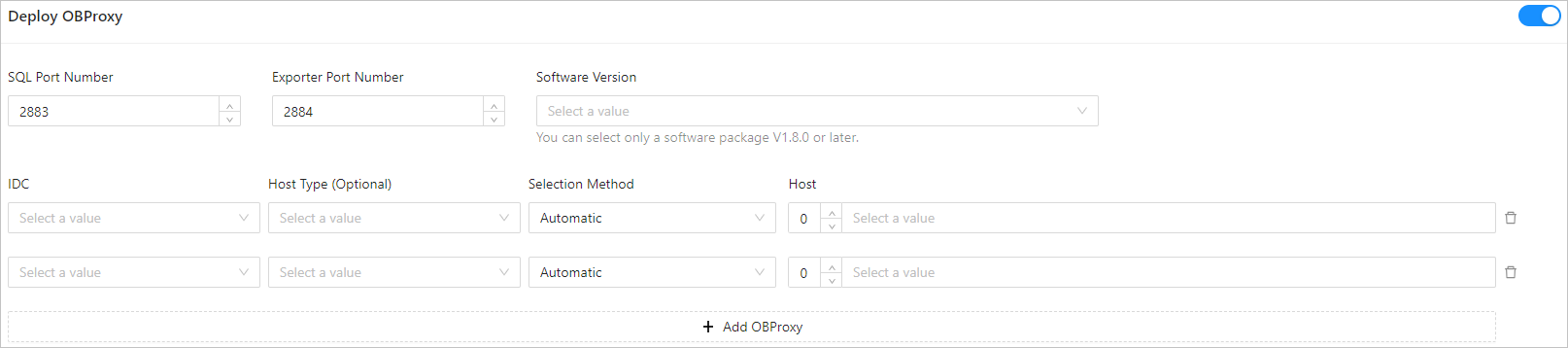
(Optional) Enable Parameter Settings, and add or modify the startup parameters and other parameters.

Click Submit.