







You can drop a tenant by using SQL statements or in the OceanBase Cloud Platform (OCP) console.
Limitations
In the primary/standby cluster configuration, you can drop tenants only from the primary cluster.
Drop a tenant by using an SQL statement
After a tenant is dropped, the databases and tables of the tenant are also dropped. However, the resources that are allocated to the tenant are not dropped and can be allocated to other tenants.
Notice
Only the administrator, that is, the
rootuser, of thesystenant, can execute theDROP TENANTstatement.
The syntax for dropping a tenant is as follows:
obclient> DROP TENANT tenant_name [FORCE | PURGE]
Some notes about this:
DROP TENANT:Drops the specified tenant to the recycle bin if the recycle bin feature is enabled for the
systenant. Thesystenant can purge or restore tenants in the recycle bin. For more information, see Recycle bin for tenants.Drops the specified tenant after a delay if the recycle bin feature is disabled by the
systenant. A garbage collection (GC) operation is performed by a background thread. You can still query internal tables for information of the tenant. The delay is determined by theschema_history_expire_timeparameter. The default delay is 7 days, which indicates that the tenant as well as databases and tables under the tenant will be dropped 7 days after theDROP TENANTstatement is executed.For more information about the
schema_history_expire_timeparameter, see schema_history_expire_time.
The
PURGEparameter specifies that a tenant is dropped after a delay and not moved to the recycle bin no matter whether the recycle bin feature is enabled by thesystenant.The
FORCEparameter specifies that a tenant is immediately dropped no matter whether the recycle bin feature is enabled by thesystenant.
Examples
When the recycle bin feature is enabled by the
systenant, drop tenantt1and move the tenant to the recycle bin. When the recycle bin feature is disabled by thesystenant, drop tenantt1after a delay.obclient> DROP TENANT t1;Drop tenant
t1after a delay, without moving the tenant to the recycle bin.obclient> DROP TENANT t1 PURGE;Immediately drop tenant
t1.obclient> DROP TENANT t1 FORCE;
Drop a tenant in the OCP console
You can immediately drop a specified tenant in the OCP console. Once dropped, the tenant cannot be restored.
Prerequisites
Before you drop a tenant, ensure that:
You are granted the system administrator, OCP tenant administrator role, or another role that has permissions to manage the cluster. Otherwise, request the administrator to assign the required role. For more information, see "Edit a user" in the OCP User Guide of the corresponding version.
In the primary/standby cluster configuration, you can drop tenants only from the primary cluster.
Procedure
Log on to the OCP console.
In the left-side navigation pane, click Tenants to go to the Tenants page.
In the Tenants list, find the target tenant and click its name to go to its details page.
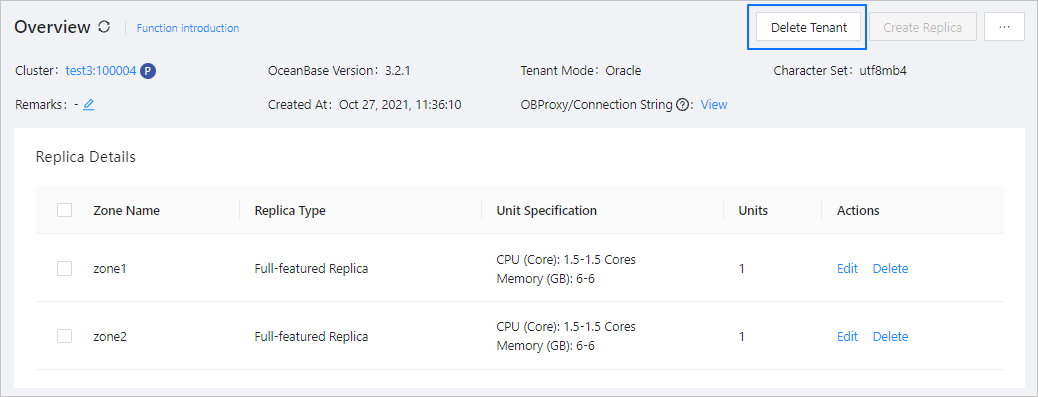
Click Delete Tenant in the upper-right corner of the page.
In the dialog box that appears, enter the word delete.
Click Delete.