







OceanBase Cloud Platform (OCP) allows you to configure personalized backup and restore strategies based on the tenant dimension. After you create a tenant-level backup strategy for a tenant, the tenant is no longer affected by the cluster-level backup strategy.
Note
If a cluster-level backup strategy exists in the cluster to which the tenant belongs, the cluster-level backup strategy content is populated by default when you create a tenant-level backup strategy.
Prerequisites
You can create backup strategies only for tenants of a cluster of OceanBase Database V4.0.0 or later.
If the OceanBase Database version of the cluster is V4.0.0 or later, second backup is disabled by default. To enable this feature, change the value of the
ocp.backup.advanced-secondary-backup.enableparameter totruein System Parameters.If the OceanBase Database version of the cluster is V4.0.0 or later, ensure that the following requirements are met before you configure second backup:
- The storage medium for both regular backup and second backup is Alibaba Cloud Object Storage Service (OSS).
- The retention period of second backup files is shorter than that of regular backup files.
- If the backup scheduling cycle is weekly, the retention period of second backup files must be greater than or equal to 7 days. If the backup scheduling cycle is monthly, the retention period of second backup files must be greater than or equal to 30 days.
- Regular backup files and second backup files cannot be stored in the same bucket. In addition, you cannot specify a custom storage path for second backup files.
- The AccessKey pair of a regular backup task must have the permissions for cross-region replication. Otherwise, the task cannot be scheduled. If the task fails to be executed, you can retry the task after you configure the permissions.
- The bucket for regular backup cannot be configured with cross-region replication rules. Otherwise, the task cannot be scheduled. If the task fails to be executed, you can retry the task after you delete these rules.
- If the destination of a second backup task is an independently deployed OSS bucket, you must configure the
cloudNameandcloudLocationfields of the OSS bucket in theocp.backup.advanced-secondary-backup.target-cloud-nameandocp.backup.advanced-secondary-backup.target-cloud-locationparameters respectively in System Parameters.
Procedure
You can create a tenant-level backup strategy by using the following two methods:
Method 1
Log on to the OCP console. In the left-side navigation pane, choose Backup & Recovery > Backup. Then, you can create a tenant-level backup strategy on the Backup page.
Method 2
Log on to the OCP console and go to the Overview page of a cluster. In the left-side navigation pane, click Backup & Recovery. Then, you can create a tenant-level backup strategy on the Backup & Recovery page.
The procedure of Method 1 is described as follows:
In the left-side navigation pane, choose Backup & Recovery > Backup.
On the Backup page, move the pointer over New Backup Strategy and select Create Tenant-level Backup Strategy.
Select the tenant to back up from the drop-down list.
For a cluster of a version earlier than OceanBase Database V2.2.60, logical backup is used.
For a cluster of OceanBase Database V2.2.60 and later, physical backup is used.
Specify the following storage configuration parameters and click Test.
For logical backup, select the storage configuration configured during service installation.
If no backup service is installed, you must first install the backup service. For more information, see Install a service.
For physical backup, specify fields described in the following table.
ParameterDescriptionStorage Configuration Name You can configure a custom configuration or select an existing configuration. - For a custom configuration, specify the following fields.
- If you select an existing configuration, click Select Existing Configuration. Then, the system automatically populates the following fields.
Storage Class The type of storage media for backup files. Valid values: - File: Your local file storage system. Generally, Network File System (NFS) is used.
- OSS: Alibaba Cloud OSS is supported only in OceanBase Database V2.2.76 and later.
- COS: Cloud Object Storage (COS) of Tencent Cloud is supported only in OceanBase Database of V2.2.76 and later but earlier than V4.0, or in OceanBase Database V4.2.1 and later.
- OBS: Huawei Cloud Object Storage Service (OBS) is supported only in OceanBase Database V3.2.3.2-105000062022090916 and later but earlier than V4.0.0.0.
Storage Directory The directory in which the backup files are stored on the media. Notice
If you have configured a backup strategy for the cluster to which the tenant belongs, we recommend that you specify the same storage directory as that of the cluster. Otherwise, the backup statistics of the tenant will be affected.Alert Threshold for Backup Storage Capacity The threshold for backup storage capacity alerts. This parameter is displayed if you select File for Storage Type. The default threshold is 80%. Domain Enter the domain name of the cloud storage of backup files. - If you select OSS for Storage Type, enter the domain name that has access to the files stored in Alibaba Cloud OSS, for example,
oss-cn-hangzhou.aliyuncs.com. - If you select COS for Storage Type, enter the domain name that has access to the files stored in the COS bucket of Tencent Cloud, for example,
cos.ap-beijing.myqcloud.com. - If you select OBS for Storage Type, enter the domain name that has access to the files stored in OBS of Huawei Cloud, for example,
obs.cn-north-4.myhuaweicloud.com.
User If you select OSS for Storage Type, enter the user that has access to the files stored in Alibaba Cloud OSS. AccessKey Pair If you select OSS for Storage Type, enter the AccessKey that has access to the files stored in Alibaba Cloud OSS. Resource Identity (APPID) If you select COS for Storage Type, move the pointer over the question mark (?) and specify the value as prompted. Project ID If you select COS for Storage Type, move the pointer over the question mark (?) and specify the value as prompted. Project Key If you select COS for Storage Type, move the pointer over the question mark (?) and specify the value as prompted. 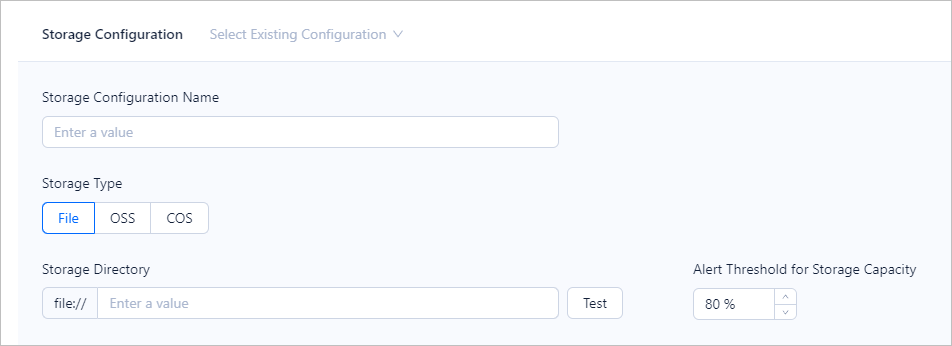
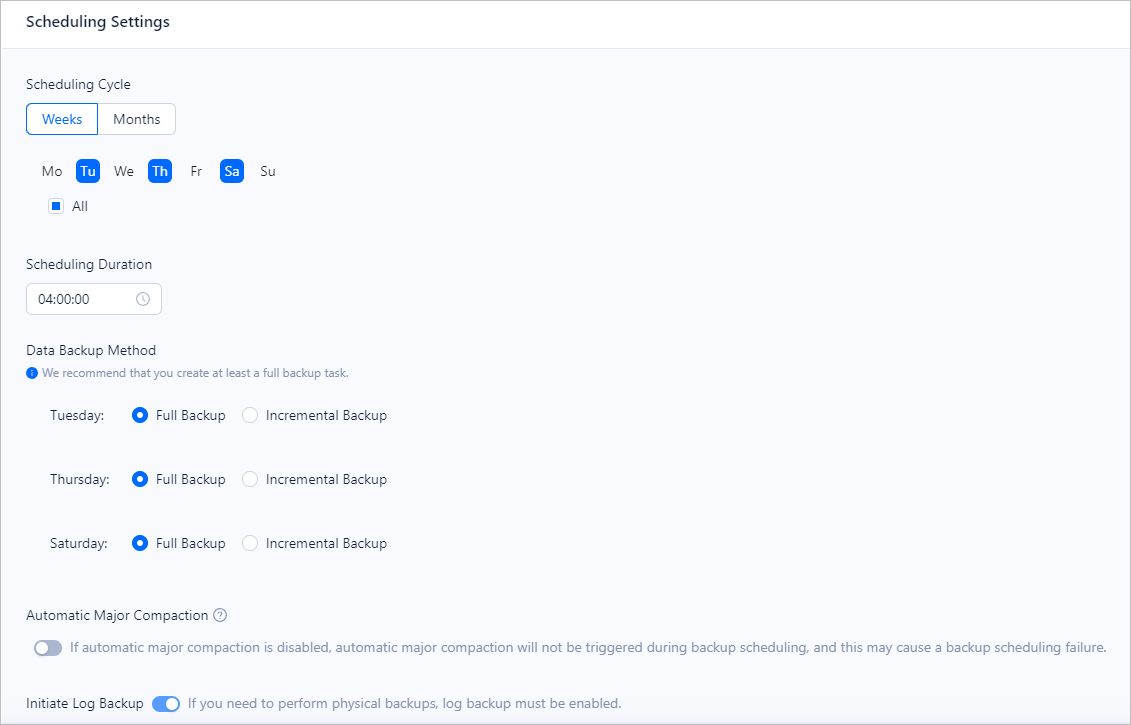
Specify fields in the Scheduling Settings section.
Scheduling Cycle: If you set the scheduling cycle to Month, you can select at most 10 days.
If you need to perform physical backups, log backup must be enabled.
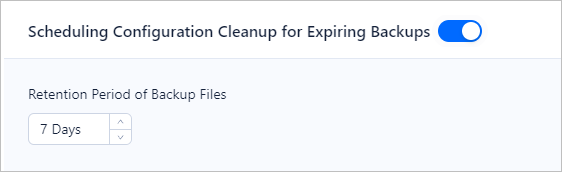
Schedule the clearing of expired backup files.
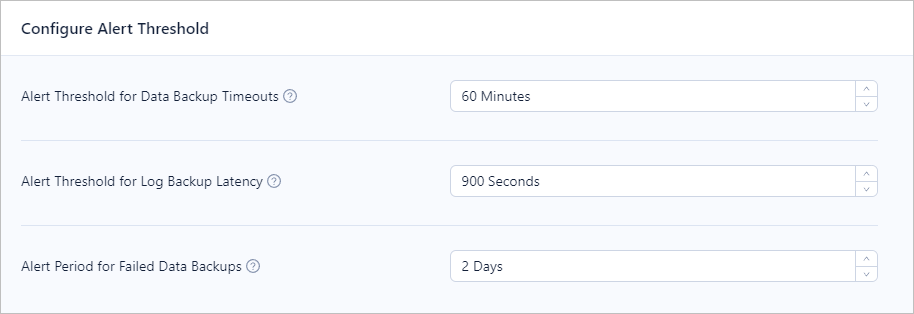
Specify alert thresholds. You can specify the timeout threshold for data backup tasks, alert threshold for log backup delays, and alert threshold for the number of days without successful data backup. After you set a threshold, an alert is triggered when the threshold is reached.
Optional. Configure second backup settings.
To back up the backup data files and log files to another directory, turn on Second Backup.
Configure storage settings for second backup.
Configure scheduling settings for second backup.
Click Submit.