







The following table describes the key capabilities of AP.
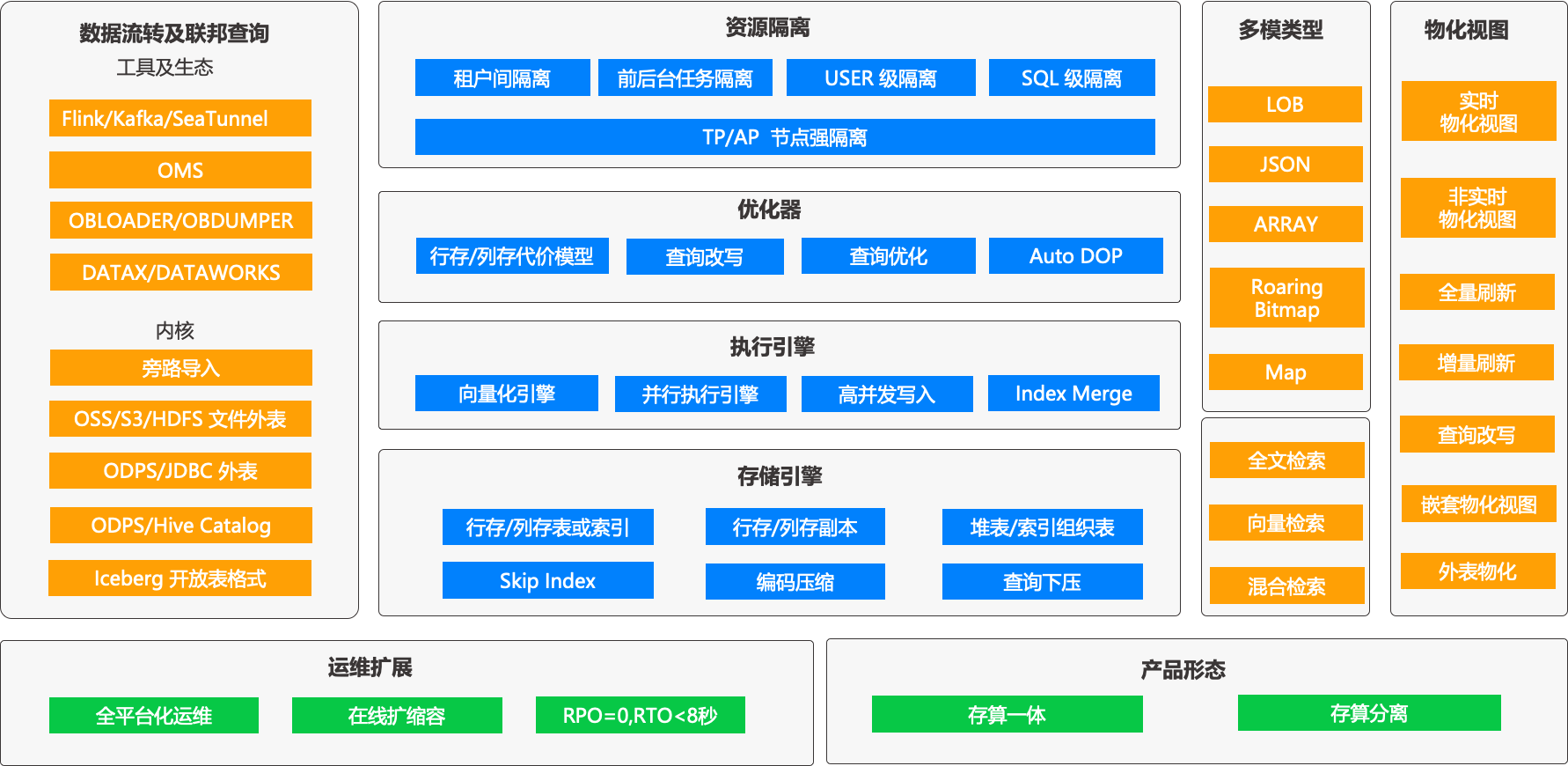
Columnar storage engine
In scenarios involving large-scale data analytics or ad-hoc queries on massive datasets, columnar storage is a key capability of an AP database. Columnar storage is a method of organizing data files that differs from row-based storage by physically arranging table data by columns. When data is stored in a columnar format, analysis queries can scan only the columns required for computation, avoiding full-row scans. This reduces resource consumption such as I/O and memory usage while improving computation speed. Additionally, columnar storage inherently lends itself to better data compression, often achieving higher compression ratios, which reduces storage space requirements and network bandwidth.
OceanBase Database builds upon its LSM-Tree (Log Structured Merge-Tree) data storage architecture. By continuously optimizing high-concurrency transaction processing (TP) capabilities, it has significantly improved performance in scenarios such as random writes, real-time updates, and strong consistency. This extensive engineering practice has led to the development of a self-controllable storage engine technology stack. Furthermore, the hierarchical merging feature of LSM-Tree and its static data organization capability make it naturally well-suited for OLAP workloads characterized by batch writes and infrequent updates. Through columnar data compression, hierarchical merging strategies, and storage fragmentation optimization, it meets the efficient scanning requirements of analytical workloads while supporting a unified architecture for mixed TP and AP workloads.
Building on its technical foundation from earlier versions, OceanBase Database's storage engine continues to evolve in V4.3 to incorporate support for columnar storage, achieving storage integration. With a single codebase, a single architecture, and a single OBServer node, columnar and row data coexist, truly balancing TP and AP query performance.
Columnar storage engine architecture
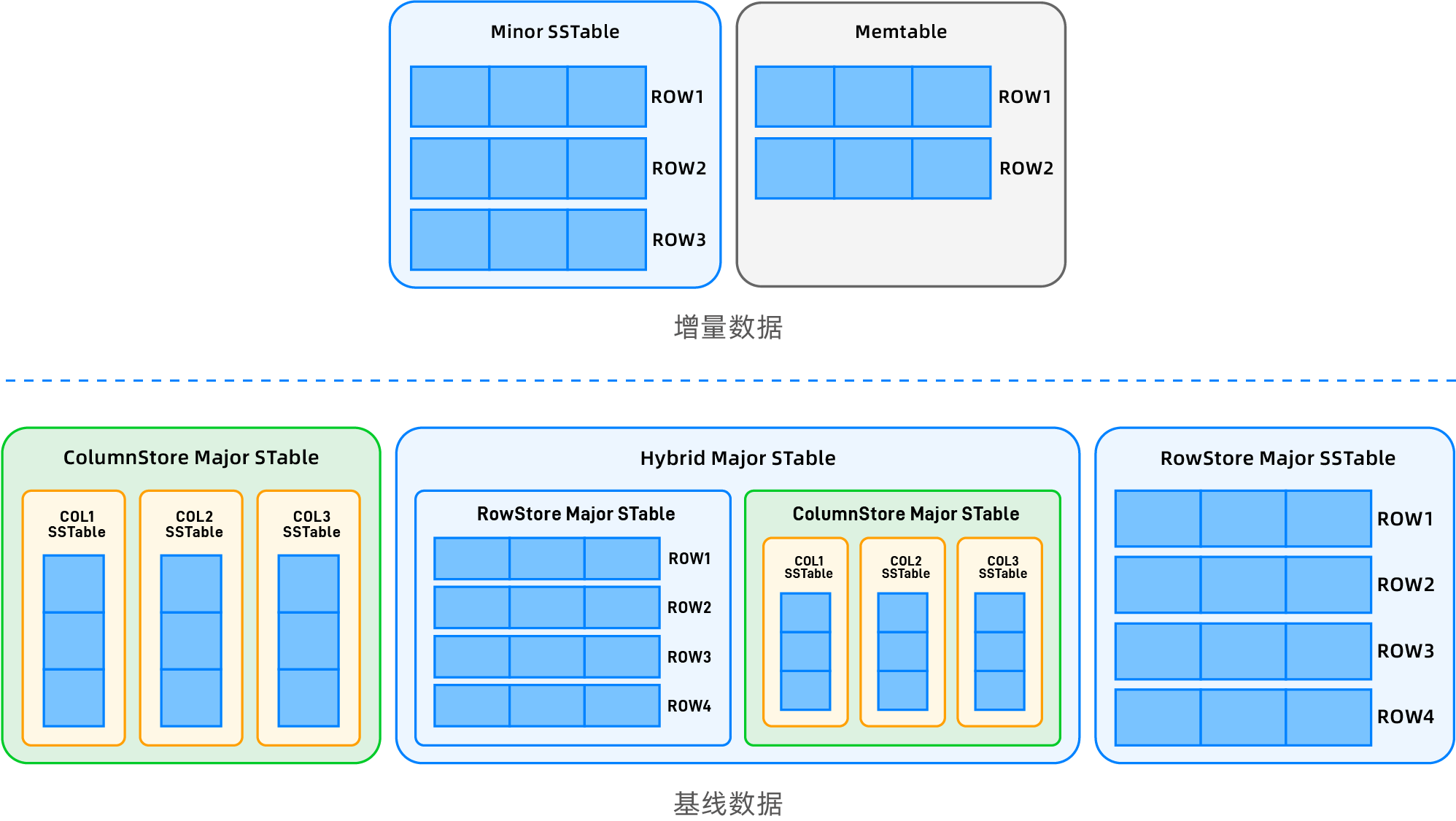
As a native distributed database, OceanBase Database stores user data in multiple replicas by default. To leverage the advantages of multi-replica deployment and provide users with enhanced features such as strong data verification and reuse of migrated data, its self-developed LSM-Tree storage engine incorporates several targeted designs. First, the entire user data can be broadly divided into two parts: baseline data and incremental data.
Baseline data
Global consistent version control: Breaking away from traditional LSM-Tree design paradigms, OceanBase Database leverages its distributed multi-replica architecture to implement a "daily major compaction" mechanism. The system can periodically or on-demand trigger the selection of a global version number. A tenant can regularly or based on user operations choose a global version number. All replicas complete a major compaction based on this version to generate the baseline data for that version, ensuring the baseline data for the same version is physically identical across all replicas.
Multi-state storage support: Baseline data supports three physical forms: row-based, columnar, and hybrid row-column storage. Users can flexibly choose the form through table creation configurations to meet the storage requirements of different business scenarios.
Incremental data
- Dynamic multi-version management: All writes after the latest baseline version (whether newly written data in the MemTable or data that has been flushed to disk as SSTables) are classified as incremental data. Each replica independently maintains multi-version records without consistency guarantees. Unlike baseline data which is generated based on a specified version, incremental data contains all multi-version data.
- Row-first strategy: Incremental data is forced to use the row-based format, ensuring that the transaction processing (TP) pipeline is fully compatible with the native row-based architecture, sharing core components such as transaction logs and locking mechanisms.
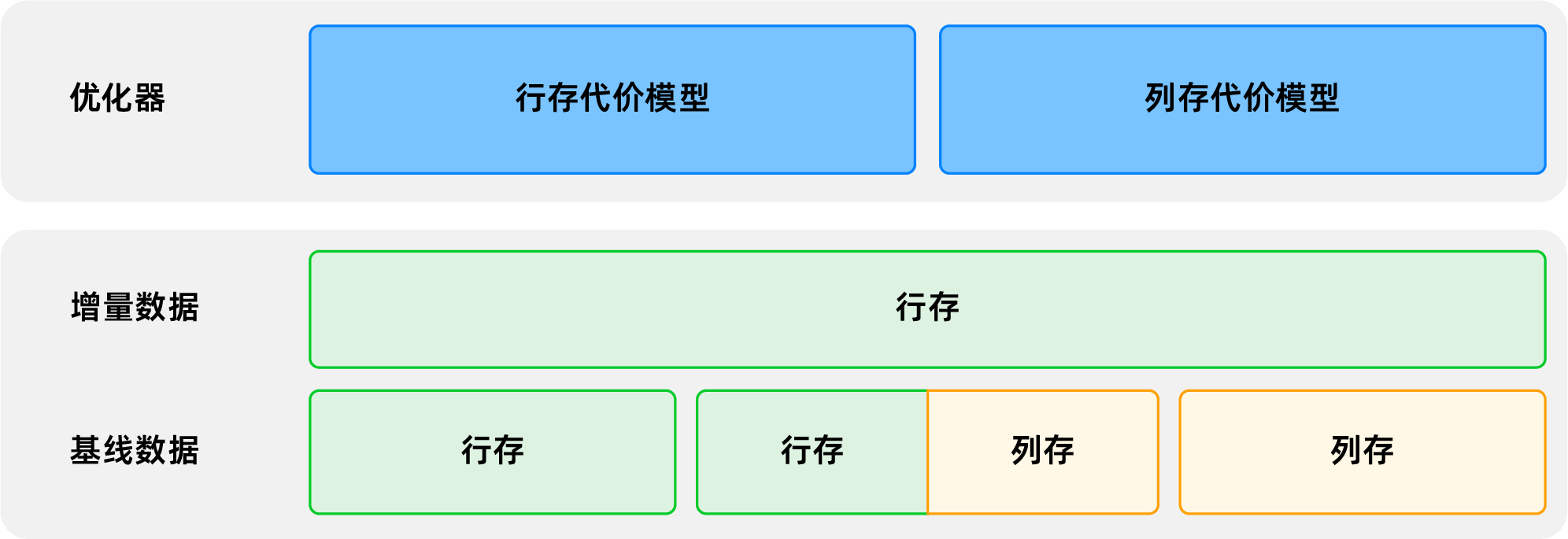
Hybrid row-column storage system
Leveraging the controllable update characteristics of columnar storage scenarios, OceanBase Database proposes a columnar storage implementation method that is transparent to upper-layer applications, combining the properties of its baseline and incremental data:
- Storage format decoupling: Baseline data is organized in a columnar format (each column as an independent SSTable, virtually combined into a logical table), while incremental data remains row-based. DML operations and synchronization with upstream and downstream systems are completely seamless.
- Dynamic synchronization engine: A bidirectional synchronization pipeline for row and column data is built at the underlying layer, supporting a smooth transition for OLAP system migration or row-based storage upgrades, without requiring business awareness of storage format differences.
- Intelligent routing mechanism: From the optimizer to the executor, the system automatically selects the optimal row/column access path based on workload characteristics, fully leveraging the performance advantages of columnar storage in AP scenarios while retaining the native support of row-based storage for TP transactions.
Key integrated capabilities
Capability Dimension |
Key technologies |
|---|---|
| Unified SQL |
|
| Integrated storage |
|
| Integrated Transactions |
|
Columnar storage replicas
To meet the requirement for strong physical isolation of TP and AP resources in HTAP mixed-workload scenarios, OceanBase Database supports Column Store Replicas (C-Replicas). A C-Replica is a new type of replica with read-only capabilities, and all baseline data for user tables on such a replica is stored in columnar format. C-Replicas are deployed in independent zones. OLAP workloads access C-Replicas through a dedicated ODP entry point and execute queries using weak-consistency reads. This allows queries to leverage the batch-processing advantages of columnar storage to accelerate execution without impacting existing OLTP workloads. In the 2F1A deployment mode, compared to the all-row-column hybrid storage method, the 2F1A1C architecture not only achieves strong physical isolation of TP and AP but also saves the storage overhead of one replica.
Columnar storage replicas strictly follow the rules of regular read-only replicas in terms of replica distribution strategies and weak-consistency release mechanisms. The main difference between the two lies in the underlying data storage structure. Similar to regular read-only replicas, columnar storage replicas do not participate in leader election or log synchronization voting processes, but they still contain all core components such as static data tables, commit logs, and in-memory data tables.
For more information about columnar storage replicas, see Columnar storage replicas. For deployment and access steps using an independent ODP, see Deploy and use columnar storage replicas.
Main features of columnar storage
Feature 1: Adaptive Compaction
After introducing the new columnar storage mode, data compaction behavior differs significantly from that of the original row-based storage. Since all incremental data is in row format, it needs to be merged with baseline data and then split into independent SSTables for each column. As a result, merge time and resource consumption are relatively higher compared to row-based storage. To accelerate compactions for columnar tables, the storage layer has also adapted and optimized the compaction process. For columnar tables, in addition to horizontal splitting and parallel compaction acceleration, which are possible like row-based tables, vertical splitting acceleration has been added. Columnar tables combine multiple-column compactions into a single task, and the number of columns within a task can be dynamically adjusted based on system resources, ensuring a better balance between overall compaction speed and memory overhead.
Feature 2: Columnar Encoding Algorithm
OceanBase Database compresses data in two stages. The first stage is OceanBase's proprietary hybrid row-column encoding compression, and the second stage is general-purpose compression. Since the hybrid row-column encoding is a built-in database algorithm, it supports direct querying without decompression and can utilize encoding information to accelerate query filtering. However, the original hybrid row-column encoding algorithm still leaned towards row organization. Therefore, a new columnar encoding algorithm has been implemented for columnar tables. Compared to the original algorithm, the new algorithm supports fully vectorized execution of queries, compatible SIMD optimizations for different instruction sets, and significantly improves compression ratio for numeric types, achieving a comprehensive upgrade in performance and compression ratio over the original algorithm.
Feature 3: Skip Index
Common columnar databases typically perform pre-aggregation calculations on each column of data at certain granularity. The aggregated results are persisted alongside the data. When a user queries column data, the database can filter data using the pre-aggregated data, greatly reducing data access overhead and unnecessary I/O consumption. In the columnar engine, skip index support has also been added. Aggregation calculations such as maximum value, minimum value, and total nulls are performed on each column of data at the microblock granularity, and these values are aggregated upwards layer by layer to obtain larger-granularity aggregate values for macroblocks, SSTables, etc. User queries can continuously drill down based on the scan range to select appropriate granularity aggregate values for filtering and aggregated output.
Feature 4: Query Pushdown
Starting from V4.x, OceanBase Database's storage layer operators and expressions have been fully adapted for vectorized execution and support query pushdown in some scenarios. In the columnar engine, the pushdown feature has been further enhanced and extended, specifically including:
Pushdown of all query filters, which can also leverage skip index and encoding information for acceleration depending on the filter type.
Pushdown of common aggregate functions. In non-group by scenarios, aggregate functions such as count/max/min/sum/avg can now be pushed down to the storage engine.
Group by pushdown. On columns with low NDV, group by pushdown for storage computation is supported, leveraging dictionary information within microblocks for significant acceleration.
For detailed information and usage instructions on columnar storage, see Columnar storage.
Shared Storage Mode
OceanBase Database supports two deployment modes: Shared-Nothing (SN) and Shared-Storage (SS).
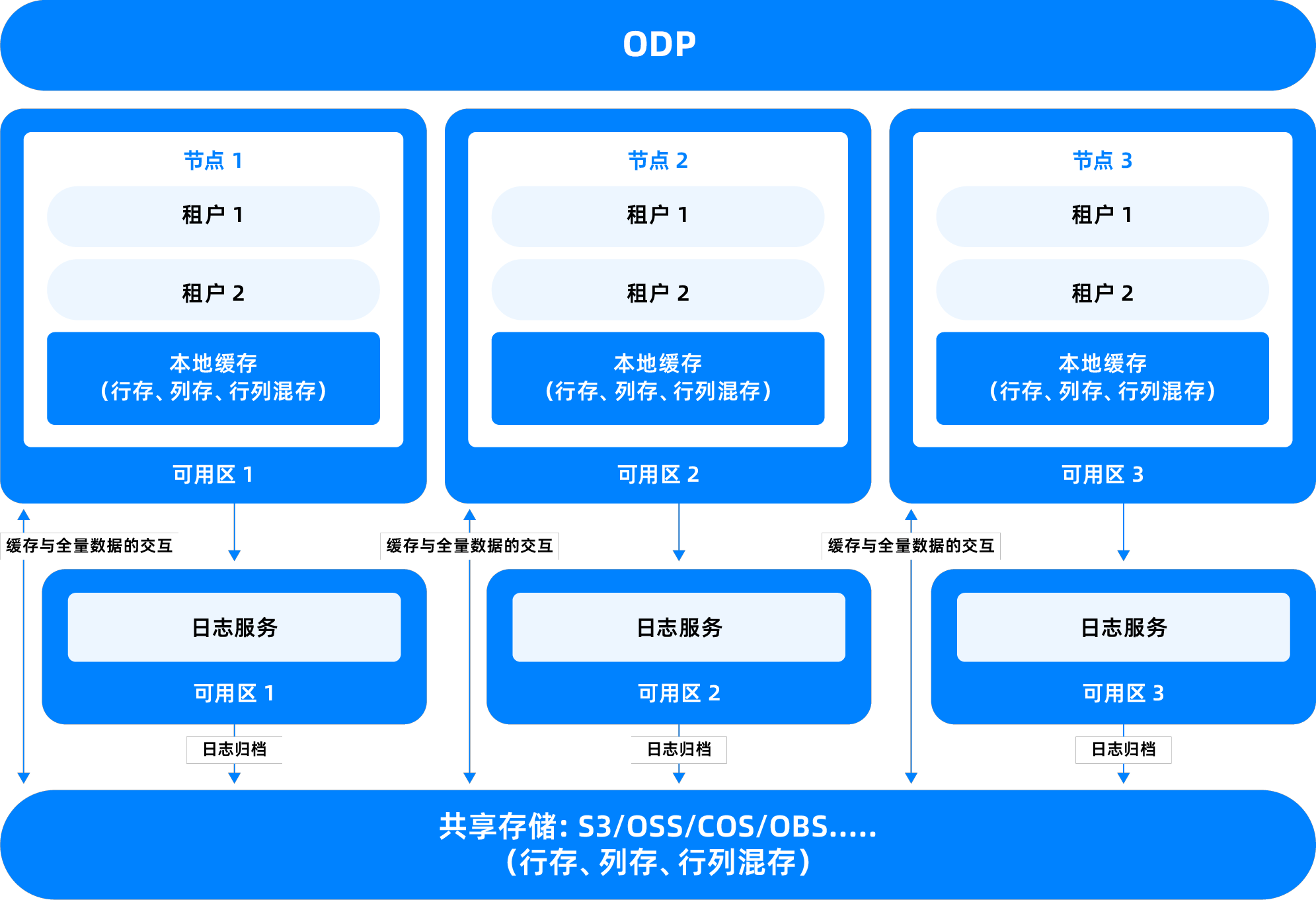
Shared-Storage (SS) mode is an architecture where data is centrally stored on shared storage devices, allowing multiple database nodes to access the same data set. It is applied in public cloud environments. This mode is primarily used to simplify storage management, improve resource utilization, and support more flexible high-availability switchover in specific scenarios.
Reduce storage redundancy: In the traditional Shared-Nothing architecture, each node holds an independent data copy, which can lead to storage resource waste. Shared storage allows multiple compute nodes to read from the same data set, reducing the number of replicas and thus lowering overall storage costs.
Fast fault recovery: When a compute node fails, other nodes can directly access the data in shared storage, eliminating the need for complex replica synchronization or migration processes, enabling faster service takeover.
Simplify O&M management: A unified storage pool facilitates operations such as backup, snapshot, and monitoring, improving the maintainability of the database system.
The OceanBase-based storage-compute separation 2-replica architecture enables:
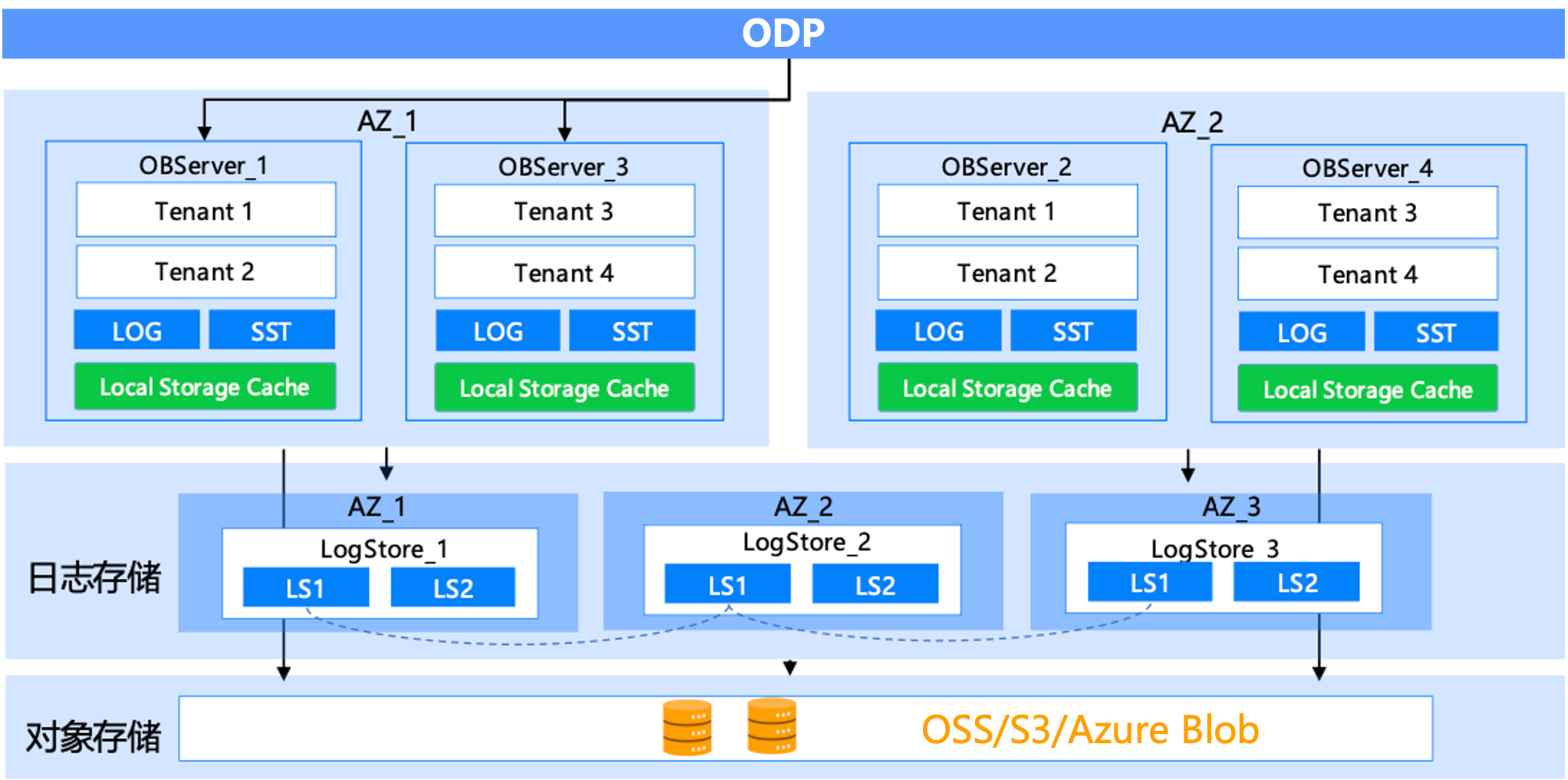
- Low cost: Full data is stored in object storage, with hot data cached locally on disks, reducing storage costs while ensuring P99 query performance. It supports elastic scaling, allowing compute and storage to scale independently. Performance loss relative to the Shared-Nothing architecture averages 0.3% to 1.7%.
- High availability: The 2F dual-replica deployment mode ensures high availability for compute nodes. Combined with a Paxos-based independent log storage service, the system guarantees RPO=0 and RTO<8s.
The OceanBase-based storage-compute separation single-replica architecture enables:
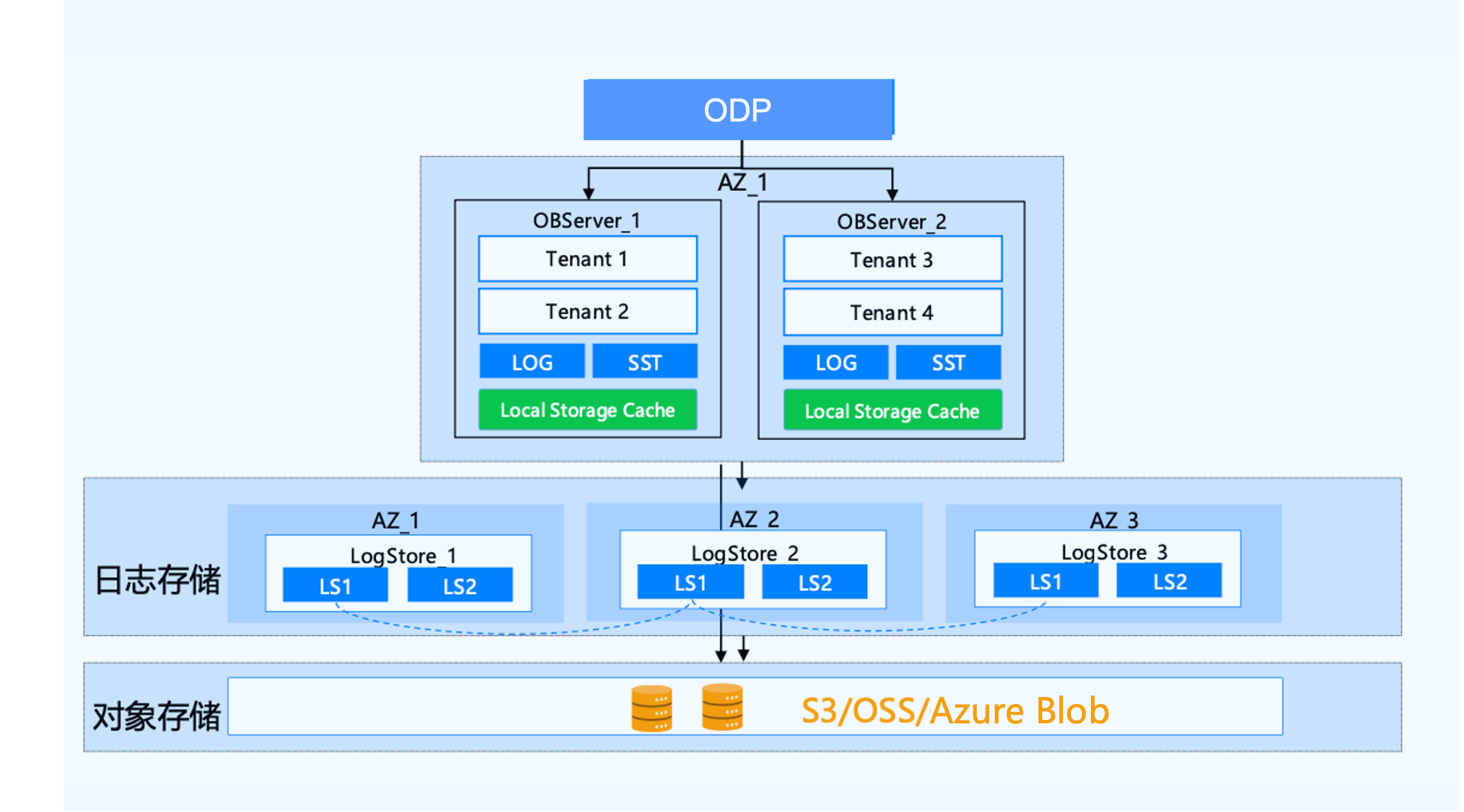
Ultimate cost-effectiveness: Full data is stored on low-cost object storage, with hot data cached locally on disks. In single-replica form, compared to cluster forms like 2F1A or 3F, it reduces compute costs by 2-3 times. Single Zone also supports rapid addition or deletion of compute nodes to meet changing performance requirements.
High availability: Redundant object storage within the same city supports data center-level disaster recovery. In single-replica form, combined with a Paxos-based independent log service and shared storage, a new compute node can be quickly started when a compute node fails, providing high availability.
Vectorized execution engine
Vectorized execution is an efficient batch-processing technique that can significantly improve performance in analytical queries. OceanBase Database introduced the vectorized execution engine in V3.2, but it was disabled by default. Starting from V4.0, the vectorized execution engine is enabled by default. In V4.3, OceanBase Database implemented Vectorized Engine 2.0, which greatly enhances execution performance through optimizations in data formats, operator implementations, and storage vectorization.
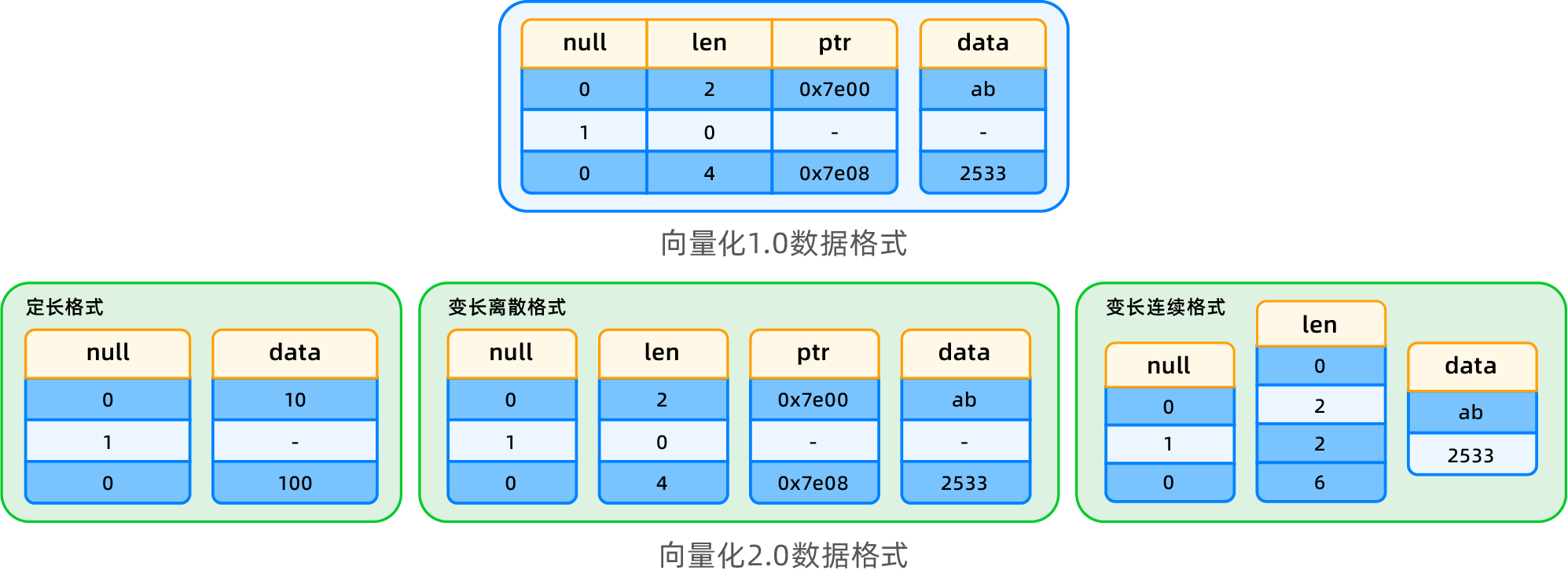
Introduction to data formats
In Vectorized Engine 2.0, a new columnar data format is introduced, storing descriptive information (NULL, len, ptr) separately for each column to avoid redundant storage. Three data formats are designed based on different data types and usage scenarios: fixed-length format, variable-length discrete format, and variable-length contiguous format.
- Fixed-length format: The length value only needs to be stored once, eliminating redundant storage and enabling direct access with better data locality. Compared to version 1.0, this format saves space, improves efficiency, and omits pointer swizzling operations.
- Variable-length discrete format: Each data item may not be contiguous in memory; it is described by an address pointer and length. This format avoids deep copying during data encoding, making it suitable for short-circuit evaluation scenarios and preventing data reorganization.
- Variable-length contiguous format: Data is stored contiguously in memory, with length information and offset addresses described by an offset array. This format improves data access efficiency, but requires reorganization and deep copying during short-circuit evaluation and columnar encoding projection. It is primarily used for columnar materialization scenarios.
Optimization of operator and expression performance
Vectorized Engine 2.0 comprehensively optimizes operators and expressions. The core approach is to leverage information from the new formats and specialized data structure implementations to reduce CPU cache misses and instruction overhead, thereby improving overall execution performance. Key optimizations include:
- Utilizing batch data attribute information: Maintaining batch data characteristic information eliminates special handling and filtering judgments for NULL, optimizing SIMD computation.
- Algorithm and data structure optimization: Optimized intermediate result materialization structures support row/column materialization. The Sort operator implements separate materialization of sort keys and non-sort keys, reducing cache misses during sorting and improving overall efficiency.
- Specialized implementation optimization: Optimizations are tailored for specific scenarios, such as encoding multi-column fixed-length join keys into a single fixed-length column and specialized implementations for aggregate calculations, significantly improving execution efficiency.
Storage vectorization optimization
The storage layer fully supports the new vectorized format, accelerating projections via SIMD, pushing predicates, pushing aggregates, and pushing groupby operations. Projection uses customized templates based on column type and length to simplify computation; predicate evaluation is performed directly on column-encoded data, enabling rapid computation of complex expressions. Aggregate pushing leverages pre-aggregated information from intermediate layers to efficiently handle statistical functions, while groupby pushing uses encoded data information to significantly accelerate performance.
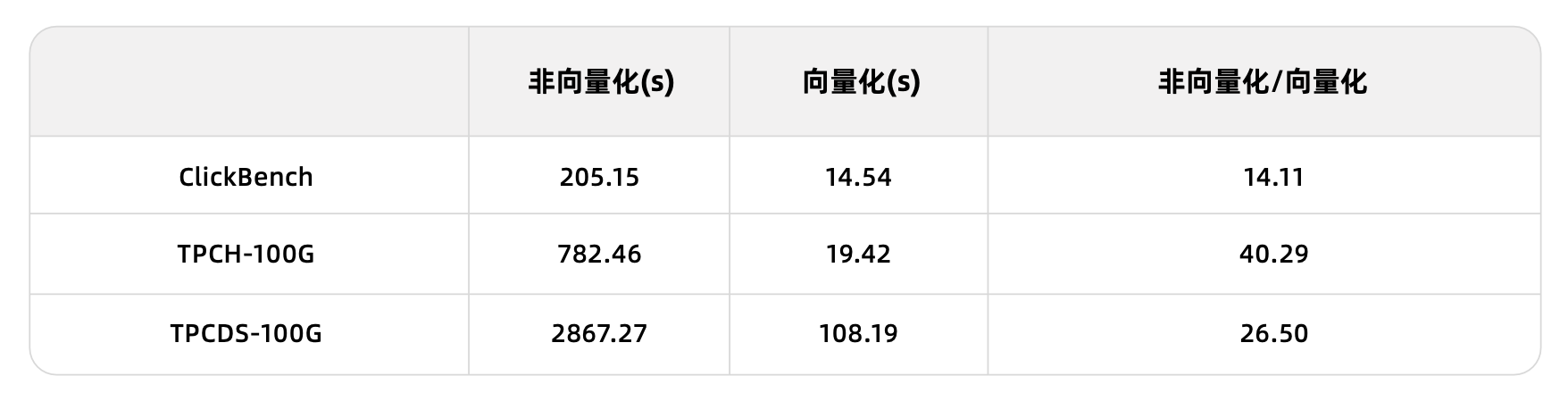
Overall, performance comparisons between the vectorized and non-vectorized engines in OceanBase Database show that vectorization can improve performance by an order of magnitude:
Real-time writing
OceanBase Database adopts the Log-Structured Merge-tree (LSM-Tree) architecture, which is designed to ensure real-time write capability. The following section provides a detailed introduction to OceanBase Database's real-time write capability.
Core storage mechanism
LSM-Tree
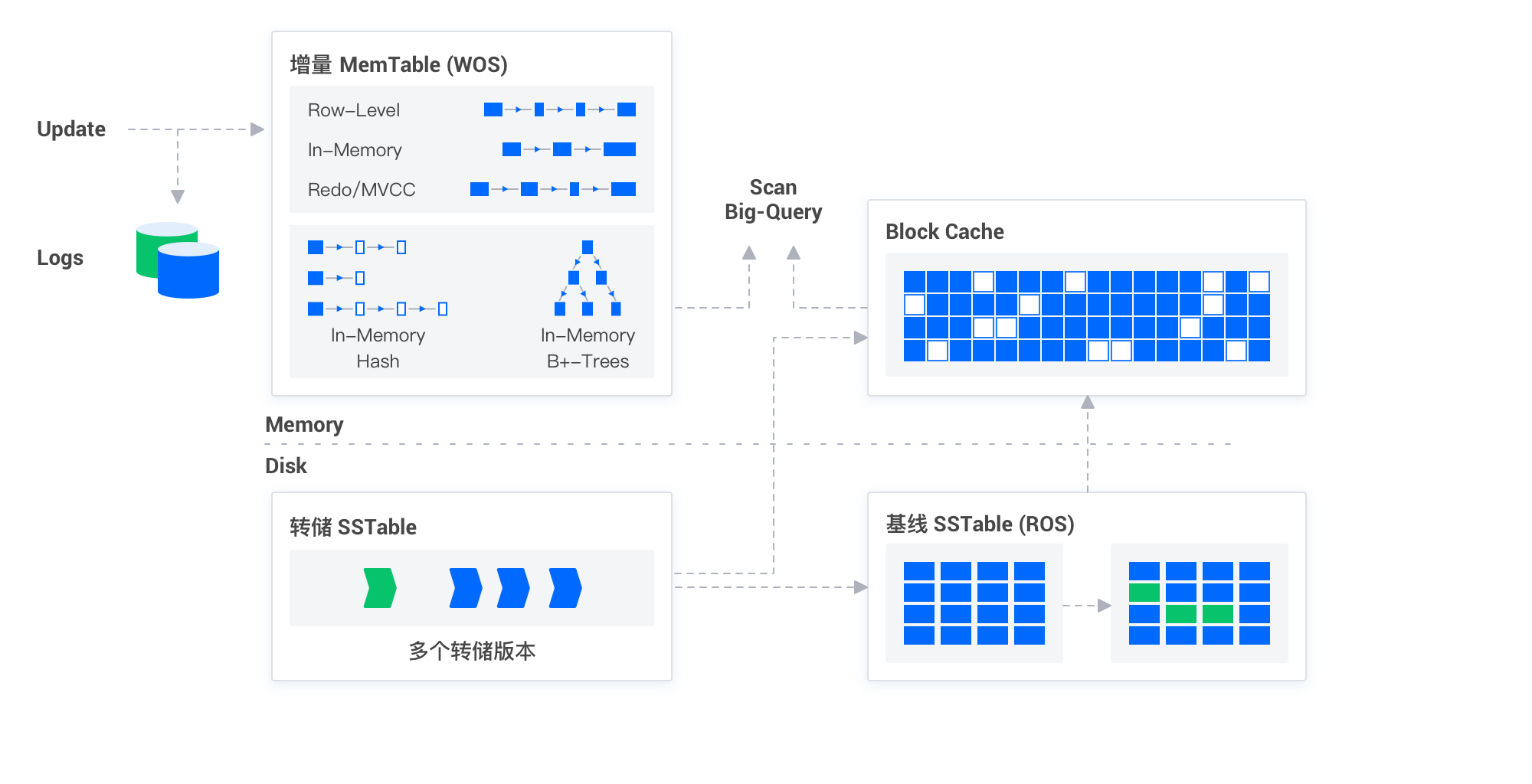
To support efficient real-time writing, OceanBase Database uses the LSM-Tree structure to store incremental data. The LSM-Tree is a specialized tree structure designed to optimize write operations. Its core idea is to first record write operations in an in-memory structure, and then asynchronously batch them to disk when a certain threshold is reached. This significantly reduces disk I/O and improves write performance. OceanBase Database periodically merges this incremental data with baseline data through minor compactions and major compactions, ensuring data consistency and integrity.
Real-time write capability
The design of the LSM-Tree architecture enables OceanBase Database to deliver exceptional performance in processing real-time data writes. Whether it's small-scale data updates or large-scale data imports, OceanBase Database responds quickly, ensuring real-time data writes. This is primarily reflected in the following aspects:
- Efficient write processing: Through the LSM-Tree, OceanBase Database centralizes write operations, reducing disk I/O and improving write efficiency.
- Immediate data accessibility: Once data is written into the in-memory structure of the LSM-Tree, it becomes immediately available for queries, ensuring real-time access.
- Optimized data merge process: Intelligent minor compaction and major compaction strategies support efficient querying.
- Strong concurrent processing capability: Leveraging its distributed architecture, OceanBase Database can process write operations in parallel across multiple nodes, greatly enhancing real-time data processing capabilities.
Optimizer
The query optimizer of OceanBase Database is designed for HTAP mixed-workload and real-time analytics scenarios. Generally, transactional workloads have the following typical characteristics: a small amount of data accessed per query, high RT requirements, and higher throughput; analytical workloads have the following typical characteristics: a large amount of data accessed per query, and relatively lower throughput. Different types of workloads also require different execution plan forms and tuning methods.
- Transactional workloads typically require creating appropriate index structures for base table filter predicates and join predicates, requiring each table to select the right index path whenever possible to significantly reduce data scanning.
- Analytical workloads typically rely on full-table scans using columnar storage, employing skipindex to quickly skip the scanning of some data blocks; they reduce query response time by increasing parallelism.
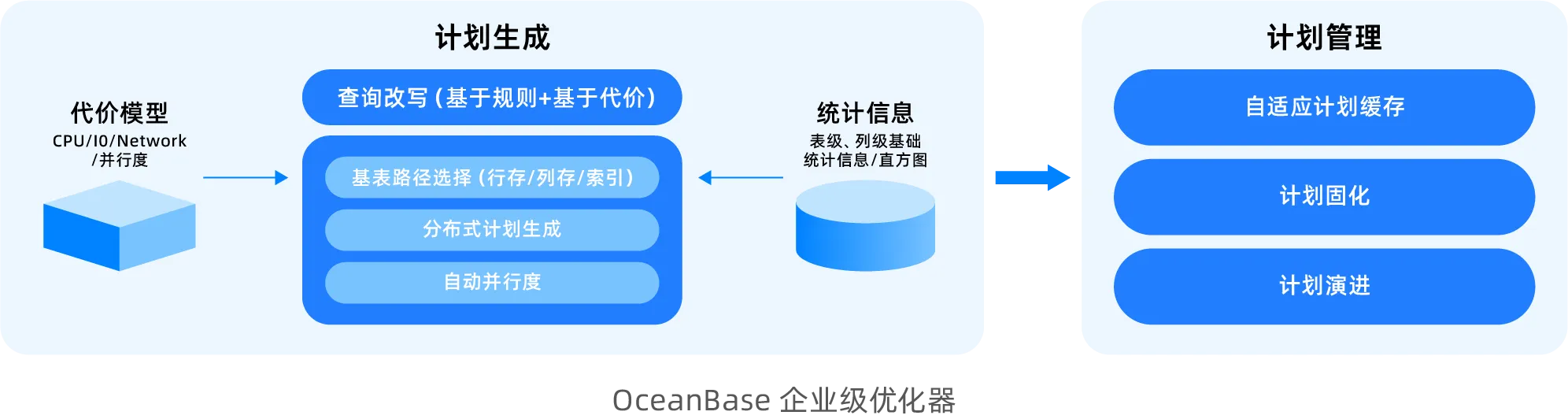
While fully inheriting the capabilities of the TP optimizer, the OceanBase AP optimizer has undergone specialized enhancements for various complex query scenarios.
More comprehensive query rewriting capability: The query rewriting module supports a rich set of rewriting algorithms. Different algorithms match different patterns and perform corresponding equivalence-preserving transformations to improve business SQL. Currently, it supports rule-based rewriting algorithms such as view merging, subquery lifting, inner join elimination, outer join elimination, and elimination of trivial conditions. It also supports cost-based rewriting algorithms like OR Expansion, JA subquery lifting, Win Magic, and Group-By Placement.
Distributed plan generation: OceanBase adopts a phase-one distributed plan generation approach, which is distinctly different from the two-phase approach used by common database systems. Typical systems first generate an optimal single-machine plan and then distribute it to simplify optimizer design. However, this approach encounters more challenges in HTAP scenarios. For example, during connection enumeration, an optimal NEST-LOOP JOIN algorithm in a single-machine scenario may result in extensive cross-machine data access after distribution, making its overall execution efficiency significantly inferior to the distributed HASH JOIN algorithm. OceanBase's phase-one plan generation framework considers factors such as data distribution and parallelization while enumerating connection orders and algorithms, making multi-factorial decisions to select a globally optimal distributed execution plan.
Row-column path selection: To handle HTAP mixed workloads effectively, a core intelligent optimization capability of the query optimizer is automatic row-column path selection. This means that for a given query, the optimizer intelligently determines whether to read data from row store or column store based on its data access characteristics, aiming for optimal execution performance. OceanBase has designed a dedicated cost model for columnar storage scans and introduced a new statistical information mechanism to accurately assess the benefits of columnar storage skipindex for such scans, ensuring precise decision-making between row store indexing and columnar storage scanning.
Easier-to-use Auto DOP: Databases often use parallel execution to accelerate complex SQL execution, but in practical business scenarios, it can be difficult to easily assess whether to enable parallelism and what degree of parallelism to use. OceanBase provides Auto DOP capability. When generating a plan, the optimizer evaluates the query's execution time and automatically determines whether to enable parallelism and sets an appropriate degree of parallelism, so SQL can achieve optimal performance by default.
Execution plan management: OceanBase's SPM (SQL Plan Management) technology is a key technique for ensuring the stable and long-term operation of real-time analytics workloads. It intelligently manages the evolution of execution plans to address issues such as drastic data volume changes, statistical information updates, or database version upgrades, which might lead the optimizer choosing a worse new execution plan. It prevents execution plan regression through gray-box validation with real traffic.
For more information, see Overview of statistical information and row estimation mechanisms.
Intelligent materialized views
The core value of intelligent materialized views lies in the fact that users only need to define the data processing result through an SQL statement, and OceanBase automatically manages data refresh and dependency computation. This means enterprises do not need to write complex ETL scripts or manage data pipelines; they only need to define the target data structure, and OceanBase will automatically handle data refresh, dependency management, and performance optimization. This approach greatly simplifies the data engineering process, reduces operational costs, and ensures data freshness and consistency.
OceanBase Database supports asynchronous materialized views. When data in the base table changes, the materialized view is not updated immediately, which ensures the execution performance of DML operations on the base table. However, there is a delay between the data in the materialized view and the base table, and dependencies rely on timely refreshes to update the data. Two strategies are supported for updating materialized view data: complete refresh and incremental refresh.
- A complete refresh directly re-executes the query statement corresponding to the materialized view, completely recalculates and overwrites the original view result data. It is suitable for scenarios with low latency requirements, low update frequency of base table data, or small data volumes, such as data summary reports updated daily or weekly.
- An incremental refresh processes only the data changes since the last refresh. This method can significantly reduce the time and resources required for refresh. To achieve precise incremental refresh, OceanBase Database implements a materialized view log function similar to Oracle MLOG (Materialized View Log). By detailing the incremental update data of the base table, it ensures the materialized view can be refreshed incrementally quickly. The incremental refresh method is particularly suitable for business scenarios with high latency requirements, massive data volumes, and frequent changes. For example, in real-time transaction systems, data may change every minute or even every second.
OceanBase Database also supports real-time materialized views, enabling real-time data analysis. Real-time materialized views utilize the materialized view log mechanism to capture and process changes in base table data, computing and integrating data changes online during queries. Even if the materialized view does not physically store the latest changed data, it ensures users receive query results consistent with directly querying the base table. At the same time, it leverages the query rewrite capability of materialized views to achieve transparent query acceleration.
OceanBase Database supports specifying a primary key or creating an index for a materialized view to optimize the performance of single-row searches, range queries, or join scenarios based on the primary key or index. If a materialized view is a large wide table formed by multi-table JOINs, you can create a columnar storage materialized view to improve the performance of certain queries. Furthermore, by creating a partitioned materialized view, you can leverage partition pruning to reduce the amount of data operated on.
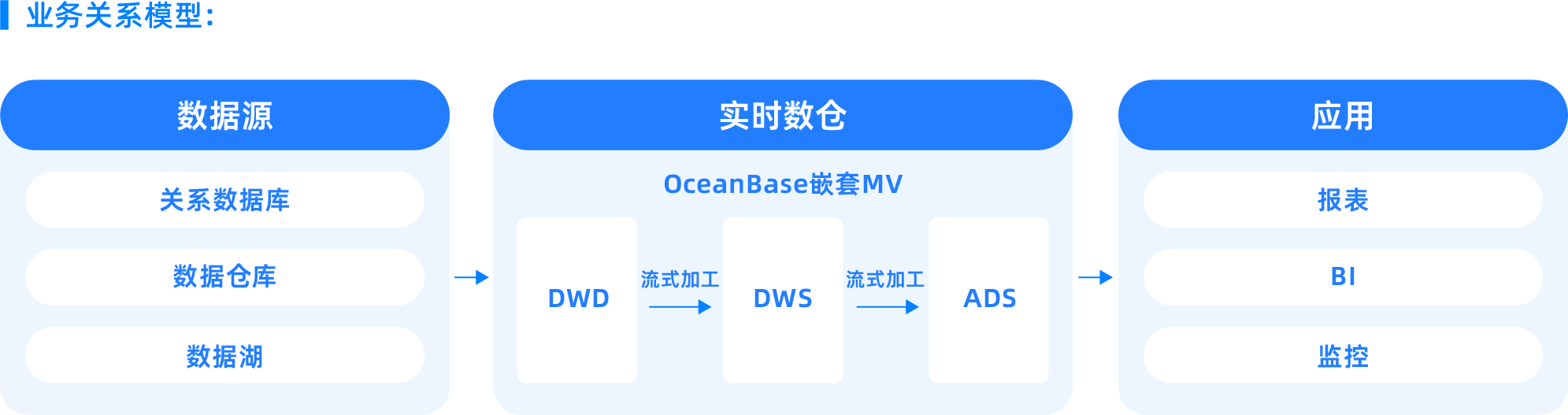
In the latest OceanBase V4.3.5 version, the Nested Materialized View (Nested MV) feature was introduced, allowing you to easily build new materialized views on top of existing ones. This is suitable for ETL processes in data warehouses, where nested materialized views can generate intermediate results during the data transformation and loading phases. These results can serve as input for subsequent processing, further optimizing the efficiency of the entire data processing pipeline.
For detailed information and usage instructions on materialized views, see Materialized view overview (MySQL-compatible mode) and Materialized view overview (Oracle-compatible mode).
Key features of intelligent materialized views:
- Declarative SQL definition: Intelligent materialized views allow users to declaratively define data processing results without manually managing conversion steps. Users only need to write standard SQL queries to specify data conversion logic, and OceanBase is responsible for executing and maintaining these queries.
- Automatic refresh mechanism: OceanBase automatically handles the cascading relationships of data refresh, including scheduling and execution, based on the user-specified target data freshness requirement. Users only need to define the latest state the data should maintain, such as a target lag of 30 seconds or 5 minutes, and OceanBase will automatically ensure the data meets this requirement.
- Incremental processing optimization: Intelligent materialized views use automatic incremental view maintenance technology, calculating only the changes since the last refresh rather than performing a complete refresh. This greatly improves performance and reduces computational cost.
- Dependency management: Intelligent materialized views automatically track data dependencies, ensuring refreshes occur in the correct order when the underlying data changes. This eliminates the need to manually manage dependencies in complex data pipelines.
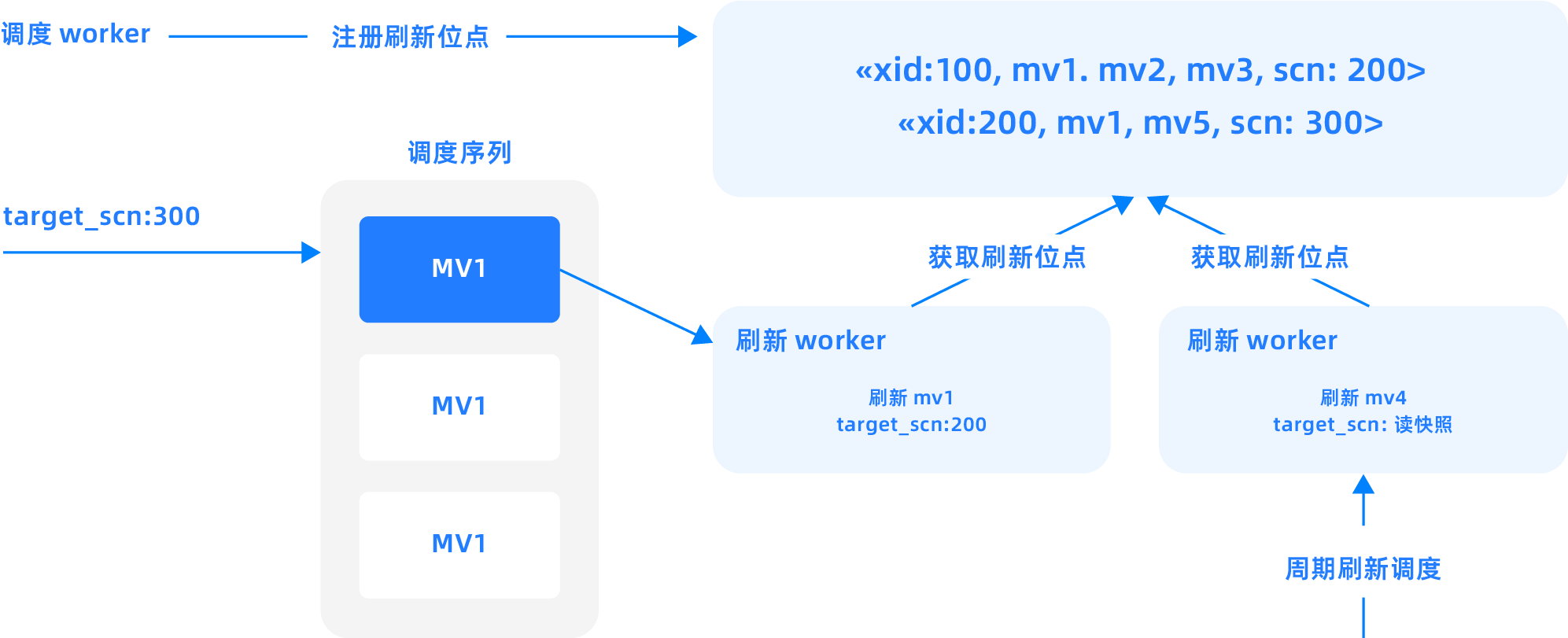
Multi-modal types
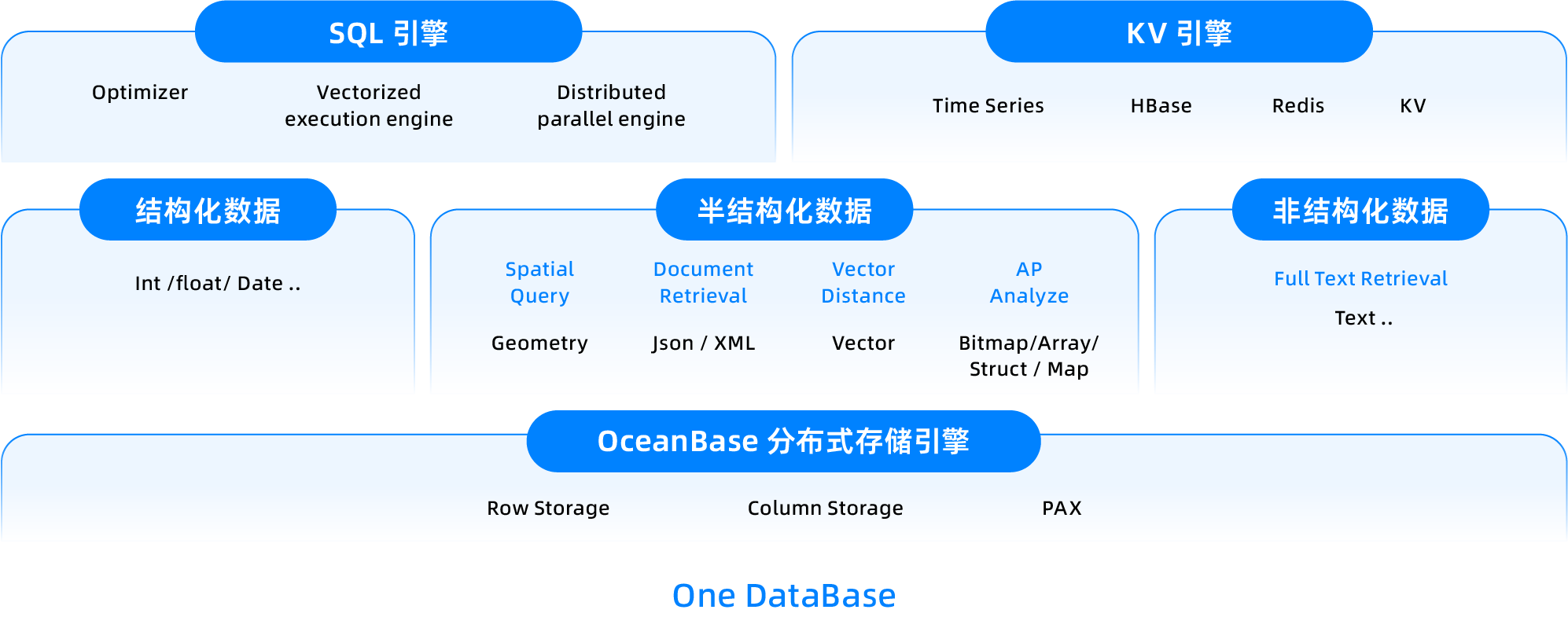
OceanBase Database is a distributed, multi-modal integrated database. In real-time analytics scenarios, it can simultaneously process structured, semi-structured, and unstructured data within a single database based on its SQL engine.
The storage foundation for multimodality is LOB (Large Object). LOB also plays a crucial role in AI storage and data processing. Multimodal data in AI scenarios (images, text, audio, video) are all large objects, and the performance of LOB is essential for computational efficiency in scenarios like AI pre-training. OceanBase provides a highly efficient LOB implementation at the storage layer, supporting 512MB of storage under SQL. Using the DBMS.Lob package, it can support efficient access to terabyte-level large objects.
In data analytics scenarios, OceanBase natively supports multimodal data types such as Array, Roaring Bitmap, and Map. It can not only efficiently store and query structured data but also directly support semi-structured data and complex aggregation analysis.
- Roaring Bitmap/Map: Suitable for advanced data mining scenarios such as large-scale label analysis, population segmentation, and deduplication aggregation.
- Array: Provides great flexibility for complex businesses such as log retrieval, behavior trajectory analysis, and multi-dimensional labeling, truly achieving one database with multiple capabilities.
For detailed information and usage instructions on the highly efficient compressed bitmap data type, see Highly efficient compressed bitmap data type (RoaringBitmap).
For detailed information and usage instructions on the array type, see Array type.
JSON, as the most widely used semi-structured type, has extensive applications in transaction, analytics, and even AI scenarios.
- In transaction scenarios, it serves as schemaless elastic columnar storage and computation.
- In analytics scenarios, JSON's multi-valued indexing is suitable for flexible computation of multi-dimensional labels.
- In AI scenarios, JSON acts as a bridge connecting models and applications. It is also the standard input/output format in data processing Pipelines such as agents/workflows.
To support JSON capabilities across multiple workloads, OceanBase JSON implements a rich set of computational expressions and JSON-based multi-value indexes. In its underlying storage format, it not only supports JSON Binary to optimize random read/write operations within JSON data but also supports structured encoding of JSON. By extracting structured information from similar JSON data, it deeply optimizes the storage compression ratio of JSON and the query performance based on JSON Path. For detailed information and usage instructions on the JSON data type, see JSON data type.
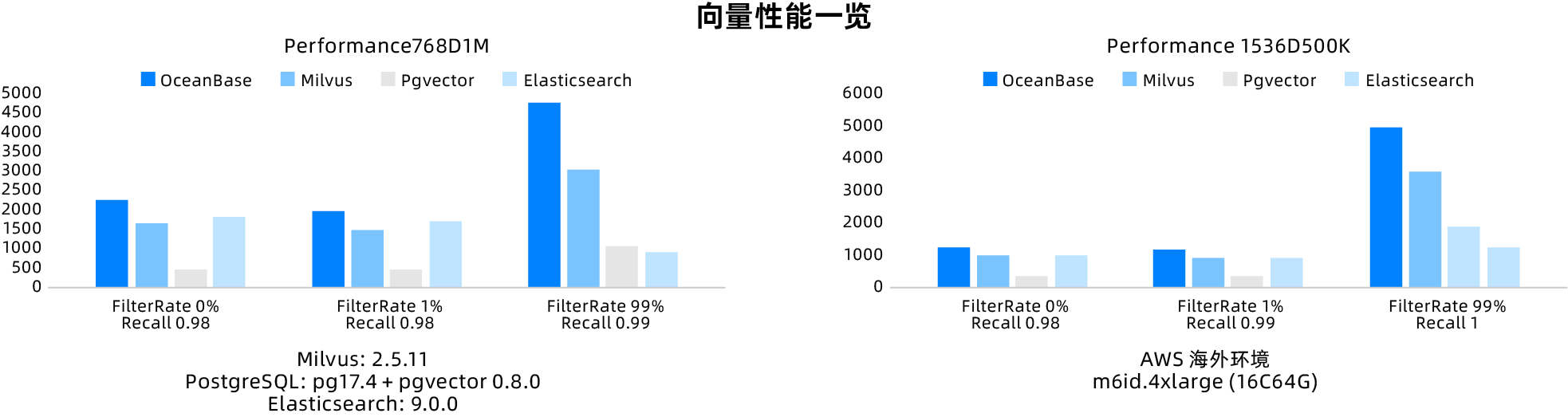
In the era of generative AI, multimodal data processing has become increasingly important. OceanBase has strengthened its vector capabilities and full-text search capabilities to better meet the demands for hybrid search in knowledge retrieval scenarios. With its proprietary path combining vector algorithms and databases, OceanBase's vectors have clear advantages over open-source vector databases, outperforming typical open-source competitors in VectorDBbench.
Special indexes
In traditional relational databases, indexes such as B-Tree and Hash are primarily used for exact value queries on structured data (such as numbers, dates, etc.). However, in practical business scenarios, with the proliferation of semi-structured data (such as JSON documents), unstructured text (logs, long texts), and multidimensional analysis scenarios, OceanBase provides two special indexes:
- Full-text index: Implemented based on an inverted index, it establishes keyword mappings for text content using tokenization techniques. Suitable for scenarios like log analysis and document retrieval.
- Multi-value index: Builds element-level indexes for JSON array fields by expanding the arrays into virtual row records and constructing a B-Tree index, significantly improving the query efficiency of set data.
Through their differentiated data structure designs, these two indexes provide targeted optimizations for different data types (text/JSON) and query patterns (fuzzy match), collectively forming an acceleration layer for complex data queries.
Full-text index
In relational databases, indexes are typically used to accelerate queries that match exact values. However, traditional B-Tree indexes often fail to meet performance requirements when handling large volumes of text data or performing fuzzy searches. In such cases, performing a full table scan to find matching data row by row leads to performance bottlenecks, especially in scenarios with large amounts of text and massive data volumes. Moreover, complex query requirements, such as approximate match and relevance sorting, are difficult to achieve through simple SQL rewriting.
To address these issues, OceanBase currently supports full-text indexing compatible with MySQL. By preprocessing text content and establishing keyword indexes, full-text indexing significantly improves the efficiency of full-text searches.
The technology used by full-text indexing to quickly search text data includes the following main features:
- Full-text search: By building a full-text index, entire documents or large segments of text content can be comprehensively indexed, enabling more flexible and efficient searching.
- Quick search: Users can quickly find matching text in the database based on entered keywords, greatly reducing search time.
- Efficient processing of large amounts of text: Full-text indexing can effectively process various types of text data, including articles, reports, web pages, and emails, providing users with precise and fast search experiences.
- Support for complex queries: In addition to basic keyword search, full-text indexing also supports complex query requirements, such as approximate match and relevance sorting, greatly enriching the database's search capabilities.
By introducing the full-text indexing feature, OceanBase can significantly improve query performance when dealing with large-scale text data and complex retrieval requirements, enabling users to obtain the information they need more efficiently.
For detailed information and usage instructions on full-text indexing, see Full-text index (MySQL-compatible mode).
Multi-value index
Multi-value indexing is a special indexing feature in the MySQL-compatible mode of OceanBase Database. It is mainly used to handle JSON documents and set data types, and is suitable for scenarios where multiple values or attributes need to be queried. Its main characteristics are as follows:
- Can create indexes on arrays or sets.
- Currently applicable to JSON documents.
- Can improve the query efficiency for searches based on JSON array elements.
Multi-value indexing is very useful in AP scenarios. AP scenarios usually involve complex data analysis and report generation, and multi-value indexing can accelerate these operations. For example, in a data warehouse, multi-value indexing can be used to accelerate data analysis across multiple dimensions and improve the efficiency of report generation. Specific applicable scenarios include:
- Many-to-many association queries: Using multi-value indexing can optimize queries for many-to-many relationships between entities. For example, in the relationship between actors and films, all actors for a film can be stored in a JSON array, and all films an actor appears in can be quickly queried using a JSON multi-value index.
- Tag and category queries: When an entity has multiple tags or categories, a multi-value index can accelerate related queries. For example, multiple tags of a product can be stored in a JSON array, and products containing a specific tag can be quickly found using a JSON multi-value index.
For detailed information and usage instructions on multi-value indexing, see Multi-value index.
MySQL ecosystem compatibility
While striving for ultimate performance and scalability, OceanBase Database also aims to provide high compatibility with the MySQL ecosystem. This enables seamless migration of MySQL-based businesses to OceanBase Database and allows full utilization of existing OLAP ecosystem tools and technology stacks, enabling rapid iteration and innovation in data analytics and business insights.
Syntax compatibility: OceanBase Database fully supports the standard MySQL SQL syntax, including but not limited to Data Definition Language (DDL), Data Manipulation Language (DML), and Data Control Language (DCL). This means that statements you previously wrote in MySQL for data queries, table structure definitions, index creation, and privilege management can be run directly in OceanBase Database with minimal syntax adjustments, significantly reducing migration costs and the learning curve.
- Seamless migration: Existing MySQL applications can be quickly migrated to OceanBase Database, reducing the workload of code modification during migration.
- Skill reuse: MySQL developers and DBAs do not need to learn new database syntax, shortening the adaptation period.
- Ecosystem integration: The MySQL-compatible syntax foundation enables OceanBase Database to better integrate into existing toolchains such as BI, ETL, and data visualization.
View compatibility: OceanBase is compatible with MySQL's information_schema views, for example:
- Table information query: Supports views like TABLES and COLUMNS, allowing users to query the structure and column information of all tables in the database. This is crucial for data dictionary management and integration with third-party tools.
- Privilege management: Supports views such as SCHEMATA and SCHEMA_PRIVILEGES, helping administrators conveniently view and manage database and table privilege settings.
Many database management, monitoring, and analysis tools rely on INFORMATION_SCHEMA to obtain database status and architecture information. This compatibility feature of OceanBase Database enables these tools to run directly on OceanBase Database without custom adaptation. OceanBase Database supports a variety of OLAP ecosystem tools, for example:
OceanBase implements a full-stack data integration from batch to streaming:
- Supports seamless integration with mainstream tools such as Flink, Kafka, OMS, OBLOADER, Dataworks, and dbt, easily connecting to enterprise existing ETL, real-time synchronization, and data warehouse environments.
- The database kernel supports direct load, file/ODPS/HDFS external tables, External Catalog, etc., greatly reducing the development and operation and maintenance barriers for multi-source data integration and data lake interaction.
- Highly compatible with MySQL/Oracle syntax, mainstream BI, analysis, and stream computing tools (such as Tableau, PowerBI, Flink, Quick BI, etc.) can be migrated and connected with zero code, truly achieving "out-of-the-box" use.
OceanBase innovates not only in its core engine but also adapts to many ecosystem products:
- Automated orchestration and scheduling: Deeply integrates with scheduling platforms such as DolphinScheduler, n8n, and Airflow to achieve automatic orchestration and operation and maintenance of multi-stage data processing tasks, improving large-scale data governance and multi-system collaboration efficiency.
- Observability: Seamlessly integrates with monitoring tools such as Prometheus and Grafana, supporting real-time performance monitoring, alerting, and intelligent operation and maintenance for multi-tenancy, nodes, and clusters, facilitating stable operation of large-scale clusters and multiple business lines.
- Data visualization empowerment: Fully compatible with mainstream BI platforms such as Superset, Tableau, QuickBI, and Guanduan BI, supporting multi-role self-service analysis, interactive dashboards, and complex business reports, aiding business insight and data-driven decision-making.
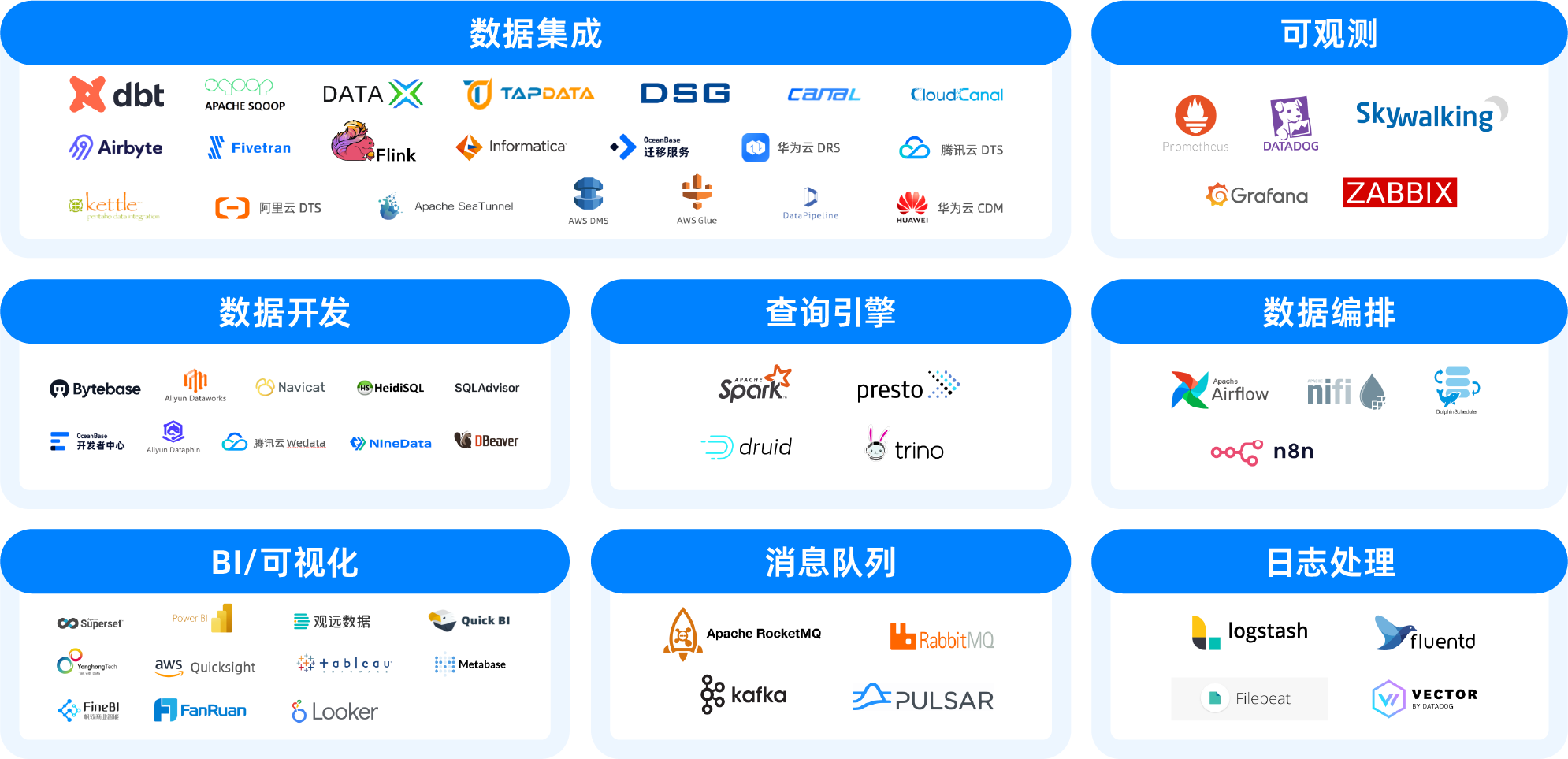
For information on OceanBase's current OLAP ecosystem integrations, see Ecosystem integrations.