







This topic describes the system and network requirements for installing OceanBase Migration Service (OMS).
Operating system
OMS can be deployed only on Linux-based servers.
Linux operating system |
Version |
Server architecture |
|---|---|---|
| CentOS | V7 | x86_64 (including Hanguang) |
| KylinOS | V10 | ARM_64 (Kunpeng) |
Deploy OMS and configure port limits
When you deploy OMS, make sure that the following ports are available and the corresponding port policies are enabled.
The following ports must be available on the server where OMS is deployed.
PortDescription8089/8090 The port for the OMS management console. 8084 - In a single-node deployment: the port for the supervisorctl Web interface.
- In a separated deployment: the port for the supervisorctl Web interface of the management node.
9084 - In a single-node deployment: this port is not required.
- In a separated deployment: the port for the supervisorctl Web interface of the component node.
8088 The port for the OMS cluster management module, which is named oms_drc_cmin supervisorctl.9000/9001 The port for the Host Agent process. 16000~16499
17000~17499
18000~18499
7100-7499The random ports for internal components of OMS. To modify the external port 8089 of the OMS management console, perform the following steps:
Log in to the Docker container.
docker exec -it ${CONTAINER_NAME} bashNote
CONTAINER_NAMEis the name of the container.Run the
vi /home/ds/ghana/config/tengine.confcommand to modify the port number after thelistenparameter in this file.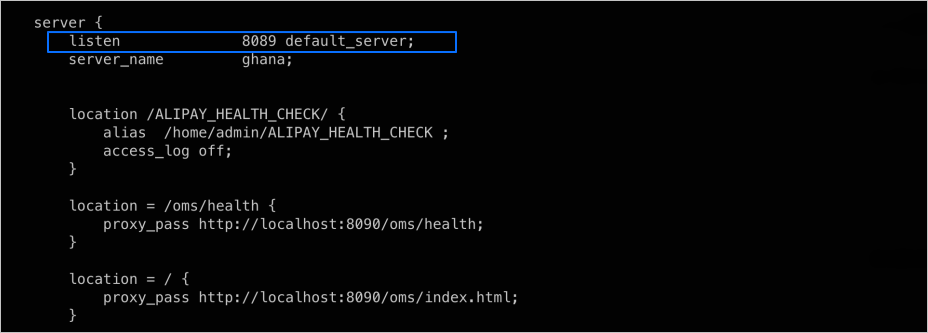
Enter
:wqand press Enter to save the changes and exit the editing mode.Run the
supervisorctl restart nginxcommand.
If you have deployed InfluxDB, make sure that port 8086 for the InfluxDB service is available on the server where InfluxDB is deployed.
NTP service
Before installation, make sure that the OMS Meta database and all OMS deployment servers have the NTP service configured and enabled, and that the clocks are synchronized between the servers. Also, ensure that the database time zone and server time zone are consistent.
Network connectivity
Ensure that the OMS deployment servers, obproxy, OBServer nodes, OCP, and data sources involved in migration and synchronization have network connectivity.