

OceanBase logo

OceanBase

A unified distributed database ready for your transactional, analytical, and AI workloads.

DEPLOY YOUR WAY

OceanBase Cloud

The best way to deploy and scale OceanBase

OceanBase Enterprise

Run and manage OceanBase on your infra

TRY OPEN SOURCE

OceanBase Community Edition

The free, open-source distributed database

OceanBase seekdb

Open source AI native search database

Customer Stories

Real-world success stories from enterprises across diverse industries.

View All
BY USE CASES

Mission-Critical Transactions

Global & Multicloud Application

Elastic Scaling for Peak Traffic

Real-time Analytics

Active Geo-redundancy

Database Consolidation

Resources

Comprehensive knowledge hub for OceanBase.

Blog

Live Demos

Training & Certification

Documentation

Official technical guides, tutorials, API references, and manuals for all OceanBase products.

View All
PRODUCTS

OceanBase Cloud

OceanBase Database

Tools

Connectors and Middleware

QUICK START

OceanBase Cloud

OceanBase Database

BEST PRACTICES

Practical guides for utilizing OceanBase more effectively and conveniently

Company

Learn more about OceanBase – our company, partnerships, and trust and security initiatives.

About OceanBase

Partner

Trust Center

Contact Us

International - English
中国站 - 简体中文
日本 - 日本語
Sign In
Start on Cloud

A unified distributed database ready for your transactional, analytical, and AI workloads.

DEPLOY YOUR WAY

OceanBase Cloud

The best way to deploy and scale OceanBase

OceanBase Enterprise

Run and manage OceanBase on your infra

TRY OPEN SOURCE

OceanBase Community Edition

The free, open-source distributed database

OceanBase seekdb

Open source AI native search database

Customer Stories

Real-world success stories from enterprises across diverse industries.

View All
BY USE CASES

Mission-Critical Transactions

Global & Multicloud Application

Elastic Scaling for Peak Traffic

Real-time Analytics

Active Geo-redundancy

Database Consolidation

Comprehensive knowledge hub for OceanBase.

Blog

Live Demos

Training & Certification

Documentation

Official technical guides, tutorials, API references, and manuals for all OceanBase products.

View All
PRODUCTS
OceanBase CloudOceanBase Database
ToolsConnectors and Middleware
QUICK START
OceanBase CloudOceanBase Database
BEST PRACTICES

Practical guides for utilizing OceanBase more effectively and conveniently

Learn more about OceanBase – our company, partnerships, and trust and security initiatives.

About OceanBase

Partner

Trust Center

Contact Us

Start on Cloud
编组
All Products
    • Databases
    • iconOceanBase Database
    • iconOceanBase Cloud
    • iconOceanBase Tugraph
    • iconInteractive Tutorials
    • iconOceanBase Best Practices
    • Tools
    • iconOceanBase Cloud Platform
    • iconOceanBase Migration Service
    • iconOceanBase Developer Center
    • iconOceanBase Migration Assessment
    • iconOceanBase Admin Tool
    • iconOceanBase Loader and Dumper
    • iconOceanBase Deployer
    • iconKubernetes operator for OceanBase
    • iconOceanBase Diagnostic Tool
    • iconOceanBase Binlog Service
    • Connectors and Middleware
    • iconOceanBase Database Proxy
    • iconEmbedded SQL in C for OceanBase
    • iconOceanBase Call Interface
    • iconOceanBase Connector/C
    • iconOceanBase Connector/J
    • iconOceanBase Connector/ODBC
    • iconOceanBase Connector/NET
icon

OceanBase Migration Service

V4.0.2Enterprise Edition

  • OMS Documentation
  • What's new
  • OMS Introduction
    • What is OMS?
    • Terms
    • OMS HA
    • Architecture
      • Overview
      • Hierarchical functional system
      • Basic components
    • Limits
  • Quick Start
    • Data migration process
    • Data synchronization process
  • Deploy OMS
    • Deployment types
    • System and network requirements
    • Memory and disk requirements
    • Environment preparations
    • Deploy OMS on a single node
    • Deploy OMS on multiple nodes in a single region
    • Deploy OMS on multiple nodes in multiple regions
    • Integrate the OIDC protocol to OMS to implement SSO
    • Scale-out OMS
    • Check the deployment
    • Deploy a time-series database (Optional)
  • OMS console
    • Log on to the OMS console
    • Overview
    • User center
      • Configure user information
      • Change your logon password
      • Log off
  • Data migration
    • Data migration overview
    • Migrate data from a MySQL database to a MySQL tenant of OceanBase Database
    • Migrate data from a MySQL tenant of OceanBase Database to a MySQL database
    • Migrate data from an Oracle database to a MySQL tenant of OceanBase Database
    • Migrate data from an Oracle tenant of OceanBase Database to an Oracle database
    • Migrate data from an Oracle database to an Oracle tenant of OceanBase Database
    • Migrate data from a DB2 LUW database to an Oracle tenant of OceanBase Database
    • Migrate data from an Oracle tenant of OceanBase Database to a DB2 LUW database
    • Migrate data from a DB2 LUW database to a MySQL tenant of OceanBase Database
    • Migrate data from a MySQL tenant of OceanBase Database to a DB2 LUW database
    • Migrate data within OceanBase Database
    • Active-active disaster recovery between OceanBase databases
    • Migrate data from a TiDB database to a MySQL tenant of OceanBase Database
    • Migrate data from a PostgreSQL database to a MySQL tenant of OceanBase Database
    • Manage data migration projects
      • View details of a data migration project
      • Change the name of a data migration project
      • View and modify migration objects
      • Use tags to manage data migration projects
      • Download and import the settings of migration objects
      • Start and pause a data migration project
      • Release and delete a data migration project
    • Features
      • DML filtering
      • Synchronize DDL operations
      • Configure matching rules for migration objects
      • Wildcard rules
      • Rename a database table
      • Use SQL conditions to filter data
      • Create and update a heartbeat table
      • Schema migration mechanisms
      • Schema migration operations
      • Set an incremental synchronization timestamp
    • Supported DDL operations and limits for synchronization
      • DDL synchronization from a MySQL database to a MySQL tenant of OceanBase Database
        • Overview of DDL synchronization from a MySQL database to a MySQL tenant of OceanBase Database
        • CREATE TABLE
          • Create a table
          • Create a column
          • Create an index or a constraint
          • Create partitions
        • Data type conversion
        • ALTER TABLE
          • Modify a table
          • Operations on columns
          • Operations on constraints and indexes
          • Operations on partitions
        • TRUNCATE TABLE
        • RENAME TABLE
        • DROP TABLE
        • CREATE INDEX
        • DROP INDEX
        • DDL incompatibilities between a MySQL database and a MySQL tenant of OceanBase Database
          • Overview
          • Incompatibilities of the CREATE TABLE statement
            • Incompatibilities of CREATE TABLE
            • Column types that are supported to create indexes or constraints
          • Incompatibilities of the ALTER TABLE statement
            • Incompatibilities of ALTER TABLE
            • Change the type of a constrained column
            • Change the type of an unconstrained column
            • Change the length of a constrained column
            • Change the length of an unconstrained column
            • Delete a constrained column
          • Incompatibilities of DROP INDEX operations
      • Synchronize DDL operations from a MySQL tenant of OceanBase Database to a MySQL database
      • DDL operations for synchronizing data from an Oracle database to an Oracle tenant of OceanBase Database
        • Overview
        • CREATE TABLE
          • Overview
          • Create a relational table
            • Create a relational table
            • Define columns of a relational table
          • Virtual columns
          • Regular columns
          • Create partitions
            • Overview
            • Partitioning
            • Subpartitioning
            • Composite partitioning
            • User-defined partitioning
            • Subpartition templates
          • Constraints
            • Overview
            • Inline constraints
            • Out-of-line constraints
        • CREATE INDEX
          • Overview
          • Normal indexes
        • ALTER TABLE
          • Modify tables
          • Modify, drop, and add table attributes
          • Column attribute management
            • Modify, drop, and add column attributes
            • Rename a column
            • Add columns and column attributes
            • Modify column attributes
            • Drop columns
          • Modify, drop, and add constraints
          • Partition management
            • Modify, drop, and add partitions
            • Drop partitions
            • Drop subpartitions
            • Add partitions and subpartitions
            • Modify partitions
            • Truncate partitions
        • DROP TABLE
        • COMMENT
        • RENAME OBJECT
        • TRUNCATE TABLE
        • DROP INDEX
        • DDL incompatibilities between an Oracle database and an Oracle tenant of OceanBase Database
          • Overview
          • Incompatibilities of CREATE TABLE
          • Incompatibilities in table modification operations
            • Incompatibilities of ALTER TABLE
            • Change the type of a constrained column
            • Change the type of an unconstrained column
            • Change the length of a constrained column
            • Change the length of an unconstrained column
      • Synchronize DDL operations from an Oracle tenant of OceanBase Database to an Oracle database
      • Synchronize DDL operations from an Oracle tenant of OceanBase Database to a DB2 LUW database
      • Synchronize DDL operations from a DB2 LUW database to a MySQL tenant of OceanBase Database
      • Synchronize DDL operations from a MySQL tenant of OceanBase Database to a DB2 LUW database
      • DDL synchronization between MySQL tenants of OceanBase Database
      • DDL synchronization between Oracle tenants of OceanBase Database
  • Data synchronization
    • Overview
    • Synchronize data from OceanBase Database to a Kafka instance
    • Synchronize data from an OceanBase database to a RocketMQ instance
    • Synchronize data from OceanBase Database to a DataHub instance
    • Synchronize data from an ODP logical table to a physical table in a MySQL tenant of OceanBase Database
    • Synchronize data from an ODP logical table to a DataHub instance
    • Synchronize data from an IDB logical table to a physical table in a MySQL tenant of OceanBase Database
    • Synchronize data from an IDB logical table to a DataHub instance
    • Synchronize data from a MySQL database to a DataHub instance
    • Synchronize data from an Oracle database to a DataHub instance
    • Manage data synchronization projects
      • View details of a data synchronization project
      • Change the name of a data synchronization project
      • View and modify synchronization objects
      • Use tags to manage data synchronization projects
      • Download and import the settings of synchronization objects
      • Start and pause a data synchronization project
      • Release and delete a data synchronization project
    • Features
      • DML filtering
      • Synchronize DDL operations
      • Rename databases and tables
      • Rename a topic
      • Use SQL conditions to filter data
      • Column filtering
      • Data formats
  • Create and manage data sources
    • Create data sources
      • Create an OceanBase data source
        • Create a physical OceanBase data source
        • Create a DBP data source
        • Create an IDB data source
      • Create a MySQL data source
      • Create an Oracle data source
      • Create a TiDB data source
      • Create a Kafka data source
      • Create a RocketMQ data source
      • Create a DataHub data source
      • Create a DB2 LUW data source
      • Create a PostgreSQL data source
    • Manage data sources
      • View data source information
      • Copy a data source
      • Edit a data source
      • Delete a data source
    • Create a database user
    • User privileges
    • Enable binlogs for the MySQL database
    • Minimum privileges required when an Oracle database serves as the source
  • OPS & Monitoring
    • O&M overview
    • Go to the overview page
    • Server
      • View server information
      • Update the quota
      • View server logs
    • Components
      • Store
        • Create a store
        • View details of a store
        • Update the configurations of a store
        • Start and pause a store
        • Delete a store
      • Incr-Sync
        • View details of an Incr-Sync component
        • Start and pause an Incr-Sync component
        • Migrate an Incr-Sync component
        • Update the configurations of an Incr-Sync component
        • Batch O&M
        • Delete an Incr-Sync component
      • Full-Import
        • View details of a Full-Import component
        • Pause a Full-Import component
        • Rerun and resume a Full-Import component
        • Update the configurations of a Full-Import component
        • Delete a Full-Import component
      • Full-Verification
        • View details of a Full-Verification component
        • Pause a Full-Verification component
        • Rerun and resume a Full-Verification component
        • Update the configurations of a Full-Verification component
        • Delete a Full-Verification component
    • O&M tickets
      • View details of an O&M ticket
      • Skip a ticket or sub-ticket
      • Retry a ticket or sub-ticket
  • System management
    • Permission Management
      • Overview
      • Manage users
      • Manage departments
    • Alert center
      • View project alerts
      • View system alerts
      • Manage alert settings
    • Associate with OCP
    • System parameters
      • Modify system parameters
      • Modify HA configurations
      • oblogproxy parameters
    • Operation audit
  • OMS O&M
    • Manage OMS services
    • OMS logs
    • Component O&M
      • O&M operations for the Supervisor component
      • CLI-based O&M for the Connector component
      • O&M operations for the Store component
    • Component tuning
      • Incr-Sync/Full-Import tuning
      • Oracle store tuning
    • Component parameters
      • Coordinator
      • Condition
      • Source Plugin
        • Overview
        • StoreSource
        • DataFlowSource
        • LogProxySource
        • KafkaSource (TiDB)
      • Sink Plugin
        • Overview
        • JDBC-Sink
        • KafkaSink
        • DatahubSink
        • RocketMQSink
      • Store parameters
        • Parameters of an Oracle store
        • Parameters of a DB2 store
        • Parameters of a MySQL store
        • Parameters of an OceanBase store
      • Parameters of the CM component
      • Parameters of the Supervisor component
    • Set throttling
  • Reference Guide
    • API Reference
      • Obtain the status of a migration project
      • Obtain the status of a synchronization project
    • OMS error codes
    • Alert Reference
      • oms_host_down
      • oms_host_down_migrate_resource
      • oms_host_threshold
      • oms_migration_failed
      • oms_migration_delay
      • oms_sync_failed
      • oms_sync_status_inconsistent
      • oms_sync_delay
  • Upgrade Guide
    • Overview
    • Upgrade OMS in single-node deployment mode
    • Upgrade OMS in multi-node deployment mode
    • FAQ
  • FAQ
    • General O&M
      • How do I modify the resource quotas of an OMS container?
      • How do I troubleshoot the OMS server down issue?
      • Deploy InfluxDB for OMS
      • Increase the disk space of the OMS host
    • Project diagnostics
      • How do I troubleshoot common problems with Oracle Store?
      • How do I perform performance tuning for Oracle Store?
      • What do I do when Oracle Store reports an error at the isUpdatePK stack?
      • What do I do when a store does not have data of the timestamp requested by the downstream?
      • What do I do when OceanBase Store failed to access an OceanBase cluster through RPC?
      • How do I use LogMiner to pull data from an Oracle database?
    • OPS & monitoring
      • What are the alert rules?
    • Data synchronization
      • FAQ about synchronization to a message queue
        • What are the strategies for ensuring the message order in incremental data synchronization to Kafka
    • Data migration
      • User privileges
        • What privileges do I need to grant to a user during data migration to or from an Oracle database?
      • Full migration
        • How do I query the ID of a checker?
        • How do I query log files of the Checker component of OMS?
        • How do I query the verification result files of the Checker component of OMS?
        • What do I do if the destination table does not exist?
        • What can I do when the full migration failed due to LOB fields?
        • What do I do if garbled characters cannot be written into OceanBase Database V3.1.2?
      • Incremental synchronization
        • How do I skip DDL statements?
        • How do I update whitelists and blacklists?
        • What are the application scope and limits of ETL?
    • Installation and deployment
      • How do I upgrade Store?
  • Release Note
    • V4.0
      • OMS V4.0.2
      • OMS V4.0.1
    • V3.4
      • OMS V3.4.0
    • V3.3
      • OMS V3.3.1
      • OMS V3.3.0
    • V3.2
      • OMS V3.2.2
      • OMS V3.2.1
    • V3.1
      • OMS V3.1.0
    • V2.1
      • OMS V2.1.2
      • OMS V2.1.0

Download PDF

OMS Documentation What's new What is OMS? Terms OMS HA Overview Hierarchical functional system Basic components Limits Data migration process Data synchronization process Deployment types System and network requirements Memory and disk requirements Environment preparations Deploy OMS on a single node Deploy OMS on multiple nodes in a single region Deploy OMS on multiple nodes in multiple regions Integrate the OIDC protocol to OMS to implement SSO Scale-out OMS Check the deployment Deploy a time-series database (Optional) Log on to the OMS console Overview Configure user information Change your logon password Log off Data migration overview Migrate data from a MySQL database to a MySQL tenant of OceanBase Database Migrate data from a MySQL tenant of OceanBase Database to a MySQL database Migrate data from an Oracle database to a MySQL tenant of OceanBase Database Migrate data from an Oracle tenant of OceanBase Database to an Oracle database Migrate data from an Oracle database to an Oracle tenant of OceanBase Database Migrate data from a DB2 LUW database to an Oracle tenant of OceanBase Database Migrate data from an Oracle tenant of OceanBase Database to a DB2 LUW database Migrate data from a DB2 LUW database to a MySQL tenant of OceanBase Database Migrate data from a MySQL tenant of OceanBase Database to a DB2 LUW database Migrate data within OceanBase Database Active-active disaster recovery between OceanBase databases Migrate data from a TiDB database to a MySQL tenant of OceanBase Database Migrate data from a PostgreSQL database to a MySQL tenant of OceanBase Database View details of a data migration project Change the name of a data migration project View and modify migration objects Use tags to manage data migration projects Download and import the settings of migration objects Start and pause a data migration project Release and delete a data migration project DML filtering Synchronize DDL operations Configure matching rules for migration objects Wildcard rules Rename a database table Use SQL conditions to filter data Create and update a heartbeat table Schema migration mechanisms Schema migration operations Set an incremental synchronization timestamp Synchronize DDL operations from a MySQL tenant of OceanBase Database to a MySQL database Synchronize DDL operations from an Oracle tenant of OceanBase Database to an Oracle database Synchronize DDL operations from an Oracle tenant of OceanBase Database to a DB2 LUW database Synchronize DDL operations from a DB2 LUW database to a MySQL tenant of OceanBase Database Synchronize DDL operations from a MySQL tenant of OceanBase Database to a DB2 LUW database DDL synchronization between MySQL tenants of OceanBase Database DDL synchronization between Oracle tenants of OceanBase Database Overview Synchronize data from OceanBase Database to a Kafka instance Synchronize data from an OceanBase database to a RocketMQ instance Synchronize data from OceanBase Database to a DataHub instance Synchronize data from an ODP logical table to a physical table in a MySQL tenant of OceanBase Database Synchronize data from an ODP logical table to a DataHub instance Synchronize data from an IDB logical table to a physical table in a MySQL tenant of OceanBase Database Synchronize data from an IDB logical table to a DataHub instance Synchronize data from a MySQL database to a DataHub instance Synchronize data from an Oracle database to a DataHub instance View details of a data synchronization project Change the name of a data synchronization project View and modify synchronization objects Use tags to manage data synchronization projects Download and import the settings of synchronization objects Start and pause a data synchronization project Release and delete a data synchronization project DML filtering Synchronize DDL operations Rename databases and tables Rename a topic Use SQL conditions to filter data Column filtering Data formats Create a MySQL data source Create an Oracle data source Create a TiDB data source Create a Kafka data source Create a RocketMQ data source Create a DataHub data source Create a DB2 LUW data source Create a PostgreSQL data source View data source informationCopy a data source Edit a data source
OceanBase logo

The Unified Distributed Database for the AI Era.

Follow Us
Products
OceanBase CloudOceanBase EnterpriseOceanBase Community EditionOceanBase seekdb
Resources
DocsBlogLive DemosTraining & Certification
Company
About OceanBaseTrust CenterLegalPartnerContact Us
Follow Us

© OceanBase 2026. All rights reserved

Cloud Service AgreementPrivacy PolicySecurity
Contact Us
Document Feedback
  1. Documentation Center
  2. OceanBase Migration Service
  3. V4.0.2
iconOceanBase Migration Service
V 4.0.2Enterprise Edition
Enterprise Edition
  • V 4.3.2
  • V 4.3.1
  • V 4.3.0
  • V 4.2.5
  • V 4.2.4
  • V 4.2.3
  • V 4.0.2
  • V 3.4.0
Community Edition
  • V 4.2.13
  • V 4.2.12
  • V 4.2.11
  • V 4.2.10
  • V 4.2.9
  • V 4.2.8
  • V 4.2.7
  • V 4.2.6
  • V 4.2.5
  • V 4.2.4
  • V 4.2.3
  • V 4.2.1
  • V 4.2.0
  • V 4.0.0
  • V 3.3.1

View details of a data migration project

Last Updated:2026-04-14 07:36:47  Updated
share
What is on this page
Access the details page
View basic information
View migration details

folded

share

After a data migration project starts, you can view the project metrics on the details page of the project, such as the basic information, and project progress and status.

Access the details page

  1. Log on to the OMS console.

  2. In the left-side navigation pane, click Data Migration.

  3. On the Data Migration page, click the name of the target project. On the details page that appears, view the basic information and migration details of the project.

    On the Data Migration page, you can search for data migration projects by tag, status, type, or keywords. A data migration project has the following status:

    • Not Started: The data migration project has not been started. You can click Start in the Actions column to start the project.

    • Running: The data migration project is in progress. You can view the data migration plan and current progress on the right.

    • Modifying: The migration objects in the migration project are being modified.

    • Integrating: The data migration project of the modified migration object is being integrated with the migration object modification task.

    • Paused: The data migration project is manually paused. You can click Resume in the Actions column to resume the project.

    • Failed: The data migration project has failed. You can view where the failure occurred on the right. To view the error messages, click the project name to go to the project details page.

    • Completed: The data migration project is completed and OMS has migrated the specified data to the destination database in the configured migration mode.

    • Releasing: The data migration project is being released. You cannot edit a data migration project in this status.

    • Released: The data migration project is released. After the project is released, OMS terminates the current migration and incremental synchronization project.

View basic information

The Basic Information section displays the basic information of the current data migration project.

Parameter Description
ID The unique ID of the data migration project.
Migration Type The migration type selected when the current data migration project was created.
Alert Level The alert level of the data synchronization project. OMS supports the following alert levels: No Protection, High Protection, Medium Protection, and Low Protection. For more information, see Alert settings.
Created By The user who created the current data migration project.
Created At The time when the current data migration project was created.
Concurrency for Full Migration The value can be Smooth, Normal, or Fast. The quantity of resources to be consumed by a full data migration task varies based on the migration performance.
Full Verification Concurrency The value can be Smooth, Normal, or Fast. Different quantities of resources of the source and destination databases are consumed at different concurrencies.
Connection Details Click Connection Details to view the information about the connection between the source and destination databases of the data migration project.

You can perform the following operations:

  • View migration objects

    Click View Objects in the upper-right corner. The migration objects of the current data migration project are displayed. You can also modify the migration objects of an ongoing data migration object. For more information, see View and modify migration objects.

  • View the component monitoring metrics

    Click View Component Monitoring in the upper-right corner to view the information about the Store, Incr-Sync, Full-Import, and Full-Verification components. You can perform the following operations on the components:

    • Start a component: Click Start in the Actions column of the component that you want to start. In the dialog box that appears, click OK.

    • Pause a component: Click Pause in the Actions column of the component that you want to pause. In the dialog box that appears, click OK.

    • Update a component: Click Update in the Actions column of the component that you want to update. On the Update Configuration page, modify the configurations and then click Update.

      Notice

      The system restarts after you update the component. Proceed with caution.

    • View logs: Click View Logs in the Actions column of the component. The View Logs page displays the latest logs. You can search for, download, and copy the logs.

  • View or modify parameter configurations

    • For a data migration project in the Running state, click the More icon in the upper-right corner and then select Settings from the drop-down list to view the parameters of the data migration project when it was created.

    • For a data migration project in the Not Started, Paused, or Failed state, click the More icon in the upper-right corner and then select Modify Parameter Configurations from the drop-down list. In the Modify Parameter Configurations dialog box, modify the parameters, and click OK.

      The parameters that can be modified vary with the type of the data migration project and the stage of the task.

  • Download object settings

    OMS allows you to download configuration information of data migration projects and import migration project settings in batches. For more information, see Download and import the settings of migration objects.

View migration details

The Migration Details section displays the status, progress, start time, completion time, and total time spent of all subtasks of the current project.

  • Schema migration

    The definitions of data objects, such as tables, indexes, constraints, comments, and views, are migrated from the source database to the destination database. Temporary tables are automatically filtered out. If the source database is not an OceanBase database, OMS performs format conversion and encapsulation based on the syntax definition and standard of the type of the destination tenant of OceanBase Database and then replicates the data to the destination database.

    When you advance to the forward switchover step in a data migration project, OMS will automatically drop the hidden columns and unique indexes based on the type of the data migration project. For more information, see Schema migration mechanisms.

    You can view the overall status, start time, completion time, total time consumed, and table and view migration progress for a schema migration project on the Schema Migration page. You can also perform the following operations on an object:

    • View Creation Syntax: On the Database or Table tab, click View next to the target object to view the creation syntax of a database, table, or index.

      If the table creation syntax is fully compatible, the DDL syntax executed on the OBServer node is displayed. Incompatible syntax is converted before it is displayed.

    • Modify Creation Syntax and Try Again: View the error information, check and modify the definition of the conversion result of a failed DDL statement, and then migrate the data to the destination again.

    • Retry/Retry All Failed Objects: You can retry failed schema migration tasks one by one or retry all failed tasks at a time.

    • Skip/Batch Skip: You can skip failed schema migration tasks one by one or skip multiple failed tasks at a time. To skip multiple objects at a time, click Batch Skip in the upper-right corner. If you skip an object, its index is also skipped.

    • Remove/Batch Remove: You can remove failed schema migration tasks one by one or remove multiple failed tasks at a time. To remove multiple failed tasks at a time, click Batch Remove in the upper-right corner. If you remove an object, its index is also removed.

    • View Details: The DDL statements executed on the OBServer node and the execution error information of a failed schema migration task are displayed.

  • Full migration

    The existing data is migrated from tables in the source database to the corresponding tables in the destination database. On the Full Migration page, you can filter objects by source and destination databases, or select View Objects with Errors to filter out objects that hinder the overall migration progress. You can also view related information on the Table Objects, Table Indexes, and Full Migration Performance tabs. The status of the full migration task changes to Completed only after the table objects and table indexes are migrated.

    • On the Table Objects tab, you can view the names, source and destination databases, estimated data volume, migrated data volume, and status of tables.

    • On the Table Indexes tab, you can view the table objects, source and destination databases, creation time, end time, time consumed, and status. You can also view the index creation syntax and remove unwanted indexes.

    • On the Full Migration Performance tab, you can view the graphs of performance data such as the RPS and migration traffic of the source database and destination database, average read time and average sharding time of the source database, average write time of the destination database, and performance benchmarks. Such information can help you identify performance issues in a timely manner.

    You can combine full migration with incremental synchronization to ensure data consistency between the source and destination databases. If any objects fail to be migrated during a full migration, the causes of the failure are displayed.

    Notice

    • If you do not select Schema Migration for Migration Type, OMS migrates the fields in the source database that match those in the destination database during full migration, without checking whether the schemas are consistent.

    • After the full migration is completed and the subsequent procedure is started, you cannot choose OPS and Monitoring > Component > Full-Verification and click Rerun in the Actions column of the target Full-Verification component.

  • Incremental synchronization

    Changed data in the source database is synchronized to the corresponding tables in the destination database after an incremental synchronization task starts. Data changes are data addition, modification, and deletion. When services continuously write data to the source database, OMS starts the incremental data pull module to pull incremental data from the source instance, parses and encapsulates the incremental data, and then stores the data in OMS. After that, OMS starts the full data migration.

    After the full data migration task is completed, OMS starts the incremental data replay module to pull incremental data from the incremental data pull module. The incremental data is synchronized to the destination instance after being filtered, mapped, and converted. If an Incr-Sync exception occurs after you execute a DDL statement on the source database and the data migration project fails, a page appears, displaying the DDL statement that causes the project failure and the Skip button. You can click Skip and confirm your operation.

    Notice

    This operation may lead to data structure inconsistency between the source and destination databases. Proceed with caution.

    For a Running data migration project, you can view its latency, current timestamp, and incremental synchronization performance in the incremental synchronization section. The latency is displayed in the following format: X seconds (updated Y seconds ago). Normally, Y is less than 20.

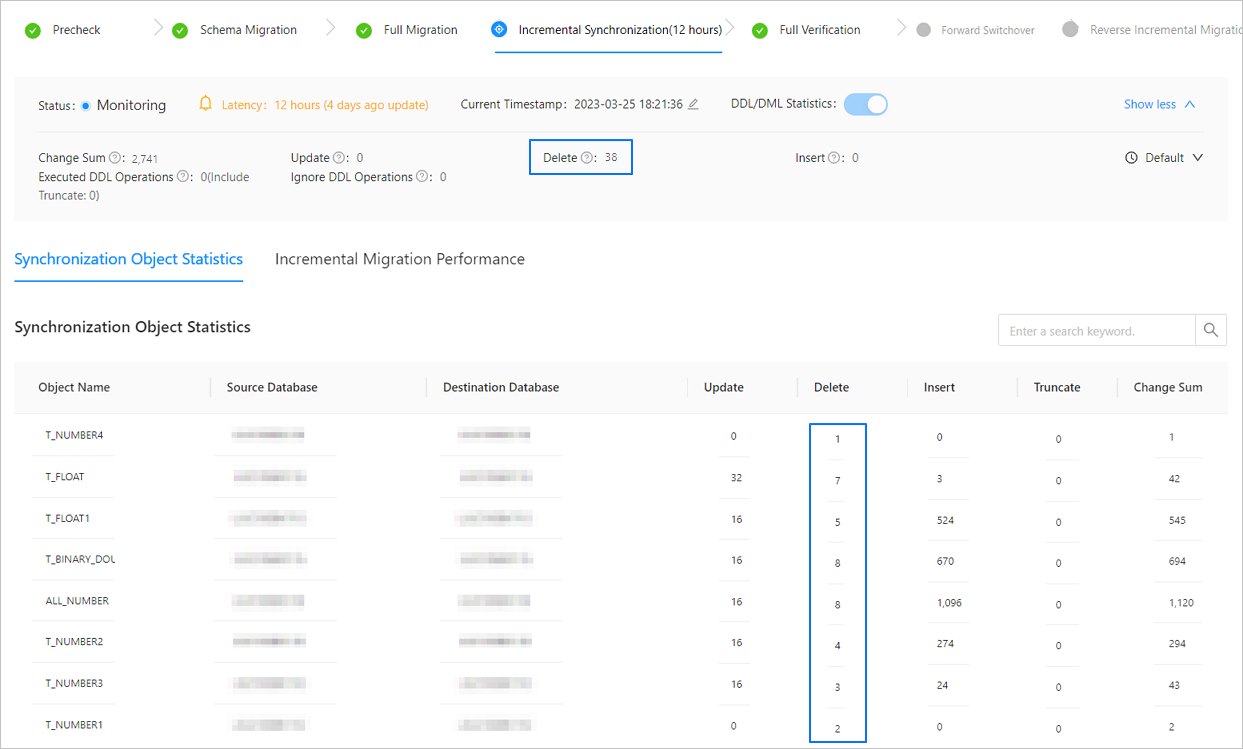
    For a Paused or Failed data migration project, you can enable the DDL/DML statistics feature to collect statistics on the database operations performed after this feature is enabled, You can also view the specific information about incremental synchronization objects and the incremental synchronization performance.

    • The Synchronization Object Statistics tab displays the statistics about table-level DML statements executed for each incremental synchronization object in the current project. The numbers displayed in the Change Sum, Delete, Insert, and Update fields in the section above the Synchronization Object Statistics tab are the sums of the corresponding columns on this tab.
      Incremental synchronization 1

    • The Incremental Synchronization Performance tab displays the following content:

      • Latency: the latency in synchronizing incremental data from the source database to the destination database, in seconds.

      • Migration traffic: the traffic throughput of incremental data synchronization from the source database to the destination database, in KB/s.

      • Average execution time: the average execution time of an SQL statement, in ms.

      • Average commit time: the average commit time of a transaction, in ms.

      • RPS: the number of records processed per second.

    When you create a data migration project, we recommend that you specify related information such as the alert level and alert frequency, to help you understand the project status. OMS provides low-level protection by default. You can modify the alert level based on your business requirements. For more information, see Alert settings.

    • When the incremental synchronization latency exceeds the specified alert threshold, the incremental synchronization status stays at Running and the system does not trigger any alerts.

    • When the incremental synchronization latency is less than or equal to the specified alert threshold, the incremental synchronization status changes from Running to Monitoring. After the incremental synchronization status changes to Monitoring, it will not change back to Running when the latency exceeds the specified alert threshold.

  • Full verification

    After the full data migration and incremental data migration are completed, OMS automatically initiates a full data verification task to verify the data tables in the source and destination databases.

    Notice

    • If you do not select Schema Migration for Migration Type, OMS verifies the fields in the source database that match those in the destination database during full verification, without checking whether the schemas are consistent.

    • During the full data verification, if you perform the create, drop, alter, or rename operation on the source tables, the full data verification may exit.

    OMS also provides APIs for you to initiate custom data verification tasks during incremental data synchronization.

    On the Full Verification page, you can view the overall status, start time, end time, total consumed time, estimated total number of rows, number of migrated rows, real-time traffic, and RPS of the full verification task.

    The Full Verification page contains the Verified Objects and Verification Performance tabs.

    • On the Verified Objects tab, you can view the verification progress and verification object list.

      • You can view the names, source and destination databases, full data verification progress and results, and result summary of all migration objects.

      • You can filter migration objects by source or destination database.

      • You can select View Completed Objects Only to view the basic information of objects that have completed schema migration, such as the object names.

      • You can choose Reverify > Restart Full Verification to run a full verification again for all migration objects.

      • For tables with inconsistent verification results:

        If you need to reverify all data in the tables, choose Reverify > Reverify Abnormal Table.

        If you need to reverify only inconsistent data, choose Reverify > Verify Only Inconsistent Records.

        Notice

        Correction operations are not supported if the source database has no corresponding data.

    • On the Full Verification Performance tab, you can view the graphs of performance data such as the RPS and verification traffic of the source and destination databases and performance benchmarks. Such information can help you identify performance issues in a timely manner.

    OMS allows you to skip full verification for a project that is being verified or has failed verification. On the Full Verification page, click Skip Full Verification in the upper-right corner. In the dialog box that appears, click OK.

    Notice

    If you skip full data verification, you cannot resume the verification task for data comparison and correction. You can only clone the current project to initiate full data verification again. Therefore, proceed with caution.

    After the full verification is completed, you can click Go To Next Stage to start a forward switchover. After you enter the switchover process, you cannot recheck the current verification task to compare or correct data.

  • Forward switchover

    Forward switchover is an abstract and standard process of traditional system cutover and does not involve the switchover of application connections. This process includes a series of tasks that are performed by OMS for application switchover in a data migration project. You need to make sure that the entire forward switchover process is completed before the application connections are switched over to the destination database.

    Forward switchover will be performed if you choose to perform data migration. During forward switchover, you need to terminate forward incremental synchronization, delete the additional columns and unique indexes that the migration depends on, add the CHECK constraint that was filtered out by OMS during the synchronization, and activate the triggers and foreign keys in the destination database to ensure the data integrity and availability of the destination database. Objects such as triggers and foreign keys are disabled before the migration to avoid data inconsistency.

    If reverse incremental migration is configured, the subtasks for starting reverse incremental migration and disabling triggers and foreign keys in the source database are included in the forward switchover process. This enables you to start real-time incremental synchronization from the destination database to the source database. This ensures that the business data flows back to the source database and allows application switchover at any time.

    1. Start forward switchover

      In this step, the project does not stop. You only need to confirm the switchover process that is about to start. To start the forward switchover task, click Start Forward Switchover.

      Notice

      Before you start a forward switchover task, make sure that the source data source is about to stop writing or has stopped writing.

    2. Perform switchover pre-check

      Check whether the current project status supports switchover. The pre-check involves the following steps:

      • Check the synchronization latency: If the synchronization latency is within 15 seconds after incremental synchronization is started, the project passes this check item. If incremental synchronization is not started, the project automatically passes this check item.

      • Check the user write privilege on the source side.

      • Check the incremental logs on the destination database.

      If the project passes the pre-check, the system automatically performs the next step. If the project fails the pre-check, the system shows the error details.

      In this case, you can retry or skip the pre-check.

      After you click Skip, you must also click Skip in the dialog box that appears.

    3. Start the destination Store

      Start incremental data pulling in the destination database. Create and start a destination Store. If the start fails, you can choose to click Retry or Skip.

    4. Confirm that writing has stopped in the source database

      In the Confirm Writing Stopped at Source section, click OK to make sure that no incremental data is generated in the source database.

    5. Confirm the writing stop timestamp upon synchronization completion

      OMS automatically checks whether the source and destination databases are synchronized to the same timestamp. After the check is completed, the latency and timestamp of the incremental synchronization are displayed. If the synchronization of incremental data failed, you can click Retry or Skip.

    6. Stop forward synchronization

      You can stop the Incr-Sync component that synchronizes data from the source database to the destination database. If the forward synchronization fails to be stopped, you can choose to click Retry or Skip.

    7. Process database objects

      In this step, the database objects are migrated, the additional columns and indexes added by OMS are deleted, and the constraints that are automatically ignored during the schema migration are added. You must also confirm that objects such as triggers and sequences have been manually migrated and that the triggers and foreign keys of the source are disabled.

      You need to click Run to process the database objects. For a running project, the View Logs and Skip options are provided in the Actions column. For manually handled projects, you must click Mark as Complete. After all projects have been marked as completed, proceed to the next step.

    8. Start reverse incremental migration

      In the Start Reverse Incremental Migration section, click Start Reverse Incremental Migration to start the Incr-Sync component that synchronizes data from the destination database to the source database. Wait until the "Reverse incremental migration started" message appears.

  • Reverse incremental migration

    For a Running data migration project, you can view its latency, current timestamp, and reverse incremental migration performance in the reverse incremental migration section. The latency is displayed in the following format: X seconds (updated Y seconds ago). Normally, Y is less than 20.

    For a Paused or Failed data migration project, you can enable the DDL/DML statistics feature to collect statistics on the database operations performed after this feature is enabled, You can also view the specific information about the objects and performance of reverse incremental data synchronization.

    • The Synchronization Object Statistics tab displays the statistics about table-level DML statements executed for each incremental synchronization object in the current project. The numbers displayed in the Change Sum, Delete, Insert, and Update fields in the section above the Synchronization Object Statistics tab are the sums of the corresponding columns on this tab.

    • The Reverse Incremental Migration Performance tab displays the following content:

      • Latency: the latency in synchronizing incremental data from the destination database to the source database, in seconds.

      • Migration traffic: the traffic throughput of incremental data synchronization from the destination database to the source database, in Kbit/s.

      • Average execution time: the average execution time of an SQL statement, in ms.

      • Average commit time: the average commit time of a transaction, in ms.

      • RPS: the number of records processed per second.

Previous topic

Migrate data from a PostgreSQL database to a MySQL tenant of OceanBase Database
Last

Next topic

Change the name of a data migration project
Next
What is on this page
Access the details page
View basic information
View migration details