







This topic describes how to upgrade an OceanBase cluster through OceanBase Cloud Platform (OCP). The method for upgrading an OceanBase cluster is closely related to its version. For more information, visit the official website of OceanBase Database, and see the Upgrade Guide for a specific version.
Prerequisites
The logged-on user has the permission to manage the cluster.
If the version of the cluster is V4.0 or later, you cannot upgrade the cluster.
Optional. To upgrade OceanBase Database earlier than V2.2.60, you must define an upgrade path in the
/home/admin/ocp-server/etc/oceanbase_upgrade_dep.ymlfile of OCP. The upgrade path must be similar to the following example. The parameter configuration method is described at the top of the file.### Omitted. - version: 2.2.70 can_be_upgraded_to: - 2.2.71 - version: 2.2.71 can_be_upgraded_to: - 2.2.72 - version: 2.2.72 can_be_upgraded_to: - 2.2.73 - version: 2.2.73 # The target version must completely appear in this format, including the two lines below: can_be_upgraded_to: -2.2.74Notice
The preceding example shows that OceanBase Database can be upgraded from V2.2.72, V2.2.71, V2.2.70, and earlier to V2.2.73, but not to V2.2.74.
All RPM packages required for the upgrade have been uploaded, such as oceanbase-x.x.x-YYYYMMDDhhmmss.el7.x86_64.rpm or oceanbase-x.x.x-YYYYMMDDhhmmss.el7.aarch64.rpm.
Procedure
Log on to the OCP console.
The Clusters page automatically appears.
The Cluster Overview page automatically appears.
In the Clusters list, find the target cluster and click its name.
The Overview page of that cluster automatically appears.
Click the More icon in the upper-right corner of the Overview page and choose Upgrade Version.
The Upgrade Version page appears.
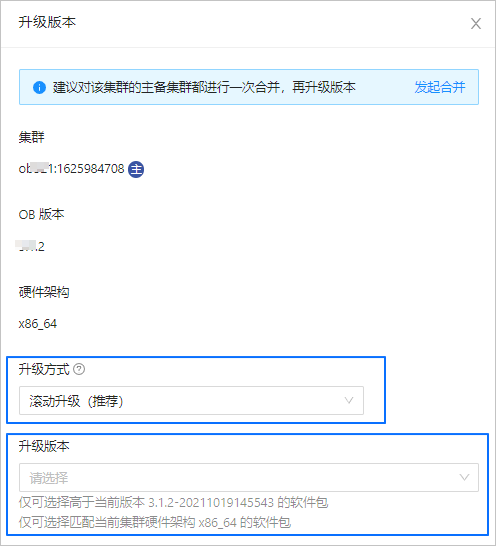
The Cluster field displays the OceanBase cluster to be upgraded.
If the cluster in Step 2 is associated with a primary or standby cluster, the associated primary or standby cluster is also upgraded.
Set the Upgrade Method parameter based on your business requirements. Valid values of this parameter:
Rolling Upgrade (recommended): Your business is not interrupted during the upgrade.
Downtime Upgrade: Your business is interrupted during the upgrade. Proceed with caution. If your cluster has less than three zones, the majority of zones cannot be formed in rolling upgrade. In this case, we recommend the downtime upgrade method.
Select the target OceanBase version from the drop-down list of the Upgrade Version field.
If the RPM package for the target version does not exist in the list, you can click Add Version at the bottom of the list to upload the target RPM package.
Click Upgrade.
If an error message prompts that the upgrade path from version xxx to version yyy is not found, you need to define the upgrade path in the
oceanbase_upgrade_dep.ymlfile as described in the preceding Prerequisites.If the configurations are correct, the Confirm xxx Upgrade Path dialog box automatically appears.
In the dialog box, verify whether the RPM packages exist for all the specified versions. If not, click Upload to upload the RPM packages as required.
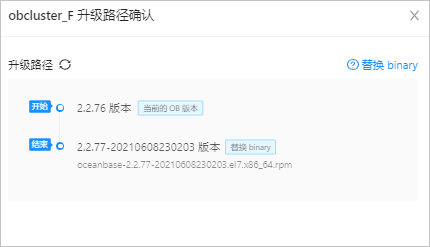
Click OK.
In the dialog box that appears, you can click View Task to view the upgrade progress.
If the task status is Completed, and this cluster in the Clusters list on the Clusters page is in the Running state, the cluster is successfully upgraded.
Notice
OCP does not allow you to roll back the upgrade of an OceanBase cluster. Do not manually skip any upgrade steps or roll back the upgrade.
View upgrade tasks.
The upgrade task is divided into multiple subtasks based on the upgrade nodes.
In the upgrade task, each upgrade node whose binary file needs to be replaced along the upgrade path is handled by a subtask. As shown in the following figure,
Submit cluster upgrade taskindicates that a subtask is created, andWait dag successindicates that the system is waiting for the subtask to complete.Submit cluster upgrade taskandWait dag successcome in pairs and may appear many times. The number of occurrences depends on that of upgrade nodes where the binary files are replaced.After all the subtasks are completed, the OceanBase cluster is upgraded to a later version. A subtask executes the following upgrade scripts: the precheck script, pre-upgrade script, observer replacement script, post-upgrade script, and version check script.