

OceanBase logo

OceanBase

A unified distributed database ready for your transactional, analytical, and AI workloads.

Product Overview
DEPLOY YOUR WAY

OceanBase Cloud

The best way to deploy and scale OceanBase

OceanBase Enterprise

Run and manage OceanBase on your infra

TRY OPEN SOURCE

OceanBase Community Edition

The free, open-source distributed database

OceanBase seekdb

Open source AI native search database

Customer Stories

Real-world success stories from enterprises across diverse industries.

View All
BY USE CASES

Mission-Critical Transactions

Global & Multicloud Application

Elastic Scaling for Peak Traffic

Real-time Analytics

Active Geo-redundancy

Database Consolidation

Resources

Comprehensive knowledge hub for OceanBase.

Blog

Live Demos

Training & Certification

Documentation

Official technical guides, tutorials, API references, and manuals for all OceanBase products.

View All
PRODUCTS

OceanBase Cloud

OceanBase Database

Tools

Connectors and Middleware

QUICK START

OceanBase Cloud

OceanBase Database

BEST PRACTICES

Practical guides for utilizing OceanBase more effectively and conveniently

Company

Learn more about OceanBase – our company, partnerships, and trust and security initiatives.

About OceanBase

Partner

Trust Center

Contact Us

International - English
中国站 - 简体中文
日本 - 日本語
Sign In
Start on Cloud

OceanBase

A unified distributed database ready for your transactional, analytical, and AI workloads.

Product Overview
DEPLOY YOUR WAY

OceanBase Cloud

The best way to deploy and scale OceanBase

OceanBase Enterprise

Run and manage OceanBase on your infra

TRY OPEN SOURCE

OceanBase Community Edition

The free, open-source distributed database

OceanBase seekdb

Open source AI native search database

Customer Stories

Real-world success stories from enterprises across diverse industries.

View All
BY USE CASES

Mission-Critical Transactions

Global & Multicloud Application

Elastic Scaling for Peak Traffic

Real-time Analytics

Active Geo-redundancy

Database Consolidation

Comprehensive knowledge hub for OceanBase.

Blog

Live Demos

Training & Certification

Documentation

Official technical guides, tutorials, API references, and manuals for all OceanBase products.

View All
PRODUCTS
OceanBase CloudOceanBase Database
ToolsConnectors and Middleware
QUICK START
OceanBase CloudOceanBase Database
BEST PRACTICES

Practical guides for utilizing OceanBase more effectively and conveniently

Learn more about OceanBase – our company, partnerships, and trust and security initiatives.

About OceanBase

Partner

Trust Center

Contact Us

Start on Cloud
编组
All Products
    • Databases
    • iconOceanBase Database
    • iconOceanBase Cloud
    • iconOceanBase Tugraph
    • iconInteractive Tutorials
    • iconOceanBase Best Practices
    • Tools
    • iconOceanBase Cloud Platform
    • iconOceanBase Migration Service
    • iconOceanBase Developer Center
    • iconOceanBase Migration Assessment
    • iconOceanBase Admin Tool
    • iconOceanBase Loader and Dumper
    • iconOceanBase Deployer
    • iconKubernetes operator for OceanBase
    • iconOceanBase Diagnostic Tool
    • iconOceanBase Binlog Service
    • Connectors and Middleware
    • iconOceanBase Database Proxy
    • iconEmbedded SQL in C for OceanBase
    • iconOceanBase Call Interface
    • iconOceanBase Connector/C
    • iconOceanBase Connector/J
    • iconOceanBase Connector/ODBC
    • iconOceanBase Connector/NET
icon

OceanBase Cloud Platform

V4.0.0Enterprise Edition

    Download PDF

    OceanBase logo

    The Unified Distributed Database for the AI Era.

    Follow Us
    Products
    OceanBase CloudOceanBase EnterpriseOceanBase Community EditionOceanBase seekdb
    Resources
    DocsBlogLive DemosTraining & CertificationTicket
    Company
    About OceanBaseTrust CenterLegalPartnerContact Us
    Follow Us

    © OceanBase 2026. All rights reserved

    Cloud Service AgreementPrivacy PolicySecurity
    Contact Us
    Document Feedback
    1. Documentation Center
    2. OceanBase Cloud Platform
    3. V4.0.0
    iconOceanBase Cloud Platform
    V 4.0.0Enterprise Edition
    Databases
    • OceanBase Database
    • OceanBase Cloud
    • OceanBase Tugraph
    • Interactive Tutorials
    • OceanBase Best Practices
    Tools
    • OceanBase Cloud Platform
    • OceanBase Migration Service
    • OceanBase Developer Center
    • OceanBase Migration Assessment
    • OceanBase Admin Tool
    • OceanBase Loader and Dumper
    • OceanBase Deployer
    • Kubernetes operator for OceanBase
    • OceanBase Diagnostic Tool
    • OceanBase Binlog Service
    Connectors and Middleware
    • OceanBase Database Proxy
    • Embedded SQL in C for OceanBase
    • OceanBase Call Interface
    • OceanBase Connector/C
    • OceanBase Connector/J
    • OceanBase Connector/ODBC
    • OceanBase Connector/NET
    • V 4.3.6
    • V 4.3.5
    • V 4.3.4
    • V 4.3.3
    • V 4.3.2
    • V 4.3.1
    • V 4.3.0
    • V 4.2.2
    • V 4.0.0 and earlier
    Community Edition
    • V 4.0.0
    • V 3.1.1
    Enterprise Edition
    • V 4.0.0
    • V 3.3.1

    Back up and recover a tenant

    Last Updated:2023-08-15 02:30:55  Updated
    Share
    What is on this page
    Initiate a backup
    Backup and recovery

    folded

    Share

    On the tenant backup and recovery page, you can back up a tenant and its cluster, and view the basic information and details about the backup and recovery for the current tenant, as well as the tenant's backup strategy.

    Initiate a backup

    Before you recover a tenant, you need to back up the tenant or its cluster.

    1. In the left-side navigation pane, click Tenants to go to the Tenant Overview page.

    2. Find the target tenant in the Tenants list, and click its name. In the left-side navigation pane of the Tenant Overview page, click Backup and Recovery.

    3. Back up the tenant or its cluster. You can also create a backup strategy for the cluster.
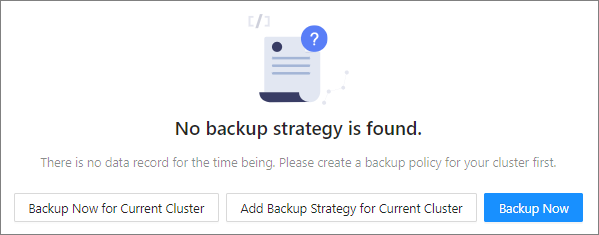
      Image 148

      • Click Backup Now. For information about the parameters in the Storage Configuration and Data Backup Method sections, see Back up now.

    Note

    Tenant backup is not supported in an OceanBase Database version earlier than V3.2.2-20220304134610.
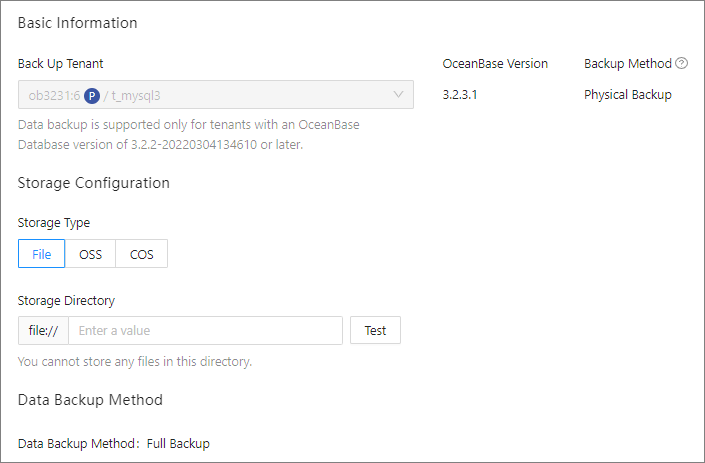
      ![Image 59](https://obbusiness-private.oss-cn-shanghai.aliyuncs.com/doc/img/ocp/%E5%A4%87%E4%BB%BD%E5%9F%BA%E7%A1%80%E4%BF%A1%E6%81%AF.png)
    
    • Click Backup Now for Current Cluster to back up the cluster of the tenant. For information about the parameters in the Storage Configuration and Data Backup Method sections, see Back up now.

      Image 60

    • You can also create a backup strategy for the cluster.

      Click Add Backup Strategy for Current Cluster to create a backup strategy. For details of the configuration method, see Create a backup strategy.

    Backup and recovery

    You can recover a tenant that has been backed up.

    • In the left-side navigation pane, click Tenants to go to the Tenant Overview page.

    • Find the target tenant in the Tenants list, and click its name. In the left-side navigation pane of the page that appears, click Backup and Recovery.

    • On the Backup and Recovery page, you can perform the following operations:

      • Click Initiate Recovery to initiate a recovery if a backup strategy is already created for the cluster. For more information, see Initiate a recovery.

      • Click Backup Now to back up the tenant. For more information, see Back up now.

      Image 61

    Parameter
    Description
    Status The backup status. Valid values: Pending Backup Scheduling, In Progress, and No Backup Strategy.
    Backup Method The backup method, which is displayed if a backup strategy is already created for the cluster. Valid values: Physical Backup and Logical Backup.
    Backup File The size of the backup file, which is displayed if a backup strategy is already created for the cluster.
    Last Data Backup The time of the last backup.
    Log Backup Timestamp The latest time of log backup.
    Log Latency The latency between the backup data and the actual data, which is displayed if a backup strategy has been created for the cluster.
    • View the backup details about the tenant.

      • View the period during which data can be recovered.

        If a backup strategy has been created for the cluster, you can view the recovery period and data backup points in time within the latest week. In the system, 7 days form a statistical period. Click < or > to switch to another statistical period.

        Image 62

      • View data backup tasks.

        Click the Data Backup Tasks tab. You can filter the data backup tasks by time and view the following information about the tasks: ID, Data Backup Method, Backup Set ID, Start Time, End Time, Status, Second Backup, and Actions.

        Image 63

      • View recovery tasks.

        Click the Recovery Tasks tab. You can filter the recovery tasks by time and view the following information about the tasks: ID, Backup Cluster, Backup Tenant, Target Cluster, Target Tenant, Start Time, End Time, Status, Backup Method, Recovery Time, and Storage Directory. You can also handle failed recovery tasks.

        Image 64

    • If a backup strategy has been created for the cluster, you can click the Backup Strategy tab and view the details about the backup strategy.
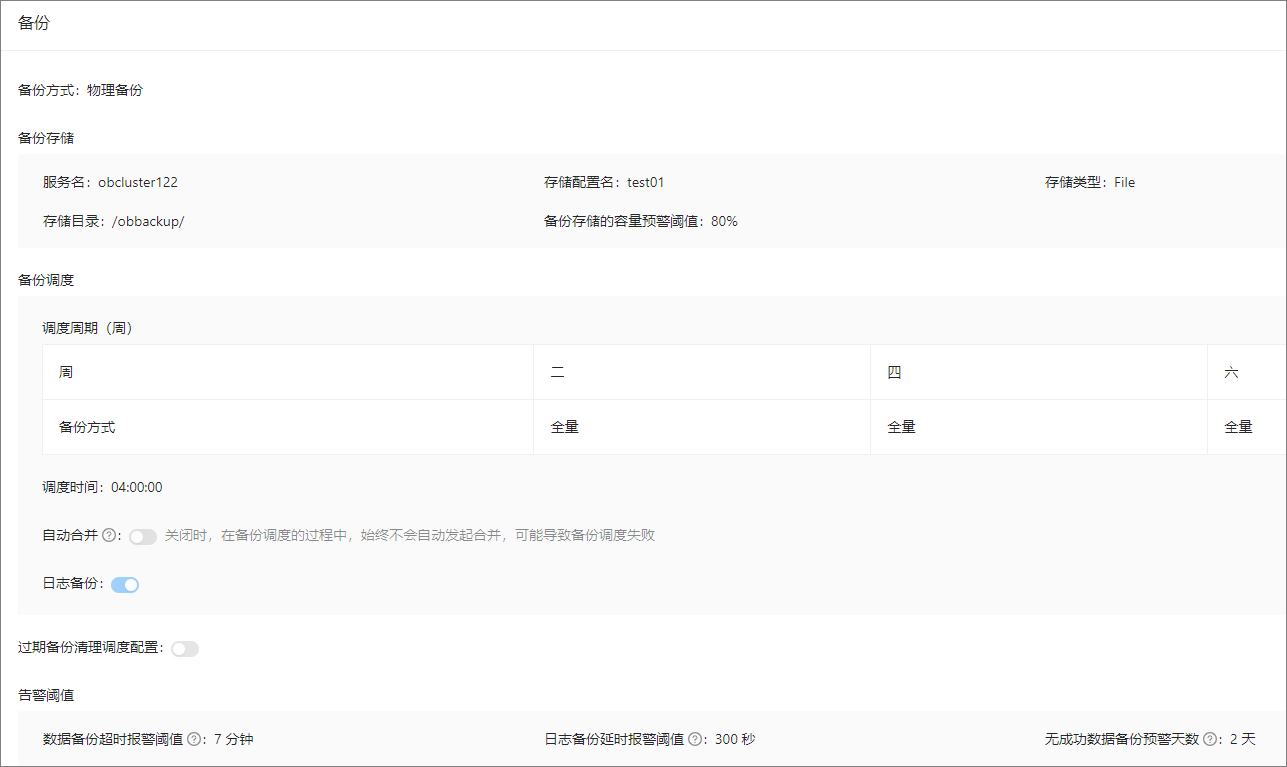
      Image 65

    Previous topic

    Perform a major compaction
    Last

    Next topic

    View tenant sessions
    Next
    What is on this page
    Initiate a backup
    Backup and recovery