







This topic describes parameters in multi-zone mode and how to modify them.
Prerequisites
You have enabled the multi-zone mode.
Modify parameters
Log on to the OceanBase Cloud Platform (OCP) console.
In the left-side navigation pane, choose System Management > OCP Multi-Zone Mode .
Click the Parameters tab.
Find the target parameter in the Parameters list and click Modify in the Actions column.
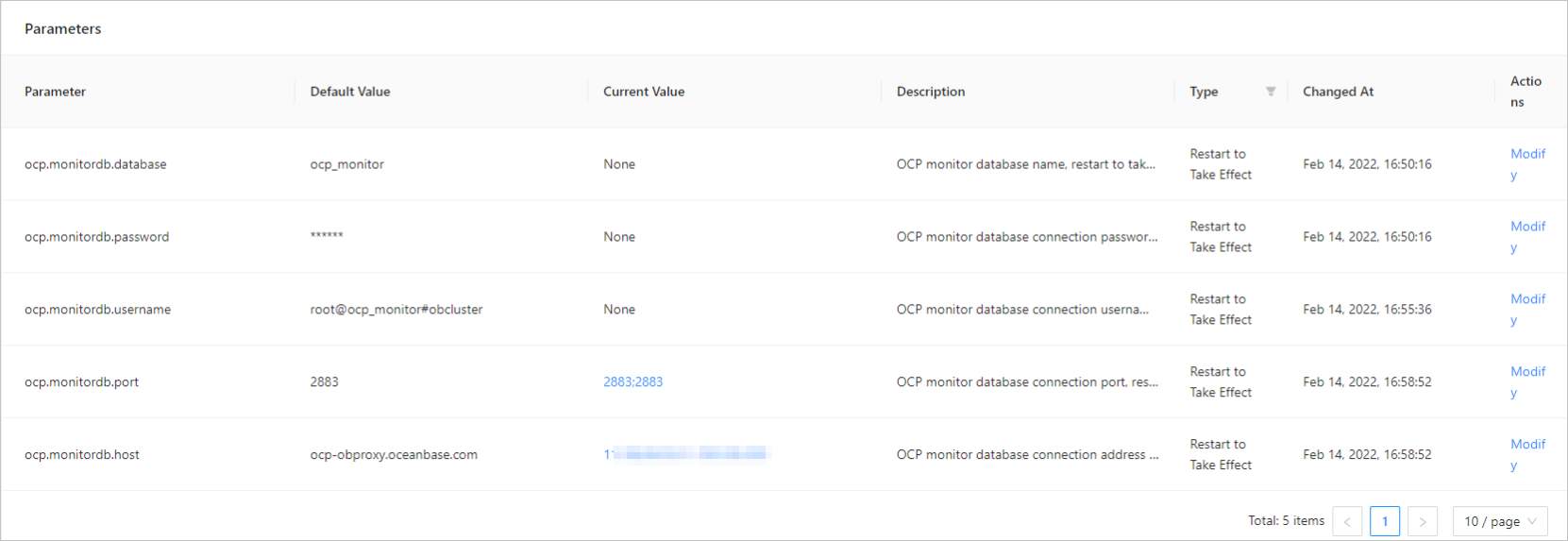
The parameter modification dialog box appears on the right side of the page.
Specify the value of this parameter in the dialog box.
Click OK .
Parameters
The following table describes the OCP parameters in multi-zone mode.
Parameter |
Description |
|---|---|
| ocp.config-url.site.url | The URL for external users to access the OCP config url service. The default value is empty, indicating that the URL specified for the ocp.site.url parameter is used. If the config url service is deployed separately, you must set a value different from that of ocp.site.url. |
| ocp.site.url | The URL for accessing the OCP site. The URL must start with HTTP or HTTPS, contain the virtual IP (VIP) address, domain name, and port number, and not end with a forward slash (/). Example: http://localhost:8080 |
| ocp.monitordb.database | The database name of the MonitorDB of OCP. The value takes effect after the system restarts. |
| ocp.monitordb.password | The connection password of the MonitorDB of OCP. The value takes effect after the system restarts. |
| ocp.monitordb.username | The username that is used to access the MonitorDB of OCP. The value takes effect after the system restarts. |
| ocp.monitordb.port | The port to access the MonitorDB of OCP. The value takes effect after the system restarts. |
| ocp.monitordb.host | The URL of OBServer or OBProxy that connects to the MonitorDB of OCP. The value takes effect after the system restarts. |