







This topic describes how to stop an OBServer process.
Prerequisites
You have the permission to Update a cluster with the current account.
Your OceanBase cluster is managed in the current OCP cluster.
Otherwise, you need to use the current OCP cluster to take over your OceanBase cluster. For more information, see Take over a cluster.
Procedure
Log on to the OCP console.
The Clusters page automatically appears.
On the Clusters page, find the target cluster that includes the OBServer you want to stop in the Clusters list and click its name. The Overview page of the cluster appears.
In the OBServers list, click the More icon. In the drop-down list that appears, choose Stop Process.
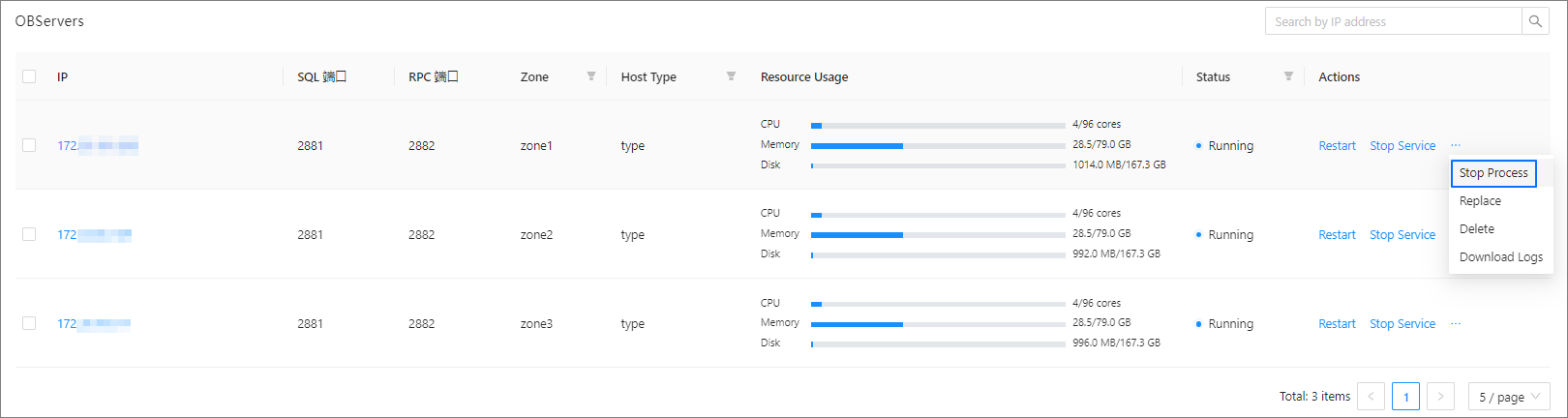
In the dialog box that appears, click Stop to stop the OBServer process.
In the dialog box, you can click View Task to view the progress.
You can also choose System Management > Tasks to view the progress of the task.
When the task status is Completed and the status of the OBServer is Stopped in the OBServers list on the Overview page, the OBServer is stopped.
Note
If you stop an OBServer process, the OBServer becomes unavailable and cannot provide services. Proceed with caution.