







You can configure an external account service of the OAuth2/OIDC type to log in to the OCP console.
Background information
Single sign-on (SSO) is an authentication method that allows you to securely authenticate to OCP.
Concepts
OAuth (Open Authorization) is an open standard for authorization. It allows users to grant third-party applications access to their protected information stored on a resource server without sharing their username and password with the third-party application. OAuth decouples authentication from authorization. As an international standard, OAuth is widely adopted and continuously used. OAuth 2.0 is an updated version of the OAuth protocol, which is more secure and easier to implement but not compatible with OAuth 1.0. OAuth 2.0 completely replaces OAuth 1.0. OAuth defines a secure, open, and simple standard for authorizing user resources. Third-party applications can obtain user authorization without knowing the user's account and password.
- OAuth 2.0 is a delegated authorization framework for REST/APIs.
- OAuth 2.0 is a token-based authorization method that allows applications to access user data without exposing the user's password.
- OAuth 2.0 decouples authentication from authorization.
OpenID Connect (OIDC) is a secure authentication mechanism. Third-party applications connect to an identity provider (IdP) to obtain user information and return it to the third-party applications in a reliable manner. OIDC extends the OAuth 2.0 protocol by adding an ID Token field that provides basic user identity information. The ID Token is encapsulated in a JSON Web Token (JWT) format, providing self-containment and tamper-proofing. This allows the ID Token to be securely transmitted to third-party applications and easily verified.
Principles
OAuth 2.0
OCP is compatible with standard OAuth 2.0 authentication centers and currently supports only the authorization code (authorization-code) mode. In this mode, applications use authorization codes to request access tokens or refresh tokens from the authorization server.
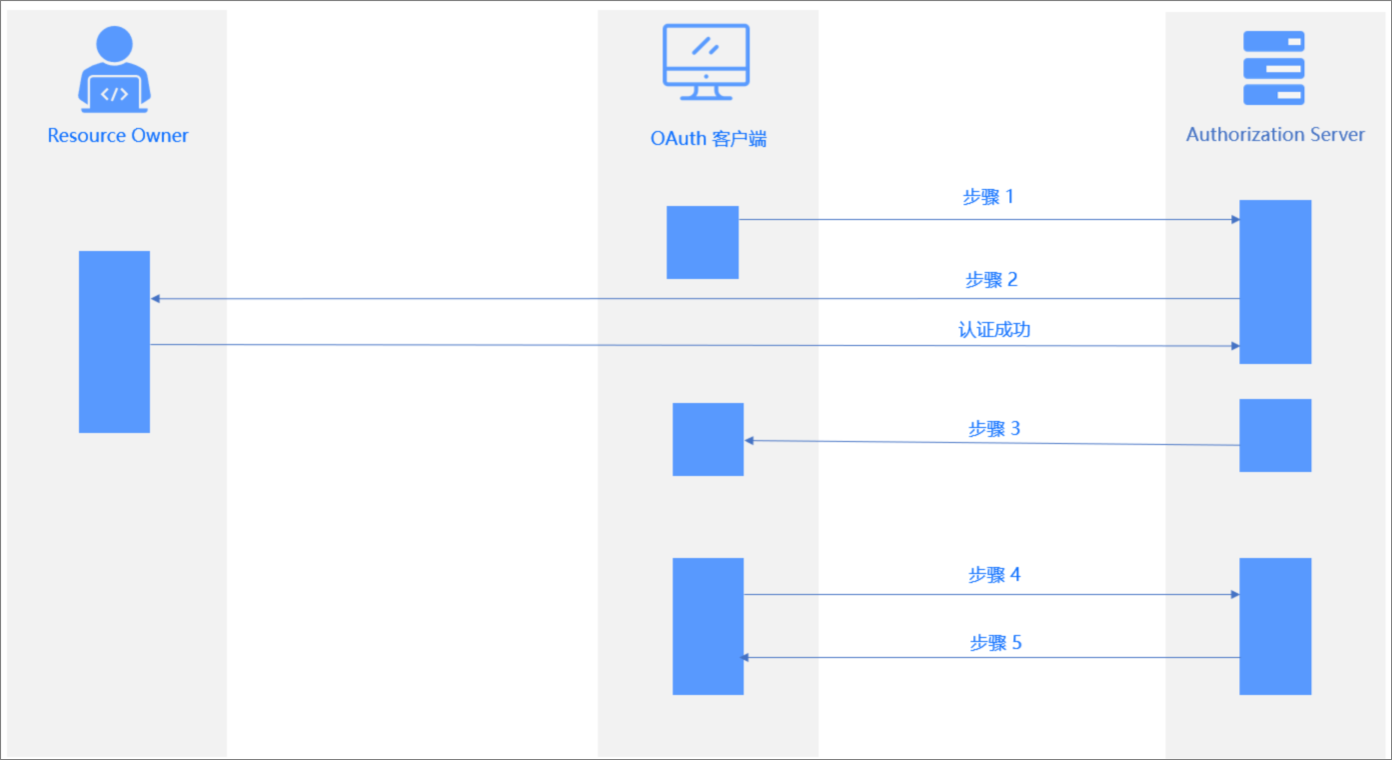
The authorization process can be described as follows:
- The user logs in to the application system and requests a redirect to the authentication server, which returns a 302 response to the login authentication page.
- The user inputs their authentication information, which is verified by the authentication server. If the verification is successful, the server returns a code to the application system.
- The application system uses the code to request an access token from the authentication server. The server verifies the client ID and code, and then sends the access token to the application system.
- The application system uses the access token to query the user's login information. The authentication server returns the user's information, such as the username.
- The application system verifies the username and creates a session, then redirects to the specified redirect URL.
The parameters in the above diagram are described as follows:
Steps |
Parameter Description |
|---|---|
| Step 1 | Authorization Requestcode.NoteThe URL where the authorization server redirects to the OCP service. If the SSO has a callback whitelist, it needs to be added to the whitelist. |
| Step 2 | Verify the parameters passed in Step 1. Display the login page for the user to authenticate. The user authorizes the client to access the resources. |
| Step 3 | Authorization Response Redirect to the redirect_url specified in Step 1 and return the following parameters: |
| Step 4 | Access Token Requestauthorization_code. |
| Step 5 | Access Token Response |
OIDC
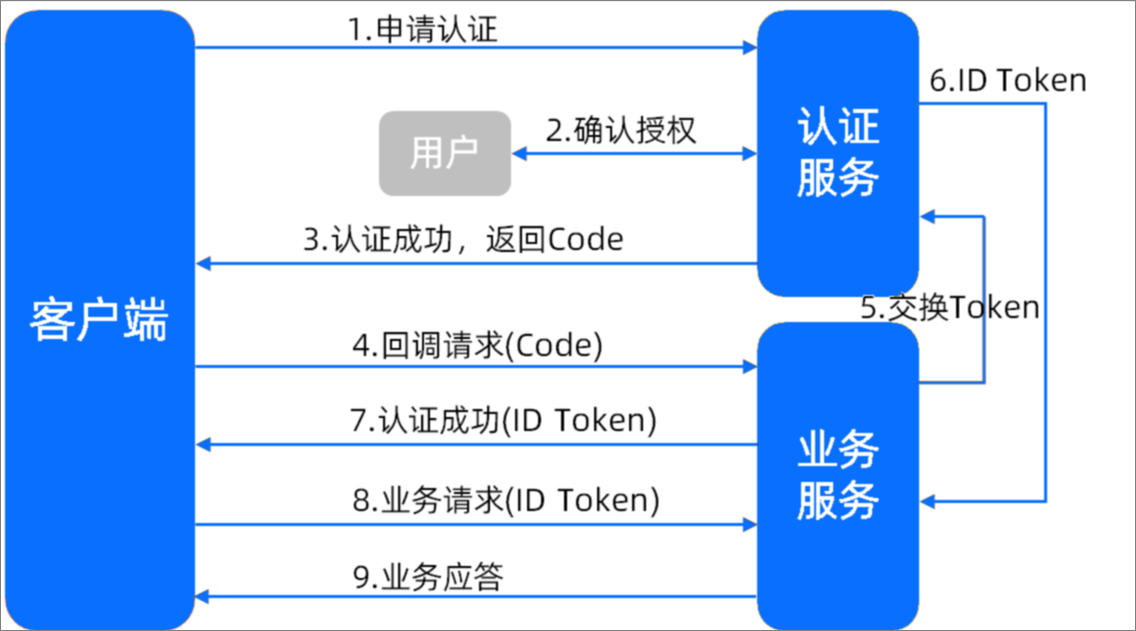
- The client sends an authentication request to the authentication service.
- The user authorizes the client on the authentication page.
- The authentication service verifies the authentication request and returns a code to the client.
- The client requests a callback interface from the business service, including the code.
- The business service requests the authentication service to issue a token, including the code, client ID, and client secret.
- The authentication service verifies the request and returns an ID Token.
- The authentication is successful. The business service returns the ID Token to the client.
- The client requests the business service, including the ID Token.
- The business service verifies the ID Token and returns the business response.
Login scenarios
- If SSO mode is enabled and local login mode is also enabled, users can log in using their local account credentials or third-party account credentials.
- If SSO mode is enabled and local login mode is disabled, users can log in using third-party account credentials. On the first login, they will be redirected to the third-party authorization login page. After authorization, subsequent logins will be direct.
- If SSO mode is disabled, only local account credentials can be used for login.
View the SSO list
If you are logged in to OCP as a user with the ADMIN or ADMIN_VIEWER role, you can view the detailed configuration information of the SSO integrations in the SSO List. This includes the configuration name, type, creation time, last modified time, creator, and whether local login mode is enabled. You can also perform common O&M operations, such as Create an SSO integration, Enable or disable an SSO integration, Edit an SSO integration, and Delete an SSO integration.