







OCP V4.3.4 is officially released, primarily optimizing the role-based access control model to enhance the overall security of the system.
Version information
Current version: V4.3.4
Previous version: V4.3.3 BP1
Release date: January 14, 2025
Supported upgrade paths:
You can directly upgrade OCP V3.2.4 and later to the current version.
To upgrade OCP V2.3.x and later but earlier than V3.2.4 to the current version, you need to upgrade OCP to V3.3.4 first.
If you use OCP of a version earlier than V2.3.0, you must upgrade OCP first to V2.3.x and then to V3.3.4.
Supported OceanBase Database versions
OCP V4.3.4 supports the following versions of OceanBase Database:
- OceanBase Database V4.x
- OceanBase Database V3.2.x
- OceanBase Database V3.1.x
- OceanBase Database V2.2.x
- OceanBase Database V2.1.x
- OceanBase Database V1.4.x
New Features
Optimized Role-Based Access Control Model
Establishes a three-tier user management system that involves system administrators, organization administrators, and users, as well as a two-dimension permission control system for resources and menus. OCP also supports a flexible mechanism for resource sharing between different organizations. This enables tenant selling in private cloud environments, resource isolation between different organizations/departments, and permission isolation between different users in the same organization. This aids users in more effectively managing system permissions and enhances the overall security of the system.
Multiple Instances Managed by a Single Host
Allows the management of multiple Docker instances on a single host (Host mode), which taps the hardware potential of high-spec servers and maximizes the utilization of hardware resources. (New system parameter:
ocp.agent.use.specific.http.ipcontrols whether OCP Agent uses the IP address allocated to Docker, with the default value of false)Improved Binlog Service System
Provides comprehensive support for Binlog service upgrade operations, ensures full coverage of Binlog basic management capabilities, and guarantees the high efficiency and stability of the service. (Note: Original setting parameters cannot be retained during Binlog upgrades, please reconfigure after the upgrade is complete.)
Product Optimizations
- Tenant Management: The system supports automatic recognition of users' execution of SWITCHOVER/FAILOVER commands on the CLI in the primary-secondary tenant scenario.
- Resolved OOM Issue: Resolves OOM issues that occurred on OCP pages in Chrome browser versions 89/90 and lower.
- Addressed Cgroup Failure Issue: Addresses the Cgroup failure issue for OceanBase 4.X after reinstalling/deleting software in higher versions of Linux (e.g., Kylin v10-sp3).
Key Feature Interpretation
Optimized Role-Based Access Control Model
OCP establishes a three-tier user management system that involves system administrators, organization administrators, and users, as well as a two-dimension permission control system for resources and menus. System administrators have full permissions for all resources and menus across the entire system. Organization administrators have full control over the resource and menu permissions within their organization. Users can only perform limited operations according to the permissions assigned to their roles. Currently, the system focuses on two dimensions of permission control: resources (including five key types: OceanBase clusters, tenants, OBProxy clusters, hosts, and Binlog services) and menus (with the lowest level set as secondary menus, for example, Clusters or Clusters → Overview). System or organization administrators can create roles with specific combinations of resource and menu permissions, accurately assigning them to users, thereby granting users the legitimate right to access the corresponding resources and menus. If a role only has partial resource permissions or menu permissions, users with that role will be unable to properly use the system's features. For instance, if a role is granted specific resource permissions for a cluster but lacks menu permissions for that cluster, then users with that role will not see the cluster page on the user interface. Similarly, if a user only has menu permissions for a cluster without actual cluster permissions, they will also be unable to operate the cluster. Additionally, the system supports a flexible mechanism for resource sharing between different organizations, where organization administrators of shared resources can grant these shared resources to relevant roles and users within their organization. With the in-depth optimization of the permission model, OCP strongly supports a series of key business scenarios, including:
- Tenant Sales: Ensures compliance and security of the sales process through refined permission settings.
- Multi-Organization Permission Isolation: Ensures independence and autonomy in resource usage and management for each organization, effectively avoiding cross-interference in permissions.
- DBA, Development, and Audit Permission Control Isolation: Clearly defines the permission boundaries for different role groups, providing rigorous and efficient permission management guarantees for database operation and maintenance, development, and auditing work.
Model Diagram
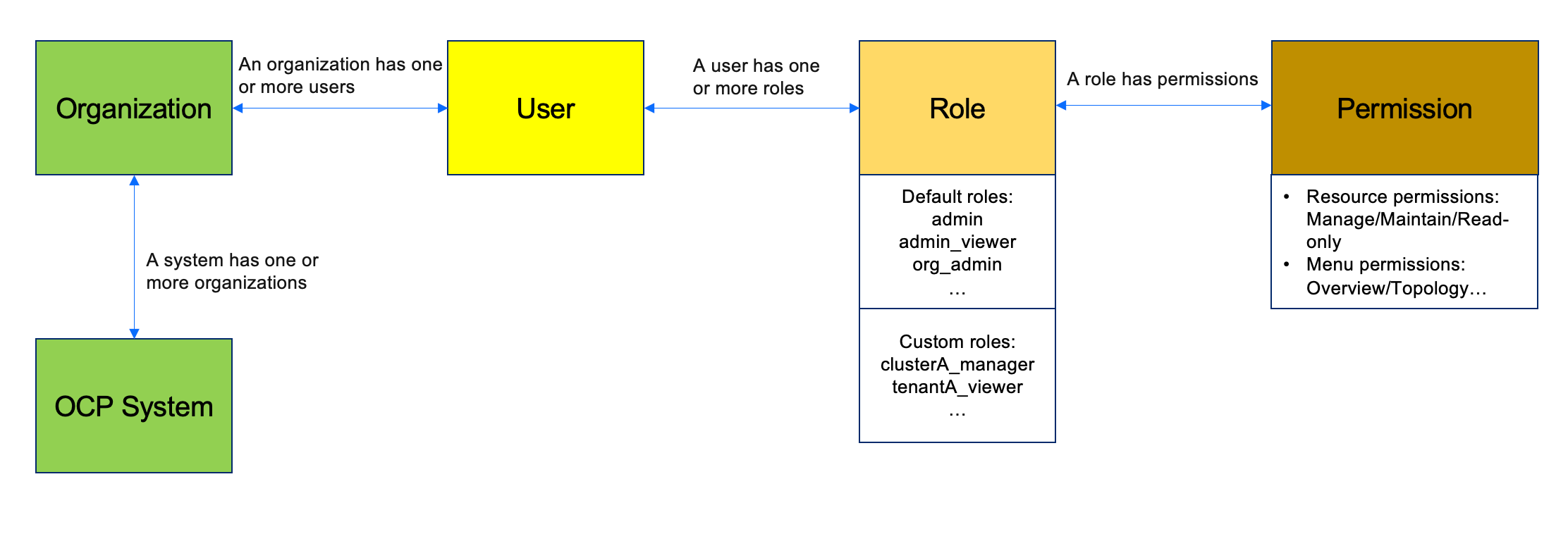
Usage Instructions
- OceanBase clusters, tenants, and corresponding hosts have a hierarchical permission relationship.
- Users with permission for a given tenant have read-only permissions on the associated cluster by default.
Function Limitations
- Do not grant functions such as Task Center, Alert Center, Parameter Template, Tag, etc., to organization administrators or regular users.
- Unique names must be maintained within the system for usernames, role names, cluster names, tag names, monitoring dashboard names, alert template names, plan names, etc.
Bug fixes
The following issues are fixed in OCP V4.3.4:
- Fixed the issue of incomplete OAS transaction data collection when there are many concurrent transactions.
- Fixed the issue that standby tenants in Oracle mode cannot select parameter templates.
- Optimized the host standardization process, supporting more automatic repair scenarios.
Known issues
No. |
Known issue |
Solution |
|---|---|---|
| 1 | Updated role permissions will not take effect immediately; you need to log out and log in again. | No solution is available now. |
| 2 | Third-party login methods such as SSO and BUC do not support modifying the user's organization information after automatic authorization. | No solution is available now. |
Limitations
Hardware requirements
OCP-Server can be installed on a physical server or in a Docker container. OCP-Server supports the multi-node HA deployment mode.
The following table lists the minimum hardware requirements of an OCP-Server node.
Hardware |
Requirement |
|---|---|
| CPU | |
| Memory | 16 GiB available memory |
| Network interface card (NIC) | 10 Gbit/s NIC |
OCP-Agent takes up a few resources and has no special requirements for hardware.
Operating system requirements
The following table lists the operating system requirements for installing OCP-Server (including OCP-Agent).
Server architecture |
Operating system |
Supported version |
|---|---|---|
| x86_64 | Red Hat Enterprise Linux (RHEL) | 7.2 and later |
| x86_64 | CentOS | 7.2 and later |
| x86_64 | AliOS | 7.2 and later |
| x86_64 | openSUSE | 12SP3 and later |
| ARM64 | AliOS | 7.2 and later |
| ARM64 | NeoKylin | 7.6 |
| ARM64 | Huawei EulerOS | 2.0 SP8 |
| x86_64 | Debian | Debian GNU/Linux 11 (bullseye) |
| x86_64 | Ubuntu | Ubuntu 18.04.6 LTS |
Client requirements
Generally, users use browsers to access OCP. The following client requirements apply.
Browser |
Earliest supported version |
|---|---|
| Chrome | 88 |
| Firefox | 78 |
| Edge | 88 |
If you need to access OCP from an iOS device, the iOS version must meet the requirement listed in the following table.
Operating system |
Earliest supported version |
|---|---|
| iOS | 10 |
We recommend that you use displays with a resolution greater than 1440 × 810 to ensure optimal use experience.