This topic describes how to import a credential of an OceanBase cluster. When you take over a cluster, such as an OceanBase cluster, from one OceanBase Cloud Platform (OCP) cluster to another, you can import the credentials of the cluster and tenants from the original OCP cluster to the new one.
Prerequisites
Make sure that you have the following permissions:
- Resource Permissions: Cluster Maintenance, Tenant Maintenance, OBProxy Maintenance, Binlog Service Maintenance, or Host Maintenance permission
- Menu Permissions: Permission on the Credential Management menu of System Management
Procedure
Log on to the OCP console.
In the left-side navigation pane, choose System Management > Credential Management to go to the Credentials page.
Click Import Credential in the upper-right corner.
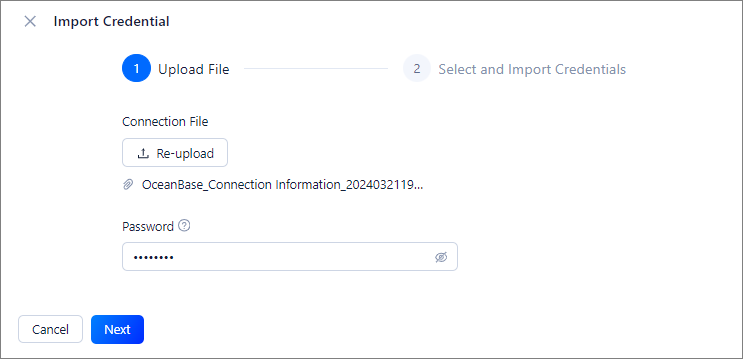
In the Import Credential dialog box, click Upload to upload the exported credential file and enter the encryption password specified when you export the credential. For information about how to export a credential, see Export a credential.
Click Next.
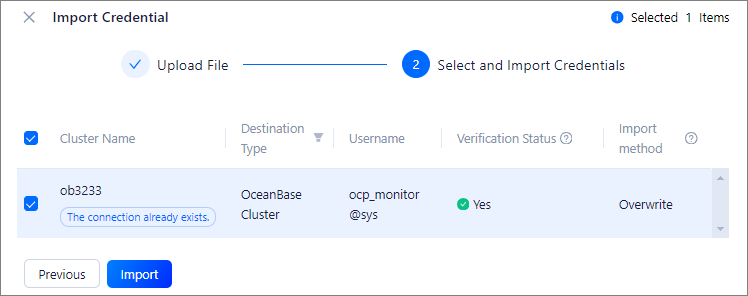
Precheck the credential.
The precheck result shows whether the credential exists and whether the connection test by using the credential succeeds.
Select the credential and click Import.