







This topic describes the primary/standby switchover procedure. You can choose one of the following switchover methods based on the business needs:
- Method 1: Perform a switchover for a specified primary tenant.
- Method 2: Perform a switchover for all primary tenants in a cluster.
Method 1: Perform a switchover for a specified primary tenant
You can switch a specified primary tenant to a standby tenant.
Prerequisites
The current primary tenant has at least one standby tenant in the Running state.
Procedure
Log on to the OceanBase Cloud Platform (OCP) console. In the left-side navigation pane, click Tenants. In the tenant list, select the target primary tenant to go to its basic information page.
Click the More icon in the upper-right corner and select Switchover from the menu.

In the dialog box that appears, confirm the information and click Start Switch.
If the primary tenant has multiple standby tenants, you must select a standby tenant for the switchover from the New Primary Tenant drop-down list. If the OCP multi-cluster mode is enabled, remote standby tenants managed by other OCP clusters are also displayed in the drop-down list.
If the synchronization mode of the selected standby tenant is Archiving-based and archiving is not enabled for the standby tenant, you must first configure an archiving address. The following table describes the parameters for configuring an archiving address.
ParameterDescriptionStorage Type The type of storage service for backup files. Valid values: - File: Your local file storage system. Generally, Network File System (NFS) is used.
- OSS: Alibaba Cloud Object Storage Service (OSS), which is supported only in OceanBase Database V2.2.76 and later.
Storage Directory The directory in which the backup files are stored on the storage service. Note
The primary and standby tenants must have the read/write privileges on this directory.
Domain If you select OSS for Storage Type, enter the access domain name of the OSS bucket. You can append a port number to the domain name, for example, oss.ap-shanghai.myqcloud.com:8080.User If you select OSS for Storage Type, enter the user that has access to the files stored in Alibaba Cloud OSS. AccessKey Pair If you select OSS for Storage Type, enter the AccessKey that has access to the files stored in Alibaba Cloud OSS.
Click the task ID in the dialog box to view the task progress.
Method 2: Perform a switchover for all primary tenants in a cluster
If you require standby tenants to provide services to ensure service continuity during the O&M of a cluster, you can switch all primary tenants in this cluster to standby tenants before the O&M.
Prerequisites
You have created primary tenants in the current cluster, and the primary tenants have available standby tenants.
Procedure
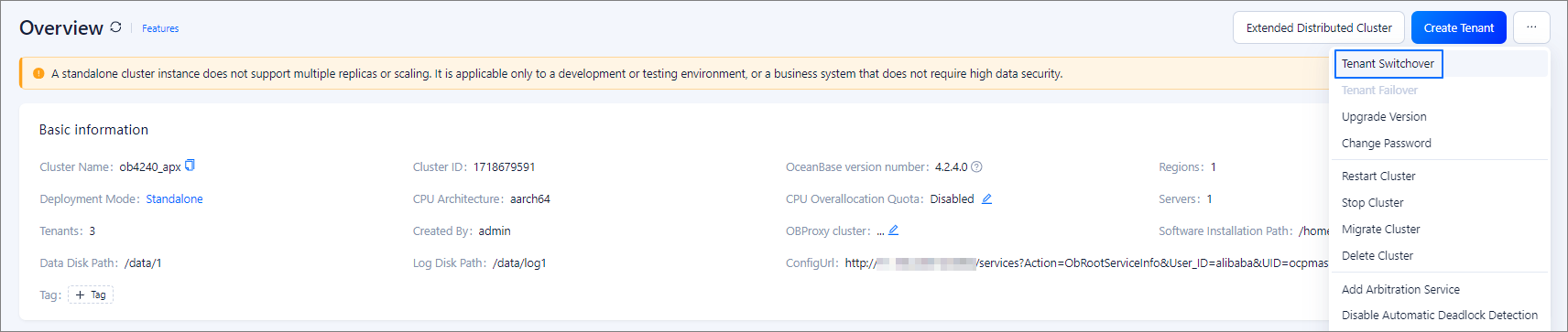
Log on to the OCP console. In the left-side navigation pane, click Clusters. On the Clusters page, go to the Overview page of the target cluster.
Click the More icon in the upper-right corner and select Tenant Switchover from the menu.
In the dialog box that appears, select the tenants for which you want to perform a switchover and click Daily Switch.
If a primary tenant has multiple standby tenants, you must select one of the standby tenants as the new primary tenant from the New Primary Tenant drop-down list. If the OCP multi-cluster mode is enabled, remote standby tenants managed by other OCP clusters are also displayed in the drop-down list.
Before you perform a switchover, the system will check the primary and standby tenants against the following conditions. If the check fails, you cannot perform a switchover for the selected tenants.
- The primary and standby tenants are in the Running state.
- The clusters of the primary and standby tenants are in the Running state and are of the same version.
- The synchronization latency of the standby tenant does not exceed the threshold, which is 5,000 ms by default. You can choose System Management > System Parameters and change the value of
ocp.standby.tenant.delay.thresholdto adjust the threshold.
If the synchronization mode of the selected standby tenant is Archiving-based and archiving is not enabled for the standby tenant, you must first configure an archiving address. The following table describes the parameters for configuring an archiving address.
ParameterDescriptionStorage Type The type of storage service for backup files. Valid values: - File: Your local file storage system. Generally, NFS is used.
- OSS: Alibaba Cloud OSS, which is supported only in OceanBase Database V2.2.76 and later.
Storage Directory The directory in which the backup files are stored on the storage service. Note
The primary and standby tenants must have the read/write privileges on this directory.
Domain If you select OSS for Storage Type, enter the access domain name of the OSS bucket. You can append a port number to the domain name, for example, oss.ap-shanghai.myqcloud.com:8080.User If you select OSS for Storage Type, enter the user that has access to the files stored in Alibaba Cloud OSS. AccessKey Pair If you select OSS for Storage Type, enter the AccessKey that has access to the files stored in Alibaba Cloud OSS. 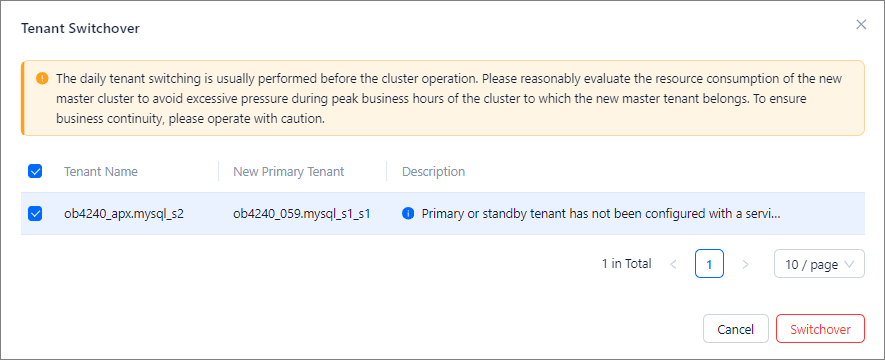
Note
This operation may cause the cluster where the new primary tenant resides to be overloaded. Proceed with caution.
Click the task ID in the dialog box to view the task progress.