







This topic describes how to take over OBProxies. The OBProxy cluster that the taken-over OBProxies join is called the destination OBProxy cluster.
Scenarios
You can migrate an OBProxy cluster from one OCP to another by moving the OBProxy cluster out from one OCP and then taking over OBProxies in the cluster to another OCP.
Considerations
An OBProxy cluster is moved out from the original OCP as a whole but taken over to the new OCP at the granularity of OBProxies. Therefore, you must prepare a destination OBProxy cluster in the new OCP to hold the taken-over OBProxies.
Prerequisites
OBProxies to be taken over must meet the following conditions:
- The OBProxy version is V1.8.0 or later.
- Only one obproxy process exists on an OBProxy host.
- If you use a non-default root@proxysys password, get the password ready for use.
- The OBProxy host has been added to OCP for management.
- The OBProxy has accessible OceanBase clusters and was once used to access the clusters.
The destination OBProxy cluster must meet the following conditions:
- The work mode of the destination OBProxy cluster is consistent with that of the OBProxies to be taken over. The work mode is
CONFIG_URLorRS_LIST. - The set of accessible OceanBase clusters of the destination OBProxy cluster coincides or contains that of the OBProxies to be taken over.
- The work mode of the destination OBProxy cluster is consistent with that of the OBProxies to be taken over. The work mode is
Make sure that the version of the OBProxies to be taken over and that of existing OBProxies in the destination OBProxy cluster are both earlier than V4.x or later than V4.x. Mixed deployment is not allowed by OCP.
Procedure
Log on to the OCP console and go to the overview page of the OBProxy cluster to be taken over.
Click Take over OBProxy in the upper-right corner to go to the OBProxy Takeover page.
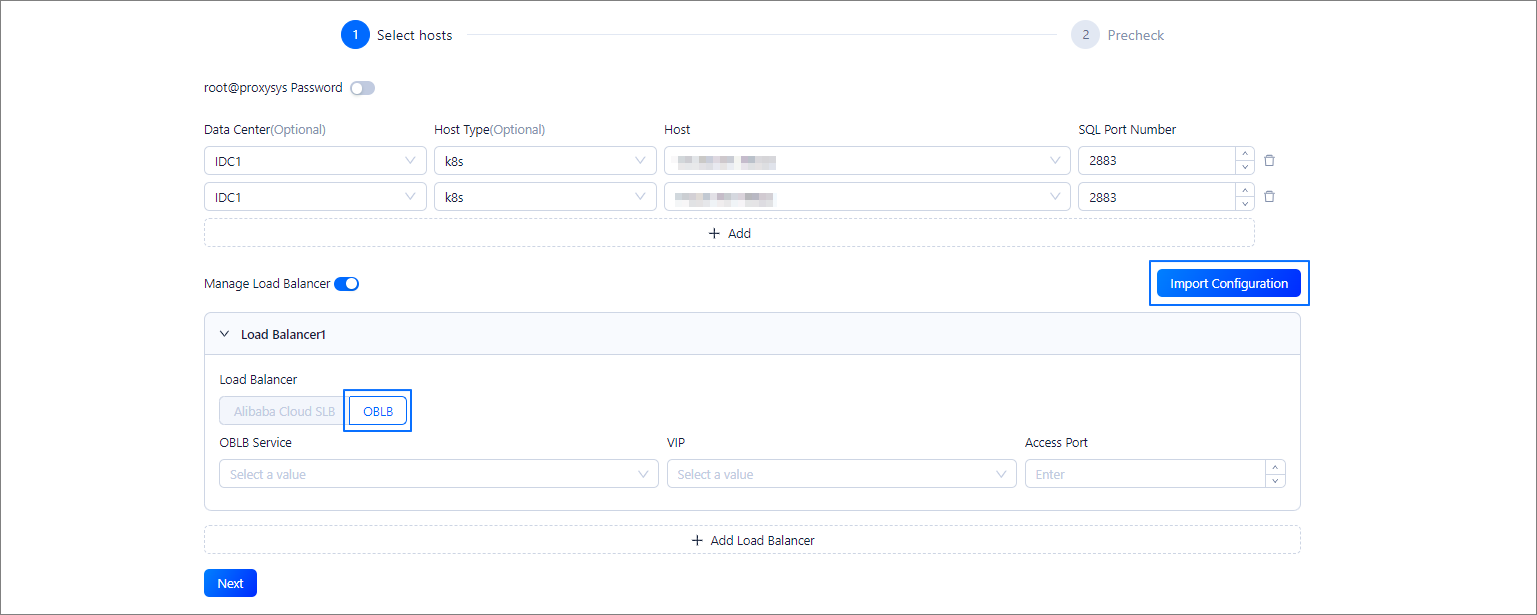
In the Select the host where the OBProxy is located step, configure the following information.
Password of root@proxysys (optional): If you disable
root@proxysys Password, OCP uses the default password to connect to the OBProxies. If you enableroot@proxysys Passwordbut do not specify the password, no password is used by default. If you specify the password, the specified password is used to connect to the OBProxies. If the OBProxies cannot be connected by using the specified password, an error is reported during the takeover precheck.Host information: Specify the IDC, host type, host IP address, and SQL port of the OBProxies to be taken over.
Load balancer information: Enter the information of the OceanBase Load Balancer (OBLB) and Alibaba Cloud Server Load Balancer (SLB) instances originally associated with the OBProxies to be taken over if you want to continue to use these instances in the new OCP. You can also import the configuration file of the load balancer instances. The file was exported by OCP when you moved out the OBProxy cluster.
Notice
- You can specify the information of only existing load balancer instances. This step does not create a load balancer instance.
- All OBProxies corresponding to the specified load balancer instances must be included in the scope of the takeover task.
Click Next to proceed to the precheck step. If the precheck fails, you can hover over Cause of Failure in the Result column and view the causes.
Fix the issues and click Recheck. When all OBProxies in the list pass the precheck, click Take over All.
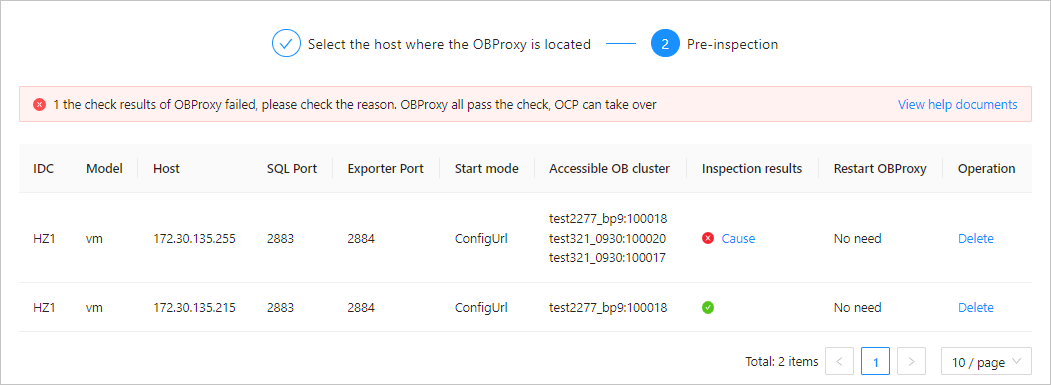
OCP cannot take over OBProxies whose parameters are inconsistent with those of the destination OBProxy cluster. You must agree to change the parameters of the OBProxies.
Click Modify and enter
confirmin the dialog box that appears to submit the OBProxy takeover task. If any parameter takes effect only after a restart, the OBProxies will be restarted during the takeover process. The OBProxies are successfully taken over after the task is completed.
FAQ
What can I do if the precheck returns the following error message: "Unable to obtain the information of the connectable OceanBase clusters of the OBProxy. Make sure that the OBProxy is configured with a connectable OceanBase cluster."?
You must use the current OBProxy to access an OceanBase cluster and run the precheck again. This error message indicates that you have not used the OBProxy. You can delete the OBProxy and rebuild it.
What can I do if I cannot add an OceanBase cluster V4.x as an accessible cluster after I created an empty destination OBProxy cluster?
OCP does not allow you to associate an empty OBProxy cluster with an OceanBase cluster V4.x.
You can add an OBProxy V4.x to the empty OBProxy cluster and proceed with the takeover process. That is, add accessible OceanBase clusters and then take over OBProxies. After the takeover task is completed, you can delete the temporarily added OBProxy if it is no longer required.
What can I do if the precheck returns the following error message: "The obproxy {ip1},{ip2},{ip3} corresponding to lb instance {ip}:{port} is not all included in the scope of this takeover."?
This error message indicates that some of the OBProxies corresponding to the specified load balancer instance are not included in the scope of the takeover task. You can add all OBProxies corresponding to the specified load balancer instance to the same batch for takeover, or ignore the load balancer instance. If you choose to ignore this load balancer instance, you do not need to enter its information for the new OCP.