






This guide helps you build efficient data pipelines with Apache Flink and OceanBase Database. Whether you're a Flink beginner or an experienced user, it will help you:
- Quickly get up to speed with Flink's core usage.
- Understand all the Flink connectors provided by OceanBase Database.
- Choose the best integration solution based on your specific business needs.
Applicable versions
- Flink V1.15 and later.
- The JDBC connector must be compatible with OceanBase Database V3.x, V4.x, or later.
- The Flink Connector OceanBase Direct Load, OBKV-HBase Connector, and OBKV-HBase2 Connector must be compatible with OceanBase Database V4.2.x or later.
Introduction to Flink
What is Apache Flink
Apache Flink is an open-source computing engine that can efficiently process real-time data streams and batch data. In data integration scenarios, Flink provides powerful capabilities, supporting data synchronization, transformation, and processing across systems.
Why recommend Flink SQL
Flink SQL is the simplest and most efficient way to use Flink. With SQL-like syntax, you can:
- Connect to various data sources (such as Kafka, MySQL, and OceanBase Database).
- Perform filtering, aggregation, and transformation operations.
- Write the results to the target system.
You can complete complex tasks with just a few lines of SQL without writing Java/Scala code.
Real-time synchronization from Kafka to OceanBase Database
The following Flink SQL script can be directly executed in the Flink SQL Client or a Flink job to consume order data from Kafka and synchronize it in real time to OceanBase Database.
Note
You can define the source and target with the CREATE TABLE statement and synchronize data in real time with a single INSERT INTO ... SELECT statement. You can also perform data transformation and filtering during the synchronization.
Define the Kafka source table.
CREATE TABLE kafka_orders ( order_id BIGINT, user_id BIGINT, amount DECIMAL(10, 2), order_time TIMESTAMP(3) ) WITH ( 'connector' = 'kafka', 'topic' = 'orders', 'properties.bootstrap.servers' = 'localhost:9092', 'properties.group.id' = 'flink-consumer', 'format' = 'json', 'scan.startup.mode' = 'latest-offset' );Define the OceanBase Database target table.
CREATE TABLE oceanbase_orders ( order_id BIGINT, user_id BIGINT, amount DECIMAL(10, 2), order_time TIMESTAMP(3), PRIMARY KEY (order_id) NOT ENFORCED ) WITH ( 'connector' = 'oceanbase', 'url' = 'jdbc:mysql://127.0.0.1:2881/test', 'username' = 'root@test', 'password' = 'password', 'table-name' = 'orders' );Execute data transformation and filtering.
INSERT INTO oceanbase_orders SELECT order_id, user_id, amount * 1.1 AS amount, -- You can perform data transformation. order_time FROM kafka_orders WHERE amount > 100; -- You can perform data filtering.
Core concepts
Concept |
Description |
|---|---|
| Source | The data source, such as Kafka or OceanBase CDC. |
| Sink | The data destination, such as OceanBase Database or Kafka. |
| Connector | The bridge between Flink and external systems. |
| SQL DDL | Declares data sources and targets with the CREATE TABLE statement. |
| SQL DML | Drives data flow with the INSERT INTO ... SELECT statement. |
How to run Flink SQL
Method 1: SQL Client (interactive)
# Start the Flink SQL Client ./bin/sql-client.sh # Execute commands at the Flink SQL> prompt Flink SQL> CREATE TABLE ... Flink SQL> INSERT INTO ...Method 2: Submit an SQL file
# Save the SQL statements to a file (such as job.sql) and submit the file ./bin/sql-client.sh -f job.sqlMethod 3: Web UI or programming API
Submit an SQL task by using the Flink Web UI or write a Java/Scala program by using the Table API or DataStream API.
Overview and selection guide for OceanBase Flink Connector
In the example above, 'connector' = 'oceanbase' is used. In reality, OceanBase provides various dedicated connectors for Flink, covering read, write, and CDC scenarios.
Overview of connectors
Notice
- Connectors are not interchangeable. Choose the appropriate one based on your specific scenario.
- OceanBase Database MySQL tenants are compatible with Flink MySQL Connector, while Oracle tenants require the use of Flink OceanBase Connector.
Scenario |
Recommended Connector |
Core Features |
Documentation Link |
|---|---|---|---|
| Real-time streaming write with moderate data volume | Flink Connector OceanBase | Based on JDBC, highly versatile | Flink Connector OceanBase Documentation |
| Lookup dimension table association | Flink Connector JDBC (Lookup Mode) | Standard JDBC | Flink Connector JDBC Documentation |
| Batch read of entire table | Flink Connector JDBC (Batch Read, Single Parallelism) | Standard JDBC | Flink Connector JDBC Documentation |
CDC data synchronization
NoticeOnly supports MySQL mode tenants in OceanBase Database. Oracle mode tenants are not supported at this time. |
Flink CDC (OceanBase CDC) | Parallel full + incremental read | OceanBase CDC Documentation |
| Large-scale data import, TB-level batch data migration | Flink Connector OceanBase Direct Load | Based on direct load, high throughput | Flink Connector OceanBase Direct Load |
| High-performance write of fixed-column KV data (simple) | Flink Connector OBKV HBase | Based on OBKV API, nested structure | Flink Connector OBKV HBase |
| High-performance KV write (advanced feature) | Flink Connector OBKV HBase2 | Flat structure, supports dynamic columns and partial updates | Flink Connector OBKV HBase2 |
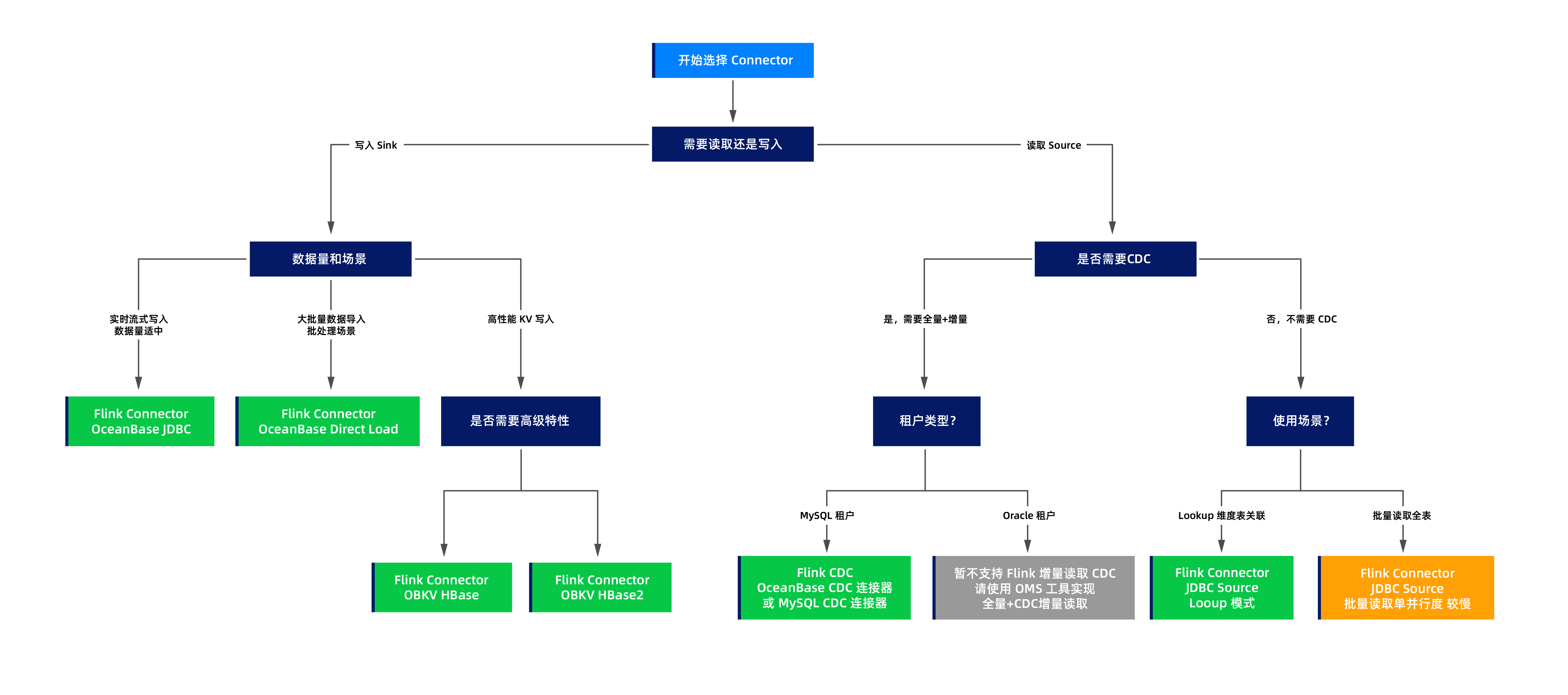
Selection decision process
You can choose the appropriate connector based on the following decision process diagram:
Typical scenarios
Scenario 1: Real-time streaming write to OceanBase Database
Requirement:
Write real-time data from Kafka or Pulsar to OceanBase Database.
Solution:
Use the Flink Connector OceanBase. For more information, see Flink Connector OceanBase.
Advantages:
- Supports unbounded streams.
- Compatible with MySQL and Oracle modes.
- Supports batch writes and buffer optimization.
Example:
Create an OceanBase sink table.
CREATE TABLE orders_sink ( order_id BIGINT, user_id BIGINT, amount DECIMAL(10, 2), order_time TIMESTAMP(3), PRIMARY KEY (order_id) NOT ENFORCED ) WITH ( 'connector' = 'oceanbase', 'url' = 'jdbc:mysql://127.0.0.1:2881/test', 'username' = 'root@test', 'password' = 'password', 'table-name' = 'orders', 'buffer-flush.interval' = '1s', 'buffer-flush.buffer-size' = '1000' );Import data.
INSERT INTO orders_sink SELECT * FROM kafka_source;
Scenario 2: Large-scale data migration
Requirement:
Migrate TB-level historical data to OceanBase Database.
Solution:
Use the Flink Connector OceanBase Direct Load. For more information, see Flink Connector OceanBase Direct Load.
Advantages:
- Based on direct load, it has a high throughput.
- Supports parallel writes from multiple nodes.
- Suitable for batch mode.
Considerations:
- Supports bounded streams but not real-time streams.
- The target table is locked (read-only) during the import.
- We recommend that you use the Flink Batch mode for better performance.
Example:
Create a direct load sink table.
CREATE TABLE large_table_sink ( id BIGINT, name STRING, data STRING, PRIMARY KEY (id) NOT ENFORCED ) WITH ( 'connector' = 'oceanbase-directload', 'url' = 'jdbc:mysql://127.0.0.1:2881/test', 'username' = 'root@test', 'password' = 'password', 'schema-name' = 'test', 'table-name' = 'large_table', 'parallel' = '8' -- The parallelism. );Write data from the source table to the result table in batch mode.
INSERT INTO large_table_sink SELECT * FROM source_table;
Scenario 3: High-performance key-value write (simple scenario)
Requirement:
Write high-performance key-value (KV) data with a simple and fixed column structure.
Solution:
Use the Flink Connector OBKV HBase. For more information, see Flink Connector OBKV HBase.
Advantages:
- Based on the OBKV HBase API, it has excellent performance.
- Suitable for scenarios with a fixed column structure.
Limitations:
- The table definition must use a nested ROW structure.
- Does not support dynamic columns.
- Does not support partial column updates.
Example:
Create an HBase sink table.
CREATE TABLE hbase_sink (
rowkey STRING,
family1 ROW<column1 STRING, column2 STRING>, -- Nested ROW structure
PRIMARY KEY (rowkey) NOT ENFORCED
) WITH (
'connector' = 'obkv-hbase',
'url' = 'http://127.0.0.1:8080/services?Action=ObRootServiceInfo&ObCluster=obcluster',
'username' = 'root@test#obcluster',
'password' = 'password',
'sys.username' = 'root',
'sys.password' = 'password',
'schema-name' = 'test',
'table-name' = 'htable1'
);
Scenario 4: High-performance KV write (advanced features)
Requirement:
You need to perform high-performance writes and use advanced features such as dynamic columns, partial column updates, and flexible timestamp control.
Solution:
Flink Connector OBKV HBase2. For more information, see Flink Connector OBKV HBase2.
Advantages:
- A flat table structure with concise definitions.
- Dynamic column support: column names can be specified at runtime.
- Partial column updates: only the columns to be updated need to be defined; columns not defined will not be updated, offering great flexibility.
- Timestamp control: different timestamps can be set for different columns (
tsColumn,tsMap). - Performance comparable to OBKV HBase.
Example:
Create an HBase2 sink table.
Basic usage: flat structure.
CREATE TABLE hbase2_sink ( rowkey STRING, column1 STRING, -- Flat structure, no need for ROW nesting column2 STRING, PRIMARY KEY (rowkey) NOT ENFORCED ) WITH ( 'connector' = 'obkv-hbase2', 'url' = 'http://127.0.0.1:8080/services?Action=ObRootServiceInfo&ObCluster=obcluster', 'username' = 'root@test#obcluster', 'password' = 'password', 'sys.username' = 'root', 'sys.password' = 'password', 'schema-name' = 'test', 'table-name' = 'htable1', 'columnFamily' = 'f' );Partial column update example.
Assume that the HBase table in OceanBase Database contains multiple columns such as column1, column2, column3, and column4. You only need to define the columns to be updated in the Flink table.
CREATE TABLE partial_update_sink ( rowkey STRING, column1 STRING, -- Define only the columns to be updated column2 STRING, -- Columns not defined here (such as column3 and column4) will not be updated PRIMARY KEY (rowkey) NOT ENFORCED ) WITH ( 'connector' = 'obkv-hbase2', 'url' = 'http://127.0.0.1:8080/services?Action=ObRootServiceInfo&ObCluster=obcluster', 'username' = 'root@test#obcluster', 'password' = 'password', 'sys.username' = 'root', 'sys.password' = 'password', 'schema-name' = 'test', 'table-name' = 'htable1', 'columnFamily' = 'f' );
Write data and update only column1 and column2, leaving other columns (column3, column4, etc.) unchanged.
INSERT INTO partial_update_sink VALUES ('1', 'new_value1', 'new_value2');
Scenario 5: CDC data synchronization (MySQL tenant)
Requirement:
Real-time capture data changes in OceanBase Database and synchronize full data and incremental data.
Solution:
Flink CDC (OceanBase CDC). For more information, see OceanBase CDC official documentation.
Advantages:
- Parallel full data reading (performance far exceeds JDBC).
- Incremental synchronization based on binlog.
- Integrated full data + incremental process.
Limitations:
Only supports MySQL mode tenants.
Example:
Create an OceanBase CDC source table.
CREATE TABLE orders_cdc ( order_id BIGINT, user_id BIGINT, amount DECIMAL(10, 2), order_time TIMESTAMP(3), PRIMARY KEY (order_id) NOT ENFORCED ) WITH ( 'connector' = 'oceanbase-cdc', 'hostname' = '127.0.0.1', 'port' = '2881', 'username' = 'root@test', 'password' = 'password', 'database-name' = 'mydb', 'table-name' = 'orders', 'scan.startup.mode' = 'initial' -- Full data + incremental );Read and process CDC data.
SELECT * FROM orders_cdc;
Scenario 6: Lookup join
Requirement:
Complete the user dimension information in the stream.
Solution:
Use the Flink JDBC connector as a lookup source. For more information, see Flink JDBC Connector.
Features:
- Supports lookup join
- Supports cache optimization
Notice
Full table scans are single-parallelism, but lookup scenarios typically involve point queries and are not subject to this limitation.
Here is an example:
Create a JDBC lookup table.
CREATE TABLE dim_user ( user_id BIGINT, user_name STRING, city STRING, PRIMARY KEY (user_id) NOT ENFORCED ) WITH ( 'connector' = 'jdbc', 'url' = 'jdbc:mysql://127.0.0.1:2881/test', 'username' = 'root@test', 'password' = 'password', 'table-name' = 'dim_user', 'lookup.cache.max-rows' = '10000', -- Cache configuration 'lookup.cache.ttl' = '1 hour' );Join the stream table with the dimension table.
SELECT o.order_id, o.user_id, u.user_name, -- Complete the user dimension information from the dimension table u.city, o.amount FROM orders_stream o LEFT JOIN dim_user FOR SYSTEM_TIME AS OF o.proc_time AS u ON o.user_id = u.user_id;
Deep comparison
The following sections provide a detailed comparison of several connectors that are easy to confuse.
OBKV HBase vs. OBKV HBase2
Feature |
OBKV HBase |
OBKV HBase2 |
|---|---|---|
| Data model | Nested ROW structure | Flat model |
| Table definition complexity | Relatively complex (requires ROW<...> nesting) |
Simple (columns can be directly defined) |
| Column family support | A table can have multiple column families | A table can have only one column family (multiple column families require separate tables, which is inconvenient) |
| Dynamic column support | Not supported | Supported |
| Partial column updates | Not supported | Supported (only the columns to be updated need to be defined) |
| Timestamp control | Not supported | Supported (tsColumn + tsMap) |
| Flexibility | Low | High |
| Performance | High | High |
| Learning curve | Low (if familiar with HBase) | Moderate (requires understanding of new features) |
| Use cases | Scenarios requiring multiple column families or fixed columns | Scenarios with a single column family, requiring dynamic columns, partial updates, and timestamp control |
Table definition comparison example:
OBKV HBase: Nested ROW structure, supporting multiple column families in a single table.
CREATE TABLE hbase_sink ( rowkey STRING, family1 ROW<column1 STRING, column2 STRING>, -- Column family 1 family2 ROW<column3 STRING, column4 STRING>, -- Column family 2 (multiple column families supported) PRIMARY KEY (rowkey) NOT ENFORCED ) WITH ( 'connector' = 'obkv-hbase', ... );Multiple column families can be written to simultaneously during insertion.
INSERT INTO hbase_sink VALUES ('row1', ROW('val1', 'val2'), ROW('val3', 'val4'));OBKV HBase2: Flat structure, supporting only one column family per table.
If multiple column families are required, separate tables must be created for each column family (which is inconvenient).
Table for column family family1:
CREATE TABLE hbase2_family1_sink ( rowkey STRING, column1 STRING, column2 STRING, PRIMARY KEY (rowkey) NOT ENFORCED ) WITH ( 'connector' = 'obkv-hbase2', 'columnFamily' = 'family1', -- Only one column family can be specified ... );Table for column family family2 (requires separate creation)
CREATE TABLE hbase2_family2_sink ( rowkey STRING, column3 STRING, column4 STRING, PRIMARY KEY (rowkey) NOT ENFORCED ) WITH ( 'connector' = 'obkv-hbase2', 'columnFamily' = 'family2', -- Different column families ... );
Separate tables must be written to for each column family during insertion.
Inserting into the table for column family family1:
INSERT INTO hbase2_family1_sink VALUES ('row1', 'val1', 'val2');Inserting into the table for column family family2:
INSERT INTO hbase2_family2_sink VALUES ('row1', 'val3', 'val4');
Note
Recommendations are as follows:
- Multiple column families required: Strongly recommend OBKV HBase.
- HBase: A single table can handle multiple column families, making it simple and convenient.
- HBase2: Requires separate tables for each column family, which is inconvenient.
- Dynamic columns, partial updates, and timestamp control required: Must choose OBKV HBase2.
- Simple scenarios (fixed columns, single column family): Both are suitable. HBase2 offers simpler table definitions, so it is recommended to use it first.
- New projects: For single-column-family scenarios, recommend OBKV HBase2. For multi-column-family scenarios, recommend OBKV HBase.
OceanBase CDC vs. JDBC Sink
Feature |
OceanBase CDC |
JDBC Connector |
|---|---|---|
| Full table scan parallelism | Supported (multiple parallel degrees) | Single parallel degree (slow) |
| Incremental read | Supported (binlog-based incremental read) | Not supported |
| Lookup Join | Not supported | Supported (main use case) |
| Batch full table scan | Supported (parallel, fast) | Supported (single-threaded, slow) |
| Tenant support | Only MySQL tenants | MySQL and Oracle tenants |
| Main use case | CDC full + incremental synchronization | Lookup dimension table join |
| Data real-time | Near real-time (binlog delay) | Real-time at query time |
Note
Recommendations are as follows:
- CDC scenarios (full + incremental synchronization): Prioritize OceanBase CDC (only for MySQL tenants)
- Lookup Join scenarios (dimension table join): Choose the JDBC Connector.
- Batch full table scan: Prioritize OceanBase CDC (MySQL tenants). For Oracle tenants, only the JDBC Connector is available, but it has lower performance.
Sink comparison
Feature |
JDBC |
Direct Load |
OBKV HBase |
OBKV HBase2 |
|---|---|---|---|---|
| Data stream type | Unbounded/bounded | Only bounded | Unbounded/bounded | Unbounded/bounded |
| Throughput | Moderate | Extremely high | High | High |
| Latency | Low | High (batch) | Low | Low |
| Table locking | None | Table locked during import | None | None |
| Compatibility mode | MySQL/Oracle | MySQL/Oracle | MySQL | MySQL |
| Complexity | Simple | Simple | Moderate | Moderate |
| Typical scenarios | Real-time writes | Batch imports | High-performance KV writes | High-performance KV writes + advanced features |
FAQ
Question 1: What are the differences between Direct Load Sink and JDBC Sink? How do I choose between them?
Main differences:
- JDBC Sink: Based on the standard JDBC protocol, suitable for real-time streaming writes, supports unbounded streams, and does not require table locking.
- Direct Load Sink: Based on the bypass import API, suitable for bulk data import, with extremely high throughput, but only supports bounded streams and locks tables during import.
Recommendations:
- Real-time streaming writes (e.g., Kafka to OceanBase Database): Choose JDBC Sink.
- Bulk historical data import (e.g., data migration): Choose Direct Load Sink.
Question 2: What are the differences between OBKV HBase and OBKV HBase2? How do I choose between them?
Main differences:
Table definition: HBase uses a nested ROW structure, while HBase2 uses a flat structure (more concise).
Column family support:
- HBase: A Flink table can write to multiple column families, which is very convenient.
- HBase2: A Flink table can only specify one column family. If you need to write to multiple column families, you must create separate tables for each and write to them individually, which can be cumbersome.
Advanced features: HBase2 supports dynamic columns, partial column updates, and timestamp control, while HBase does not.
Use cases: HBase is suitable for scenarios requiring multiple column families, while HBase2 is suitable for scenarios requiring advanced features with a single column family.
Recommendations:
Multiple column families: Strongly recommend OBKV HBase (HBase2 requires creating a table for each column family, which is inconvenient).
Dynamic columns, partial column updates, and timestamp control: Recommend OBKV HBase2.
Simple fixed columns and single column family: Both are suitable, but recommend OBKV HBase2 (more concise table definition).
New projects:
- Single column family: Use OBKV HBase2.
- Multiple column families: Use OBKV HBase.
Question 3: What are the use cases for JDBC Source, and how does it differ from CDC?
JDBC Source has two main use cases:
Lookup Join (dimension table association) - Recommended use case
- In stream computing, query dimension tables based on primary keys in real time.
- Supports cache optimization for efficient performance.
- This is the primary use case for JDBC Source.
Batch reading of full tables
- Can read full table data from OceanBase Database.
- Single parallelism, slower performance, not recommended for large tables.
- Suitable for small-scale batch reads.
Comparison between JDBC Source and CDC:
- OceanBase CDC: Supports parallel full-table reads and binlog incremental reads, high performance, suitable for CDC scenarios (only for MySQL tenants).
- JDBC Source: Mainly used for Lookup Join, can also perform batch reads but with lower performance (single parallelism).
Recommendations:
- Lookup dimension table association: Choose JDBC Source (mandatory).
- CDC full-table and incremental reads (MySQL tenant): Choose OceanBase CDC (recommended).
- Batch read full tables: Prioritize OceanBase CDC; if not supported (e.g., Oracle tenant), use JDBC Source.
Question 4: Why does OceanBase CDC only support MySQL tenants? What about Oracle tenants?
OceanBase CDC supports MySQL-compatible binlog services. For Oracle tenants, use the OMS tool to implement CDC incremental reads.
For more information about binlogs, see Overview of binlog service.
Question 5: How do I choose the appropriate batch size and parallelism?
Batch size (Buffer Size):
- Small batches (100-500): Suitable for low-latency scenarios, data is written as soon as possible.
- Medium batches (1000-5000): Balances latency and throughput, recommended default value.
- Large batches (5000+): Suitable for high-throughput scenarios, but latency increases.
Parallelism:
- Generally set to the number of CPU cores or a multiple of it.
- In bypass import scenarios, you can set a higher parallelism (e.g., 8-16) based on tenant resources to fully utilize bypass import capabilities.
- Consider the load capacity of the OceanBase cluster.
Question 6: Can different connectors be used together?
Yes. A Flink task can use multiple different connectors simultaneously.
Common combinations:
- Flink CDC (MySQL) Source + OceanBase JDBC Sink: Real-time synchronization from MySQL to OceanBase Database.
- OceanBase CDC Source + Kafka Sink: Data transfer from OceanBase Database to Kafka message queue.
- Kafka Source + JDBC Lookup + OceanBase Sink: Data from Kafka is associated with dimension tables and then written to OceanBase Database.