







Background information
The full-text search feature of OceanBase Database can effectively address various challenges encountered in practical production environments, particularly in scenarios such as system log analysis and user behavior and profile analysis. This feature enables rapid efficient filtering and screening of data, as well as high-quality relevance assessment. Additionally, the multi-round recall architecture that combines sparse and dense vectors enhances the recall efficiency of OceanBase Database in RAG systems within specific knowledge domains.
This tutorial uses a news information scenario as an example. In such scenarios, three core challenges impose higher demands on the retrieval system:
- Real-time requirement: Quickly locate target information from TBs of data.
- Semantic complexity: Tackle challenges in natural language processing, such as Chinese word segmentation and synonym handling.
- Mixed query requirements: Improve the joint optimization capabilities for text retrieval and structured queries.
The tutorial will demonstrate how to use the full-text search feature to quickly find target news among a large amount of information. It will also show how OceanBase Database's full-text search feature enhances functionality, performance, and ease of use through keyword queries.
Concept
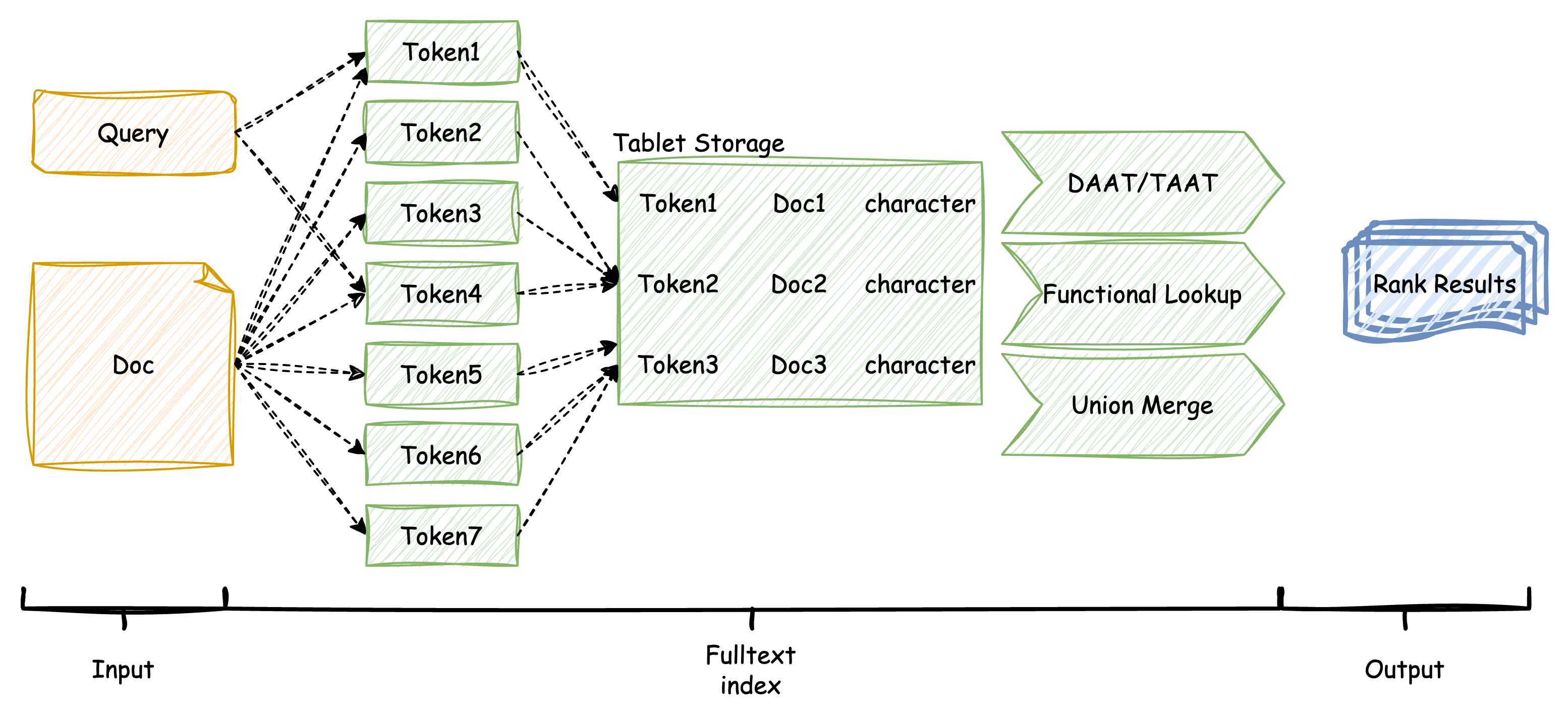
In the OceanBase storage engine, user documents and queries are split into multiple keywords (also known as tokens) based on the tokenizer. These keywords and the statistical features of the documents are stored in internal auxiliary tables for relevance assessment (ranking) in the information retrieval phase. To calculate the relevance scores between keywords in user queries and the stored documents, OceanBase Database uses the advanced BM25 algorithm. The algorithm then outputs the relevant documents along with their scores.
In the query process of full-text search, OceanBase Database further optimizes the TAAT/DAAT flow based on its high-performance query engine and supports the union merge between multiple indexes. These improvements enable full-text search to handle more complex query features and meet user data retrieval requirements.
Prerequisites
To use the full-text search feature of OceanBase Database smoothly and effectively, make sure that the following prerequisites are met:
Environment requirements: You have deployed an OceanBase cluster of V4.3.5 BP1 or later and created a MySQL tenant. For more information about how to deploy an OceanBase cluster, see Deployment overview. After the deployment, run the following SQL statements to verify the cluster and tenant information:
-- Verify cluster information SELECT * FROM GV$OB_SERVERS; -- Verify tenant information SELECT * FROM oceanbase.DBA_OB_TENANTS;Privilege settings: The MySQL tenant you created has the privileges to insert and query data. For more information about privilege settings, see Directly grant privileges.
Database creation: You have created a database. For more information, see Create a database.
Procedure
The following procedure will guide you through the use of full-text indexes in OceanBase Database, as well as common views and query techniques.
Step 1: Import the dataset
OceanBase Database provides the IK full-text search engine for Chinese. You can use it to create a full-text index on a column. In this example, the Chinese football sports news dataset is imported to OceanBase Database to create a partitioned table named sport_data_whole. The table has three columns of the VARCHAR data type: event, date, and news. A full-text index is created on the news column by using the IK Chinese full-text search engine in the max_word mode.
Note
In the smart mode, the IK full-text search engine does not match shorter words once it matches the longest word. In the max_word mode, the IK full-text search engine matches all words in a text. OceanBase Database also provides the space and beng full-text search engines for English, as well as the ngram full-text search engine that splits texts by character length.
-- Create a table and create a full-text index by using the IK full-text search engine.
CREATE TABLE sport_data_whole (
event VARCHAR(64),
date VARCHAR(16),
news VARCHAR(65535),
FULLTEXT INDEX (news) WITH PARSER ik PARSER_PROPERTIES=(ik_mode="max_word")
);
Import the news dataset from a local file to the table by using a client. This operation is expected to take about 30 seconds.
-- Import data
LOAD DATA /*+ PARALLEL(8) */ LOCAL INFILE '/home/sports_data_whole.csv' INTO TABLE sport_data_whole
FIELDS TERMINATED BY ',' LINES TERMINATED BY '\n';
After the import, the table contains 5,268 news items, with an average length of about 2,700 Chinese characters. The original dataset is about 57 MB in size. After efficient compression, the actual storage space required is less than 30 MB, most of which is occupied by the inverted and forward auxiliary tables of the full-text index, which store a large number of word segmentation records.
-- Verify the number of imported items.
SELECT AVG(LENGTH(news)), COUNT(*) FROM sport_data_whole;
The return result is as follows:
+-------------------+----------+
| avg(length(news)) | count(*) |
+-------------------+----------+
| 2781.6900 | 5268 |
+-------------------+----------+
1 row in set
-- Query the view to verify the result.
SELECT * FROM oceanbase.DBA_OB_TABLE_SPACE_USAGE;
The return result is as follows:
+----------+---------------+--------------------------------+-------------+---------------+
| TABLE_ID | DATABASE_NAME | TABLE_NAME | OCCUPY_SIZE | REQUIRED_SIZE |
+----------+---------------+--------------------------------+-------------+---------------+
| 500035 | test | sport_data_whole | 6597450 | 8392704 |
| 500036 | test | __idx_500035_news | 10715722 | 12587008 |
| 500037 | test | __idx_500035_fts_rowkey_doc | 21058 | 28672 |
| 500038 | test | __idx_500035_fts_doc_rowkey | 23236 | 28672 |
| 500039 | test | __idx_500035_news_fts_doc_word | 11178599 | 12587008 |
+----------+---------------+--------------------------------+-------------+---------------+
Step 2: Use full-text search
You can use the stored news dataset and indexes to search for news that meet multiple conditions or with high filtering accuracy. For example, as a football fan, you can use the Boolean mode to search for news that contain both "Bayern" and "own goal".
The Boolean mode not only has a simpler syntax but also provides faster query speed compared with the LIKE matching without indexes.
-- Use the Boolean mode to search for news that contain both "own goal" and "Bayern"
SELECT COUNT(*) FROM sport_data_whole
WHERE MATCH (news) AGAINST ('+own goal +Bayern' IN BOOLEAN MODE);
The return result is as follows:
+----------+
| count(*) |
+----------+
| 2 |
+----------+
1 row in set (0.03 sec)
You can also use the LIKE query method:
-- Use the LIKE syntax to search for news that contain both "own goal" and "Bayern"
SELECT COUNT(*) FROM sport_data_whole
WHERE news LIKE '%own goal%' AND news LIKE '%Bayern%';
The return result is as follows:
+----------+
| count(*) |
+----------+
| 2 |
+----------+
1 row in set (0.08 sec)
You can further rank the two news items and determine which one is more relevant to the search based on the scores in the output results.
-- Return the events, dates, and scores of the news to help determine relevance.
SELECT event, date, MATCH (news) AGAINST ('own goal Bayern') AS score
FROM sport_data_whole
WHERE MATCH (news) AGAINST ('+own goal +Bayern' IN BOOLEAN MODE);
The return result is as follows:
+-------+------+---------------------+
| event | date | score |
+-------+------+---------------------+
| ucl | 0278 | 0.4657063867776557 |
| ucl | 0201 | 0.41760566608994765 |
+-------+------+---------------------+
2 rows in set
You can also use the - operator in the Boolean mode to exclude some keywords. For example, fouls are almost inevitable in football matches. If you want to find out which matches were very intense without any red cards, yellow cards, or fouls at all, you can use the Boolean mode.
-- Find intense matches without any yellow cards, red cards, or fouls.
SELECT COUNT(*) FROM sport_data_whole
WHERE MATCH (news) AGAINST ('+intense -yellow card -red card -foul' IN BOOLEAN MODE);
The return result is as follows:
+----------+
| count(*) |
+----------+
| 31 |
+----------+
1 row in set
Step 3: Optimize
Optimize the use of the TOKENIZE function
When the query result of the full-text index does not meet the expectation, it is usually due to poor tokenization results. OceanBase Database provides a fast TOKENIZE function to assist in testing the tokenization effect, and it supports all tokenizers and their corresponding attributes. You can use the TOKENIZE function to verify the tokenization results.
For example, the following example of manual tokenization shows that the support for the names of overseas sports celebrities is insufficient (such as Boatafen and Gekerro), which may result in poor search results when these names are used for searching.
Use the
TOKENIZEfunction to verify the tokenization effect of the tokenizer:-- Verify the word segmentation effect on Chinese sports news by using the ik_smart mode. SELECT TOKENIZE('Boateng's right-wing counterattack ends with a manusha pass. Götze arrives at the far post and glides past the defender before drilling the ball past Mythetov from 8 meters out.', 'ik', '[{"additional_args": [{"ik_mode": "smart"}]}]');The above result does not identify names such as "Boateng" and "Götze".
Execute the following statement to check whether the query hits the target document:
-- Retrieve news of a specific player in boolean mode SELECT COUNT(*) FROM sport_data_whole WHERE MATCH (news) AGAINST ('+GOTZE +BOATEN' IN BOOLEAN MODE);The return result is as follows:
+----------+ | count(*) | +----------+ | 0 | +----------+ 1 row in setThe preceding result does not match the target record.
To update the system dictionary, you can insert the preceding Chinese names into the system dictionary table. After the system dictionary is updated, you need to refresh the cache.
Note
If you want to update the system dictionary, we recommend that you contact OceanBase Technical Support.
Rebuild full-text indexes:
-- Rebuild full-text indexes to apply the new dictionary. ALTER TABLE sport_data_whole DROP INDEX ft_idx_news, ADD FULLTEXT INDEX ft_idx_news (news) WITH PARSER ik;Verify the optimization effect of the tokenizer:
-- Retest the tokenization (same input) SELECT TOKENIZE('With a clever reverse one-two in the D-forward channel, Arjen Robben put the ball into the far side netting from 7 meters away.', 'ik', '[{"additional_args": [{"ik_mode": "smart"}]}]');The return result is as follows:
+---------------------------------------------------------------------------------------------------------------------------------------------------------------------------------------------------------------------------------+ | tokenize('Boateng gets behind Leno with a pass and people who were on the left flank split his hair, Gocze stands behind the line, spins and steps away from the corner, reaches out in front of the goal 8 meters, exerts low abs from Pyatov, and drills through the situation.', 'ik', '[{"additional_args": [{"ik_mode": "smart"}]}]') | +---------------------------------------------------------------------------------------------------------------------------------------------------------------------------------------------------------------------------------+ | ["Goles", "Gomez", "Penalty", "Right", "Incision", "Direction", "Facing", "Shot", "Low", "Pivoting", "Bouncing", "Yeltsin", "Respawned", "Right", "Foot", "Right", "Foot", "In", "Right", "Foot", "Graziano", "Gonzalo", "Bethune"] | +---------------------------------------------------------------------------------------------------------------------------------------------------------------------------------------------------------------------------------+ 1 row in setThe results indicate that professional name entities have been successfully identified.
Execute the following statement to verify the retrieval accuracy:
SELECT COUNT(*) FROM sport_data_whole WHERE MATCH (news) AGAINST('+Gotze +Boateng' IN BOOLEAN MODE);The return result is as follows:
+----------+ | count(*) | +----------+ | 79 | +----------+ 1 row in setThe above results indicate that 79 relevant records were correctly identified.
Optimize using Union Merge
At last, we will compare the performance improvement of full-text indexes and normal indexes in mixed queries with the help of union merge. To show the effect better, a normal local index will be created on the date column of the sport_data_whole table. You can use the SHOW INDEX statement to check whether the indexes take effect.
-- Add a normal index to the date column.
ALTER TABLE sport_data_whole ADD INDEX (date);
-- View index information
SHOW INDEX FROM sport_data_whole;
The return result is as follows:
+------------------+------------+----------+--------------+-------------+-----------+-------------+----------+--------+------+------------+-----------+---------------+---------+------------+
| Table | Non_unique | Key_name | Seq_in_index | Column_name | Collation | Cardinality | Sub_part | Packed | Null | Index_type | Comment | Index_comment | Visible | Expression |
+------------------+------------+----------+--------------+-------------+-----------+-------------+----------+--------+------+------------+-----------+---------------+---------+------------+
| sport_data_whole | 1 | news | 1 | news | A | NULL | NULL | NULL | YES | FULLTEXT | available | | YES | NULL |
| sport_data_whole | 1 | date | 1 | date | A | NULL | NULL | NULL | YES | BTREE | available | | YES | NULL |
+------------------+------------+----------+--------------+-------------+-----------+-------------+----------+--------+------+------------+-----------+---------------+---------+------------+
2 rows in set
Performance comparison with MySQL
To compare the full-text search performance of OceanBase Database with that of MySQL, we use MySQL's full-text search feature as a reference. Due to its relatively weak Chinese word segmentation capabilities, we chose the English wikir1k dataset (369,721 rows, with an average of 100 words per row) for the performance comparison.
The following table shows the comparison results in both natural language and boolean modes. The results show that OceanBase Database significantly outperforms MySQL in scenarios that require extensive word segmentation or a large number of results. For small result sets, the advantage of the query engine is not as pronounced because the computational load is relatively small, resulting in similar performance between the two engines.
Test environment: OceanBase Database tenant specification, 8c 16g; MySQL version, 8.0.36 for Linux on x86_64 (MySQL Community Server - GPL).
Natural language mode
-- q1: Query documents that contain "and".
SELECT * FROM wikir1k WHERE MATCH (document) AGAINST ('and');
-- q2: Query documents that contain "and", and limit the number of results to 10.
SELECT * FROM wikir1k WHERE MATCH (document) AGAINST ('and') LIMIT 10;
-- q3: Query documents that contain "librettists".
SELECT * FROM wikir1k WHERE MATCH (document) AGAINST ('librettists');
-- q4: Query documents that contain "librettists", and limit the number of results to 10.
SELECT * FROM wikir1k WHERE MATCH (document) AGAINST ('librettists') LIMIT 10;
-- q5: Query documents that contain "alleviating librettists".
SELECT * FROM wikir1k WHERE MATCH (document) AGAINST ('alleviating librettists');
-- q6: Query documents that contain "black spotted white yellow".
SELECT * FROM wikir1k WHERE MATCH (document) AGAINST ('black spotted white yellow');
-- q7: Query documents that contain "black spotted white yellow", and limit the number of results to 10.
SELECT * FROM wikir1k WHERE MATCH (document) AGAINST ('black spotted white yellow') LIMIT 10;
-- q8: Query documents that contain "between up and down".
SELECT * FROM wikir1k WHERE MATCH (document) AGAINST ('between up and down');
-- q9: Query documents that contain "between up and down", and limit the number of results to 10.
SELECT * FROM wikir1k WHERE MATCH (document) AGAINST ('between up and down') LIMIT 10;
-- q10: Query long documents.
SELECT * FROM wikir1k WHERE MATCH (document) AGAINST ('alleviating librettists modifications retelling intangible hydrographic administratively berwickshire strathaven dumfriesshire lesmahagow transhumanist musselburgh prestwick cardiganshire montgomeryshire');
-- q11: Query long documents, and add "and".
SELECT * FROM wikir1k WHERE MATCH (document) AGAINST ('alleviating librettists modifications retelling intangible hydrographic administratively berwickshire strathaven dumfriesshire lesmahagow transhumanist musselburgh prestwick cardiganshire montgomeryshire and');
-- q12: Query long documents, and limit the number of results to 10.
SELECT * FROM wikir1k WHERE MATCH (document) AGAINST ('alleviating librettists modifications retelling intangible hydrographic administratively berwickshire strathaven dumfriesshire lesmahagow transhumanist musselburgh prestwick cardiganshire montgomeryshire and') LIMIT 10;
Scenario |
OceanBase |
MySQL |
|---|---|---|
| q1 Single token high-frequency word | 3820458us | 5718430us |
| q2 Single token high-frequency word with limit | 231861us | 503772us |
| q3 Single token low-frequency word | 879us | 672us |
| q4 Single token low-frequency word with limit | 720us | 700us |
| q5 Multiple tokens with small result set | 1591us | 1100us |
| q6 Multiple tokens with medium result set | 259700us | 602221us |
| q7 Multiple tokens with medium result set and limit | 25502us | 42620us |
| q8 Multiple tokens with large result set | 3842391us | 6846847us |
| q9 Multiple tokens with large result set and limit | 301362us | 784024us |
| q10 Many tokens with small result set | 22143us | 10161us |
| q11 Many tokens with large result set | 3905829us | 5929343us |
| q12 Many tokens with large result set and limit | 345968us | 769970us |
Boolean mode
-- q1: +High-frequency words -Medium-frequency words
SELECT * FROM wikir1k WHERE MATCH (document) AGAINST ('+and -which -his' IN BOOLEAN MODE);
-- q2: +High-frequency words -Low-frequency words
SELECT * FROM wikir1k WHERE MATCH (document) AGAINST ('+which (+and -his)' IN BOOLEAN MODE);
-- q3: +Medium-frequency words (+High-frequency words -Medium-frequency words)
SELECT * FROM wikir1k WHERE MATCH (document) AGAINST ('+and -carabantes -bufera' IN BOOLEAN MODE);
-- q4: +High-frequency words +Low-frequency words
SELECT * FROM wikir1k WHERE MATCH (document) AGAINST ('+and +librettists' IN BOOLEAN MODE);
Scenario |
OceanBase |
MySQL |
|---|---|---|
| q1: +High-frequency words -Medium-frequency words | 1586657us | 2440798us |
| q2: +High-frequency words -Low-frequency words | 3726508us | 7974832us |
| q3: +Medium-frequency words (+High-frequency words -Medium-frequency words) | 3080644us | 5612041us |
| q4: +High-frequency words +Low-frequency words | 230284us | 357580us |
Performance comparison
The data comparison shows that OceanBase Database significantly outperforms MySQL Database in complex full-text searches, whether in natural language mode or Boolean mode. OceanBase Database's advantage is particularly pronounced when handling queries that require extensive tokenization or return large result sets. This provides developers and data analysts with a strong reference for choosing a database, especially for applications that require efficient retrieval of massive amounts of data. OceanBase Database clearly demonstrates its powerful performance and flexible querying capabilities in such scenarios.
OceanBase Database's full-text index ensures fast response times, making it especially suitable for real-world applications that demand high-concurrency and high-performance searching.