

OceanBase logo

OceanBase

A unified distributed database ready for your transactional, analytical, and AI workloads.

Product Overview
DEPLOY YOUR WAY

OceanBase Cloud

The best way to deploy and scale OceanBase

OceanBase Enterprise

Run and manage OceanBase on your infra

TRY OPEN SOURCE

OceanBase Community Edition

The free, open-source distributed database

OceanBase seekdb

Open source AI native search database

Customer Stories

Real-world success stories from enterprises across diverse industries.

View All
BY USE CASES

Mission-Critical Transactions

Global & Multicloud Application

Elastic Scaling for Peak Traffic

Real-time Analytics

Active Geo-redundancy

Database Consolidation

Resources

Comprehensive knowledge hub for OceanBase.

Blog

Live Demos

Training & Certification

Documentation

Official technical guides, tutorials, API references, and manuals for all OceanBase products.

View All
PRODUCTS

OceanBase Cloud

OceanBase Database

Tools

Connectors and Middleware

QUICK START

OceanBase Cloud

OceanBase Database

BEST PRACTICES

Practical guides for utilizing OceanBase more effectively and conveniently

Company

Learn more about OceanBase – our company, partnerships, and trust and security initiatives.

About OceanBase

Partner

Trust Center

Contact Us

International - English
中国站 - 简体中文
日本 - 日本語
Sign In
Start on Cloud

OceanBase

A unified distributed database ready for your transactional, analytical, and AI workloads.

Product Overview
DEPLOY YOUR WAY

OceanBase Cloud

The best way to deploy and scale OceanBase

OceanBase Enterprise

Run and manage OceanBase on your infra

TRY OPEN SOURCE

OceanBase Community Edition

The free, open-source distributed database

OceanBase seekdb

Open source AI native search database

Customer Stories

Real-world success stories from enterprises across diverse industries.

View All
BY USE CASES

Mission-Critical Transactions

Global & Multicloud Application

Elastic Scaling for Peak Traffic

Real-time Analytics

Active Geo-redundancy

Database Consolidation

Comprehensive knowledge hub for OceanBase.

Blog

Live Demos

Training & Certification

Documentation

Official technical guides, tutorials, API references, and manuals for all OceanBase products.

View All
PRODUCTS
OceanBase CloudOceanBase Database
ToolsConnectors and Middleware
QUICK START
OceanBase CloudOceanBase Database
BEST PRACTICES

Practical guides for utilizing OceanBase more effectively and conveniently

Learn more about OceanBase – our company, partnerships, and trust and security initiatives.

About OceanBase

Partner

Trust Center

Contact Us

Start on Cloud
编组
All Products
    • Databases
    • iconOceanBase Database
    • iconOceanBase Cloud
    • iconOceanBase Tugraph
    • iconInteractive Tutorials
    • iconOceanBase Best Practices
    • Tools
    • iconOceanBase Cloud Platform
    • iconOceanBase Migration Service
    • iconOceanBase Developer Center
    • iconOceanBase Migration Assessment
    • iconOceanBase Admin Tool
    • iconOceanBase Loader and Dumper
    • iconOceanBase Deployer
    • iconKubernetes operator for OceanBase
    • iconOceanBase Diagnostic Tool
    • iconOceanBase Binlog Service
    • Connectors and Middleware
    • iconOceanBase Database Proxy
    • iconEmbedded SQL in C for OceanBase
    • iconOceanBase Call Interface
    • iconOceanBase Connector/C
    • iconOceanBase Connector/J
    • iconOceanBase Connector/ODBC
    • iconOceanBase Connector/NET
icon

OceanBase Developer Center

V3.2.1Enterprise Edition

  • OceanBase Developer Center Documentation
  • What's New
    • Product updates
  • Overview
    • What is ODC?
    • Benefits
    • Architecture
    • Features
    • Limits
  • Quick Start
    • Overview
    • Install ODC
    • Log on to ODC with an account
    • Create a private connection
  • Tutorials
    • Tips on the SQL Console
    • Create a connection
    • Export data
    • Import data
    • Debug a stored procedure
    • View the performance of an SQL statement
  • User Guide (Web ODC)
    • Log on to ODC
      • Log on to ODC with an account
      • Change the password
    • ODC homepage
    • Connect to a database
      • Create a private connection
      • Manage private connections
    • Public resource management
      • Overview
      • Member management
        • Manage users
        • Manage roles
      • Resource management
        • Manage public connections
        • Manage resource groups
      • System settings
    • Use the workspace
      • Overview
      • SQL window
      • Anonymous block window
      • Command-line window
      • Stored scripts
      • Snippet
    • Use tools
      • Data export and import
        • Overview
        • Export and import formats
        • Batch export and import
        • Single table export and import
      • Data mocking
      • Asynchronous execution
    • Recycle bin
    • Task management
      • Overview
      • Import tasks
      • Export tasks
      • Data mocking tasks
      • Database Change
    • Session management
    • Database objects
      • Table objects
        • Overview
        • Create a table
        • Table list
        • Manage table attributes
        • Manage table data
      • View objects
        • Overview
        • Create a view
        • Manage views
      • Function objects
        • Overview
        • Create a function
        • Manage functions
      • Stored procedure objects
        • Overview
        • Create a stored procedure
        • Manage stored procedures
      • Sequence objects
        • Overview
        • Create a sequence
        • Manage sequences
      • Package objects
        • Overview
        • Create a program package
        • Manage program packages
      • Trigger objects
        • Overview
        • Create a trigger
        • Manage triggers
      • Type objects
        • Overview
        • Create a type
        • Manage types
      • Synonym objects
        • Overview
        • Create a synonym
        • Manage synonyms
    • Help center
  • User Guide (Client ODC)
    • Install ODC
    • ODC homepage
    • Connect to a database
      • Create a connection
      • Manage connections
    • Use the workspace
      • Overview
      • SQL window
      • Anonymous block window
      • Command-line window
      • Stored scripts
      • Snippet
    • Use tools
      • Data export and import
        • Overview
        • Export and import formats
        • Batch export and import
        • Single table export and import
      • Data mocking
      • Asynchronous execution
    • Recycle bin
    • Task management
      • Overview
      • Import tasks
      • Export tasks
      • Data mocking tasks
      • Database Change
    • Session management
    • Database objects
      • Table objects
        • Overview
        • Create a table
        • Table list
        • Manage table attributes
        • Manage table data
      • View objects
        • Overview
        • Create a view
        • Manage views
      • Function objects
        • Overview
        • Create a function
        • Manage functions
      • Stored procedure objects
        • Overview
        • Create a stored procedure
        • Manage stored procedures
      • Sequence objects
        • Overview
        • Create a sequence
        • Manage sequences
      • Package objects
        • Overview
        • Create a program package
        • Manage program packages
      • Trigger objects
        • Overview
        • Create a trigger
        • Manage triggers
      • Type objects
        • Overview
        • Create a type
        • Manage types
      • Synonym objects
        • Overview
        • Create a synonym
        • Manage synonyms
    • Help center
  • Deployment Guide
    • Deployment overview
    • Preparations before deployment
    • Deploy a single ODC node
      • Deployment process
      • Load and run an ODC image
    • Deploy ODC in high availability mode
      • Deployment process
      • Load and run an ODC image
      • Deploy SSL certificate
      • Deploy the NGINX proxy
      • Configure certificate trust
    • Deployment verification
  • Upgrade Guide
    • Overview
    • Preparation for upgrade
    • Upgrade single-node ODC
      • Upgrade process
      • Stop ODC of the earlier version
      • Load and run an ODC image
    • Upgrade high-availability
      • Upgrade process
      • Stop ODC of the earlier version
      • Load and run an ODC image
      • Upgrade NGINX image
    • Upgrade verification
    • Rollback after upgrade failed
  • FAQ

Download PDF

OceanBase Developer Center Documentation Product updates What is ODC? Benefits Architecture Features Limits Overview Install ODC Log on to ODC with an account Create a private connection Tips on the SQL Console Create a connection Export data Import data Debug a stored procedure View the performance of an SQL statement Log on to ODC with an account Change the password ODC homepage Create a private connection Manage private connections Overview System settings Overview SQL window Anonymous block window Command-line window Stored scripts Snippet Data mocking Asynchronous execution Recycle bin Overview Import tasks Export tasks Data mocking tasks Database Change Session management Help center Install ODC ODC homepage Create a connection Manage connections Overview SQL window Anonymous block window Command-line window Stored scripts Snippet Data mocking Asynchronous execution Recycle bin Overview Import tasks Export tasks Data mocking tasks Database Change Session management Help center Deployment overview Preparations before deployment Deployment process Load and run an ODC image Deployment process Load and run an ODC image Deploy SSL certificate Deploy the NGINX proxy Configure certificate trust Deployment verification Overview Preparation for upgrade Upgrade process Stop ODC of the earlier version Load and run an ODC image Upgrade process Stop ODC of the earlier version Load and run an ODC image Upgrade NGINX image Upgrade verification Rollback after upgrade failed FAQ
OceanBase logo

The Unified Distributed Database for the AI Era.

Follow Us
Products
OceanBase CloudOceanBase EnterpriseOceanBase Community EditionOceanBase seekdb
Resources
DocsBlogLive DemosTraining & CertificationTicket
Company
About OceanBaseTrust CenterLegalPartnerContact Us
Follow Us

© OceanBase 2026. All rights reserved

Cloud Service AgreementPrivacy PolicySecurity
Contact Us
Document Feedback
  1. Documentation Center
  2. OceanBase Developer Center
  3. V3.2.1
iconOceanBase Developer Center
V 3.2.1Enterprise Edition
  • V 4.4.2
  • V 4.4.1
  • V 4.4.0
  • V 4.3.4
  • V 4.3.3
  • V 4.3.2
  • V 4.3.1
  • V 4.3.0
  • V 4.2.4
  • V 4.2.3
  • V 4.2.2
  • V 4.2.1
  • V 4.2.0
  • V 4.1.3 and earlier

Features

Last Updated:2023-06-25 03:26:49  Updated
Share
What is on this page
Database connection management
Workspace
Creation and management of database objects
Session management and properties
Data import and export
Command-line window
Data mocking

folded

Share

OceanBase Developer Center (ODC) is an enterprise-class database development platform tailored for OceanBase. It supports both MySQL and Oracle modes of OceanBase, and provides database developers with features such as database development, WebSQL-based workspace, SQL diagnostics, session management, and data import and export.

Database connection management

ODC allows you to connect to databases in MySQL or Oracle mode in OceanBase. After you enter the required information on the connection creation page of ODC, you can test the connection and save the connection configuration. ODC allows you to save the connection configurations of multiple databases. On the homepage of OceanBase Developer Center (ODC), the Connections tab displays the connection settings that you created and saved. You can copy, edit, and delete a saved connection configuration.

Image 594

Workspace

ODC provides a WebSQL-based workspace where you can edit and diagnose SQL and PL/SQL statements. In the SQL window of the workspace, you can run and save your SQL scripts. In the anonymous block window, you can edit, run, debug, and save anonymous blocks. The workspace also provides diagnostic information such as execution details and execution results in the corresponding tabs. You can also use the Snippet feature to search for and save frequently used code.

Image 595

Creation and management of database objects

Object creation and management is a common task in database development. In ODC, you can create and manage database objects such as tables, views, functions, stored procedures, sequences, triggers, types, and synonyms. In addition to object creation and management by using SQL statements, ODC provides a concise and clear visualized interface where you can create objects and manage their properties.

Image 545

Session management and properties

A session is a connection between an application and a database. On the Session Management page, you can view the details about all sessions of a database. The Session Properties page of ODC provides a graphical interface where you can view and modify the session variables and global variables that the current database supports.

Image 521

Data import and export

To make data maintenance easier, ODC supports importing and exporting a single table or multiple tables. You can import and export files in SQL and ODC formats. ODC allows you to select multiple tables to import or export their data at a time. You can also import or export the data of a single table.
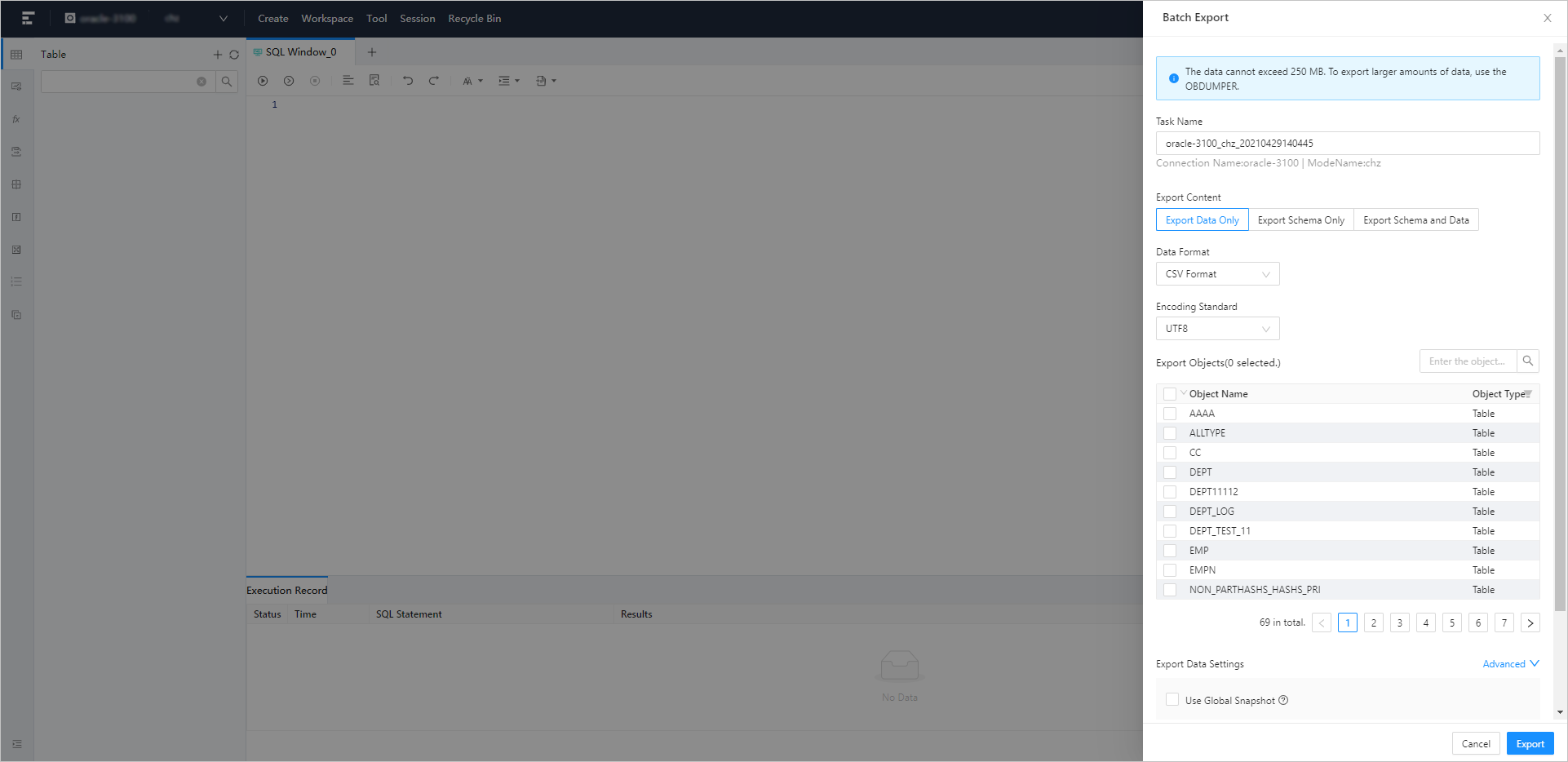
Image 596

Command-line window

The OceanBase client (OBClient) is the recommended command-line client for OceanBase Database. As a graphical user interface (GUI) development tool for OceanBase Database, OceanBase Developer Center (ODC) integrates OBClient in the form of a command-line window. The command-line window allows you to use command lines to develop and manage database features without downloading and installing OBClient. You can execute SQL or PL statements and view the execution results in real time. You can also use the SOURCE command to run files uploaded to your servers.

Image 513

Data mocking

OceanBase Developer Center (ODC) provides the data mocking feature that can generate data based on field types in a table. This can meet your requirement for a large amount of data during database performance tests or feature verification. ODC generates data based on the field types and rules that you specified in the Mock Data panel.

Image 597

Previous topic

Architecture
Last

Next topic

Limits
Next
What is on this page
Database connection management
Workspace
Creation and management of database objects
Session management and properties
Data import and export
Command-line window
Data mocking