







Background
OceanBase Database Proxy (ODP) may forward weak-consistency read requests to a follower. Especially in a read/write splitting scenario, ODP will first forward weak-consistency read requests to a follower. A latency exists between the data saved by a follower and the latest data in the leader. A weak-consistency read request may not read the latest data from a follower.
Generally, a short latency is acceptable in weak-consistency read scenarios, but a long latency is unacceptable in actual business scenarios. In the scenario shown in the following figure, the latency of the data read by the follower is unacceptable for the client, and the client cannot perceive or control the latency of the data read by a weak-consistency read request.
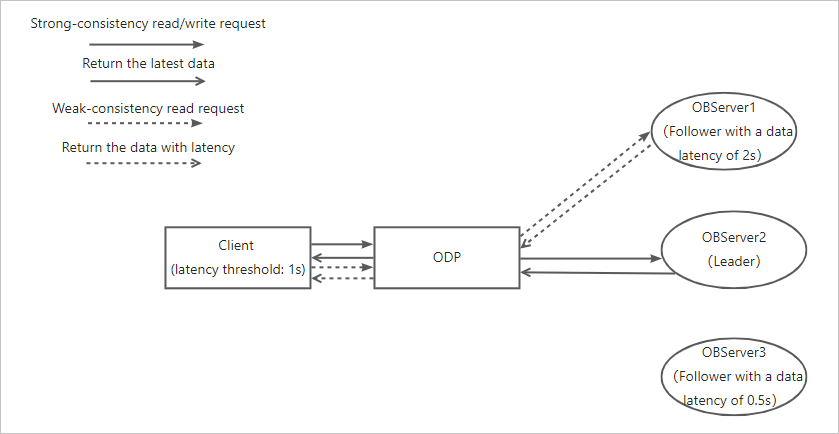
ODP and OceanBase Database provide the follower latency threshold feature to address this issue.
Introduction
The follower latency threshold feature allows you to control the maximum latency of the data read by weak-consistency read requests. Based on the timeout feedback from an OBServer node, ODP forwards the weak-consistency read requests that exceed the latency threshold to other OBServer nodes.
In the preceding scenario, the latency of the OBServer1 node does not meet the expectation of the client. When a weak-consistency request is forwarded to OBServer1, OBServer1 will provide timeout feedback. Then, ODP will route this request to OBServer3. The following figure shows the result.
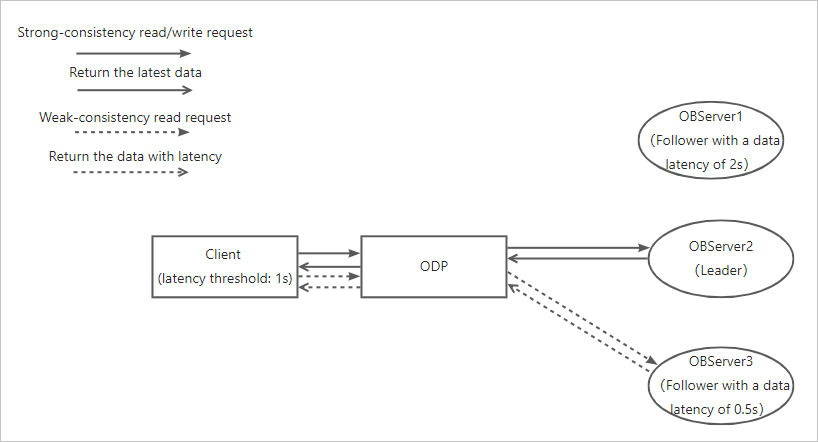
Considerations
You must set the following parameters to adjust the follower latency threshold feature.
read_stale_retry_interval: specifies the time for clearing the latency tags of replicas. The default value is 5s. This is a parameter of ODP.
ob_max_read_stale_time: specifies the maximum latency allowed for data read by weak-consistency read requests. The default value is -1, indicating that this feature is disabled. This is a parameter of ODP. OceanBase Database perceives data latency based on weak-consistency read version numbers. Therefore, the value of this parameter must not be smaller than the refresh interval of weak-consistency read version numbers in OceanBase Database.
weak_read_version_refresh_interval: specifies the refresh interval for weak-consistency read version numbers. This is a parameter of OceanBase Database. The default value is 100 ms in OceanBase Database V4.0.0 and later, and is 50 ms in versions earlier than OceanBase Database V4.0.0. For more information, see weak_read_version_refresh_interval in the OceanBase Database documentation.
Note
This feature depends on the OceanBase 2.0 protocol.
If a data partition has a latency on all followers, ODP will forward all requests that access this data partition to the leader.
Examples
Query the value of the weak_read_version_refresh_interval parameter of OceanBase Database and make sure that the value of ob_max_read_stale_time is not smaller than that of weak_read_version_refresh_interval.
obclient> show parameters like 'weak_read_version_refresh_interval';
| zone  | svr_type | svr_ip        | svr_port | name                               | data_type | value | info                                                                       | section  | scope   | source  | edit_level        |
+-------+----------+-------------+----------+------------------------------------+-----------+-------+----------------------------------------------------------------------------+----------+---------+---------+-------------------+
| zone1 | observer | 10.10.10.1  |     2882 | weak_read_version_refresh_interval | NULL      | 100ms | the time interval to refresh cluster weak read version Range: [50ms, +∞)   | OBSERVER | CLUSTER | DEFAULT | DYNAMIC_EFFECTIVE |
| zone3 | observer | 10.10.10.3 |     2882 | weak_read_version_refresh_interval | NULL      | 100ms | the time interval to refresh cluster weak read version Range: [50ms, +∞)   | OBSERVER | CLUSTER | DEFAULT | DYNAMIC_EFFECTIVE |
| zone2 | observer | 10.10.10.2  |     2882 | weak_read_version_refresh_interval | NULL      | 100ms | the time interval to refresh cluster weak read version Range: [50ms, +∞)   | OBSERVER | CLUSTER | DEFAULT | DYNAMIC_EFFECTIVE |
+-------+----------+-------------+----------+------------------------------------+-----------+-------+----------------------------------------------------------------------------+----------+---------+---------+-------------------+
Log on to the proxysys tenant as the root user and turn on threshold settings related to weak-consistency read.
obclient> alter proxyconfig set enable_ob_protocol_v2=true;
Query OK, 0 rows affected

obclient> alter proxyconfig set enable_reroute='true';
Query OK, 0 rows affected

obclient> alter proxyconfig set ob_max_read_stale_time='800ms';
Query OK, 0 rows affected
In normal cases, the data latency does not exceed the specified value (800 ms) of the ob_max_read_stale_time parameter. The following example sets the NIC latency for the node where the weak-consistency read replica resides to achieve the target data latency.
obclient> select svr_ip, sql_port from oceanbase.__all_virtual_proxy_schema where tenant_name = 'mysql' and database_name = 'test' and table_name = 'test' and sql_port > 0 AND role = 2;
+------------+----------+
| svr_ip     | sql_port |
+------------+----------+
| 10.10.10.2 |     2881 |
| 10.10.10.3 |     2881 |
+------------+----------+
2 rows in set
Initiate a weak-consistency request.
obclient> select /*+READ_CONSISTENCY(WEAK)*/ * from test where c2 = 10;
Empty set
Query the latency tagging records of the weak-consistency read replica.
obclient> show proxysession read_stale;
+-----------------+----------+--------------+----------------------------+
| server_addr     | table_id | partition_id | feedback_time              |
+-----------------+----------+--------------+----------------------------+
| 10.10.10.2:2881 |   500003 |       200002 | 2023-06-25 11:18:03.129081 |
+-----------------+----------+--------------+----------------------------+
Weak-consistency read requests of this partition will no longer be forwarded to this replica within the latency clearing time of this replica, which is specified by the read_stale_retry_interval parameter.
After the time specified by read_stale_retry_interval elapses, ODP will try to forward requests to the tagged replica. If this replica still has a latency, the OBServer node will continue to return weak-consistency read latency feedback. If this replica has got rid of the latency, requests are normally processed.