

OceanBase logo

OceanBase

A unified distributed database ready for your transactional, analytical, and AI workloads.

DEPLOY YOUR WAY

OceanBase Cloud

The best way to deploy and scale OceanBase

OceanBase Enterprise

Run and manage OceanBase on your infra

TRY OPEN SOURCE

OceanBase Community Edition

The free, open-source distributed database

OceanBase seekdb

Open source AI native search database

Customer Stories

Real-world success stories from enterprises across diverse industries.

View All
BY USE CASES

Mission-Critical Transactions

Global & Multicloud Application

Elastic Scaling for Peak Traffic

Real-time Analytics

Active Geo-redundancy

Database Consolidation

Resources

Comprehensive knowledge hub for OceanBase.

Blog

Live Demos

Training & Certification

Documentation

Official technical guides, tutorials, API references, and manuals for all OceanBase products.

View All
PRODUCTS

OceanBase Cloud

OceanBase Database

Tools

Connectors and Middleware

QUICK START

OceanBase Cloud

OceanBase Database

BEST PRACTICES

Practical guides for utilizing OceanBase more effectively and conveniently

Company

Learn more about OceanBase – our company, partnerships, and trust and security initiatives.

About OceanBase

Partner

Trust Center

Contact Us

International - English
中国站 - 简体中文
日本 - 日本語
Sign In
Start on Cloud

A unified distributed database ready for your transactional, analytical, and AI workloads.

DEPLOY YOUR WAY

OceanBase Cloud

The best way to deploy and scale OceanBase

OceanBase Enterprise

Run and manage OceanBase on your infra

TRY OPEN SOURCE

OceanBase Community Edition

The free, open-source distributed database

OceanBase seekdb

Open source AI native search database

Customer Stories

Real-world success stories from enterprises across diverse industries.

View All
BY USE CASES

Mission-Critical Transactions

Global & Multicloud Application

Elastic Scaling for Peak Traffic

Real-time Analytics

Active Geo-redundancy

Database Consolidation

Comprehensive knowledge hub for OceanBase.

Blog

Live Demos

Training & Certification

Documentation

Official technical guides, tutorials, API references, and manuals for all OceanBase products.

View All
PRODUCTS
OceanBase CloudOceanBase Database
ToolsConnectors and Middleware
QUICK START
OceanBase CloudOceanBase Database
BEST PRACTICES

Practical guides for utilizing OceanBase more effectively and conveniently

Learn more about OceanBase – our company, partnerships, and trust and security initiatives.

About OceanBase

Partner

Trust Center

Contact Us

Start on Cloud
编组
All Products
    • Databases
    • iconOceanBase Database
    • iconOceanBase Cloud
    • iconOceanBase Tugraph
    • iconInteractive Tutorials
    • iconOceanBase Best Practices
    • Tools
    • iconOceanBase Cloud Platform
    • iconOceanBase Migration Service
    • iconOceanBase Developer Center
    • iconOceanBase Migration Assessment
    • iconOceanBase Admin Tool
    • iconOceanBase Loader and Dumper
    • iconOceanBase Deployer
    • iconKubernetes operator for OceanBase
    • iconOceanBase Diagnostic Tool
    • iconOceanBase Binlog Service
    • Connectors and Middleware
    • iconOceanBase Database Proxy
    • iconEmbedded SQL in C for OceanBase
    • iconOceanBase Call Interface
    • iconOceanBase Connector/C
    • iconOceanBase Connector/J
    • iconOceanBase Connector/ODBC
    • iconOceanBase Connector/NET
icon

OceanBase Database Proxy

V4.2.0Community Edition

  • What is ODP?
  • Installation and deployment
    • Deploy ODP by using OBD
    • Deploy ODP by using OCP
    • Deploy ODP by using the CLI
    • Deployment modes
  • Basic operations
  • Configuration parameter
    • Parameter description
    • Dynamically modifiable parameters
    • Parameters that are not dynamically modifiable
    • Internal and inherited parameters
    • In-memory parameters
  • Connection management
    • Principles
    • Session status synchronization
    • Client session
    • Server session
  • Data routing
    • Factors affecting data routing
    • Routing strategies
    • ODP routing
    • Intra-tenant routing
    • Read/Write separation
    • Follower latency threshold
  • High availability mechanism
    • Overview
    • High availability of ODP services
    • High availability of OceanBase Database
    • High availability testing
  • Security and protocols
  • Operation and maintenance
    • Troubleshooting
      • Troubleshooting logic
      • Monitoring logs
    • Performance analysis
    • Show Trace

Download PDF

What is ODP? Deploy ODP by using OBD Deploy ODP by using OCP Deploy ODP by using the CLI Deployment modes Basic operations Parameter description Dynamically modifiable parameters Parameters that are not dynamically modifiable Internal and inherited parameters In-memory parameters Principles Session status synchronization Client session Server session Factors affecting data routing Routing strategies ODP routing Intra-tenant routing Read/Write separation Follower latency threshold Overview High availability of ODP services High availability of OceanBase Database High availability testing Security and protocols Troubleshooting logic Monitoring logs Performance analysis Show Trace
OceanBase logo

The Unified Distributed Database for the AI Era.

Follow Us
Products
OceanBase CloudOceanBase EnterpriseOceanBase Community EditionOceanBase seekdb
Resources
DocsBlogLive DemosTraining & Certification
Company
About OceanBaseTrust CenterLegalPartnerContact Us
Follow Us

© OceanBase 2026. All rights reserved

Cloud Service AgreementPrivacy PolicySecurity
Contact Us
Document Feedback
  1. Documentation Center
  2. OceanBase Database Proxy
  3. V4.2.0
iconOceanBase Database Proxy
V 4.2.0Community Edition
  • V 4.3.6
  • V 4.3.4
  • V 4.3.3
  • V 4.3.2
  • V 4.3.1
  • V 4.3.0
  • V 4.2.3
  • V 4.2.2
  • V 4.2.0 and earlier
Community Edition
  • V 4.2.0
  • V 4.1.0
  • V 4.0.0
  • V 3.1.0

Principles

Last Updated:2023-10-10 02:43:33  Updated
share
What is on this page
Background information
Features
Connection mapping
Connection feature

folded

share

Background information

OceanBase Database Proxy (ODP) offers users a range of features including database access and routing. By connecting directly to ODP, users can seamlessly utilize the OceanBase database. During the usage of database features, ODP interacts with OBServer nodes, ensuring a transparent and streamlined interaction process. Notably, connection management plays a crucial role in facilitating this process.

Features

ODP's connection management provides the following features:

  1. Proxy feature: ODP functions as both a client and a server. It ensures that the interaction behavior conforms to the MySQL protocol.

  2. Connection feature: ODP implements many connection functionalities, including accessing different clusters and tenants, and supporting primary and backup databases, prepared statements in distributed architecture, and commands like kill and show processlist.

  3. High availability feature: ODP can handle issues such as timeouts and changes in server or network status, which shields users from backend exceptions.

Connection mapping

When you establish a connection between a client and a standalone database, there is only one physical connection between them, as shown in the following figure.
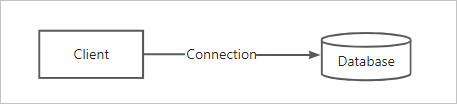
Standalone database

However, when you use ODP to establish a connection between a client and an OceanBase database, the situation is different. As shown in the following figure, there is one physical connection between the client and ODP, while there may be multiple physical connections between ODP and OBServer nodes. The connection between the client and ODP is referred to as a client connection, and the connection between ODP and an OBServer node is referred to as a server connection.
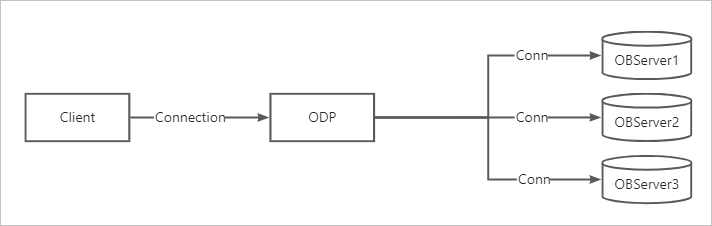
Distributed database

If the data accessed by the client is stored on different OBServer nodes, ODP will establish multiple physical connections with these OBServer nodes. It will also manage and reuse these connections, presenting only one logical connection from the client's perspective. Based on this, ODP can provide a wide range of features, such as primary/standby database splitting, read/write splitting, data access request routing for partitioned tables, prepared statements in distributed architecture, and backend exception shielding.

Connection feature

ODP changes the mapping mode of database connections to M:N. Therefore, some connection functionalities require additional handling. For example, when using the show processlist command to query the number of connections, users want to query the number of connections between the client and ODP, rather than the number of connections between ODP and OBServer nodes.

The following describes several common connection functionalities:

  • Connection stickiness

    ODP has not yet implemented status synchronization for all functionalities, such as transaction status, temporary table status, and cursor status. For these functionalities, ODP will only forward subsequent requests to the node where the status starts, eliminating the need for status synchronization. However, the drawback is that the advantages of a distributed system cannot be fully leveraged. Therefore, ODP will gradually support status synchronization for related functionalities in the order of significance.

  • Combined use of show processlist and kill

    The show processlist command is used to display the connections between the client and the server. For ODP, this command displays only the connection between the client and ODP, not the connections between ODP and OBServer nodes.

    The kill command is used to terminate a client connection. When a client connection is closed, ODP will also close the corresponding server connections. Before using kill to terminate a client connection, you must first obtain the connection ID by using show processlist.

  • Impact on load balancing

    Because ODP handles show processlist and kill, both commands must be sent to the same ODP node to work properly.

    In scenarios that require load balancing, such as a public cloud, multiple ODP nodes are mounted to a load balancer. In this case, if show processlist and kill are sent over two different connections, the load balancer may forward the requests to different ODP nodes. Therefore, we recommend that you do not use these commands in such scenarios.

Previous topic

In-memory parameters
Last

Next topic

Session status synchronization
Next
What is on this page
Background information
Features
Connection mapping
Connection feature