

OceanBase logo

OceanBase

A unified distributed database ready for your transactional, analytical, and AI workloads.

Product Overview
DEPLOY YOUR WAY

OceanBase Cloud

The best way to deploy and scale OceanBase

OceanBase Enterprise

Run and manage OceanBase on your infra

TRY OPEN SOURCE

OceanBase Community Edition

The free, open-source distributed database

OceanBase seekdb

Open source AI native search database

Customer Stories

Real-world success stories from enterprises across diverse industries.

View All
BY USE CASES

Mission-Critical Transactions

Global & Multicloud Application

Elastic Scaling for Peak Traffic

Real-time Analytics

Active Geo-redundancy

Database Consolidation

Resources

Comprehensive knowledge hub for OceanBase.

Blog

Live Demos

Training & Certification

Documentation

Official technical guides, tutorials, API references, and manuals for all OceanBase products.

View All
PRODUCTS

OceanBase Cloud

OceanBase Database

Tools

Connectors and Middleware

QUICK START

OceanBase Cloud

OceanBase Database

BEST PRACTICES

Practical guides for utilizing OceanBase more effectively and conveniently

Company

Learn more about OceanBase – our company, partnerships, and trust and security initiatives.

About OceanBase

Partner

Trust Center

Contact Us

International - English
中国站 - 简体中文
日本 - 日本語
Sign In
Start on Cloud

OceanBase

A unified distributed database ready for your transactional, analytical, and AI workloads.

Product Overview
DEPLOY YOUR WAY

OceanBase Cloud

The best way to deploy and scale OceanBase

OceanBase Enterprise

Run and manage OceanBase on your infra

TRY OPEN SOURCE

OceanBase Community Edition

The free, open-source distributed database

OceanBase seekdb

Open source AI native search database

Customer Stories

Real-world success stories from enterprises across diverse industries.

View All
BY USE CASES

Mission-Critical Transactions

Global & Multicloud Application

Elastic Scaling for Peak Traffic

Real-time Analytics

Active Geo-redundancy

Database Consolidation

Comprehensive knowledge hub for OceanBase.

Blog

Live Demos

Training & Certification

Documentation

Official technical guides, tutorials, API references, and manuals for all OceanBase products.

View All
PRODUCTS
OceanBase CloudOceanBase Database
ToolsConnectors and Middleware
QUICK START
OceanBase CloudOceanBase Database
BEST PRACTICES

Practical guides for utilizing OceanBase more effectively and conveniently

Learn more about OceanBase – our company, partnerships, and trust and security initiatives.

About OceanBase

Partner

Trust Center

Contact Us

Start on Cloud
编组
All Products
    • Databases
    • iconOceanBase Database
    • iconOceanBase Cloud
    • iconOceanBase Tugraph
    • iconInteractive Tutorials
    • iconOceanBase Best Practices
    • Tools
    • iconOceanBase Cloud Platform
    • iconOceanBase Migration Service
    • iconOceanBase Developer Center
    • iconOceanBase Migration Assessment
    • iconOceanBase Admin Tool
    • iconOceanBase Loader and Dumper
    • iconOceanBase Deployer
    • iconKubernetes operator for OceanBase
    • iconOceanBase Diagnostic Tool
    • iconOceanBase Binlog Service
    • Connectors and Middleware
    • iconOceanBase Database Proxy
    • iconEmbedded SQL in C for OceanBase
    • iconOceanBase Call Interface
    • iconOceanBase Connector/C
    • iconOceanBase Connector/J
    • iconOceanBase Connector/ODBC
    • iconOceanBase Connector/NET
icon

OceanBase Database

SQL - V4.6.0

    Download PDF

    OceanBase logo

    The Unified Distributed Database for the AI Era.

    Follow Us
    Products
    OceanBase CloudOceanBase EnterpriseOceanBase Community EditionOceanBase seekdb
    Resources
    DocsBlogWhite PaperLive DemosTraining & CertificationTicket
    Company
    About OceanBaseTrust CenterLegalPartnerContact Us
    Follow Us

    © OceanBase 2026. All rights reserved

    Cloud Service AgreementPrivacy PolicySecurity
    Contact Us
    Document Feedback
    1. Documentation Center
    2. OceanBase Database
    3. SQL
    4. V4.6.0
    iconOceanBase Database
    SQL - V 4.6.0
    Databases
    • OceanBase Database
    • OceanBase Cloud
    • OceanBase Tugraph
    • Interactive Tutorials
    • OceanBase Best Practices
    Tools
    • OceanBase Cloud Platform
    • OceanBase Migration Service
    • OceanBase Developer Center
    • OceanBase Migration Assessment
    • OceanBase Admin Tool
    • OceanBase Loader and Dumper
    • OceanBase Deployer
    • Kubernetes operator for OceanBase
    • OceanBase Diagnostic Tool
    • OceanBase Binlog Service
    Connectors and Middleware
    • OceanBase Database Proxy
    • Embedded SQL in C for OceanBase
    • OceanBase Call Interface
    • OceanBase Connector/C
    • OceanBase Connector/J
    • OceanBase Connector/ODBC
    • OceanBase Connector/NET
    SQL
    KV
    • V 4.6.0
    • V 4.4.2
    • V 4.3.5
    • V 4.3.3
    • V 4.3.1
    • V 4.3.0
    • V 4.2.5
    • V 4.2.2
    • V 4.2.1
    • V 4.2.0
    • V 4.1.0
    • V 4.0.0
    • V 3.1.4 and earlier

    Query processing

    Last Updated:2026-05-07 11:26:24  Updated
    Share
    What is on this page
    Query pushdown

    folded

    Share

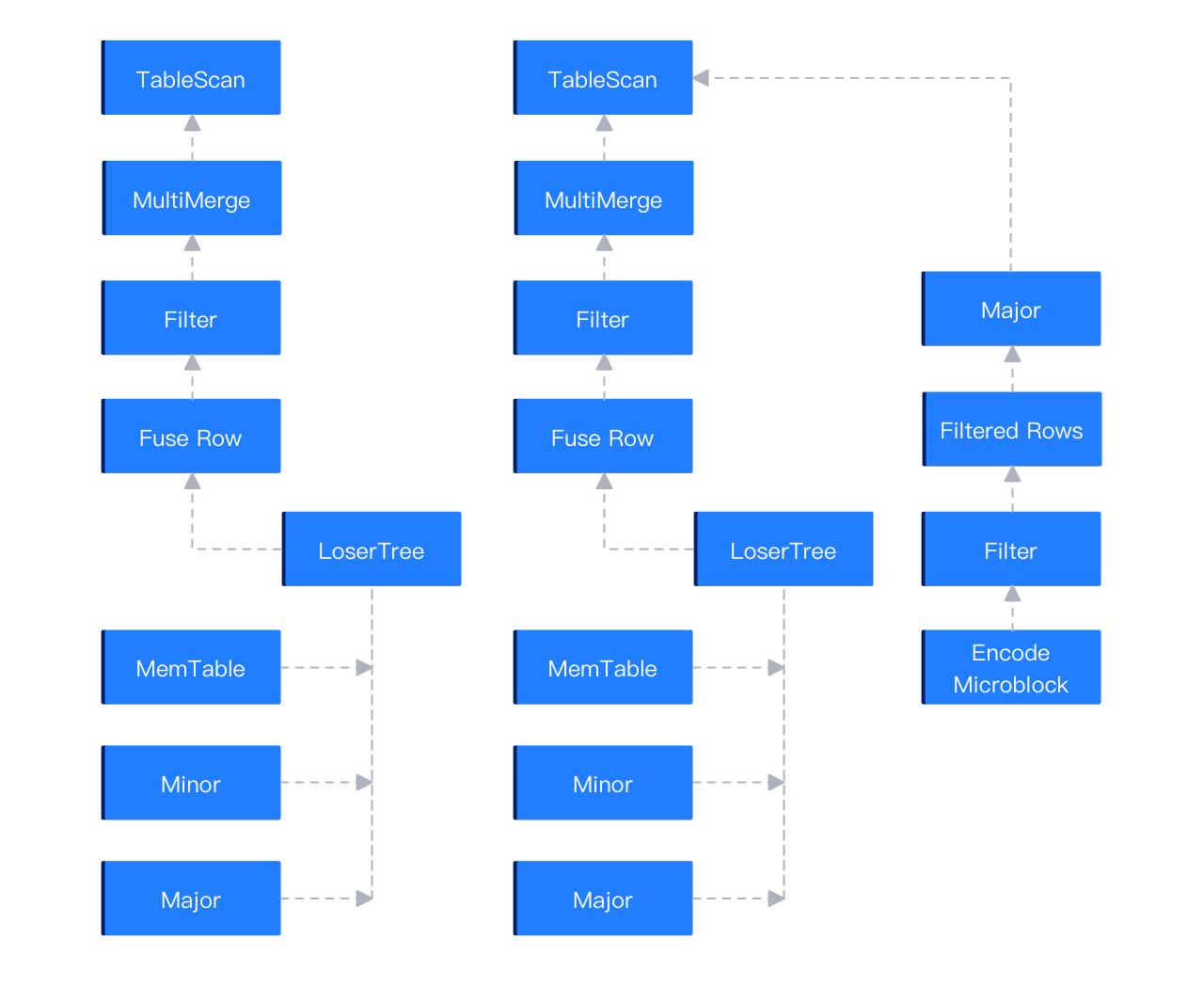
    OceanBase Database uses the table_scan operator of the pull mode to perform iteration. Each row is iterated and then delivered to the SQL layer after the following steps are performed:

    1. Each SSTable locates the macroblock and corresponding microblocks to be scanned by the query range, opens and scans each microblock, and delivers the requested rows as a whole.

    2. The iterators in the MemTable, minor SSTable, and major SSTable iterate the rows, respectively.

    3. The number of rows to be fused is determined by the number of iterators whose current rowkeys are the same based on the loser tree structure.

    4. The result row after the fusion is generated based on the result of the requirement projection.

    5. The filter callback function of SQL is called to check the result row. If the conditions are met, the result row is returned to the upper layer.

    Query pushdown

    If you use a storage engine based on the log-structured merge-tree (LSM tree) architecture, you may encounter the following problems during the query process:

    • Excessive and frequent iterations and primary key comparisons are required. In scenarios such as online analytical processing (OLAP) services, most tables are seldom updated. Data is stored in the baseline major SSTable. The MemTable and minor SSTables store only a small amount of incremental or updated data. In ideal conditions, most paths can be quickly and directly scanned from the major SSTable. Iterator fusion (Major SSTable, MemTable, and Minor SSTable) is required only when primary keys have possible intersections. However, in practice, the storage engine needs to compare each row with the data generated by minor compactions and with the iterators in the MemTable to check whether the primary keys are consistent. This results in low efficiency and eliminates the possibility of scaling for vectorization.

    • Filter operators cannot perform calculations in a timely manner. To ensure the accuracy of final results, all rows must be fused to make sure that the latest data is used. A check on filter operators is performed at last during the iteration of each row.

    • Useless projection is excessively performed. The rows delivered by microblock scanning must make sure that all required columns are projected. After multiple iterations and fusion operations, the rows that meet the filter conditions can be directly returned. However, if the rows do not meet the conditions, other projected columns except those required for filtering are unusable.

    OceanBase Database pushes the filter operators down to the storage layer to resolve these problems, as shown in the following figure.
    Query processing

    1. Operator pushdown: OceanBase Database can quickly identify the situation in which no data intersections are involved. To be specific, OceanBase Database can detect the data range without intersections between the data in the major SSTable and the incremental data. For data within this range, OceanBase Database can access the major SSTable to obtain the latest and final status. Therefore, the filter operators can be directly pushed down for this data range.

    2. Operator filtering: OceanBase Database parses and splits each pushed-down filter expression into an expression tree that is comprehensible to the storage layer. The expression tree contains information about corresponding columns and related filter expressions. The filtering operations can be divided into black-box filtering and white-box filtering based on the complexity of filter conditions.

      1. SQL layer-based filtering (black box): The storage layer cannot process filter conditions with a calculation expression such as a * 2 > 3. These filter conditions need to be processed by calling callback functions of the SQL layer. After the operators are pushed to the decoder layer of microblocks, the operators cannot be further pushed down. OceanBase Database needs to project the corresponding columns based on the filter node information and then call callback functions of the SQL layer to generate the results.

      2. Storage-based filtering (white box): For simple and regular filter conditions, such as a > 1 and b = 'abc', the storage layer can comprehend the semantic and process the filter node. The SQL layer then parses the corresponding operators and constant expressions. In this way, the storage layer can push down this filter node to the decoding rule of each column. This allows you to reduce the projection overhead and make full use of encoding information for acceleration.

    Previous topic

    Multi-level caching in shared storage
    Last

    Next topic

    Detect silent data corruption
    Next
    What is on this page
    Query pushdown