

OceanBase logo

OceanBase

A unified distributed database ready for your transactional, analytical, and AI workloads.

Product Overview
DEPLOY YOUR WAY

OceanBase Cloud

The best way to deploy and scale OceanBase

OceanBase Enterprise

Run and manage OceanBase on your infra

TRY OPEN SOURCE

OceanBase Community Edition

The free, open-source distributed database

OceanBase seekdb

Open source AI native search database

Customer Stories

Real-world success stories from enterprises across diverse industries.

View All
BY USE CASES

Mission-Critical Transactions

Global & Multicloud Application

Elastic Scaling for Peak Traffic

Real-time Analytics

Active Geo-redundancy

Database Consolidation

Resources

Comprehensive knowledge hub for OceanBase.

Blog

Live Demos

Training & Certification

Documentation

Official technical guides, tutorials, API references, and manuals for all OceanBase products.

View All
PRODUCTS

OceanBase Cloud

OceanBase Database

Tools

Connectors and Middleware

QUICK START

OceanBase Cloud

OceanBase Database

BEST PRACTICES

Practical guides for utilizing OceanBase more effectively and conveniently

Company

Learn more about OceanBase – our company, partnerships, and trust and security initiatives.

About OceanBase

Partner

Trust Center

Contact Us

International - English
中国站 - 简体中文
日本 - 日本語
Sign In
Start on Cloud

OceanBase

A unified distributed database ready for your transactional, analytical, and AI workloads.

Product Overview
DEPLOY YOUR WAY

OceanBase Cloud

The best way to deploy and scale OceanBase

OceanBase Enterprise

Run and manage OceanBase on your infra

TRY OPEN SOURCE

OceanBase Community Edition

The free, open-source distributed database

OceanBase seekdb

Open source AI native search database

Customer Stories

Real-world success stories from enterprises across diverse industries.

View All
BY USE CASES

Mission-Critical Transactions

Global & Multicloud Application

Elastic Scaling for Peak Traffic

Real-time Analytics

Active Geo-redundancy

Database Consolidation

Comprehensive knowledge hub for OceanBase.

Blog

Live Demos

Training & Certification

Documentation

Official technical guides, tutorials, API references, and manuals for all OceanBase products.

View All
PRODUCTS
OceanBase CloudOceanBase Database
ToolsConnectors and Middleware
QUICK START
OceanBase CloudOceanBase Database
BEST PRACTICES

Practical guides for utilizing OceanBase more effectively and conveniently

Learn more about OceanBase – our company, partnerships, and trust and security initiatives.

About OceanBase

Partner

Trust Center

Contact Us

Start on Cloud
编组
All Products
    • Databases
    • iconOceanBase Database
    • iconOceanBase Cloud
    • iconOceanBase Tugraph
    • iconInteractive Tutorials
    • iconOceanBase Best Practices
    • Tools
    • iconOceanBase Cloud Platform
    • iconOceanBase Migration Service
    • iconOceanBase Developer Center
    • iconOceanBase Migration Assessment
    • iconOceanBase Admin Tool
    • iconOceanBase Loader and Dumper
    • iconOceanBase Deployer
    • iconKubernetes operator for OceanBase
    • iconOceanBase Diagnostic Tool
    • iconOceanBase Binlog Service
    • Connectors and Middleware
    • iconOceanBase Database Proxy
    • iconEmbedded SQL in C for OceanBase
    • iconOceanBase Call Interface
    • iconOceanBase Connector/C
    • iconOceanBase Connector/J
    • iconOceanBase Connector/ODBC
    • iconOceanBase Connector/NET
icon

OceanBase Database

SQL - V4.6.0

    Download PDF

    OceanBase logo

    The Unified Distributed Database for the AI Era.

    Follow Us
    Products
    OceanBase CloudOceanBase EnterpriseOceanBase Community EditionOceanBase seekdb
    Resources
    DocsBlogWhite PaperLive DemosTraining & CertificationTicket
    Company
    About OceanBaseTrust CenterLegalPartnerContact Us
    Follow Us

    © OceanBase 2026. All rights reserved

    Cloud Service AgreementPrivacy PolicySecurity
    Contact Us
    Document Feedback
    1. Documentation Center
    2. OceanBase Database
    3. SQL
    4. V4.6.0
    iconOceanBase Database
    SQL - V 4.6.0
    Databases
    • OceanBase Database
    • OceanBase Cloud
    • OceanBase Tugraph
    • Interactive Tutorials
    • OceanBase Best Practices
    Tools
    • OceanBase Cloud Platform
    • OceanBase Migration Service
    • OceanBase Developer Center
    • OceanBase Migration Assessment
    • OceanBase Admin Tool
    • OceanBase Loader and Dumper
    • OceanBase Deployer
    • Kubernetes operator for OceanBase
    • OceanBase Diagnostic Tool
    • OceanBase Binlog Service
    Connectors and Middleware
    • OceanBase Database Proxy
    • Embedded SQL in C for OceanBase
    • OceanBase Call Interface
    • OceanBase Connector/C
    • OceanBase Connector/J
    • OceanBase Connector/ODBC
    • OceanBase Connector/NET
    SQL
    KV
    • V 4.6.0
    • V 4.4.2
    • V 4.3.5
    • V 4.3.3
    • V 4.3.1
    • V 4.3.0
    • V 4.2.5
    • V 4.2.2
    • V 4.2.1
    • V 4.2.0
    • V 4.1.0
    • V 4.0.0
    • V 3.1.4 and earlier

    OceanBase Connector/ODBC

    Last Updated:2026-05-07 11:26:24  Updated
    Share
    What is on this page
    Application
    Driver manager
    OceanBase Connector/ODBC
    ODBC.INI
    OBServer node

    folded

    Share

    Open Database Connectivity (ODBC) is developed to share data between heterogeneous databases. It has become a main component of the Windows Open System Architecture (WOSA) and a standard for database access interfaces in Windows. ODBC provides a unified interface for accessing heterogeneous databases. It allows applications to access data managed by different database management systems (DBMSs) based on SQL. Therefore, applications can directly manipulate data in databases regardless of the database design. ODBC allows you to access database files on all types of computers, as well as non-database objects such as Excel files and ASCII data files.

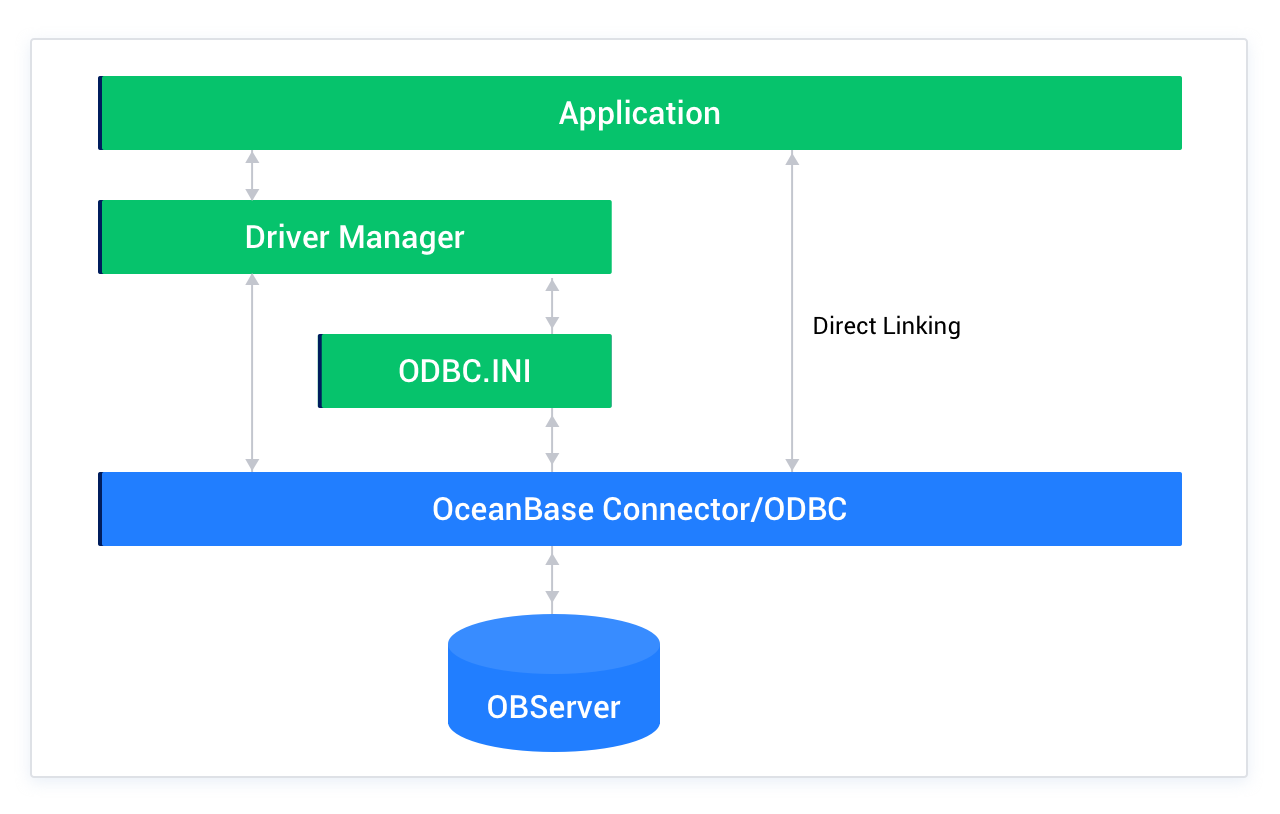
    OceanBase Connector/ODBC is developed based on the MySQL ODBC driver. This driver allows you to use the new data models provided by OceanBase Database, such as arrays. The following figure shows the architecture of OceanBase Connector/ODBC.
    odbc-architecture.png

    Application

    An application accesses data on an OBServer node by using a standard ODBC API. Then the ODBC API communicates with the driver manager. To access data, the application only needs to know the data source name (DSN), without knowing where or how the data is stored or how the system is configured.

    The following tasks are universal for any applications that use ODBC:

    • Select and connect to an OBServer node.

    • Submit SQL statements for execution.

    • Search for execution results, if any.

    • Handle errors.

    • Commit or roll back transactions that contain the SQL statements.

    • Disconnect from the OBServer node.

    Most data access operations are performed through SQL statements. Therefore, applications that use OceanBase Connector/ODBC mainly need to submit SQL statements and search for execution results of the statements.

    Driver manager

    The driver manager is a library that manages communication between applications and drivers. It performs the following tasks:

    • Parses the DSN used to connect to the database. Database connection information is identified by the DSN. The DSN is a configuration string that identifies a database driver, a database, a database host, and optional identity authentication information. Any applications compatible with ODBC can use the same preconfigured DSN to connect to the data source.

    • Loads and unloads the driver required for accessing the database defined in the DSN. For example, after you configure a DSN for connecting to an OceanBase database, the driver manager loads OceanBase Connector/ODBC so that the ODBC API can communicate with OBServer nodes.

    • Handles ODBC function calls or passes them to drivers.

    OceanBase Connector/ODBC

    OceanBase Connector/ODBC is a library used to implement the functions supported by the ODBC API. It is used to handle ODBC function calls, submit SQL requests to OBServer nodes, and return results to applications. It allows you to modify the requests from applications to make them comply with the syntax specifications of OceanBase Database.

    ODBC.INI

    The ODBC.INI configuration file stores the driver and database information required for connecting to an OBServer node. Based on the DSN defined in the ODBC.INI configuration file, the driver manager can determine the driver to be loaded, and the driver can read connection parameters.

    OBServer node

    An OBServer node stores the information of OceanBase Database. Query operations can fetch data from the database, and insert and update operations can act on data in the database.

    Previous topic

    OceanBase Connector/C
    Last

    Next topic

    OMA
    Next
    What is on this page
    Application
    Driver manager
    OceanBase Connector/ODBC
    ODBC.INI
    OBServer node