







FAQ about columnar storage
What is a columnar format?
OceanBase Columnar Storage is a hybrid data storage mode in which data is stored in a columnar format on disk and in a rowar format in memory for scanning performance and transaction processing.
For analytical queries, columnar stores significantly boost query performance, making columnar storage a crucial feature in OceanBase for delivering HTAP capabilities. In a traditional AP database, columnar data is typically static and challenging to update in-place. However, OceanBase's LSM tree architecture features static SSTables, inherently well-suited for columnar storage. MemTables are dynamic and still row-oriented, but their usage does not interfere with transaction processing, allowing us to balance performance for both TP and AP queries.
What is a columnstore index?
OceanBase Database also supports columnstore indexes, which are different from indexing columns. A columnstore index has a columnstore structure.
For example, we already have a row-store table named t6. If we want to sum the values in the c3 column with the best performance, we can create a columnar index for the c3 column.
create table t6(
c1 TINYINT,
c2 SMALLINT,
c3 MEDIUMINT
);
create /*+ parallel(2) */ index idx1 on t6(c3) with column group (each column);
In addition to these index creation methods, the system also supports additional index creation options.
Allows storing redundant rows within an index.
create index idx1 on t1(c2) storing(c1) with column group(all columns, each column); alter table t1 add index idx1 (c2) storing(c1) with column group(all columns, each column);Support for pure columnar storage in indexes.
create index idx1 on t1(c2) storing(c1) with column group(each column); alter table t1 add index idx1 (c2) storing(c1) with column group(each column);
The purpose of using the STORING clause in a database index is to store additional non-indexed column data within the index. This allows for performance optimization by eliminating the need to access the main table and reduces the cost of index sorting. When a query only needs to access columns stored in the index and does not require accessing the original rows from the main table, query performance is significantly enhanced.
FAQ about columnstore tables and columnstore replicas
The following content refers to "columnstore replica" as C replica.
What's the difference between a column store table and a column store replica? What is the relationship between them?
They describe different dimensions of:
Columnstore tables: Per-table storage form, such as rowstore, pure columnstore, hybrid row and column, etc. are specified by
WITH COLUMN GROUPordefault_table_store_format. Data is physically stored on F (Fully functional) / R (Read-only) replicas of the tenant. In these replicas, MemTables and their flushes remain row-organized. Base tables can be stored columnar or redundantly, combining rows and columns. Reading integrates incremental and baseline data. For consistent reads that follow the semantic paths, strong consistent reads aligned with replica role (in accordance with transaction and isolation levels) are guaranteed by default.Column-oriented replica (C-Replica): A type of independent replica that typically resides in a separate zone and does not participate in Paxos leader elections or voting. Data is asynchronously synchronized from the front-replica (F-R) using logs. The local major compaction layer primarily uses columnar storage to hold user table data. For the same logical table, the F/R may use row or hybrid storage while the C-Replica uses columnar storage, which helps achieve resource isolation between AP and TP systems.
Relationships: They are independent. Columnstore tables can be created in a tenant without C replicas (data exists only in F/R columnstore or hybrid storage mode). In a tenant with C replicas, F/R columnstore and C replicas can provide read-only analytics in columnstore mode. Columnstore tables can also coexist with C replicas, configured as needed.
- Read Consistency: The C-Replica lag behind the log source; analytics queries accessing the C-Replica via ODP and other methods often follow the weak read strategy. If you require an exact copy of the log as in TP mode with no C-Replica lag, it is recommended to prioritize completing the analysis on a columnstore table or hybrid row-column table on F/R.
Do I need a columnar replica to create a columnar table? Can I create a columnar table on a Full replica?
It is also possible to create columnar tables on Full (F) replicas without the need for columnar replicas.
Columnstore tables are configured at the table level with the WITH COLUMN GROUP option during table creation or through the tenant-level parameter default_table_store_format. As long as the tenant has F/R replicas, a columnstore table can be created in any Locality (e.g., F@zone1, F@zone2) or with a mixed row/column storage format for the same Locality. The data will be stored in the F/R replicas either as a columnstore or with a mix of row and columnar storage formats, depending on the configuration. Optional C replicas can be deployed separately for physical or logical isolation of TP (transaction processing) or AP (analytics) workloads and for read-only analytical traffic. The presence of a columnstore table is independent of C replicas.
Can OceanBase Database directly create a pure columnar table or must it be based on a rowstore table?
Direct creation of a pure column store table is supported without being based on a row store table.
Specifying WITH COLUMN GROUP (each column) when creating a table results in a pure columnstore table (columnstore baseline only, no rowstore baseline). For example:
CREATE TABLE t (pk INT PRIMARY KEY, c1 INT, c2 INT) WITH COLUMN GROUP (each column);
In a partitioned table, the primary key columns will keep an extra copy of row data for point lookups, but it's still regarded as a purely columnar storage table. Alternatively, you can create a rowstore table and convert it to a columnar table by using DDL statements like ALTER TABLE ... ADD COLUMN GROUP (each column);. For more information, see the section titled "How to create a columnar table?".
How is the data consistency between columnar and row-oriented tables ensured? What is the latency if it is asynchronous?
There are two scenarios:
- Column-based tables (in F/R replicas): The baseline uses columnar or hybrid storage layouts, while increments are organized row-wise in a MemTable or SST. When reading, increments are merged with the baseline. Under default F/R semantics, this ensures strong consistency across replicas without additional latency.
- Column-oriented replica (C replica): A C replica does not participate in Paxos protocols and asynchronously follows the data of the front-end (F) replica or read-only replica (R) replica by replaying the logs. A C replica may have a certain lag to the logs of the corresponding F or R replica. For versions earlier than V4.6.0, the queries read from a C replica have only weak consistency. For V4.6.0 and later, you can configure a C replica to support strong read, which can ensure high consistency. A strong read waits for the C replica to be caught up with the F or R replica. This type of read has a high latency. To ensure complete consistency with the F/R replicas, you are advised to complete the analytical query on the column-oriented table or hybrid table on F/R replicas.
How are TP and AP traffic separated? What happens if AP fails?
**Traffic splitting: **
- No C-Replication: TP and AP share the same set of F/R replicas and access points, with the optimizer automatically selecting between row/column storage paths. No physical isolation at the TP/AP cabinet or link level.
- There is a C replica: Typically, TP operations go through the read/write entry point of the F/R (strong read/write). For AP operations, an independent ODP is used, and weak reads are configured on the ODP side, routing requests to the C replica (e.g.,
proxy_primary_zone_name,route_target_replica_type = 'ColumnStore', andinit_sql='set @@ob_route_policy = COLUMN_STORE_ONLY'). This ensures a decoupling between TP/AP and the C replica. For more information about O&M and replica management, see Deploy and use columnstore replicas.
Disaster recovery on (C)AP replica nodes:
- You cannot restore a C-Replica as the leader. The physical restore of a C-Replica is not supported. If a C-Replica is included in the tenant's locality, the restore will fail. If the primary database does not have a C-Replica, the standby database is not recommended to have a C-Replica.
- If the Zone or ODP where the C replicas are located is faulty, AP queries can fall back to F/R replicas: change the AP client to connect to the primary ODP or adjust the routing to execute the analytical query on the F/R replica (which shares resources with TP).
- In V4.3.5 BP1 and later, you can deploy multiple C replicas (up to 3 in recommended). You can deploy C replicas across zones and distribute AP read traffic using multiple independent ODPs and routing configurations to ensure redundancy and high availability.
FAQ on Accessing and Routing Columnstore Replicas
Why is an independent ODP usually required to access a C replica?
In OceanBase Database V4.3.5, to isolate the AP traffic from the TP link and route it stably to the C replica, a common practice is to deploy a dedicated ODP for the C replica and configure weak reads and columnar routing strategies on that ODP. For detailed steps, see Deploy and use columnstore replicas.
Where should the independent ODP be deployed? Is an exclusive server required?
It is not mandatory. The independent ODP can be deployed on any host that is network-accessible to the cluster. The documentation recommends standalone deployment primarily to reduce the risk of resource contention with OBServer nodes, rather than being a protocol or product limitation.
What is the relationship between proxy_idc_name and columnstore replica routing?
proxy_idc_name is mainly used for data center affinity (LDC) routing. Whether a request is routed to a C replica falls under the replica selection dimension. Both can be used simultaneously, but should be configured and verified separately.
For details, see ODP read/write splitting and routing policies and LDC routing.
How to create a columnar table?
First, create a hybrid row-columnstore table.
- Non-partitioned table:
create table t1(
c1 TINYINT,
c2 SMALLINT,
c3 MEDIUMINT
) with column group (all columns, each column);
- Partitioned table:
create table t2(
pk int,
c1 int,
c2 int,
primary key (pk)
)
partition by hash(pk) partitions 4
with column group (all columns, each column);
When creating a hybrid row-columnstore table, the with column group (all columns, each column) syntax is always used. This syntax means the following:
all columns: All columns are grouped together as a wide column and stored row by row. This is essentially the same as the original rowstore.each column: Each column is stored in columnar format.
When both all columns and each column are used together, it means that after creating a columnstore table, the data is redundantly stored in both rowstore and columnstore formats. Each replica stores two copies of the baseline data. However, it's worth noting that regardless of how many baseline data copies there are, the incremental data in the memtable and the dump is still shared.
Next, create a pure columnstore table.
- Non-partitioned table:
create table t3(
c1 TINYINT,
c2 SMALLINT,
c3 MEDIUMINT
) with column group (each column);
- Partitioned table:
create table t4(
pk1 int,
pk2 int,
c1 int,
c2 int,
primary key (pk1, pk2)
)
partition by hash(pk1) partitions 4
with column group (each column);
For the t4 table, a columnstore is created for each of the columns pk1, pk2, c1, and c2, and a rowstore is created for the combination of (pk1, pk2).
How do I make a tenant's default table type columnstore?
Set a tenant-level parameter:
alter system set default_table_store_format = "column";
You can also set the default table type to rowstore or to both rowstore and columnstore:
alter system set default_table_store_format = "row"; //rowstore
alter system set default_table_store_format = "compound"; //both rowstore and columnstore
What are the recommended configurations for columnstore?
# Set the collation to utf8mb4_bin, which can improve performance by 15%.
set global collation_connection = utf8mb4_bin;
set global collation_server = utf8mb4_bin;
set global ob_query_timeout= 10000000000;
set global ob_trx_timeout= 100000000000;
set global ob_sql_work_area_percentage=30;
set global max_allowed_packet=67108864;
# Recommended value is 10 times the number of CPU cores.
set global parallel_servers_target=1000;
set global parallel_degree_policy = auto;
set global parallel_min_scan_time_threshold = 10;
# Limit the maximum degree of parallelism when parallel_degree_policy is set to auto.
# A high degree of parallelism may cause performance issues. The recommended value is cpu_count * 2.
set global parallel_degree_limit = 0;
alter system set compaction_low_thread_score = cpu_count;
alter system set compaction_mid_thread_score = cpu_count;
alter system set default_table_store_format = "column";
Note
In the preceding code, cpu_count indicates the value of min_cpu specified when the tenant was created.
How do I determine whether a query is executed in columnstore mode?
When a query is executed in rowstore mode, the explain statement displays TABLE FULL SCAN. When a query is executed in columnstore mode, the explain statement displays COLUMN TABLE FULL SCAN. For example, the following statement accesses the t5 table:
create table t5(
c1 TINYINT,
c2 SMALLINT,
c3 MEDIUMINT,
c4 INT,
c5 INT,
PRIMARY KEY(c1, c2)
) with column group(all columns, each column);
OceanBase(admin@test)>explain select c1,c2 from t5;
+------------------------------------------------------------------------+
| Query Plan |
+------------------------------------------------------------------------+
| =============================================== |
| |ID|OPERATOR |NAME|EST.ROWS|EST.TIME(us)| |
| ----------------------------------------------- |
| |0 |TABLE FULL SCAN|t5 |1 |3 | |
| =============================================== |
| Outputs & filters: |
| ------------------------------------- |
| 0 - output([t5.c1], [t5.c2]), filter(nil), rowset=16 |
| access([t5.c1], [t5.c2]), partitions(p0) |
| is_index_back=false, is_global_index=false, |
| range_key([t5.c1], [t5.c2]), range(MIN,MIN ; MAX,MAX)always true |
+------------------------------------------------------------------------+
11 rows in set (0.011 sec)
OceanBase(admin@test)>explain select c1 from t5;
+------------------------------------------------------------------------+
| Query Plan |
+------------------------------------------------------------------------+
| ====================================================== |
| |ID|OPERATOR |NAME|EST.ROWS|EST.TIME(us)| |
| ------------------------------------------------------ |
| |0 |COLUMN TABLE FULL SCAN|t5 |1 |3 | |
| ====================================================== |
| Outputs & filters: |
| ------------------------------------- |
| 0 - output([t5.c1]), filter(nil), rowset=16 |
| access([t5.c1]), partitions(p0) |
| is_index_back=false, is_global_index=false, |
| range_key([t5.c1], [t5.c2]), range(MIN,MIN ; MAX,MAX)always true |
+------------------------------------------------------------------------+
11 rows in set (0.003 sec)
Can I add or drop columns in a columnstore table?
Yes, you can add or drop columns.
You can increase or decrease the length of a VARCHAR column.
Columnstore tables support various offline DDL operations, similar to rowstore tables.
For more information about columnstore modifications, see Convert a table from rowstore to columnstore (MySQL mode) and Convert a table from rowstore to columnstore (Oracle mode).
What are the characteristics of queries on columnstore tables?
In a hybrid row-columnstore table, range scans are executed in columnstore mode by default, while point get queries fall back to rowstore mode.
In a pure columnstore table, all queries are executed in columnstore mode.
Does columnstore support transactions, and what are the limitations on transaction size?
Yes, columnstore supports transactions, and there are no limitations on transaction size. It provides high consistency.
Are there any special features for log synchronization, backup, and restore in columnstore tables?
No, columnstore tables are the same as rowstore tables in this regard. The synchronized logs are in rowstore mode.
Can I convert a rowstore table to a columnstore table by using DDL?
Yes. You can add columnstore storage and drop rowstore storage. Here is an example:
create table t1( pk1 int, c2 int, primary key (pk1));
alter table t1 add column group(all columns, each column);
alter table t1 drop column group(all columns, each column);
alter table t1 add column group(each column);
alter table t1 drop column group(each column);
Note
After you execute alter table t1 drop column group(all columns, each column);, you do not need to worry about the absence of a column group to store data. All columns are stored in a default column group named DEFAUTL COLUMN GROUP.
Can I group multiple columns together in columnstore?
In OceanBase Database V4.3.0, you can either store each column separately or store all columns together as a rowstore. You cannot store a subset of columns together.
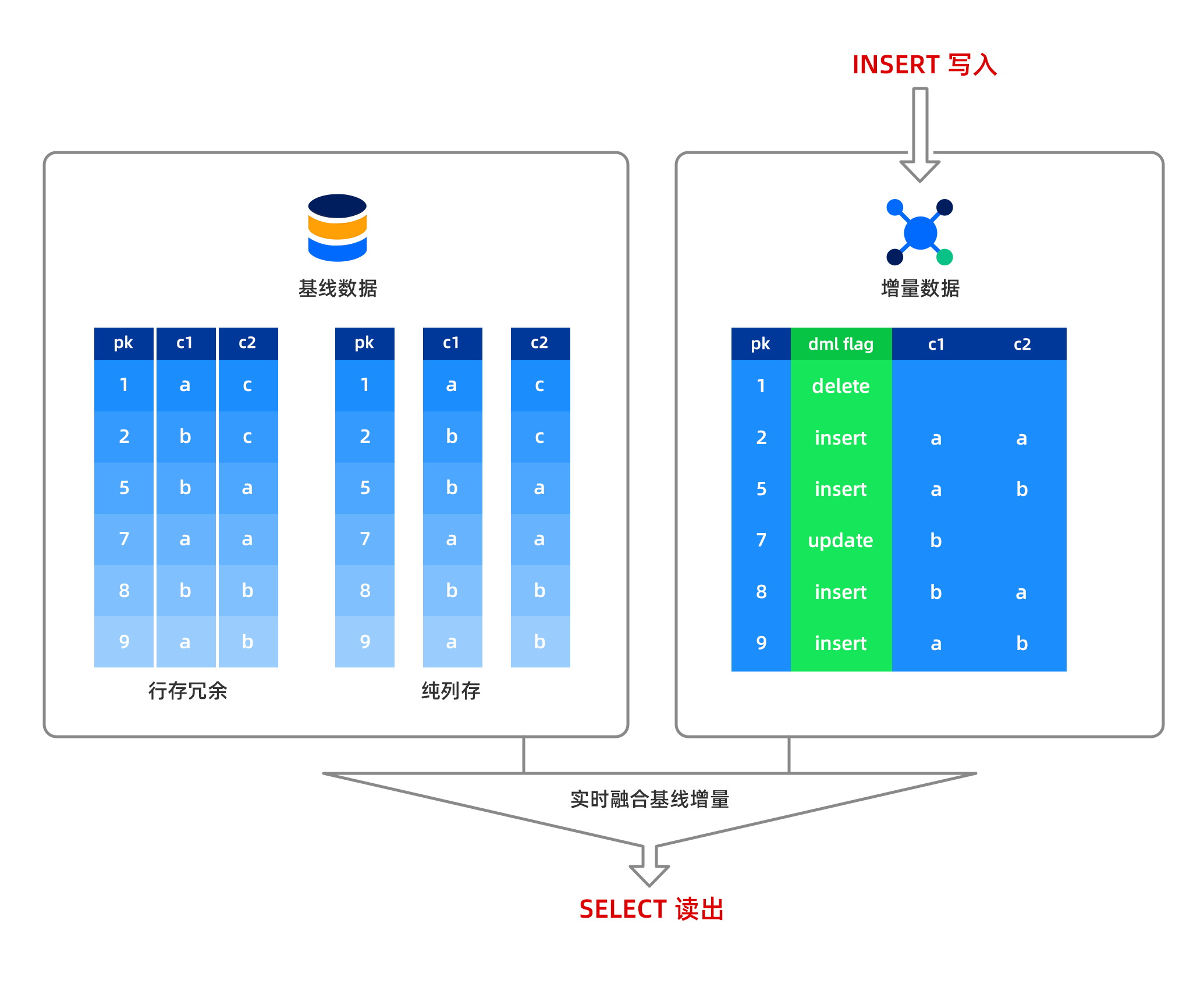
Does OceanBase Database support updates for columnar tables? What is the structure of data in a MemTable?
In OceanBase Database, insert, update, and delete operations are performed in memory, and the data is stored in a row-based format in the MemTable. Baseline data is read-only and stored in a columnar format on disk. When a column of data is read, the system combines the row-based data from the MemTable with the columnar data from the disk in real time and returns the result to the user. This means that OceanBase Database supports strong-consistency reads for columnar data, with no data latency. Data written to the MemTable can be dumped, and the dumped data is still stored in a row-based format. After a major compaction, the row-based data and baseline columnar data are combined to form new baseline columnar data.
Notice
For columnar tables, if there are a large number of update operations and no major compaction is performed in a timely manner, query performance will be affected. Therefore, it is recommended to perform a major compaction after batch data import to achieve optimal query performance. However, a small number of update operations will not significantly impact performance.
What are the characteristics of queries on columnar tables?
In a redundant rowstore table, columnar table queries default to using range scans in columnar mode, while point get queries fall back to rowstore mode.
In a pure columnar table, all queries use columnar mode.
Can an index be created on a column of a columnar table?
Yes. OceanBase Database does not differentiate between creating an index on a columnar table or a rowstore table. The index structures are the same.
Creating an index on one or more columns of a columnar table allows for the construction of a covering index, which can improve point query performance, or for sorting specific columns to enhance sorting performance.
What is the maximum number of columns supported?
Currently, a columnar table can support up to 4,096 columns.
What are the considerations when using columnar tables?
First, after batch data import, it is recommended to perform a major compaction to optimize read performance. After data import, trigger a major compaction within the tenant to ensure all data is baseline. Execute alter system major freeze; within the tenant, and then run select STATUS from CDB_OB_MAJOR_COMPACTION where TENANT_ID = tenant_id; in the system tenant to check if the major compaction is complete. When the STATUS changes to IDLE, the major compaction is complete.
Second, after a major compaction, it is recommended to collect statistics. The method for collecting statistics is as follows:
In a business tenant, collect statistics for all tables in one click, starting 16 threads for concurrent collection:
CALL DBMS_STATS.GATHER_SCHEMA_STATS ('db', granularity=>'auto', degree=>16);You can monitor the progress of statistics collection by querying the
GV$OB_OPT_STAT_GATHER_MONITORview.
Third, you can use the full direct load feature to batch import data. Tables imported using this method do not require a major compaction to achieve optimal columnar scan performance. Tools that support full direct load include obloader and the native LOAD DATA command.
Fourth, for scenarios other than large wide tables, using columnar tables may not be necessary to achieve performance comparable to columnar tables. This is due to the row-column hybrid storage architecture at the microblock level in OceanBase Database's rowstore version (do not be surprised if you encounter this).
Fifth, the performance of large tables differs between cold runs and hot runs.
Sixth, the optimizer automatically selects whether to use rowstore or columnar mode for accessing columnar data based on cost estimation.
Seventh, the major compaction of columnar tables will be slower.
Are there any special considerations for log synchronization, backup, and restore for columnar tables?
No. The synchronization and backup/restore processes for columnar tables are the same as those for rowstore tables. The synchronized logs are in rowstore mode.
FAQ about data import and migration
What is bypass import? How do I perform a bypass import?
Bypass import is a method of data import that accelerates data import and query. For large tables, we recommend that you use bypass import. Currently, the load data command and the insert into select statement support bypass import. For more information, see Overview of direct load.
Can I use Flink CDC to synchronize data from other databases to OceanBase Database?
Yes. For more information, see Use Flink CDC to synchronize data from a MySQL database to OceanBase Database.
Can I use Flink connectors to access OceanBase Database?
Yes. For more information, see https://github.com/oceanbase/flink-connector-oceanbase.
FAQ about performance tuning
What are other ways to further improve AP Query performance?
Based on some practical experience, first, if there are no special sorting requirements, do not use the utf8mb4 character set when creating tables; instead, use the binary character set to improve performance. For example:
create table t5(c1 TINYINT, c2 VARVHAR(50)) CHARSET=binary with column group (each column);
Second, if users or businesses can accept it, specify the utf8mb4_bin character set when creating tables for MySQL tenants by using the following syntax: CHARSET = utf8mb4 collate=utf8mb4_bin.
Additionally, increasing the IOPS of a unit can accelerate direct load.
What are the characteristics of the optimizer for columnar storage?
Compared with the optimizer for row-based storage, the optimizer for columnar storage has the following features:
- The ability to autonomously select between row-based and columnar storage.
- The ability to control the selection of row-based or columnar storage using hints at the table level.
- Adapted plan cost calculation for columnar storage.
- Late materialization optimization for columnar storage.