







You can choose the appropriate product form, deployment solution, and deployment method as needed.
Select the appropriate product form
OceanBase Database offers two editions: Enterprise Edition and Community Edition:
- OceanBase Database Enterprise Edition: A fully self-developed enterprise-grade native distributed database that delivers financial-grade high availability on commodity hardware. It pioneered the "five IDCs across three regions" deployment model, setting a new standard for automatic, lossless city-level disaster recovery. It has set world records in the TPC-C benchmark test and supports single clusters of over 1,500 nodes. It features cloud-native architecture, strong consistency, and high compatibility with Oracle/MySQL.
- OceanBase Database Community Edition: A fully self-developed, open-source database that is compatible with MySQL. It integrates standalone and distributed deployment and features a native distributed architecture. It supports enterprise-grade capabilities such as financial-grade high availability, transparent horizontal scaling, distributed transactions, multi-tenancy, and syntax compatibility.
For more information about the feature differences between OceanBase Database Enterprise Edition and Community Edition, see Feature differences between Enterprise Edition and Community Edition.
Select the appropriate deployment solution
OceanBase Database supports high availability and disaster recovery at the single-machine (OceanBase cluster deployed in a single IDC), IDC (OceanBase cluster deployed across multiple IDCs within the same city; collectively referred to as IDCs hereinafter), and city (OceanBase cluster deployed across multiple cities) levels. It supports single-IDC, dual-IDC, three-IDCs-across-two-regions, and five-IDCs-across-three-regions deployments. It also supports deploying an arbitration service to reduce costs.
For detailed information about each deployment solution, see Introduction to OceanBase cluster high availability deployment solutions.
Select the appropriate deployment method
Product Form |
Application scenarios |
Recommended deployment method |
Deployment Tools |
|---|---|---|---|
| OceanBase Enterprise Edition | Production Environment | We recommend that you deploy OceanBase clusters using OCP. For more information, see Deploy a three-replica OceanBase cluster by using OCP. |
OAT + OCP |
| OceanBase Enterprise Edition | Non-production environment | You can deploy an OceanBase cluster using the command line. For more information, see Deploy a three-replica OceanBase cluster by using the command line. |
oatcli command-line tool |
| OceanBase Database Community Edition | Production Environment | We recommend that you use OBD for standard deployment. For more information, see Deploy an OceanBase cluster on the OBD console. |
obd |
| OceanBase Database Community Edition | Kubernetes environment | We recommend that you deploy it using the OB-Operator. For more information, see Deploy OceanBase Database in a Kubernetes cluster. |
ob-operator |
| OceanBase Database Community Edition | Quick experience scenarios on non-native operating systems (such as macOS and Windows) | We recommend that you deploy OceanBase Database using Docker images. For more information, see Solution 3: Deploy the OceanBase container environment in Deploy OceanBase Database in a container environment. |
|
| OceanBase Database Community Edition | Quick experience scenarios on natively supported operating systems (Linux series, see the list of supported operating systems for details) | We recommend that you use OBD for deployment. For specific operations, see Scenario 1: Deploy an OceanBase demonstration environment or Scenario 2: Deploy an OceanBase cluster environment in the Quick start/Quickly deploy OceanBase Database topic of the official documentation. | obd |
Plan your resources
Before deploying with the selected deployment solution, you need to plan and prepare the required resources.
- For server configuration requirements, see Prepare servers.
Deploy column store replicas
To support TP-enhanced mixed-load (quasi-real-time decision analysis) scenarios, OceanBase Database supports read-only column store replicas (Column Store Replica, C replica). You can deploy column store replicas on independent zones. On a column store replica, user tables (including replicated tables, but excluding index tables, internal tables, and system tables) are stored in columnar format.
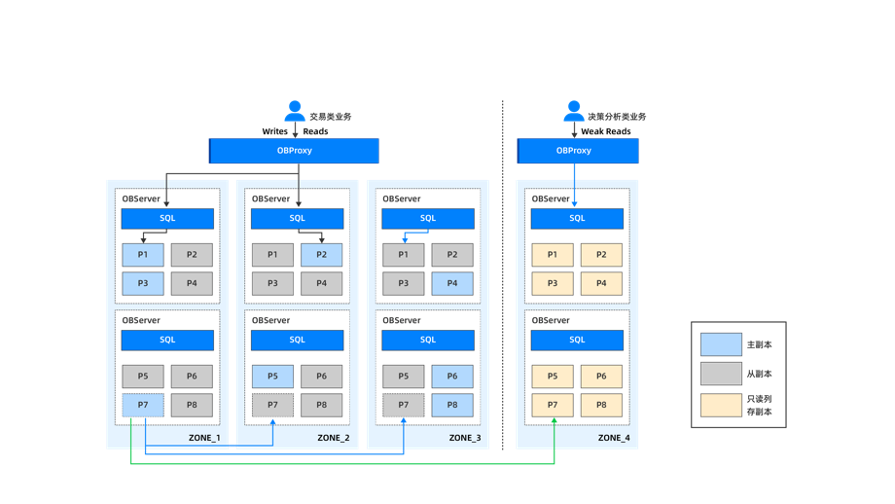
After a tenant deploys column store replicas (C replicas) in a locality, accessing these C replicas requires deploying a separate set of ODP (ODP V4.3.2+), and configuring weak reads and column store routing on the ODP side to allow OLAP requests to reach the column store replicas via methods like weak reads. For deployment and configuration steps, see Deploy and use column store replicas.