







OceanBase Database is suitable for hybrid transaction/analytical processing (HTAP) scenarios. OceanBase Database adopts a distributed architecture based on peer nodes. This architecture allows OceanBase Database to handle high-concurrency and scalable online transaction processing (OLTP) tasks and perform parallel computing for online analytical processing (OLAP) tasks based on the massively parallel processing (MPP) architecture in the same data engine, without maintaining two sets of data.
OceanBase Database not only allows you to analyze a large amount of online business data in parallel but also allows you to perform parallel DML (PDML) operations to quickly and securely execute large transactions that concurrently write data in batches. All these are achieved without compromising transaction consistency.
The following describes how to manually run the Transaction Processing Performance Council Benchmark H (TPC-H) test to show the characteristics of OceanBase Database in operational OLAP scenarios. TPC-H is a commonly used benchmark that measures the analysis and decision support capabilities of database systems by using a series of complex queries on massive amounts of data. For more information, visit the official website of TPC.
Note
On May 20, 2021, OceanBase Database set a new world record in running the TPC-H benchmark with a result of 15.26 million QphH. It is the only database that has set world records in both the TPC-C and TPC-H benchmarks, which demonstrates its ability to simultaneously handle online transactions and real-time analysis. For more information, see TPC-H Results.
Manually run the TPC-H benchmark test
The following content provides a manual step-by-step TPC-H benchmark test based on the official TPC-H tools from TPC. Manual testing can help you better understand OceanBase Database, especially the settings of some parameters.
Step 1: Create a test tenant
Note
The OceanBase cluster in this test is deployed in 1:1:1 mode.
Execute the following commands in the system tenant (sys tenant) to create a test tenant:
Create the resource unit
mysql_box.CREATE RESOURCE UNIT mysql_box MAX_CPU 28, MEMORY_SIZE '200G', MIN_IOPS 200000, MAX_IOPS 12800000, LOG_DISK_SIZE '300G';Create the resource pool
mysql_pool.CREATE RESOURCE POOL mysql_pool UNIT = 'mysql_box', UNIT_NUM = 1, ZONE_LIST = ('z1','z2','z3');Create the MySQL-compatible tenant
mysql_tenant.CREATE TENANT mysql_tenant RESOURCE_POOL_LIST = ('mysql_pool'), PRIMARY_ZONE = RANDOM, LOCALITY = 'F@z1,F@z2,F@z3' SET VARIABLES ob_compatibility_mode='mysql', ob_tcp_invited_nodes='%', secure_file_priv = "/";
Step 2: Optimize the environment
Optimize OceanBase Database parameters.
Execute the following statements in the system tenant (
systenant) to configure the relevant parameters:ALTER SYSTEM FLUSH PLAN CACHE GLOBAL; ALTER SYSTEM SET enable_sql_audit = false; SELECT sleep(5); ALTER SYSTEM SET enable_perf_event = false; ALTER SYSTEM SET syslog_level = 'PERF'; ALTER SYSTEM SET enable_record_trace_log = false; ALTER SYSTEM SET data_storage_warning_tolerance_time = '300s'; ALTER SYSTEM SET _data_storage_io_timeout = '600s'; ALTER SYSTEM SET trace_log_slow_query_watermark = '7d'; ALTER SYSTEM SET large_query_threshold = '0ms'; ALTER SYSTEM SET enable_syslog_recycle = 1; ALTER SYSTEM SET max_syslog_file_count = 300;Optimize tenant parameters.
Execute the following statements in the test tenant (user tenant) to configure the relevant parameters:
SET GLOBAL NLS_DATE_FORMAT = 'YYYY-MM-DD HH24:MI:SS'; SET GLOBAL NLS_TIMESTAMP_FORMAT = 'YYYY-MM-DD HH24:MI:SS.FF'; SET GLOBAL NLS_TIMESTAMP_TZ_FORMAT = 'YYYY-MM-DD HH24:MI:SS.FF TZR TZD'; SET GLOBAL ob_query_timeout = 10800000000; SET GLOBAL ob_trx_timeout = 10000000000; SET GLOBAL ob_sql_work_area_percentage = 50; ALTER SYSTEM SET default_table_store_format = 'column' ; ALTER SYSTEM SET ob_enable_batched_multi_statement = 'true'; ALTER SYSTEM SET _io_read_batch_size = '128k'; ALTER SYSTEM SET _io_read_redundant_limit_percentage = 50; SET GLOBAL parallel_degree_policy = AUTO; SET GLOBAL parallel_servers_target = 10000; SET GLOBAL collation_connection = utf8mb4_bin; SET GLOBAL collation_database = utf8mb4_bin; SET GLOBAL collation_server = utf8mb4_bin; SET GLOBAL autocommit = 1; ALTER SYSTEM SET ob_enable_batched_multi_statement = 'true';
Step 3: Install the TPC-H tools
Download the TPC-H tools. For more information, see the TPC-H Tools Download page.
After the download completes, unzip the package and go to the TPC-H directory.
[wieck@localhost ~] $ unzip 7e965ead-8844-4efa-a275-34e35f8ab89b-tpc-h-tool.zip [wieck@localhost ~] $ cd TPC-H_Tools_v3.0.0Copy the
Makefile.suitefile.[wieck@localhost TPC-H_Tools_v3.0.0] $ cd dbgen/ [wieck@localhost dbgen] $ cp Makefile.suite MakefileModify the
CC,DATABASE,MACHINE, andWORKLOADparameters in theMakefilefile.[wieck@localhost dbgen] $ vim MakefileCC = gcc # Current values for DATABASE are: INFORMIX, DB2, TDAT (Teradata) # SQLSERVER, SYBASE, ORACLE, VECTORWISE # Current values for MACHINE are: ATT, DOS, HP, IBM, ICL, MVS, # SGI, SUN, U2200, VMS, LINUX, WIN32 # Current values for WORKLOAD are: TPCH DATABASE= MYSQL MACHINE = LINUX WORKLOAD = TPCHModify the
tpcd.hfile and add new macro definitions.[wieck@localhost dbgen] $ vim tpcd.h#ifdef MYSQL #define GEN_QUERY_PLAN "" #define START_TRAN "START TRANSACTION" #define END_TRAN "COMMIT" #define SET_OUTPUT "" #define SET_ROWCOUNT "limit %d;\n" #define SET_DBASE "use %s;\n" #endifCompile the files.
makeThe expected output is as follows:
gcc -g -DDBNAME=\"dss\" -DLINUX -DMYSQL -DTPCH -DRNG_TEST -D_FILE_OFFSET_BITS=64 -c -o build.o build.c gcc -g -DDBNAME=\"dss\" -DLINUX -DMYSQL -DTPCH -DRNG_TEST -D_FILE_OFFSET_BITS=64 -c -o driver.o driver.c gcc -g -DDBNAME=\"dss\" -DLINUX -DMYSQL -DTPCH -DRNG_TEST -D_FILE_OFFSET_BITS=64 -c -o bm_utils.o bm_utils.c gcc -g -DDBNAME=\"dss\" -DLINUX -DMYSQL -DTPCH -DRNG_TEST -D_FILE_OFFSET_BITS=64 -c -o rnd.o rnd.c gcc -g -DDBNAME=\"dss\" -DLINUX -DMYSQL -DTPCH -DRNG_TEST -D_FILE_OFFSET_BITS=64 -c -o print.o print.c gcc -g -DDBNAME=\"dss\" -DLINUX -DMYSQL -DTPCH -DRNG_TEST -D_FILE_OFFSET_BITS=64 -c -o load_stub.o load_stub.c gcc -g -DDBNAME=\"dss\" -DLINUX -DMYSQL -DTPCH -DRNG_TEST -D_FILE_OFFSET_BITS=64 -c -o bcd2.o bcd2.c gcc -g -DDBNAME=\"dss\" -DLINUX -DMYSQL -DTPCH -DRNG_TEST -D_FILE_OFFSET_BITS=64 -c -o speed_seed.o speed_seed.c gcc -g -DDBNAME=\"dss\" -DLINUX -DMYSQL -DTPCH -DRNG_TEST -D_FILE_OFFSET_BITS=64 -c -o text.o text.c gcc -g -DDBNAME=\"dss\" -DLINUX -DMYSQL -DTPCH -DRNG_TEST -D_FILE_OFFSET_BITS=64 -c -o permute.o permute.c gcc -g -DDBNAME=\"dss\" -DLINUX -DMYSQL -DTPCH -DRNG_TEST -D_FILE_OFFSET_BITS=64 -c -o rng64.o rng64.c gcc -g -DDBNAME=\"dss\" -DLINUX -DMYSQL -DTPCH -DRNG_TEST -D_FILE_OFFSET_BITS=64 -O -o dbgen build.o driver.o bm_utils.o rnd.o print.o load_stub.o bcd2.o speed_seed.o text.o permute.o rng64.o -lm gcc -g -DDBNAME=\"dss\" -DLINUX -DMYSQL -DTPCH -DRNG_TEST -D_FILE_OFFSET_BITS=64 -c -o qgen.o qgen.c gcc -g -DDBNAME=\"dss\" -DLINUX -DMYSQL -DTPCH -DRNG_TEST -D_FILE_OFFSET_BITS=64 -c -o varsub.o varsub.c gcc -g -DDBNAME=\"dss\" -DLINUX -DMYSQL -DTPCH -DRNG_TEST -D_FILE_OFFSET_BITS=64 -O -o qgen build.o bm_utils.o qgen.o rnd.o varsub.o text.o bcd2.o permute.o speed_seed.o rng64.o -lmThis will generate the
dbgenfile for data generation and theqgenanddists.dssfiles for SQL generation.
Step 4: Generate data
You can generate 10 GB, 100 GB, or 1 TB of data based on your environment. This example uses 100 GB of data.
./dbgen -s 100
mkdir tpch100
mv *.tbl tpch100
To generate 1 TB of data in multi-threaded mode, OceanBase Database supports direct load, so you can import data from multiple files into tables at the same time:
#!/bin/bash
SCALE_FACTOR=1000
CHUNK_COUNT=20
for ((i=1; i<=CHUNK_COUNT; i++))
do
CMD="./dbgen -s ${SCALE_FACTOR} -C ${CHUNK_COUNT} -S ${i} -vf"
$CMD &
done
wait
echo "All data generation tasks completed."
Step 5: Generate query SQL
Note
You can perform the following steps to generate an SQL query statement and then adjust it, or you can use the SQL query statement provided in GitHub. If you choose to use the SQL query statement from GitHub, change the value of the cpu_num parameter in the statement to the actual number of concurrent threads.
Use the tools provided with TPC-H to generate query SQL statements. Follow these steps:
Copy
dbgen/qgenanddbgen/dists.dssto themysql_sqldirectory.Create the
gen.shscript in thedbgendirectory to generate SQL query statements.vim gen.sh#!/usr/bin/bash for i in {1..22} do ./qgen ./queries/$i -s 100 > "$i".sql doneGenerate 22 SQL query statements in the
dbgendirectory, and then copy all the query statements to themysql_sqlfolder.Modify the SQL query statements based on the actual number of concurrent threads.
Run the following command under the
systenant to view the total number of available CPUs for a tenant:select sum(max_cpu) from DBA_OB_UNITS;Take
Q1as an example. The modified SQL statement is as follows:SELECT /*+ parallel(96) */ ---Add parallel execution l_returnflag, l_linestatus, sum(l_quantity) as sum_qty, sum(l_extendedprice) as sum_base_price, sum(l_extendedprice * (1 - l_discount)) as sum_disc_price, sum(l_extendedprice * (1 - l_discount) * (1 + l_tax)) as sum_charge, avg(l_quantity) as avg_qty, avg(l_extendedprice) as avg_price, avg(l_discount) as avg_disc, count(*) as count_order FROM lineitem WHERE l_shipdate <= date '1998-12-01' - interval '90' day GROUP BY l_returnflag, l_linestatus ORDER BY l_returnflag, l_linestatus;
Step 6: Create tables
For 100 GB of data, create the schema file
create_tpch_mysql_table_part.ddl.drop tablegroup IF EXISTS tpch_tg_SF_TPC_USER_lineitem_order_group; drop tablegroup IF EXISTS tpch_tg_SF_TPC_USER_partsupp_part; create tablegroup tpch_tg_SF_TPC_USER_lineitem_order_group binding true partition by key 1 partitions 256; create tablegroup tpch_tg_SF_TPC_USER_partsupp_part binding true partition by key 1 partitions 256; DROP TABLE IF EXISTS LINEITEM; CREATE TABLE lineitem ( l_orderkey int(11) NOT NULL, l_partkey int(11) NOT NULL, l_suppkey int(11) NOT NULL, l_linenumber int(11) NOT NULL, l_quantity decimal(15,2) NOT NULL, l_extendedprice decimal(15,2) NOT NULL, l_discount decimal(15,2) NOT NULL, l_tax decimal(15,2) NOT NULL, l_returnflag char(1) DEFAULT NULL, l_linestatus char(1) DEFAULT NULL, l_shipdate date NOT NULL, l_commitdate date DEFAULT NULL, l_receiptdate date DEFAULT NULL, l_shipinstruct varchar(25) DEFAULT NULL, l_shipmode varchar(10) DEFAULT NULL, l_comment varchar(44) DEFAULT NULL, primary key(l_shipdate, l_orderkey, l_linenumber) )row_format = condensed tablegroup = tpch_tg_SF_TPC_USER_lineitem_order_group partition by key (l_orderkey) partitions 256 with column group(each column); alter table lineitem CONVERT TO CHARACTER SET utf8mb4 COLLATE utf8mb4_bin; DROP TABLE IF EXISTS ORDERS; CREATE TABLE orders ( o_orderkey int(11) NOT NULL, o_custkey int(11) NOT NULL, o_orderstatus varchar(1) DEFAULT NULL, o_totalprice decimal(15,2) DEFAULT NULL, o_orderdate date NOT NULL, o_orderpriority varchar(15) DEFAULT NULL, o_clerk varchar(15) DEFAULT NULL, o_shippriority int(11) DEFAULT NULL, o_comment varchar(79) DEFAULT NULL, PRIMARY KEY (o_orderkey, o_orderdate) ) row_format = condensed tablegroup = tpch_tg_SF_TPC_USER_lineitem_order_group partition by key(o_orderkey) partitions 256 with column group(each column); alter table orders CONVERT TO CHARACTER SET utf8mb4 COLLATE utf8mb4_bin; DROP TABLE IF EXISTS PARTSUPP; CREATE TABLE partsupp ( ps_partkey int(11) NOT NULL, ps_suppkey int(11) NOT NULL, ps_availqty int(11) DEFAULT NULL, ps_supplycost decimal(15,2) DEFAULT NULL, ps_comment varchar(199) DEFAULT NULL, PRIMARY KEY (ps_partkey, ps_suppkey)) row_format = condensed tablegroup tpch_tg_SF_TPC_USER_partsupp_part partition by key(ps_partkey) partitions 256 with column group(each column); alter table partsupp CONVERT TO CHARACTER SET utf8mb4 COLLATE utf8mb4_bin; DROP TABLE IF EXISTS PART; CREATE TABLE part ( p_partkey int(11) NOT NULL, p_name varchar(55) DEFAULT NULL, p_mfgr varchar(25) DEFAULT NULL, p_brand varchar(10) DEFAULT NULL, p_type varchar(25) DEFAULT NULL, p_size int(11) DEFAULT NULL, p_container varchar(10) DEFAULT NULL, p_retailprice decimal(12,2) DEFAULT NULL, p_comment varchar(23) DEFAULT NULL, PRIMARY KEY (p_partkey)) row_format = condensed tablegroup tpch_tg_SF_TPC_USER_partsupp_part partition by key(p_partkey) partitions 256 with column group(each column); alter table part CONVERT TO CHARACTER SET utf8mb4 COLLATE utf8mb4_bin; DROP TABLE IF EXISTS CUSTOMER; CREATE TABLE customer ( c_custkey int(11) NOT NULL, c_name varchar(25) DEFAULT NULL, c_address varchar(40) DEFAULT NULL, c_nationkey int(11) DEFAULT NULL, c_phone varchar(15) DEFAULT NULL, c_acctbal decimal(15,2) DEFAULT NULL, c_mktsegment char(10) DEFAULT NULL, c_comment varchar(117) DEFAULT NULL, PRIMARY KEY (c_custkey)) row_format = condensed partition by key(c_custkey) partitions 256 with column group(each column); alter table customer CONVERT TO CHARACTER SET utf8mb4 COLLATE utf8mb4_bin; DROP TABLE IF EXISTS SUPPLIER; CREATE TABLE supplier ( s_suppkey int(11) NOT NULL, s_name varchar(25) DEFAULT NULL, s_address varchar(40) DEFAULT NULL, s_nationkey int(11) DEFAULT NULL, s_phone varchar(15) DEFAULT NULL, s_acctbal decimal(15,2) DEFAULT NULL, s_comment varchar(101) DEFAULT NULL, PRIMARY KEY (s_suppkey) ) row_format = condensed partition by key(s_suppkey) partitions 256 with column group(each column); alter table supplier CONVERT TO CHARACTER SET utf8mb4 COLLATE utf8mb4_bin; DROP TABLE IF EXISTS NATION; CREATE TABLE nation ( n_nationkey int(11) NOT NULL, n_name varchar(25) DEFAULT NULL, n_regionkey int(11) DEFAULT NULL, n_comment varchar(152) DEFAULT NULL, PRIMARY KEY (n_nationkey) ) row_format = condensed with column group(each column); alter table nation CONVERT TO CHARACTER SET utf8mb4 COLLATE utf8mb4_bin; DROP TABLE IF EXISTS REGION; CREATE TABLE region ( r_regionkey int(11) NOT NULL, r_name varchar(25) DEFAULT NULL, r_comment varchar(152) DEFAULT NULL, PRIMARY KEY (r_regionkey) ) row_format = condensed with column group(each column); alter table region CONVERT TO CHARACTER SET utf8mb4 COLLATE utf8mb4_bin; CREATE VIEW revenue0 AS SELECT l_suppkey as supplier_no, SUM(l_extendedprice * ( 1 - l_discount )) as total_revenue FROM lineitem WHERE l_shipdate >= DATE '1996-01-01' AND l_shipdate < DATE '1996-04-01' GROUP BY l_suppkey;For 1 TB of data, create the schema file
create_tpch_mysql_table_part_1000G.ddl.drop tablegroup IF EXISTS tpch_tg_SF_TPC_USER_lineitem_order_group_1000; drop tablegroup IF EXISTS tpch_tg_SF_TPC_USER_partsupp_part_1000; create tablegroup tpch_tg_SF_TPC_USER_lineitem_order_group_1000 binding true partition by key 1 partitions 256; create tablegroup tpch_tg_SF_TPC_USER_partsupp_part_1000 binding true partition by key 1 partitions 256; DROP TABLE IF EXISTS LINEITEM; CREATE TABLE lineitem ( l_orderkey bigint NOT NULL, l_partkey int(32) NOT NULL, l_suppkey int(32) NOT NULL, l_linenumber int(32) NOT NULL, l_quantity decimal(32,2) NOT NULL, l_extendedprice decimal(32,2) NOT NULL, l_discount decimal(15,2) NOT NULL, l_tax decimal(15,2) NOT NULL, l_returnflag varchar(64) DEFAULT NULL, l_linestatus varchar(64) DEFAULT NULL, l_shipdate date NOT NULL, l_commitdate date DEFAULT NULL, l_receiptdate date DEFAULT NULL, l_shipinstruct varchar(64) DEFAULT NULL, l_shipmode varchar(64) DEFAULT NULL, l_comment varchar(64) DEFAULT NULL, primary key(l_shipdate, l_orderkey, l_linenumber) )row_format = condensed tablegroup = tpch_tg_SF_TPC_USER_lineitem_order_group_1000 partition by key (l_orderkey) partitions 256 with column group(each column); alter table lineitem CONVERT TO CHARACTER SET utf8mb4 COLLATE utf8mb4_bin; DROP TABLE IF EXISTS ORDERS; CREATE TABLE orders ( o_orderkey bigint NOT NULL, o_custkey int(32) NOT NULL, o_orderstatus varchar(64) DEFAULT NULL, o_totalprice decimal(15,2) DEFAULT NULL, o_orderdate date NOT NULL, o_orderpriority varchar(15) DEFAULT NULL, o_clerk varchar(15) DEFAULT NULL, o_shippriority int(32) DEFAULT NULL, o_comment varchar(128) DEFAULT NULL, PRIMARY KEY (o_orderkey, o_orderdate) ) row_format = condensed tablegroup = tpch_tg_SF_TPC_USER_lineitem_order_group_1000 partition by key(o_orderkey) partitions 256 with column group(each column); alter table orders CONVERT TO CHARACTER SET utf8mb4 COLLATE utf8mb4_bin; DROP TABLE IF EXISTS PARTSUPP; CREATE TABLE partsupp ( ps_partkey int(11) NOT NULL, ps_suppkey int(11) NOT NULL, ps_availqty int(11) DEFAULT NULL, ps_supplycost decimal(15,2) DEFAULT NULL, ps_comment varchar(199) DEFAULT NULL, PRIMARY KEY (ps_partkey, ps_suppkey)) row_format = condensed tablegroup tpch_tg_SF_TPC_USER_partsupp_part_1000 partition by key(ps_partkey) partitions 256 with column group(each column); alter table partsupp CONVERT TO CHARACTER SET utf8mb4 COLLATE utf8mb4_bin; DROP TABLE IF EXISTS PART; CREATE TABLE part ( p_partkey int(11) NOT NULL, p_name varchar(55) DEFAULT NULL, p_mfgr varchar(25) DEFAULT NULL, p_brand varchar(10) DEFAULT NULL, p_type varchar(25) DEFAULT NULL, p_size int(11) DEFAULT NULL, p_container varchar(10) DEFAULT NULL, p_retailprice decimal(12,2) DEFAULT NULL, p_comment varchar(23) DEFAULT NULL, PRIMARY KEY (p_partkey)) row_format = condensed tablegroup tpch_tg_SF_TPC_USER_partsupp_part_1000 partition by key(p_partkey) partitions 256 with column group(each column); alter table part CONVERT TO CHARACTER SET utf8mb4 COLLATE utf8mb4_bin; DROP TABLE IF EXISTS CUSTOMER; CREATE TABLE customer ( c_custkey int(11) NOT NULL, c_name varchar(25) DEFAULT NULL, c_address varchar(40) DEFAULT NULL, c_nationkey int(11) DEFAULT NULL, c_phone varchar(15) DEFAULT NULL, c_acctbal decimal(15,2) DEFAULT NULL, c_mktsegment char(10) DEFAULT NULL, c_comment varchar(117) DEFAULT NULL, PRIMARY KEY (c_custkey)) row_format = condensed partition by key(c_custkey) partitions 256 with column group(each column); alter table customer CONVERT TO CHARACTER SET utf8mb4 COLLATE utf8mb4_bin; DROP TABLE IF EXISTS SUPPLIER; CREATE TABLE supplier ( s_suppkey int(11) NOT NULL, s_name varchar(25) DEFAULT NULL, s_address varchar(40) DEFAULT NULL, s_nationkey int(11) DEFAULT NULL, s_phone varchar(15) DEFAULT NULL, s_acctbal decimal(15,2) DEFAULT NULL, s_comment varchar(101) DEFAULT NULL, PRIMARY KEY (s_suppkey) ) row_format = condensed partition by key(s_suppkey) partitions 256 with column group(each column); alter table supplier CONVERT TO CHARACTER SET utf8mb4 COLLATE utf8mb4_bin; DROP TABLE IF EXISTS NATION; CREATE TABLE nation ( n_nationkey int(11) NOT NULL, n_name varchar(25) DEFAULT NULL, n_regionkey int(11) DEFAULT NULL, n_comment varchar(152) DEFAULT NULL, PRIMARY KEY (n_nationkey) ) row_format = condensed with column group(each column); alter table nation CONVERT TO CHARACTER SET utf8mb4 COLLATE utf8mb4_bin; DROP TABLE IF EXISTS REGION; CREATE TABLE region ( r_regionkey int(11) NOT NULL, r_name varchar(25) DEFAULT NULL, r_comment varchar(152) DEFAULT NULL, PRIMARY KEY (r_regionkey) ) row_format = condensed with column group(each column); alter table region CONVERT TO CHARACTER SET utf8mb4 COLLATE utf8mb4_bin; CREATE VIEW revenue0 AS SELECT l_suppkey as supplier_no, SUM(l_extendedprice * ( 1 - l_discount )) as total_revenue FROM lineitem WHERE l_shipdate >= DATE '1996-01-01' AND l_shipdate < DATE '1996-04-01' GROUP BY l_suppkey;
Step 7: Load data
Write your own script based on the data and SQL query statements generated from the preceding steps. The following is an example of how to load data.
Create the data loading script
load_data.sh.#!/bin/bash host='$host_ip' # Note: Please enter the IP address of a server where an observer, such as observer A, resides. It is recommended to place the data files on this server as well. port='$host_port' # The port number of observer A. user='$user' # The username. tenant='$tenant_name' # The name of the tenant. password='$password' # The password. database='$db_name' # The name of the database. data_path='$data_file' # Note: Please specify the path of the .tbl data files generated in the data generation step under an observer, such as observer A. function load_data { remote_user="$user" # The username of the observer node that stores data. table_name=${1} if [[ ${password} == "" ]];then obclient_conn="obclient -h${host} -P${port} -u${user} -D${database} -A -c" else obclient_conn="obclient -h${host} -P${port} -u${user} -D${database} -p${password} -A -c" fi table_list=$(ssh "${remote_user}@${host}" "ls ${data_path}/${table_name}.tbl* 2>/dev/null") echo "$table_list" IFS=$'\n' read -d '' -r -a table_files <<< "$table_list" table_files_comma_separated=$(IFS=,; echo "${table_files[*]}") echo "${table_files_comma_separated}" echo `date "+[%Y-%m-%d %H:%M:%S]"`"----------------------Importing data file for table ${table_name}----------------------" # You can import data using the direct load method, or modify it to use other methods. echo "load data /*+ parallel(80) direct(true,0) */ infile '${table_files_comma_separated}' into table ${table_name} fields terminated by '|';" | ${obclient_conn} } starttime=`date +%s%N` for table in "nation" "region" "customer" "lineitem" "orders" "partsupp" "part" "supplier" do load_data "${table}" done end_time=`date +%s%N` totaltime=`echo ${end_time} ${starttime} | awk '{printf "%0.2f\n", ($1 - $2) / 1000000000}'` echo `date "+[%Y-%m-%d %H:%M:%S]"` "load data cost ${totaltime}s"After loading data, perform major compaction and collect statistics.
Perform major compaction.
Execute the following statement in the test tenant to perform major compaction:
ALTER SYSTEM MAJOR FREEZE;Check whether major compaction is complete.
You can check in the
systenant whether major compaction is complete:SELECT dt.TENANT_NAME, cc.FROZEN_SCN, cc.LAST_SCN FROM oceanbase.DBA_OB_TENANTS dt, oceanbase.CDB_OB_MAJOR_COMPACTION cc WHERE dt.TENANT_ID = cc.TENANT_ID AND dt.TENANT_NAME = 'mysql_tenant';Note
Major compaction is complete when all values of
FROZEN_SCNequal those ofLAST_SCN.Collect statistics.
Create the statistics collection file
analyze_table.sql:call dbms_stats.gather_table_stats(NULL, 'part', degree=>128, granularity=>'AUTO', method_opt=>'FOR ALL COLUMNS SIZE 128'); call dbms_stats.gather_table_stats(NULL, 'lineitem', degree=>128, granularity=>'AUTO', method_opt=>'FOR ALL COLUMNS SIZE 128'); call dbms_stats.gather_table_stats(NULL, 'customer', degree=>128, granularity=>'AUTO', method_opt=>'FOR ALL COLUMNS SIZE 128'); call dbms_stats.gather_table_stats(NULL, 'orders', degree=>128, granularity=>'AUTO', method_opt=>'FOR ALL COLUMNS SIZE 128'); call dbms_stats.gather_table_stats(NULL, 'partsupp', degree=>128, granularity=>'AUTO', method_opt=>'FOR ALL COLUMNS SIZE 128'); call dbms_stats.gather_table_stats(NULL, 'supplier', degree=>128, granularity=>'AUTO', method_opt=>'FOR ALL COLUMNS SIZE 128');Log in to the test tenant and execute the following to collect statistics:
source analyze_table.sql
Step 8: Run the test
Write your own script based on the data and SQL query statements generated from the preceding steps. The following is an example of how to run the test.
Write the test script
tpch.sh.#!/bin/bash host='$host_ip' # Note: Please enter the IP address of a server hosting an observer, such as observer A. port='$host_port' # The port number of observer A. user='$user' # The username. tenant='$tenant_name' # The name of the tenant. password='$password' # Password database='$db_name' # The name of the database. if [[ ${password} == "" ]];then TPCH_TEST="obclient -h${host} -P${port} -u${user}@{$tenant} -D${database} -A -c" else TPCH_TEST="obclient -h${host} -P${port} -p${password} -u${user}@{$tenant} -D${database} -A -c" fi function clear_kvcache { if [[ ${password_sys} == "" ]];then obclient_sys="obclient -h${host} -P${port} -uroot@sys -Doceanbase -A -c" else obclient_sys="obclient -h${host} -P${port} -uroot@sys -Doceanbase -p${password_sys} -A -c" fi tenant_name=${user#*@} echo "alter system flush kvcache ;" | ${obclient_sys} echo "alter system flush kvcache tenant '${tenant_name}' cache 'user_row_cache';" | ${obclient_sys} sleep 3s } function do_explain { #execution plan echo `date '+[%Y-%m-%d %H:%M:%S]'` "BEGIN EXPLAIN ALL TPCH PLAN" for i in {1..22} do sql_explain="source explain_mysql/${i}.sql" echo `date '+[%Y-%m-%d %H:%M:%S]'` "BEGIN EXPLAIN Q${i}:" echo ${sql_explain} | ${TPCH_TEST} | sed 's/\\n/\n/g' |tee explain_log/${i}.exp echo `date '+[%Y-%m-%d %H:%M:%S]'` "Q${i} END" done } function do_warmup { #warmup totaltime=0 for i in {1..22} do starttime=`date +%s%N` echo `date '+[%Y-%m-%d %H:%M:%S]'` "BEGIN prewarm Q${i}" sql1="source mysql_sql/${i}.sql" echo ${sql1}| ${TPCH_TEST} > mysql_log/${i}_prewarm.log || ret=1 stoptime=`date +%s%N` costtime=`echo ${stoptime} ${starttime} | awk '{printf "%0.2f\n", ($1 - $2) / 1000000000}'` first_array[$i]=$(echo "scale=2; ${first_array[$i]} + $costtime" | bc) echo `date '+[%Y-%m-%d %H:%M:%S]'` "END,COST ${costtime}s" totaltime=`echo ${totaltime} ${costtime} | awk '{printf "%0.2f\n", ($1 + $2)}'` done echo "total cost:${totaltime}s" } function hot_run { #Formal execution for j in {1..10} do totaltime=0 for i in {1..22} do starttime=`date +%s%N` echo `date '+[%Y-%m-%d %H:%M:%S]'` "BEGIN BEST Q${i} (hot run)" sql1="source mysql_sql/${i}.sql" echo ${sql1}| ${TPCH_TEST} > mysql_log/${i}.log || ret=1 stoptime=`date +%s%N` costtime=`echo ${stoptime} ${starttime} | awk '{printf "%0.2f\n", ($1 - $2) / 1000000000}'` hot_array[$i]=$(echo "scale=2; ${hot_array[$i]} + $costtime" | bc) echo `date '+[%Y-%m-%d %H:%M:%S]'` "END,COST ${costtime}s" totaltime=`echo ${totaltime} ${costtime} | awk '{printf "%0.2f\n", ($1 + $2)}'` done echo "total cost:${totaltime}s" done } function cold_run { #Formal execution for j in {1..3} do totaltime=0 for i in {1..22} do clear_kvcache starttime=`date +%s%N` echo `date '+[%Y-%m-%d %H:%M:%S]'` "BEGIN BEST Q${i} (cold run)" sql1="source mysql_sql/${i}.sql" echo $sql1| $TPCH_TEST > mysql_log/${i}_cold.log || ret=1 stoptime=`date +%s%N` costtime=`echo $stoptime $starttime | awk '{printf "%0.2f\n", ($1 - $2) / 1000000000}'` cold_array[$i]=$(echo "scale=2; ${cold_array[$i]} + $costtime" | bc) echo `date '+[%Y-%m-%d %H:%M:%S]'` "END,COST ${costtime}s" totaltime=`echo ${totaltime} ${costtime} | awk '{printf "%0.2f\n", ($1 + $2)}'` done echo "total cost:${totaltime}s" done } do_explain do_warmup hot_run cold_runRun the test script.
sh tpch.sh
FAQ
Q: What should I do if an error occurs while importing data? Here is the error message:
ERROR 1017 (HY000) at line 1: File not existA: The
tblfile must be placed in a directory on the server that hosts OceanBase Database, because only local data can be imported and loaded.Q: What should I do if an error occurs while viewing data? Here is the error message:
ERROR 4624 (HY000): No memory or reach tenant memory limitA: You are running out of memory. Allocate more memory to the tenant.
Q: What should I do if an error occurs while importing data? Here is the error message:
ERROR 1227 (42501) at line 1: Access deniedA: Grant the access privilege to the login user by running the following command:
grant file on *.* to tpch_100g_part;
Manually try out operational OLAP
Through the preceding steps, you have obtained a TPC-H test environment. Now, try out the operational OLAP capability of OceanBase Database. First, use OBClient to log in to the database. If you do not have OBClient installed, you can also use the mysql client.
obclient -h127.0.0.1 -P2881 -uroot@test -Dtest -A -p -c
Before you start, set the degree of parallelism (DOP) based on the configurations of the OceanBase cluster and the tenant. We recommend that you set the DOP to be no more than twice the number of CPU cores of your tenant. For example, if your tenant has a maximum of 8 CPU cores, set the DOP to 16:
MySQL [test]> SET GLOBAL parallel_servers_target=16;
Query OK, 0 rows affected
MySQL [test]> SET GLOBAL parallel_max_servers=16;
Query OK, 0 rows affected
OceanBase Database is compatible with most internal views of MySQL databases. Run the following command to query the sizes of tables in the current environment:
MySQL [test]> SELECT table_name, table_rows, CONCAT(ROUND(data_length/(1024*1024*1024),2),' GB') table_size FROM information_schema.TABLES WHERE table_schema = 'test' order by table_rows desc;
+------------+------------+------------+
| table_name | table_rows | table_size |
+------------+------------+------------+
| lineitem | 6001215 | 0.37 GB |
| orders | 1500000 | 0.08 GB |
| partsupp | 800000 | 0.04 GB |
| part | 200000 | 0.01 GB |
| customer | 150000 | 0.01 GB |
| supplier | 10000 | 0.00 GB |
| nation | 25 | 0.00 GB |
| region | 5 | 0.00 GB |
+------------+------------+------------+
8 rows in set
Run the Q1 query below to verify the query capability of OceanBase Database. The Q1 query summarizes and analyzes the prices, discounts, shipments, and quantities of various products within a specified period of time on the largest table named lineitem. This query will read all the data in the entire table and perform partitioning, sorting, and aggregation.
Execute the query with parallel queries disabled (default)
Run the following command:
select
l_returnflag,
l_linestatus,
sum(l_quantity) as sum_qty,
sum(l_extendedprice) as sum_base_price,
sum(l_extendedprice * (1 - l_discount)) as sum_disc_price,
sum(l_extendedprice * (1 - l_discount) * (1 + l_tax)) as sum_charge,
avg(l_quantity) as avg_qty,
avg(l_extendedprice) as avg_price,
avg(l_discount) as avg_disc,
count(*) as count_order
from
lineitem
where
l_shipdate <= date '1998-12-01' - interval '90' day
group by
l_returnflag,
l_linestatus
order by
l_returnflag,
l_linestatus;
The execution result is as follows:
+--------------+--------------+----------+----------------+----------------+--------------+---------+------------+----------+-------------+
| l_returnflag | l_linestatus | sum_qty | sum_base_price | sum_disc_price | sum_charge | avg_qty | avg_price | avg_disc | count_order |
+--------------+--------------+----------+----------------+----------------+--------------+---------+------------+----------+-------------+
| A | F | 37734107 | 56586577106 | 56586577106 | 56586577106 | 25.5220 | 38273.1451 | 0.0000 | 1478493 |
| N | F | 991417 | 1487505208 | 1487505208 | 1487505208 | 25.5165 | 38284.4806 | 0.0000 | 38854 |
| N | O | 74476040 | 111701776272 | 111701776272 | 111701776272 | 25.5022 | 38249.1339 | 0.0000 | 2920374 |
| R | F | 37719753 | 56568064200 | 56568064200 | 56568064200 | 25.5058 | 38250.8701 | 0.0000 | 1478870 |
+--------------+--------------+----------+----------------+----------------+--------------+---------+------------+----------+-------------+
4 rows in set (6.791 sec)
Execute the query with parallel queries enabled
The operational OLAP capability of OceanBase Database is based on a single set of data and the execution engine, without the need to synchronize or maintain heterogeneous data. Add a parallel hint to the query statement to set the DOP to 8 and execute the statement again:
select /*+parallel(8) */
l_returnflag,
l_linestatus,
sum(l_quantity) as sum_qty,
sum(l_extendedprice) as sum_base_price,
sum(l_extendedprice * (1 - l_discount)) as sum_disc_price,
sum(l_extendedprice * (1 - l_discount) * (1 + l_tax)) as sum_charge,
avg(l_quantity) as avg_qty,
avg(l_extendedprice) as avg_price,
avg(l_discount) as avg_disc,
count(*) as count_order
from
lineitem
where
l_shipdate <= date '1998-12-01' - interval '90' day
group by
l_returnflag,
l_linestatus
order by
l_returnflag,
l_linestatus;
In the same environment and datasets, the execution result is as follows:
+--------------+--------------+----------+----------------+----------------+--------------+---------+------------+----------+-------------+
| l_returnflag | l_linestatus | sum_qty | sum_base_price | sum_disc_price | sum_charge | avg_qty | avg_price | avg_disc | count_order |
+--------------+--------------+----------+----------------+----------------+--------------+---------+------------+----------+-------------+
| A | F | 37734107 | 56586577106 | 56586577106 | 56586577106 | 25.5220 | 38273.1451 | 0.0000 | 1478493 |
| N | F | 991417 | 1487505208 | 1487505208 | 1487505208 | 25.5165 | 38284.4806 | 0.0000 | 38854 |
| N | O | 74476040 | 111701776272 | 111701776272 | 111701776272 | 25.5022 | 38249.1339 | 0.0000 | 2920374 |
| R | F | 37719753 | 56568064200 | 56568064200 | 56568064200 | 25.5058 | 38250.8701 | 0.0000 | 1478870 |
+--------------+--------------+----------+----------------+----------------+--------------+---------+------------+----------+-------------+
4 rows in set (1.197 sec)
As you can see, the query speed is increased by nearly 6 times with parallel queries. Run the EXPLAIN command to view the execution plan, which shows the DOP (line 18, operator 1, dop=8):
===============================================================
|ID|OPERATOR |NAME |EST. ROWS|COST |
---------------------------------------------------------------
|0 |PX COORDINATOR MERGE SORT | |6 |13507125|
|1 | EXCHANGE OUT DISTR |:EX10001|6 |13507124|
|2 | SORT | |6 |13507124|
|3 | HASH GROUP BY | |6 |13507107|
|4 | EXCHANGE IN DISTR | |6 |8379337 |
|5 | EXCHANGE OUT DISTR (HASH)|:EX10000|6 |8379335 |
|6 | HASH GROUP BY | |6 |8379335 |
|7 | PX BLOCK ITERATOR | |5939712 |3251565 |
|8 | TABLE SCAN |lineitem|5939712 |3251565 |
===============================================================
Outputs & filters:
-------------------------------------
0 - output([lineitem.l_returnflag], [lineitem.l_linestatus], [T_FUN_SUM(T_FUN_SUM(lineitem.l_quantity))], [T_FUN_SUM(T_FUN_SUM(lineitem.l_extendedprice))], [T_FUN_SUM(T_FUN_SUM(lineitem.l_extendedprice * 1 - lineitem.l_discount))], [T_FUN_SUM(T_FUN_SUM(lineitem.l_extendedprice * 1 - lineitem.l_discount * 1 + lineitem.l_tax))], [T_FUN_SUM(T_FUN_SUM(lineitem.l_quantity)) / cast(T_FUN_COUNT_SUM(T_FUN_COUNT(lineitem.l_quantity)), DECIMAL(20, 0))], [T_FUN_SUM(T_FUN_SUM(lineitem.l_extendedprice)) / cast(T_FUN_COUNT_SUM(T_FUN_COUNT(lineitem.l_extendedprice)), DECIMAL(20, 0))], [T_FUN_SUM(T_FUN_SUM(lineitem.l_discount)) / cast(T_FUN_COUNT_SUM(T_FUN_COUNT(lineitem.l_discount)), DECIMAL(20, 0))], [T_FUN_COUNT_SUM(T_FUN_COUNT(*))]), filter(nil), sort_keys([lineitem.l_returnflag, ASC], [lineitem.l_linestatus, ASC])
1 - output([lineitem.l_returnflag], [lineitem.l_linestatus], [T_FUN_SUM(T_FUN_SUM(lineitem.l_quantity))], [T_FUN_SUM(T_FUN_SUM(lineitem.l_extendedprice))], [T_FUN_SUM(T_FUN_SUM(lineitem.l_extendedprice * 1 - lineitem.l_discount))], [T_FUN_SUM(T_FUN_SUM(lineitem.l_extendedprice * 1 - lineitem.l_discount * 1 + lineitem.l_tax))], [T_FUN_COUNT_SUM(T_FUN_COUNT(*))], [T_FUN_SUM(T_FUN_SUM(lineitem.l_quantity)) / cast(T_FUN_COUNT_SUM(T_FUN_COUNT(lineitem.l_quantity)), DECIMAL(20, 0))], [T_FUN_SUM(T_FUN_SUM(lineitem.l_extendedprice)) / cast(T_FUN_COUNT_SUM(T_FUN_COUNT(lineitem.l_extendedprice)), DECIMAL(20, 0))], [T_FUN_SUM(T_FUN_SUM(lineitem.l_discount)) / cast(T_FUN_COUNT_SUM(T_FUN_COUNT(lineitem.l_discount)), DECIMAL(20, 0))]), filter(nil), dop=8
2 - output([lineitem.l_returnflag], [lineitem.l_linestatus], [T_FUN_SUM(T_FUN_SUM(lineitem.l_quantity))], [T_FUN_SUM(T_FUN_SUM(lineitem.l_extendedprice))], [T_FUN_SUM(T_FUN_SUM(lineitem.l_extendedprice * 1 - lineitem.l_discount))], [T_FUN_SUM(T_FUN_SUM(lineitem.l_extendedprice * 1 - lineitem.l_discount * 1 + lineitem.l_tax))], [T_FUN_COUNT_SUM(T_FUN_COUNT(*))], [T_FUN_SUM(T_FUN_SUM(lineitem.l_quantity)) / cast(T_FUN_COUNT_SUM(T_FUN_COUNT(lineitem.l_quantity)), DECIMAL(20, 0))], [T_FUN_SUM(T_FUN_SUM(lineitem.l_extendedprice)) / cast(T_FUN_COUNT_SUM(T_FUN_COUNT(lineitem.l_extendedprice)), DECIMAL(20, 0))], [T_FUN_SUM(T_FUN_SUM(lineitem.l_discount)) / cast(T_FUN_COUNT_SUM(T_FUN_COUNT(lineitem.l_discount)), DECIMAL(20, 0))]), filter(nil), sort_keys([lineitem.l_returnflag, ASC], [lineitem.l_linestatus, ASC])
3 - output([lineitem.l_returnflag], [lineitem.l_linestatus], [T_FUN_SUM(T_FUN_SUM(lineitem.l_quantity))], [T_FUN_SUM(T_FUN_SUM(lineitem.l_extendedprice))], [T_FUN_SUM(T_FUN_SUM(lineitem.l_extendedprice * 1 - lineitem.l_discount))], [T_FUN_SUM(T_FUN_SUM(lineitem.l_extendedprice * 1 - lineitem.l_discount * 1 + lineitem.l_tax))], [T_FUN_COUNT_SUM(T_FUN_COUNT(lineitem.l_quantity))], [T_FUN_COUNT_SUM(T_FUN_COUNT(lineitem.l_extendedprice))], [T_FUN_SUM(T_FUN_SUM(lineitem.l_discount))], [T_FUN_COUNT_SUM(T_FUN_COUNT(lineitem.l_discount))], [T_FUN_COUNT_SUM(T_FUN_COUNT(*))]), filter(nil),
group([lineitem.l_returnflag], [lineitem.l_linestatus]), agg_func([T_FUN_SUM(T_FUN_SUM(lineitem.l_quantity))], [T_FUN_SUM(T_FUN_SUM(lineitem.l_extendedprice))], [T_FUN_SUM(T_FUN_SUM(lineitem.l_extendedprice * 1 - lineitem.l_discount))], [T_FUN_SUM(T_FUN_SUM(lineitem.l_extendedprice * 1 - lineitem.l_discount * 1 + lineitem.l_tax))], [T_FUN_COUNT_SUM(T_FUN_COUNT(*))], [T_FUN_COUNT_SUM(T_FUN_COUNT(lineitem.l_quantity))], [T_FUN_COUNT_SUM(T_FUN_COUNT(lineitem.l_extendedprice))], [T_FUN_SUM(T_FUN_SUM(lineitem.l_discount))], [T_FUN_COUNT_SUM(T_FUN_COUNT(lineitem.l_discount))])
4 - output([lineitem.l_returnflag], [lineitem.l_linestatus], [T_FUN_SUM(lineitem.l_quantity)], [T_FUN_SUM(lineitem.l_extendedprice)], [T_FUN_SUM(lineitem.l_extendedprice * 1 - lineitem.l_discount)], [T_FUN_SUM(lineitem.l_extendedprice * 1 - lineitem.l_discount * 1 + lineitem.l_tax)], [T_FUN_COUNT(lineitem.l_quantity)], [T_FUN_COUNT(lineitem.l_extendedprice)], [T_FUN_SUM(lineitem.l_discount)], [T_FUN_COUNT(lineitem.l_discount)], [T_FUN_COUNT(*)]), filter(nil)
5 - (#keys=2, [lineitem.l_returnflag], [lineitem.l_linestatus]), output([lineitem.l_returnflag], [lineitem.l_linestatus], [T_FUN_SUM(lineitem.l_quantity)], [T_FUN_SUM(lineitem.l_extendedprice)], [T_FUN_SUM(lineitem.l_extendedprice * 1 - lineitem.l_discount)], [T_FUN_SUM(lineitem.l_extendedprice * 1 - lineitem.l_discount * 1 + lineitem.l_tax)], [T_FUN_COUNT(lineitem.l_quantity)], [T_FUN_COUNT(lineitem.l_extendedprice)], [T_FUN_SUM(lineitem.l_discount)], [T_FUN_COUNT(lineitem.l_discount)], [T_FUN_COUNT(*)]), filter(nil), dop=8
6 - output([lineitem.l_returnflag], [lineitem.l_linestatus], [T_FUN_SUM(lineitem.l_quantity)], [T_FUN_SUM(lineitem.l_extendedprice)], [T_FUN_SUM(lineitem.l_extendedprice * 1 - lineitem.l_discount)], [T_FUN_SUM(lineitem.l_extendedprice * 1 - lineitem.l_discount * 1 + lineitem.l_tax)], [T_FUN_COUNT(lineitem.l_quantity)], [T_FUN_COUNT(lineitem.l_extendedprice)], [T_FUN_SUM(lineitem.l_discount)], [T_FUN_COUNT(lineitem.l_discount)], [T_FUN_COUNT(*)]), filter(nil),
group([lineitem.l_returnflag], [lineitem.l_linestatus]), agg_func([T_FUN_SUM(lineitem.l_quantity)], [T_FUN_SUM(lineitem.l_extendedprice)], [T_FUN_SUM(lineitem.l_extendedprice * 1 - lineitem.l_discount)], [T_FUN_SUM(lineitem.l_extendedprice * 1 - lineitem.l_discount * 1 + lineitem.l_tax)], [T_FUN_COUNT(*)], [T_FUN_COUNT(lineitem.l_quantity)], [T_FUN_COUNT(lineitem.l_extendedprice)], [T_FUN_SUM(lineitem.l_discount)], [T_FUN_COUNT(lineitem.l_discount)])
7 - output([lineitem.l_returnflag], [lineitem.l_linestatus], [lineitem.l_quantity], [lineitem.l_extendedprice], [lineitem.l_discount], [lineitem.l_extendedprice * 1 - lineitem.l_discount], [lineitem.l_extendedprice * 1 - lineitem.l_discount * 1 + lineitem.l_tax]), filter(nil)
8 - output([lineitem.l_returnflag], [lineitem.l_linestatus], [lineitem.l_quantity], [lineitem.l_extendedprice], [lineitem.l_discount], [lineitem.l_extendedprice * 1 - lineitem.l_discount], [lineitem.l_extendedprice * 1 - lineitem.l_discount * 1 + lineitem.l_tax]), filter([lineitem.l_shipdate <= ?]),
access([lineitem.l_shipdate], [lineitem.l_returnflag], [lineitem.l_linestatus], [lineitem.l_quantity], [lineitem.l_extendedprice], [lineitem.l_discount], [lineitem.l_tax]), partitions(p[0-15])
In this example, OceanBase Database is deployed on a single server. However, the most prominent feature of the parallel execution framework of OceanBase Database lies in that it can concurrently execute analytical queries on large amounts of data on multiple servers. For example, if a table has hundreds of millions of data rows across multiple OBServer nodes, the distributed execution framework generates a distributed parallel execution plan and uses the resources of these nodes for analytical queries. Therefore, OceanBase Database has high scalability. In addition, you can set the DOP at multiple levels, such as the SQL statement, session, and table levels.
Use obd to automatically run the TPC-H benchmark test
Applicability
This section applies only to OceanBase Database Community Edition. OceanBase Database Enterprise Edition does not support OceanBase Deployer (obd).
Apart from using the official TPC-H tools from TPC, you can also use obd to conveniently generate the dataset, create tables, import data, and automatically run the 22 SQL statements. Before you start, install the obtpch component on the server where OceanBase Database and obd are deployed:
sudo yum install obtpch
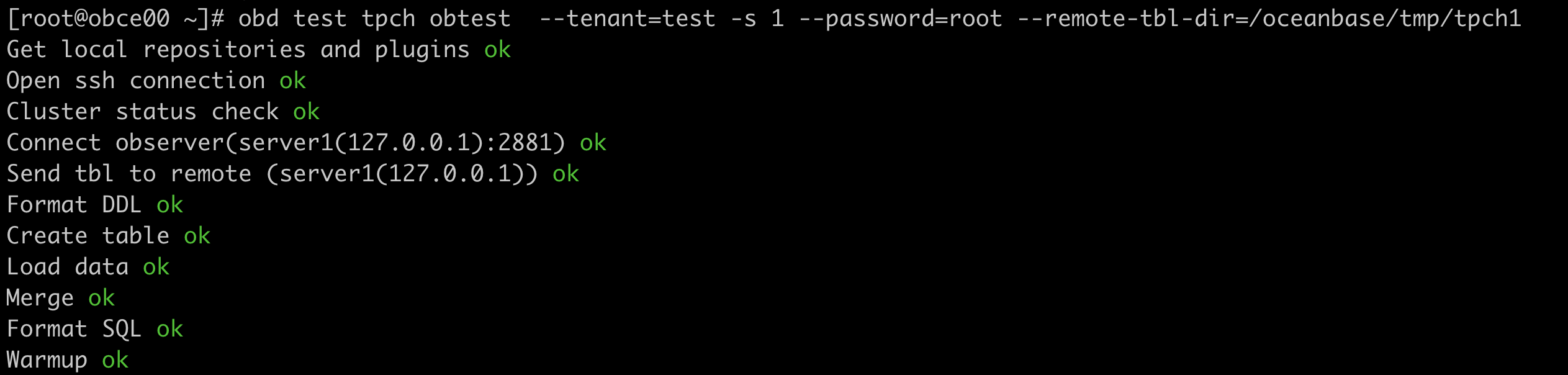
Then, run the following command to start the TPC-H benchmark test, with a dataset size of 1 GB. The entire process includes dataset generation, schema import, and automatic test execution. In this example, it is assumed that your test environment is deployed in the same way as that in Get started with OceanBase Database. You can modify the cluster name, password, installation directory, etc. to adapt to your situation.
Notice
Make sure that your disk space is sufficient to store the dataset files, so as to avoid filling up the space and causing system errors.
In this example, the /tmp directory is used to store dataset files.
cd /tmp
obd test tpch obtest --tenant=test -s 1 --password='******' --remote-tbl-dir=/tmp/tpch1
After the preceding command is executed, obd starts to run the benchmark test, and you can see each step of the test process.

After the data import is completed, obd automatically executes 22 SQL statements and prints the execution time for each SQL statement as well as the total execution time.