Background information
In the information explosion era, users often need to quickly retrieve necessary information from massive amounts of data. Efficient retrieval systems are required to quickly locate content of interest in online literature databases, e-commerce product catalogs, and rapidly growing multimedia content libraries. As the amount of data continues to increase, traditional keyword-based search methods cannot meet users' needs for both accuracy and speed. This is where vector search technology comes in. It encodes different types of data, such as text, images, and audio, into mathematical vectors and performs search operations in the vector space. This allows the system to capture the deep semantic information of data and provide more accurate and efficient search results.
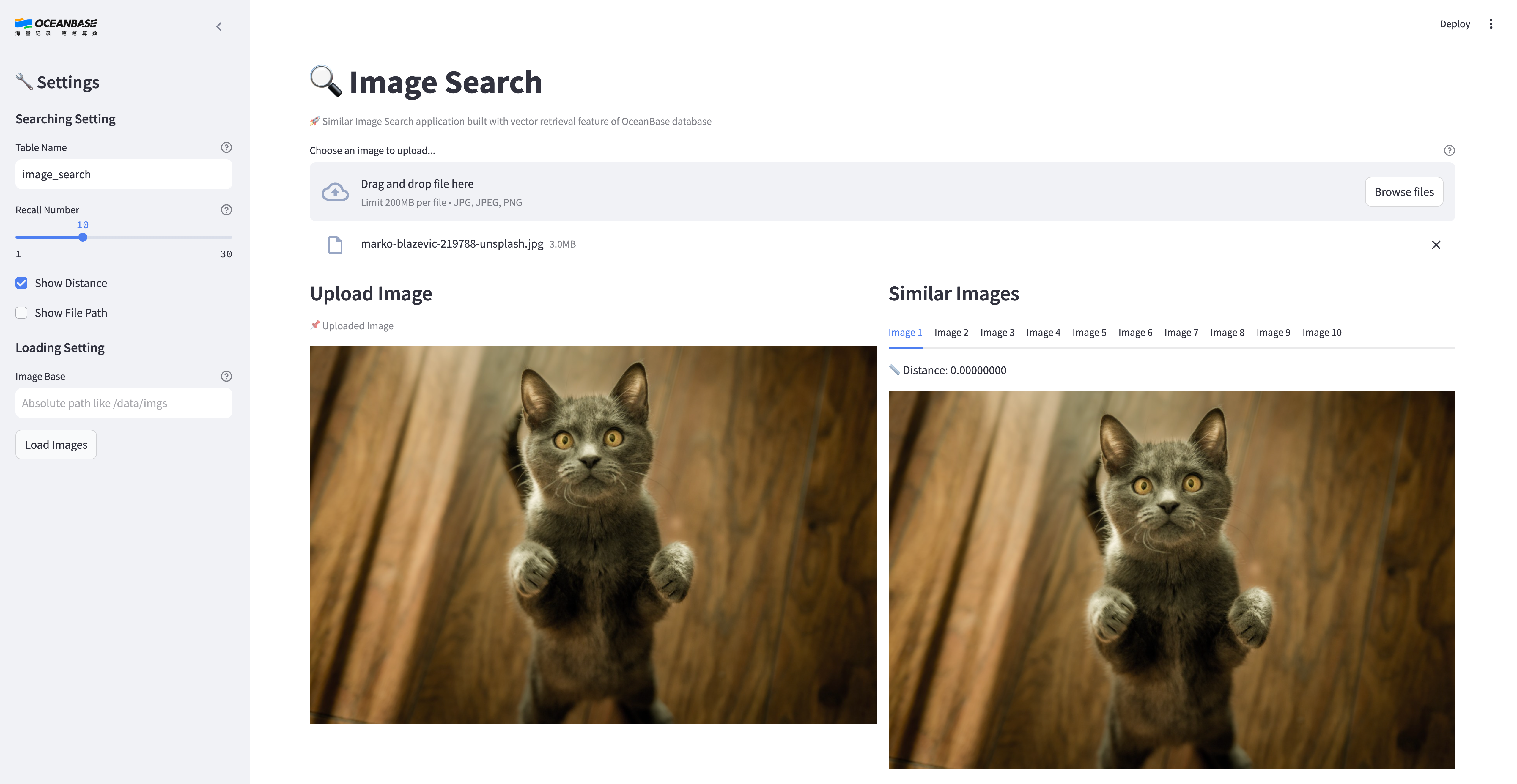
This topic will show you how to build your own image search application using OceanBase's vector search technology.
Image search architecture
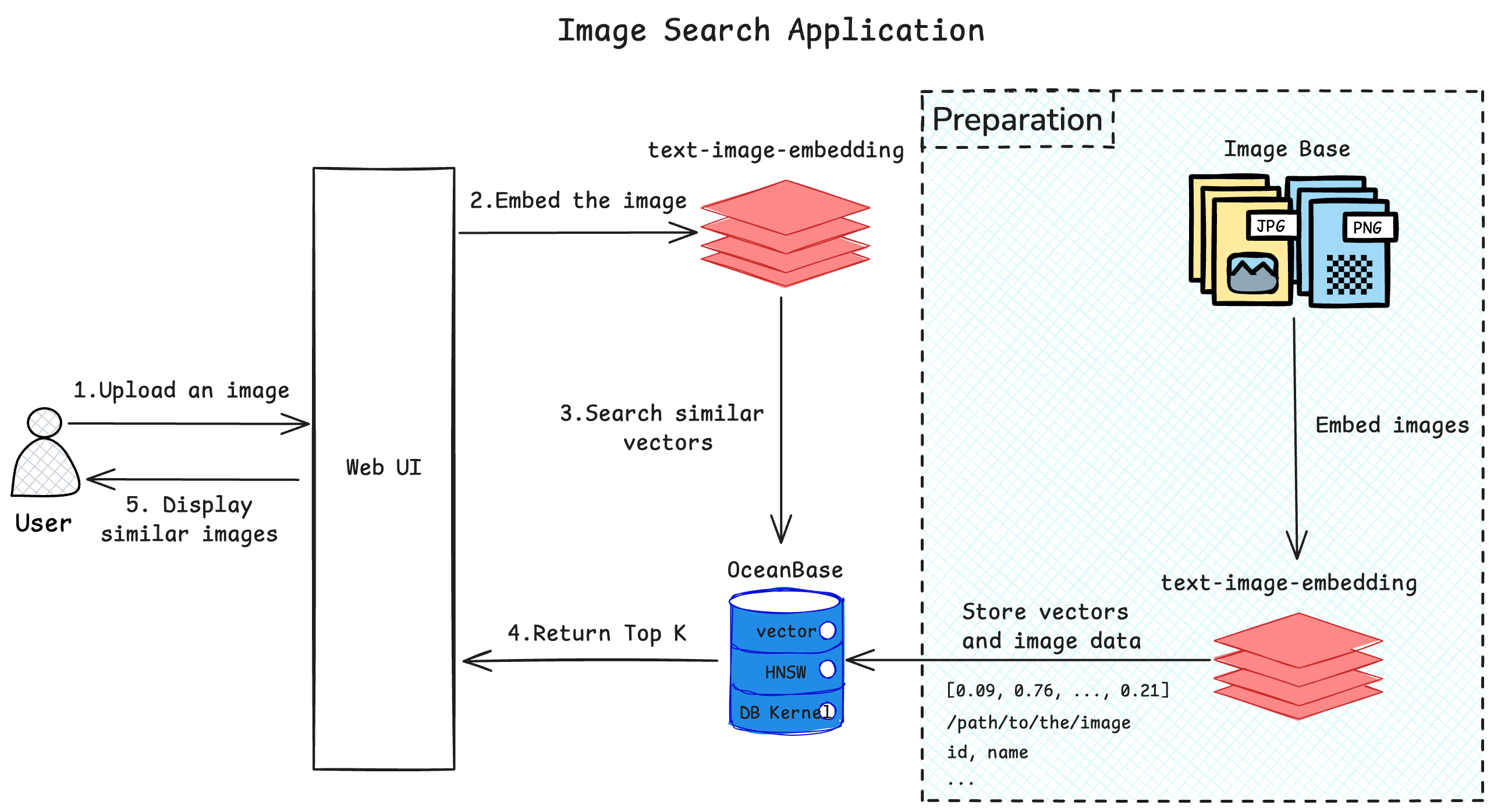
The image search application stores a library of images as vectors within a database. Users can upload the image they want to search for through the UI interface. The application then converts the image into a vector, searches for similar vectors in the database, and returns the results. The similar images are displayed on the UI interface.
Prerequisites
You have deployed OceanBase Database V4.4.0 or later and created a MySQL-compatible tenant. For more information about how to deploy an OceanBase cluster, see Deployment overview.
The MySQL-compatible tenant you created has the
INSERTandSELECTprivileges. For more information about how to configure privileges, see Grant direct privileges.You have created a database. For more information about how to create a database, see Create a database.
The vector search feature is enabled for the database. For more information about the vector search feature, see Perform fast vector search by using SQL.
obclient> ALTER SYSTEM SET ob_vector_memory_limit_percentage = 30;You have prepared the required images. If you do not have enough images for testing, you can use the image datasets from open-source websites.
You have installed Python 3.9 or later.
You have installed Poetry.
python3 -m ensurepip python3 -m pip install poetry
Build your image search application
Clone the code repository.
git clone https://github.com/ob-labs/image-search.git cd image-searchInstall dependencies.
poetry installSet environment variables.
cp .env.example .env # Update the database information in the .env file. vi .envUpdate the contents of the
.envfile:HF_ENDPOINT=https://hf-mirror.com DB_HOST="127.0.0.1" ## Set the IP address of the tenant. DB_PORT="2881" ## Set the port. DB_USER="root@test" ## Set the tenant and username. DB_NAME="test" ## Set the database name. DB_PASSWORD="" ## Set the password of the tenant user.Upload the prepared images to the server.
Start the image search program.
poetry run streamlit run --server.runOnSave false image_search_ui.pyThe return result is as follows:
Collecting usage statistics. To deactivate, set browser.gatherUsageStats to false. You can now view your Streamlit app in your browser. Local URL: http://localhost:8501 Network URL: http://xxx.xxx.xxx.xxx:8501 External URL: http://xxx.xxx.xxx.xxx:8501Open the image search UI. Open the corresponding URL from step 5 based on your environment.
Under Image loading settings, enter the absolute path to the directory where the images are stored on the server in Image loading directory.
Click Load Images.
After the images are loaded, you can perform image search.
Application demo