

OceanBase logo

OceanBase

A unified distributed database ready for your transactional, analytical, and AI workloads.

DEPLOY YOUR WAY

OceanBase Cloud

The best way to deploy and scale OceanBase

OceanBase Enterprise

Run and manage OceanBase on your infra

TRY OPEN SOURCE

OceanBase Community Edition

The free, open-source distributed database

OceanBase seekdb

Open source AI native search database

Customer Stories

Real-world success stories from enterprises across diverse industries.

View All
BY USE CASES

Mission-Critical Transactions

Global & Multicloud Application

Elastic Scaling for Peak Traffic

Real-time Analytics

Active Geo-redundancy

Database Consolidation

Resources

Comprehensive knowledge hub for OceanBase.

Blog

Live Demos

Training & Certification

Documentation

Official technical guides, tutorials, API references, and manuals for all OceanBase products.

View All
PRODUCTS

OceanBase Cloud

OceanBase Database

Tools

Connectors and Middleware

QUICK START

OceanBase Cloud

OceanBase Database

BEST PRACTICES

Practical guides for utilizing OceanBase more effectively and conveniently

Company

Learn more about OceanBase – our company, partnerships, and trust and security initiatives.

About OceanBase

Partner

Trust Center

Contact Us

International - English
中国站 - 简体中文
日本 - 日本語
Sign In
Start on Cloud

A unified distributed database ready for your transactional, analytical, and AI workloads.

DEPLOY YOUR WAY

OceanBase Cloud

The best way to deploy and scale OceanBase

OceanBase Enterprise

Run and manage OceanBase on your infra

TRY OPEN SOURCE

OceanBase Community Edition

The free, open-source distributed database

OceanBase seekdb

Open source AI native search database

Customer Stories

Real-world success stories from enterprises across diverse industries.

View All
BY USE CASES

Mission-Critical Transactions

Global & Multicloud Application

Elastic Scaling for Peak Traffic

Real-time Analytics

Active Geo-redundancy

Database Consolidation

Comprehensive knowledge hub for OceanBase.

Blog

Live Demos

Training & Certification

Documentation

Official technical guides, tutorials, API references, and manuals for all OceanBase products.

View All
PRODUCTS
OceanBase CloudOceanBase Database
ToolsConnectors and Middleware
QUICK START
OceanBase CloudOceanBase Database
BEST PRACTICES

Practical guides for utilizing OceanBase more effectively and conveniently

Learn more about OceanBase – our company, partnerships, and trust and security initiatives.

About OceanBase

Partner

Trust Center

Contact Us

Start on Cloud
编组
All Products
    • Databases
    • iconOceanBase Database
    • iconOceanBase Cloud
    • iconOceanBase Tugraph
    • iconInteractive Tutorials
    • iconOceanBase Best Practices
    • Tools
    • iconOceanBase Cloud Platform
    • iconOceanBase Migration Service
    • iconOceanBase Developer Center
    • iconOceanBase Migration Assessment
    • iconOceanBase Admin Tool
    • iconOceanBase Loader and Dumper
    • iconOceanBase Deployer
    • iconKubernetes operator for OceanBase
    • iconOceanBase Diagnostic Tool
    • iconOceanBase Binlog Service
    • Connectors and Middleware
    • iconOceanBase Database Proxy
    • iconEmbedded SQL in C for OceanBase
    • iconOceanBase Call Interface
    • iconOceanBase Connector/C
    • iconOceanBase Connector/J
    • iconOceanBase Connector/ODBC
    • iconOceanBase Connector/NET
icon

OceanBase Database

SQL - V4.3.5

    Download PDF

    OceanBase logo

    The Unified Distributed Database for the AI Era.

    Follow Us
    Products
    OceanBase CloudOceanBase EnterpriseOceanBase Community EditionOceanBase seekdb
    Resources
    DocsBlogLive DemosTraining & Certification
    Company
    About OceanBaseTrust CenterLegalPartnerContact Us
    Follow Us

    © OceanBase 2026. All rights reserved

    Cloud Service AgreementPrivacy PolicySecurity
    Contact Us
    Document Feedback
    1. Documentation Center
    2. OceanBase Database
    3. SQL
    4. V4.3.5
    iconOceanBase Database
    SQL - V 4.3.5
    SQL
    KV
    • V 4.4.2
    • V 4.3.5
    • V 4.3.3
    • V 4.3.1
    • V 4.3.0
    • V 4.2.5
    • V 4.2.2
    • V 4.2.1
    • V 4.2.0
    • V 4.1.0
    • V 4.0.0
    • V 3.1.4 and earlier

    Build an image search application with OceanBase Database

    Last Updated:2026-04-09 08:28:54  Updated
    share
    What is on this page
    Background information
    Architecture
    Prerequisites
    Build your image search application
    Clone the code repository
    Install dependencies
    Set environment variables
    Start the image search program
    Example

    folded

    share

    Background information

    In the information explosion era, users often need to quickly retrieve necessary information from massive amounts of data. Efficient retrieval systems are required to quickly locate content of interest in online literature databases, e-commerce product catalogs, and rapidly growing multimedia content libraries. As the amount of data continues to increase, traditional keyword-based search methods cannot meet users' needs for both accuracy and speed. This is where vector search technology comes in. It encodes different types of data, such as text, images, and audio, into mathematical vectors and performs search operations in the vector space. This allows the system to capture the deep semantic information of data and provide more accurate and efficient search results.

    This topic will show you how to build your own image search application using OceanBase's vector search technology.

    Architecture

    The image search application stores a library of images as vectors within a database. Users can upload the image they want to search for through the UI interface. The application then converts the image into a vector, searches for similar vectors in the database, and returns the results. The similar images are displayed on the UI interface.
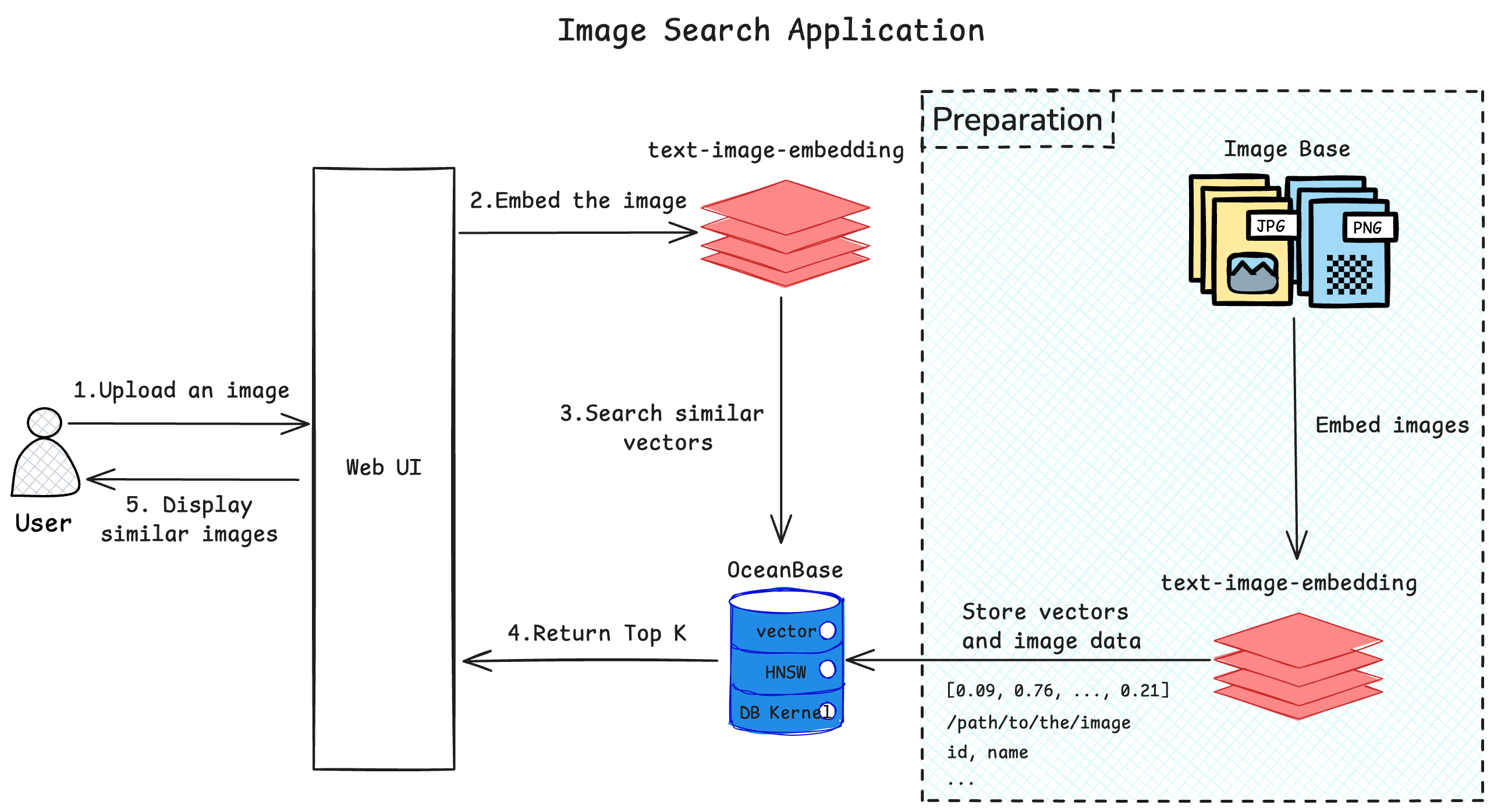
    building-a-graph-search-application-based-on-oceanBase

    Prerequisites

    • You have deployed OceanBase Database V4.3.3 or later and created a MySQL tenant. For more information about how to deploy an OceanBase cluster, see Deployment overview.

    • The MySQL tenant you created has the INSERT and SELECT privileges. For more information about how to configure privileges, see Grant direct privileges.

    • You have created a database. For more information about how to create a database, see Create a database.

    • The vector search feature is enabled for the database. For more information about the vector search feature, see Perform fast vector search by using SQL.

      obclient> ALTER SYSTEM SET ob_vector_memory_limit_percentage = 30;
      
    • You have prepared the required images. If you do not have enough images for testing, you can use the image datasets from open-source websites.

    • You have installed Python 3.9 or later.

    • You have installed Poetry.

      python3 -m ensurepip
      python3 -m pip install poetry
      

    Build your image search application

    Clone the code repository

    git clone https://gitee.com/oceanbase-devhub/image-search.git
    cd image-search
    

    Install dependencies

    poetry install
    

    Set environment variables

    cp .env.example .env
    # Update the database information in the .env file.
    vi .env
    

    Update the contents of the .env file:

    HF_ENDPOINT=https://hf-mirror.com
    
    DB_HOST="127.0.0.1"   ## Set the IP address of the tenant.
    DB_PORT="2881"   ## Set the port.
    DB_USER="root@test" ## Set the tenant and username.
    DB_NAME="test"   ## Set the database name.
    DB_PASSWORD=""  ## Set the password of the tenant user.
    

    Start the image search program

    poetry run streamlit run --server.runOnSave false image_search_ui.py
    

    The return result is as follows:

    Collecting usage statistics. To deactivate, set browser.gatherUsageStats to false.
    
        You can now view your Streamlit app in your browser.
    
        Local URL: http://localhost:8501
        Network URL: http://xxx.xxx.xxx.xxx:8501
        External URL: http://xxx.xxx.xxx.xxx:8501
    

    Example

    You need to prepare some images and place them in a folder on your server, update the Loading Setting in the UI with the absolute path to the directory where the images are stored on the server, and click Load Images.

    If you do not have enough images for testing, you can refer to image datasets from major open-source websites.
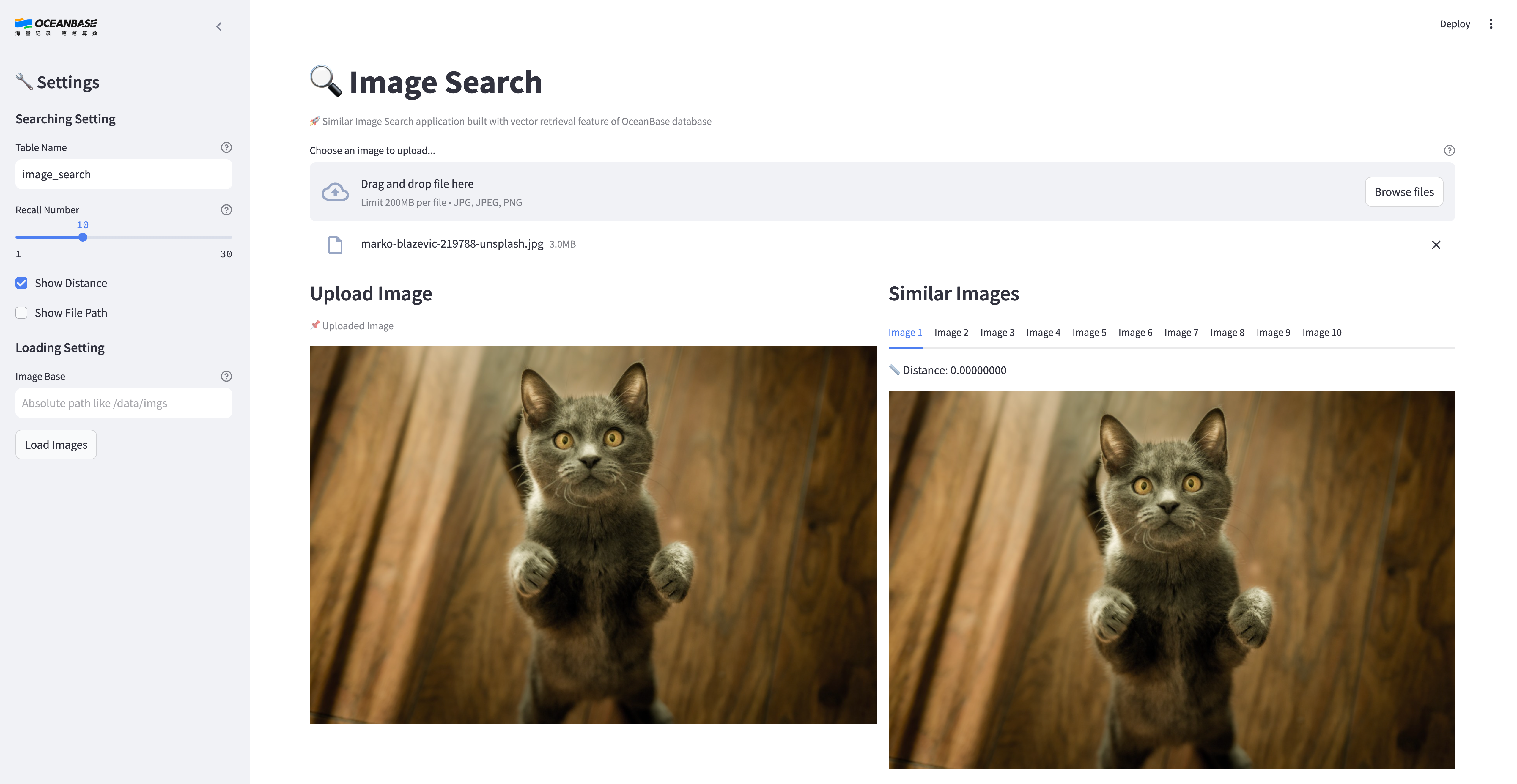
    image-search-ui

    Previous topic

    Overview
    Last

    Next topic

    Build an intelligent Q&A assistant with OceanBase Database
    Next
    What is on this page
    Background information
    Architecture
    Prerequisites
    Build your image search application
    Clone the code repository
    Install dependencies
    Set environment variables
    Start the image search program
    Example