







This topic introduces how to build an application by using a C3P0 connection pool, MySQL Connector/J, and OceanBase Database. It also covers the use of the application for fundamental database operations, including table creation, data insertion, data deletion, data updating, and data query.
 Click to download the c3p0-mysql-jdbc sample project
  Connect to OceanBase Database by using a C3P0 connection pool (MySQL mode)
Prerequisites
You have installed OceanBase Database and created a MySQL tenant.
You have installed JDK 1.8 and Maven.
You have installed Eclipse.
Note
The tool used to run the sample code in this topic is Eclipse IDE for Java Developers 2022-03, but you can also choose a tool of your preference to run the sample code.
Procedure
Note
The steps outlined in this topic are for the Windows environment. If you are using a different operating system or compiler, the steps may vary slightly.
- Import the
c3p0-mysql-jdbcproject into Eclipse. - Obtain the URL of OceanBase Database.
- Modify the database connection information in the
c3p0-mysql-jdbcproject. - Run the
c3p0-mysql-jdbcproject.
Step 1: Import the c3p0-mysql-jdbc project into Eclipse
Start Eclipse and choose File > Open Projects from File System from the menu bar.
In the dialog box that appears, click Directory to browse and select the project, and then click Finish.
Note
When you import a Maven project using Eclipse, it will automatically detect the
pom.xmlfile in the project, download the required dependency libraries based on the described dependencies in the file, and add them to the project.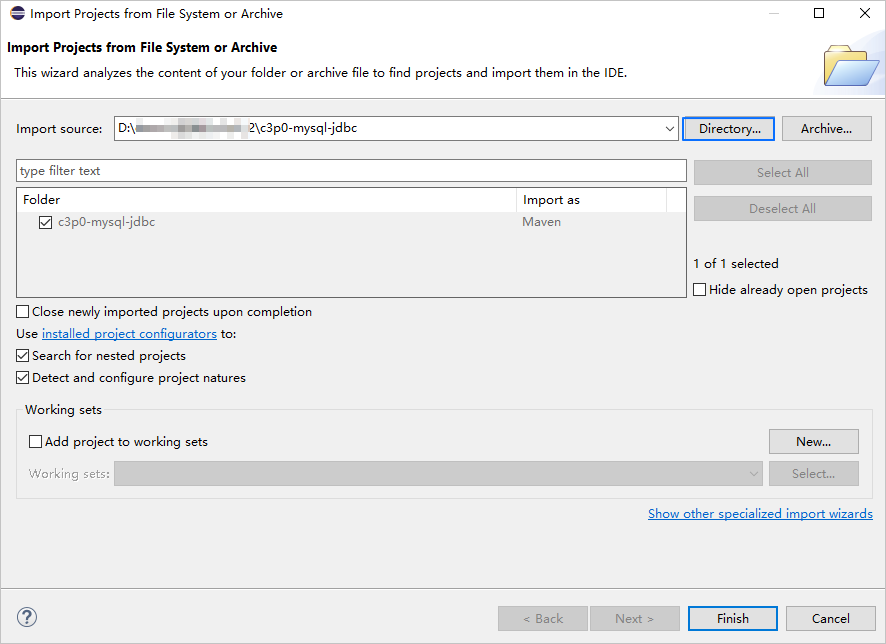
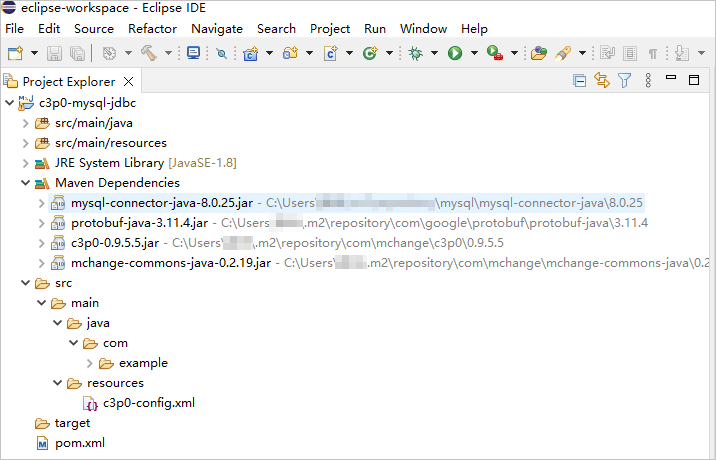
View the project status.
Step 2: Obtain the URL of OceanBase Database
Contact the deployment personnel or administrator of OceanBase Database to obtain the corresponding database connection string.
Here is an example:
obclient -hxxx.xxx.xxx.xxx -P2881 -utest_user001@mysql001 -p****** -DtestFor more information about the connection string, see Connect to an OceanBase tenant by using OBClient.
Fill in the URL below based on the OceanBase Database connection string, and specify the corresponding values of each parameter.
jdbc:mysql://$host:$port/$database_name?user=$user_name&password=$passwordParameter description:
$host: the IP address for connecting to OceanBase Database. For connection through OceanBase Database Proxy (ODP), use the IP address of an ODP. For direct connection, use the IP address of an OBServer node.$port: the port for connecting to OceanBase Database. For connection through ODP, the default value is2883, which can be customized when ODP is deployed. For direct connection, the default value is2881, which can be customized when OceanBase Database is deployed.$database_name: the name of the database to be accessed.Note
The user used to connect to the tenant must have the
CREATE,INSERT,DELETE,UPDATE, andSELECTprivileges on the database. For more information about user privileges, see Privilege types in MySQL mode.$user_name: the account for connecting to the tenant. For connection through ODP, the format isusername@tenant name#cluster nameorcluster name:tenant name:username. For direct connection, the format isusername@tenant name.$password: the password of the account.
For more information about the connection properties of MySQL Connector/J, see Configuration Properties.
Here is an example:
jdbc:mysql://xxx.xxx.xxx.xxx:2881/test?user=test_user001@mysql001&password=******
Step 3: Modify the database connection information in the c3p0-mysql-jdbc project
Modify the database connection information in the c3p0-mysql-jdbc/src/main/resources/c3p0-config.xml file based on the information obtained in Step 2: Obtain the URL of OceanBase Database.
Here is an example:
- The IP address of the OBServer node is
xxx.xxx.xxx.xxx. - The port is 2881.
- The name of the database to be accessed is
test. - The tenant account is
test_user001@mysql001. Here,mysql001refers to a user tenant created in OceanBase Database with the MySQL mode, andtest_user001is the username of themysql001tenant. - The password is
******.
Sample code:
...
<property name="jdbcUrl">jdbc:mysql://xxx.xxx.xxx.xxx:2881/test</property>
<property name="user">test_user001@mysql001</property>
<property name="password">******</property>
...
Step 4: Run the c3p0-mysql-jdbc project
In the project navigation view, locate and expand the src/main/java directory.
Right-click the Main.java file and choose Run As > Java Application.
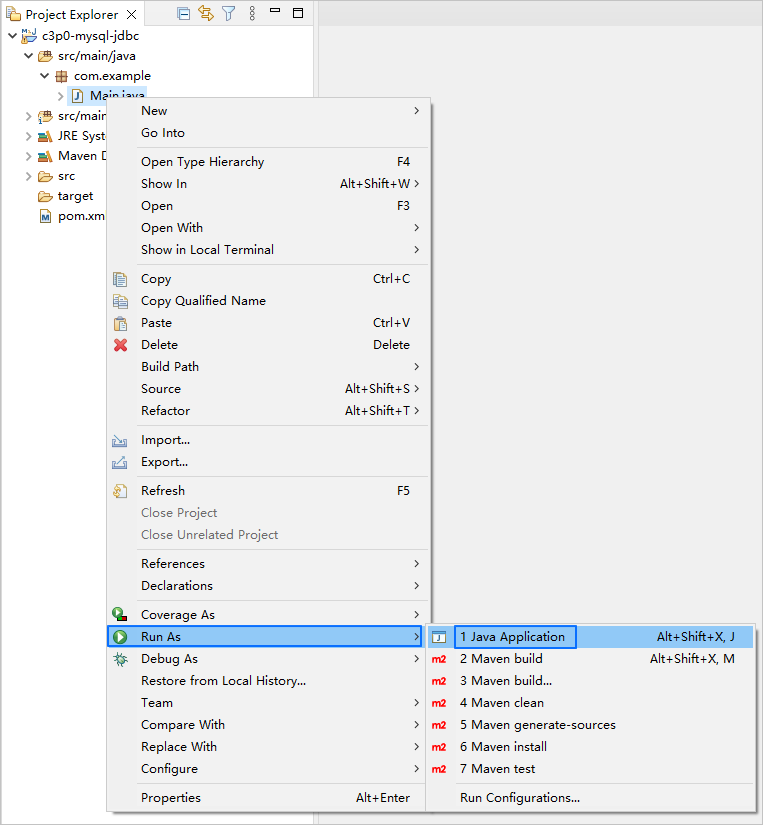
In the console window of Eclipse, view the project logs and output results.

You can also execute the following SQL statement in OBClient to view the result.
obclient [test]> SELECT * FROM test_c3p0;The return result is as follows:
+------+--------------+ | id | name | +------+--------------+ | 5 | test_update | | 6 | test_insert6 | | 7 | test_insert7 | | 8 | test_insert8 | | 9 | test_insert9 | +------+--------------+ 5 rows in set
Project code introduction
Click c3p0-mysql-jdbc to download the project code, which is a compressed package named c3p0-mysql-jdbc.zip.
After decompressing it, you will find a folder named c3p0-mysql-jdbc. The directory structure is as follows:
c3p0-mysql-jdbc
├── src
│ └── main
│ ├── java
│ │ └── com
│ │ └── example
│ │ └── Main.java
│ └── resources
│ └── c3p0-config.xml
└── pom.xml
File description:
src: the root directory for source code.main: the main code directory, containing the core logic of the application.java: the directory for storing the Java source code.com: the directory for storing the Java package.example: the directory for storing the packages of the sample project.Main.java: the main class that contains logic such as table creation and data insertion.resources: the directory for storing resource files, including configuration files.c3p0-config.xml: the configuration file of the C3P0 connection pool.pom.xml: the configuration file of the Maven project, which is used to manage project dependencies and build settings.
Introduction to pom.xml
The pom.xml file is the configuration file of the Maven project, which defines the dependencies, plugins, and build rules of the project. Maven is a Java project management tool that can automatically download dependencies, compile, and package the project.
The pom.xml file in this topic mainly includes the following parts:
Declaration statement.
Declare this file to be an XML file that uses XML standard
1.0and character encodingUTF-8.Sample code:
<?xml version="1.0" encoding="UTF-8"?>Configure namespaces and the POM model version.
- Use
xmlnsto specify the POM namespace ashttp://maven.apache.org/POM/4.0.0. - Use
xmlns:xsito specify the XML namespace ashttp://www.w3.org/2001/XMLSchema-instance. - Use
xsi:schemaLocationto specify the POM namespace ashttp://maven.apache.org/POM/4.0.0, and the location of the corresponding XSD file ashttp://maven.apache.org/xsd/maven-4.0.0.xsd. - Use
<modelVersion>to specify the POM model version as4.0.0.
Sample code:
<project xmlns="http://maven.apache.org/POM/4.0.0" xmlns:xsi="http://www.w3.org/2001/XMLSchema-instance" xsi:schemaLocation="http://maven.apache.org/POM/4.0.0 http://maven.apache.org/xsd/maven-4.0.0.xsd"> <modelVersion>4.0.0</modelVersion> <!-- Other configurations --> </project>- Use
Configure basic information.
- Use
<groupId>to specify the project group ascom.example. - Use
<artifactId>to specify the project name astestc3p0. - Use
<version>to specify the project version as1.0-SNAPSHOT.
Sample code:
<groupId>com.example</groupId> <artifactId>testc3p0</artifactId> <version>1.0-SNAPSHOT</version>- Use
Configure the properties of the project's source file.
Specify the Maven compiler plugin as
maven-compiler-plugin, and set both the source code and target Java versions to 8. This means that the project's source code is written using Java 8 features, and the compiled bytecode will also be compatible with the Java 8 runtime environment. This setup ensures that the project can correctly handle Java 8 syntax and features during compilation and execution.Note
Java 1.8 and Java 8 are different names for the same version.
Sample code:
<build> <plugins> <plugin> <groupId>org.apache.maven.plugins</groupId> <artifactId>maven-compiler-plugin</artifactId> <configuration> <source>8</source> <target>8</target> </configuration> </plugin> </plugins> </build>Configure the components on which the project depends.
Note
The following code defines that the project depends on MySQL Connector/J 8.0.25. For more information about other versions, see MySQL Connector/J.
Define the dependency using
<dependency>:- Add the
mysql-connector-javadependency library:
- Use
<groupId>to specify the dependency group asmysql. - Use
<artifactId>to specify the dependency name asmysql-connector-java. - Use
<version>to specify the dependency version as8.0.25.
- Add the
c3p0dependency library:
- Use
<groupId>to specify the dependency group ascom.mchange. - Use
<artifactId>to specify the dependency name asc3p0. - Use
<version>to specify the dependency version as0.9.5.5.
Sample code:
<dependencies> <dependency> <groupId>mysql</groupId> <artifactId>mysql-connector-java</artifactId> <version>8.0.25</version> </dependency> <dependency> <groupId>com.mchange</groupId> <artifactId>c3p0</artifactId> <version>0.9.5.5</version> </dependency> </dependencies>- Add the
c3p0-config.xml code introduction
The c3p0-config.xml file is a configuration file of the C3P0 connection pool, used to configure properties related to database connections. You can configure the database driver, URL, username, password, and pool size of the connection pool by setting the values of various <property> elements.
The c3p0-config.xml file in this topic contains sample code in the following sections:
Declaration statement.
The statement declares that this file is an XML file that uses XML standard
1.0and character encodingUTF-8.Sample code:
<?xml version="1.0" encoding="UTF-8"?>Configuration of basic information.
- The
<c3p0-config>element contains the configurations of the C3P0 connection pool. - The
<named-config name="oceanbase">element defines a named configuration with the nameoceanbase. You can use this name to reference the named configuration and obtain connection information and pool properties related to theoceanbasedatabase.
Sample code:
<c3p0-config> <named-config name="oceanbase"> // Set the values of various <property> elements. </named-config> </c3p0-config>- The
Configuration of the database driver.
The
<property>element is used to specify that the MySQL JDBC drivercom.mysql.cj.jdbc.Driveris used to connect to OceanBase Database.Note
For more information about the class name of MySQL Connector/J, see Driver/Datasource Class Name.
Sample code:
<property name="driverClass">com.mysql.cj.jdbc.Driver</property>Configuration of database connection information.
- Set the URL of the database connection, which includes the host IP address, port number, database to be accessed, and URL parameters.
- Configure the database username.
- Configure the database password.
Sample code:
<property name="jdbcUrl">jdbc:mysql://$host:$port/$database_name</property> <property name="user">$user_name</property> <property name="password">$password</property>Parameters:
$host: the IP address for connecting to OceanBase Database. For connection through ODP, use the IP address of an ODP. For direct connection, use the IP address of an OBServer node.$port: the port for connecting to OceanBase Database. For connection through ODP, the default value is2883, which can be customized when ODP is deployed. For direct connection, the default value is2881, which can be customized when OceanBase Database is deployed.$database_name: the name of the database to be accessed.$user_name: the tenant account. For connection through ODP, the format isusername@tenant name#cluster nameorcluster name:tenant name:username. For direct connection, the format isusername@tenant name.$password: the password of the account.
Configuration of other c3p0 database connection pool parameters.
- Set the value of the
acquireIncrementparameter to20. That is, when the number of connections in the connection pool is insufficient, 20 connections will be added each time. - Set the value of the
initialPoolSizeparameter to10. That is, 10 connections will be created when the connection pool is started. - Set the value of the
minPoolSizeparameter to5. That is, the connection pool will keep at least five connections. - Set the value of the
maxPoolSizeparameter to30. That is, the connection pool will allow at most 30 connections. - Set the value of the
maxStatementsparameter to0. That is, statements will not be cached. - Set the value of the
maxStatementsPerConnectionparameter to0. That is, each connection will not cache statements. - Set the value of the
numHelperThreadsparameter to3. These helper threads are used to execute slow JDBC operations. - Set the value of the
checkoutTimeoutparameter to3000. That is, the connection attribute is checked every three seconds. - Set the value of the
checkoutTimeoutparameter to1000. That is, if a connection cannot be obtained within 1000 ms, a timeout exception will be thrown. - Set the value of the
idleConnectionTestPeriodparameter to3000. That is, the status of idle connections in the connection pool will be checked every three seconds. - Set the value of the
maxIdleTimeparameter to10000. That is, if a connection is idle for more than 10 seconds, the connection will be closed. - Set the value of the
maxIdleTimeExcessConnectionsparameter to5000. That is, if a connection exceeds the maximum number of connections and is idle for more than five seconds, the connection will be closed. - Set the value of the
acquireRetryDelayparameter to1000. That is, if a connection cannot be obtained, the system will retry after 1000 ms. - Set the value of the
automaticTestTableparameter toTest. This is a special table used to test the validity of connections. - Specify whether to test the validity of a connection when it is returned to the connection pool. If you set the value to true, the validity of the connection will be tested when it is returned to the connection pool.
Sample code:
<property name="acquireIncrement">20</property> <property name="initialPoolSize">10</property> <property name="minPoolSize">5</property> <property name="maxPoolSize">30</property> <property name="maxStatements">0</property> <property name="maxStatementsPerConnection">0</property> <property name="numHelperThreads">3</property> <property name="propertyCycle">3</property> <property name="checkoutTimeout">1000</property> <property name="idleConnectionTestPeriod">3</property> <property name="maxIdleTime">10</property> <property name="maxIdleTimeExcessConnections">5</property> <property name="acquireRetryDelay">1000</property> <property name="automaticTestTable">Test</property> <property name="testConnectionOnCheckin">true</property>- Set the value of the
Notice
The attribute (parameter) settings depend on project requirements and database characteristics. We recommend that you adjust and configure the parameters as needed. For more information about C3P0 connection pool parameters, see C3P0.
Commonly configured parameters of C3P0 connection pool:
Category |
Attribute |
Default value |
Description |
|---|---|---|---|
| Required parameters | driverClass | N/A | The name of the driver class. |
| jdbcUrl | N/A | The connection URL of the database. | |
| user | N/A | The username for connecting to the database. | |
| password | N/A | The password for connecting to the database. | |
| Basic parameters | acquireIncrement | 3 | The number of connections to be acquired at a time when the connection pool is insufficient. For example, if the value of acquireIncrement is 20 and only five connections are available in the connection pool, the connection pool will create 20 new connections at a time to meet the needs of the application. |
| acquireRetryAttempts | 30 | The number of retries when a new connection cannot be obtained from the database. If this value is less than or equal to zero, C3P0 will continue to attempt to obtain a connection. | |
| maxIdleTime | 0 | The maximum idle time of a connection in the connection pool. A value of 0 indicates that idle connections never expire. For example, if maxIdleTime is set to 10 seconds, connections in the connection pool will be closed and removed if they are idle for more than 10 seconds. A new connection will be created in the connection pool the next time the application requests a connection. |
|
| maxPoolSize | 15 | The maximum number of connections in the connection pool. When the number of connections in the connection pool reaches the value of maxPoolSize, new connection requests will be blocked until connections are released back to the connection pool. |
|
| minPoolSize | 3 | The minimum number of connections in the connection pool. The connection pool will retain at least the number of connections specified by minPoolSize, even if the connections are idle. |
|
| initialPoolSize | 3 | The number of connections to be created when the connection pool is started. The value must be between minPoolSize and maxPoolSize. That is, the connection pool will create initialPoolSize connections when it is initialized. |
|
| Optional parameters | acquireRetryDelay | 1000 | The retry delay in milliseconds when a connection cannot be obtained. If the connection pool does not have available connections when the application requests a connection from the connection pool, the connection request may fail. In this case, the connection pool will retry based on the configuration of acquireRetryDelay. |
| autoCommitOnClose | false | Specifies whether to automatically commit transactions when a connection is closed. The default value is false, which specifies not to automatically commit transactions when a connection is closed. If you want to explicitly commit transactions before closing a connection, set autoCommitOnClose to true.
NoticeAutomatic transaction commit may cause data inconsistency or loss. Therefore, you should use |
|
| automaticTestTable | null | The name of the automatic test table of the connection pool. C3P0 creates an empty table with the specified name and tests the connection by querying the table. The default value is null, which specifies not to execute any test statements. For example, if you set automaticTestTable to Test, C3P0 will create an empty table named Test and perform tests using its built-in query statements.
NoteIf you configure both |
|
| idleConnectionTestPeriod | 0 | The interval, in ms, for testing idle connections in the connection pool. That is, the connection pool tests idle connections at a specified interval. The default value is 0, which specifies not to test idle connections. | |
| maxStatements | 0 | The maximum number of prepared statements allowed in the connection pool.
Note
|
|
| maxStatementsPerConnection | 0 | The maximum number of prepared statements allowed in each connection.
Note
|
|
| numHelperThreads | 3 | The number of helper threads used for asynchronous task processing.
Note
|
|
| preferredTestQuery | null | The test statement to be executed for all connections. This significantly improves the test speed when connection testing is enabled.
NoteThe test table must exist when the data source is initially configured. |
|
| checkoutTimeout | 0 | The timeout period, in ms, for obtaining a connection from the connection pool. The default value is 0, which specifies not to set a timeout period. When the connection pool is out of connections, the client will wait for a new connection after calling getConnection(). If no new connection is available within the specified timeout period, a SQLException will be thrown. |
|
| Not recommended parameters | breakAfterAcquireFailure | false | Specifies whether to interrupt the connection acquisition operation of the connection pool when the connection acquisition fails. A failure in acquiring a connection causes all threads waiting for the connection pool to acquire a connection to throw an exception. However, the data source remains valid and continues to attempt to acquire a connection the next time getConnection() is called.
|
| testConnectionOnCheckout | false | Specifies whether to test a connection when it is obtained from the connection pool.
NoteAlthough connection testing can ensure the validity of connections, it also introduces additional overhead. Therefore, you should enable connection testing based on your application requirements and performance needs. If your application requires high availability of connections, you can enable connection testing. However, if connections in the connection pool are frequently acquired and released, connection testing may become too frequent and negatively impact performance. |
|
| testConnectionOnCheckin | false | Specifies whether to test a connection when it is returned to the connection pool.
NoteAlthough connection testing can ensure the validity of connections, it also introduces additional overhead. Therefore, you should enable connection testing based on your application requirements and performance needs. If your application requires high availability of connections, you can enable connection testing. However, if connections in the connection pool are frequently acquired and returned, connection testing may become too frequent and negatively impact performance. |
Introduction to Main.java
The Main.java file is part of the sample application, demonstrating how to obtain a database connection through the c3p0 connection pool and perform a series of database operations within a transaction. These operations include creating a table, inserting data, deleting data, updating data, querying data, and printing the query results. This showcases how to use the c3p0 connection pool to manage database connections and execute transactional operations, thereby enhancing the efficiency and performance of database operations.
The code in this topic for the Main.java file primarily includes the following sections:
Define the package and import
java.sqlinterfaces.- Declare the name of the package to which the current code belongs as
com.example. - Import the
java.sql.Connectionclass for representing database connections. - Import the
java.sql.PreparedStatementclass for executing precompiled database operations. - Import the
java.sql.ResultSetclass for representing the result sets of database queries. - Import the
com.mchange.v2.c3p0.ComboPooledDataSourceclass for using the c3p0 connection pool.
Sample code:
package com.example; import java.sql.Connection; import java.sql.PreparedStatement; import java.sql.ResultSet; import com.mchange.v2.c3p0.ComboPooledDataSource;- Declare the name of the package to which the current code belongs as
Define class names and methods.
- Define a public class named
Main, which serves as the entry point of the program. The class name must be the same as the file name. - Define a public static method named
main, which serves as the starting execution point of the program. - Use the
try-with-resourcesstatement to obtain a database connection and create a precompiled SQL statement. - Perform transactional operations on the database.
- Capture possible exceptions and print the exception stack information.
- Define a private static method named
getConnectionfor obtaining database connections from the c3p0 connection pool. Inside the method, first create aComboPooledDataSourceobject namedcpds, which specifies the connection pool configuration through theoceanbaseparameter. Then, call thecpds.getConnection()method to request a database connection from the connection pool and return the connection.
Sample code:
public class Main { public static void main(String[] args) { try ( // Obtain a database connection. // Create a precompiled SQL statement. ) { // Perform database transaction operations: start a transaction, create a table, insert data, delete data, update data, query data, and commit the transaction. } catch (Exception e) { e.printStackTrace(); } } private static Connection getConnection() throws Exception { ComboPooledDataSource cpds = new ComboPooledDataSource("oceanbase"); return cpds.getConnection(); } }- Define a public class named
Obtain a database connection.
Obtain a database connection and assign it to the
connvariable.Sample code:
Connection conn = getConnection();Create precompiled SQL statements.
- Create a precompiled SQL statement for creating a database table named
test_c3p0. - Create a precompiled SQL statement for inserting data into the
test_c3p0table. - Create a precompiled SQL statement for deleting data from the
test_c3p0table. - Create a precompiled SQL statement for updating data in the
test_c3p0table. - Create a precompiled SQL statement for querying data from the
test_c3p0table.
Sample code:
PreparedStatement stmtCreate = conn.prepareStatement("CREATE TABLE test_c3p0 (id INT, name VARCHAR(32))"); PreparedStatement stmtInsert = conn.prepareStatement("INSERT INTO test_c3p0 VALUES (?, ?)"); PreparedStatement stmtDelete = conn.prepareStatement("DELETE FROM test_c3p0 WHERE id < ?"); PreparedStatement stmtUpdate = conn.prepareStatement("UPDATE test_c3p0 SET name = ? WHERE id = ?"); PreparedStatement stmtSelect = conn.prepareStatement("SELECT * FROM test_c3p0")- Create a precompiled SQL statement for creating a database table named
Start a transaction.
Set the auto-commit mode of the database connection to
falseto enable the transaction mechanism.Sample code:
conn.setAutoCommit(false);Create a table.
Execute the SQL statement for creating a table.
Sample code:
stmtCreate.execute();Insert data.
Use the
forloop to insert 10 data entries into thetest_c3p0table. The value of the first column is the value of theivariable, and the value of the second column is the value of thetest_insertstring followed by the value of theivariable.Sample code:
for (int i = 0; i < 10; i++) { stmtInsert.setInt(1, i); stmtInsert.setString(2, "test_insert" + i); stmtInsert.executeUpdate(); }Delete data.
Set the value of the deletion statement parameter to 5 and execute the deletion operation.
Sample code:
stmtDelete.setInt(1, 5); stmtDelete.executeUpdate();Update data.
Set the first parameter of the update statement to
test_updateand the second parameter to 5, and execute the update operation.Sample code:
stmtUpdate.setString(1, "test_update"); stmtUpdate.setInt(2, 5); stmtUpdate.executeUpdate();Query data.
- Execute the query statement and save the query result in the
ResultSetobjectrs. - Use the while loop to check whether the result set contains another row by calling the rs.next() method. If yes, execute the code in the loop.
- The code in the loop prints the
idandnamecolumn values of each row. - Close the result set and release the related resources.
Sample code:
ResultSet rs = stmtSelect.executeQuery(); while (rs.next()) { System.out.println(rs.getInt("id") + " " + rs.getString("name")); } rs.close();- Execute the query statement and save the query result in the
Commit a transaction.
Sample code:
conn.commit();
Full code
<?xml version="1.0" encoding="UTF-8"?>
<project xmlns="http://maven.apache.org/POM/4.0.0"
xmlns:xsi="http://www.w3.org/2001/XMLSchema-instance"
xsi:schemaLocation="http://maven.apache.org/POM/4.0.0 http://maven.apache.org/xsd/maven-4.0.0.xsd">
<modelVersion>4.0.0</modelVersion>
<groupId>com.oceanbase</groupId>
<artifactId>testc3p0</artifactId>
<version>1.0-SNAPSHOT</version>
<build>
<plugins>
<plugin>
<groupId>org.apache.maven.plugins</groupId>
<artifactId>maven-compiler-plugin</artifactId>
<configuration>
<source>8</source>
<target>8</target>
</configuration>
</plugin>
</plugins>
</build>
<dependencies>
<dependency>
<groupId>mysql</groupId>
<artifactId>mysql-connector-java</artifactId>
<version>8.0.25</version>
</dependency>
<dependency>
<groupId>com.mchange</groupId>
<artifactId>c3p0</artifactId>
<version>0.9.5.5</version>
</dependency>
</dependencies>
</project>
<?xml version="1.0" encoding="UTF-8"?>
<c3p0-config>
<named-config name="oceanbase">
<!-- Configure Database Driver -->
<property name="driverClass">com.mysql.cj.jdbc.Driver</property>
<!-- Configure Database Link Address -->
<property name="jdbcUrl">jdbc:mysql://$host:$port/$database_name</property>
<!-- Configure database username -->
<property name="user">$user_name</property>
<!-- Configure database password -->
<property name="password">$password</property>
<!-- How many connection objects does the database Connection pool want from the database at one time -->
<property name="acquireIncrement">20</property>
<!-- Initialize connections -->
<property name="initialPoolSize">10</property>
<!-- Minimum number of connections -->
<property name="minPoolSize">5</property>
<!-- The maximum number of connections reserved in the Connection pool. Default: 15 -->
<property name="maxPoolSize">30</property>
<!-- JDBC standard parameter used to control the number of PreparedStatements loaded within the data source. However, the pre cached statements belong to a single connection rather than the entire Connection pool. So setting this parameter requires considering multiple factors. If both maxStatements and maxStatementsPerConnection are 0, the cache is turned off. Default:0 -->
<property name="maxStatements">0</property>
<!-- MaxStatementsPerConnection defines the maximum number of cached statements owned by a single connection in the Connection pool. Default: 0 -->
<property name="maxStatementsPerConnection">0</property>
<!-- C3p0 is an asynchronous operation, and slow JDBC operations are completed by the helper process. Expanding these operations can effectively improve performance by enabling multiple operations to be executed simultaneously through multithreading. Default:3 -->
<property name="numHelperThreads">3</property>
<!-- The user can wait up to 300 seconds before modifying the system configuration parameters. Default: 300 -->
<property name="propertyCycle">3</property>
<!-- The default setting for obtaining the connection timeout is to wait for a unit of milliseconds -->
<property name="checkoutTimeout">1000</property>
<!-- Check all free connections in the Connection pool every few seconds. Default: 0 -->
<property name="idleConnectionTestPeriod">3</property>
<!-- The maximum idle time, within seconds, if not used, the connection will be discarded. If it is 0, it will never be discarded. Default: 0 -->
<property name="maxIdleTime">10</property>
<!-- Configure the lifetime of the connection. Connections beyond this time will be automatically disconnected and discarded by the Connection pool. Of course, the connection being used will not be immediately disconnected, but will wait for it to close before disconnecting. When configured to 0, there is no restriction on the lifetime of the connection. -->
<property name="maxIdleTimeExcessConnections">5</property>
<!-- The interval time between two connections, in milliseconds. Default: 1000 -->
<property name="acquireRetryDelay">1000</property>
<!-- C3p0 will create an empty table called Test and use its built-in query statement for testing. If this parameter is defined, the property preferredTestQuery will be ignored. You cannot perform any operations on this Test table, it will only be used for c3p0 testing. Default: null -->
<property name="automaticTestTable">Test</property>
<!-- Test if the connection is valid when obtaining it -->
<property name="testConnectionOnCheckin">true</property>
</named-config>
</c3p0-config>
package com.example;
import java.sql.Connection;
import java.sql.PreparedStatement;
import java.sql.ResultSet;
import com.mchange.v2.c3p0.ComboPooledDataSource;
public class Main {
public static void main(String[] args) {
try (Connection conn = getConnection();
PreparedStatement stmtCreate = conn.prepareStatement("CREATE TABLE test_c3p0 (id INT, name VARCHAR(32))");
PreparedStatement stmtInsert = conn.prepareStatement("INSERT INTO test_c3p0 VALUES (?, ?)");
PreparedStatement stmtDelete = conn.prepareStatement("DELETE FROM test_c3p0 WHERE id < ?");
PreparedStatement stmtUpdate = conn.prepareStatement("UPDATE test_c3p0 SET name = ? WHERE id = ?");
PreparedStatement stmtSelect = conn.prepareStatement("SELECT * FROM test_c3p0")) {
// Begin transaction
conn.setAutoCommit(false);
// Create table
stmtCreate.execute();
// Insert data
for (int i = 0; i < 10; i++) {
stmtInsert.setInt(1, i);
stmtInsert.setString(2, "test_insert" + i);
stmtInsert.executeUpdate();
}
// Delete data
stmtDelete.setInt(1, 5);
stmtDelete.executeUpdate();
// Update data
stmtUpdate.setString(1, "test_update");
stmtUpdate.setInt(2, 5);
stmtUpdate.executeUpdate();
// Query data
ResultSet rs = stmtSelect.executeQuery();
while (rs.next()) {
System.out.println(rs.getInt("id") + " " + rs.getString("name"));
}
rs.close();
// Commit transaction
conn.commit();
} catch (Exception e) {
e.printStackTrace();
}
}
private static Connection getConnection() throws Exception {
ComboPooledDataSource cpds = new ComboPooledDataSource("oceanbase");
return cpds.getConnection();
}
}
Related information
For more information about MySQL Connector/J, see Overview of MySQL Connector/J.