







This topic introduces how to build an application by using a HikariCP connection pool, MySQL Connector/J, and OceanBase Database. It also covers the use of the application for fundamental database operations, including table creation, data insertion, data deletion, data updating, and data query.
 Click to download the hikaricp-mysql-client sample project
  Connect to OceanBase Database by using a HikariCP connection pool (MySQL mode)
Prerequisites
You have installed OceanBase Database and created a MySQL tenant.
You have installed JDK 1.8 and Maven.
You have installed Eclipse.
Note
The tool used to run the sample code in this topic is Eclipse IDE for Java Developers 2022-03, but you can also choose a tool that suits your personal preference to run the sample code.
Procedure
Note
The steps outlined in this topic are for the Windows environment. If you are using a different operating system or compiler, the steps may vary slightly.
- Import the
hikaricp-mysql-clientproject into Eclipse. - Obtain the URL of OceanBase Database.
- Modify the database connection information in the
hikaricp-mysql-clientproject. - Run the
hikaricp-mysql-clientproject.
Step 1: Import the hikaricp-mysql-client project into Eclipse
Start Eclipse and choose File > Open Projects from File System from the menu bar.
In the dialog box that appears, click Directory to browse and select the project, and then click Finish.
Note
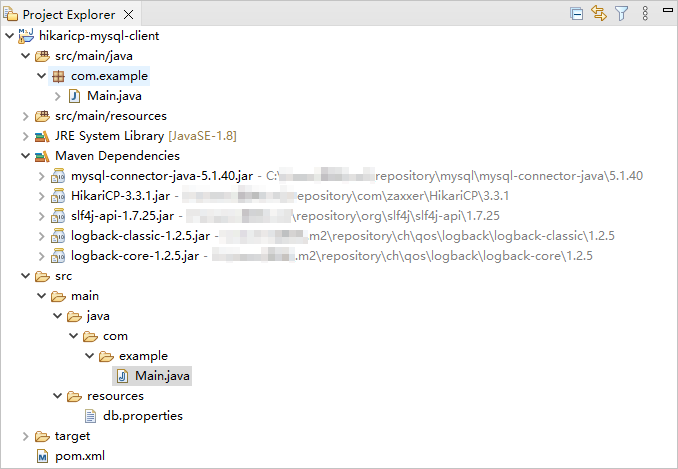
When you import a Maven project using Eclipse, it will automatically detect the
pom.xmlfile in the project, download the required dependency libraries based on the described dependencies in the file, and add them to the project.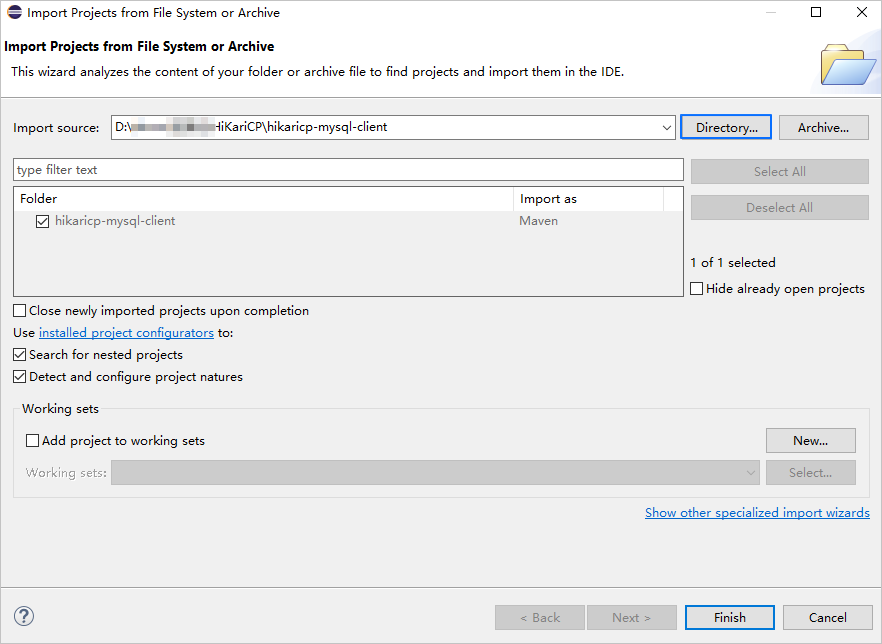
View the project.
Step 2: Obtain the URL of OceanBase Database
Contact the deployment personnel or administrator of OceanBase Database to obtain the corresponding database connection string.
Here is an example:
obclient -hxxx.xxx.xxx.xxx -P2881 -utest_user001@mysql001 -p****** -DtestFor more information about the connection string, see Connect to an OceanBase tenant by using OBClient.
Fill in the URL based on the OceanBase Database connection string, as shown in the following example.
jdbc:mysql://$host:$port/$database_name?user=$user_name&password=$password&useSSL=falseParameter description:
$host: the IP address for connecting to OceanBase Database. For connection through OceanBase Database Proxy (ODP), use the IP address of an ODP. For direct connection, use the IP address of an OBServer node.$port: the port for connecting to OceanBase Database. For connection through ODP, the default value is2883, which can be customized when ODP is deployed. For direct connection, the default value is2881, which can be customized when OceanBase Database is deployed.$database_name: the name of the database to be accessed.Note
The user used to connect to the tenant must have the
CREATE,INSERT,DELETE,UPDATE, andSELECTprivileges on the database. For more information about user privileges, see Privilege types in MySQL mode.user_name: the tenant connection account. For connection through ODP, the format isusername@tenant name#cluster nameorcluster name:tenant name:username. For direct connection, the format isusername@tenant name.password: the password of the account.
For more information about the connection properties of MySQL Connector/J, see Configuration Properties.
Here is an example:
jdbc:mysql://xxx.xxx.xxx.xxx:2881/test?user=test_user001@mysql001&password=******&useSSL=false
Step 3: Modify the database connection information in the hikaricp-mysql-client project
Modify the database connection information in the hikaricp-mysql-client/src/main/resources/db.properties file based on the information obtained in Step 2: Obtain the URL of OceanBase Database.
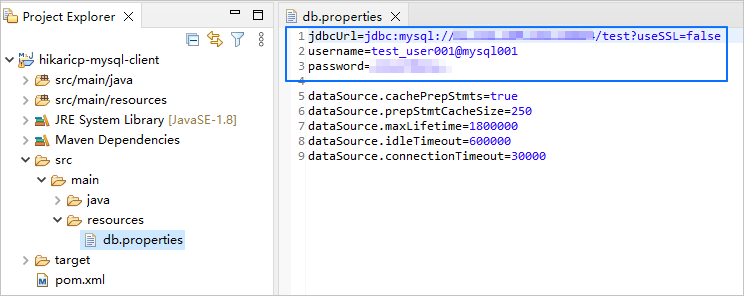
Here is an example:
- The IP address of the OBServer node is
xxx.xxx.xxx.xxx. - The port is 2881.
- The name of the database to be accessed is
test. - The tenant account is
test_user001@mysql001. Here,mysql001is a MySQL user tenant created in OceanBase Database, andtest_user001is the username of themysql001tenant. - The password is
******.
Sample code:
...
jdbcUrl=jdbc:mysql://xxx.xxx.xxx.xxx:2881/test?useSSL=false
username=test_user001@mysql001
password=******
...
Step 4: Run the hikaricp-mysql-client project
In the project navigation view, locate and expand the src/main/java directory.
Right-click the Main.java file and choose Run As > Java Application.
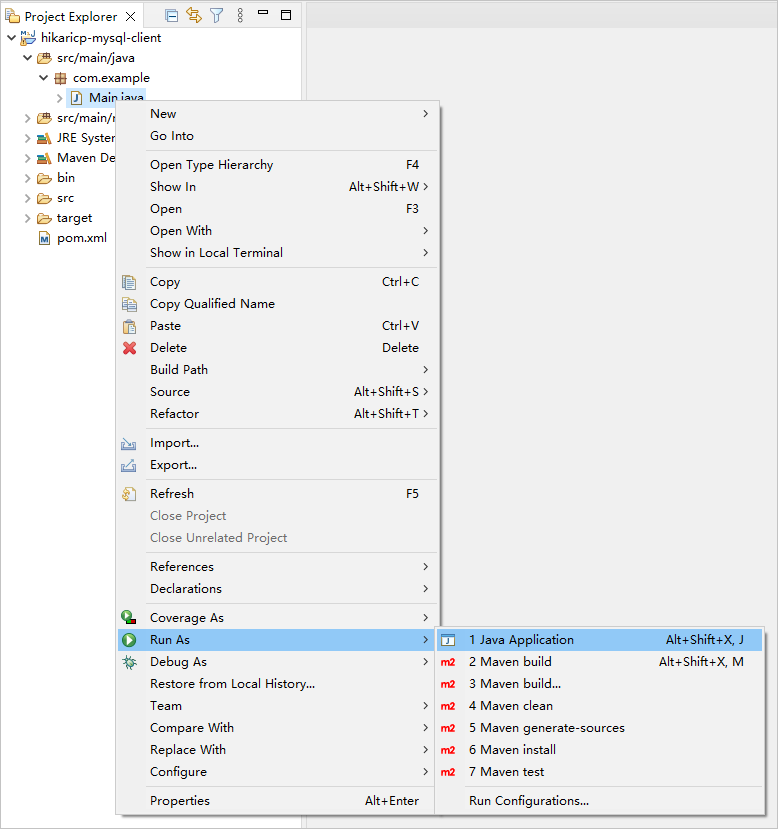
In the console window of Eclipse, view the project logs and output results.
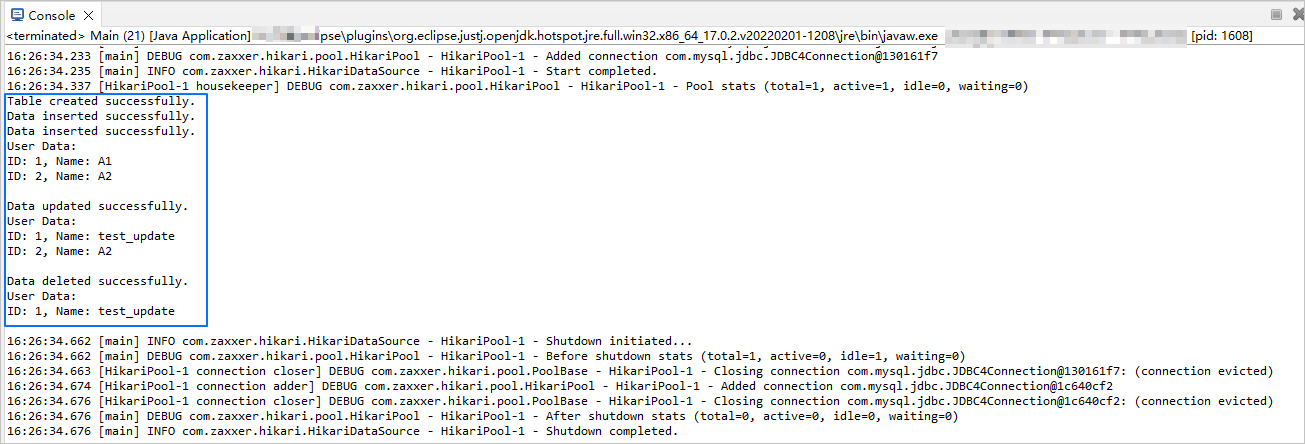
You can also execute the following SQL statement in OBClient to view the result.
obclient [(none)]> SELECT * FROM test.test_hikaricp;The return result is as follows:
+------+-------------+ | id | name | +------+-------------+ | 1 | test_update | +------+-------------+ 1 row in set
Project code introduction
Click hikaricp-mysql-client to download the project code, which is a compressed package named hikaricp-mysql-client.zip.
After decompressing it, you will find a folder named hikaricp-mysql-client. The directory structure is as follows:
hikaricp-mysql-client
├── src
│ └── main
│ ├── java
│ │ └── com
│ │ └── example
│ │ └── Main.java
│ └── resources
│ └── db.properties
└── pom.xml
File description:
src: the root directory for source code.main: the main code directory, containing the core logic of the application.java: a directory for storing the Java source code.com: a directory for storing the Java package.example: a directory for storing the packages of the sample project.Main.java: a sample file of the main class that contains logic for table creation, data insertion, data deletion, data modification, and data query.resources: a directory for storing resource files, including configuration files.db.properties: the configuration file of the connection pool, which contains relevant database connection parameters.pom.xml: the configuration file of the Maven project, which is used to manage project dependencies and build settings.
Introduction to pom.xml
The pom.xml file is the configuration file of the Maven project, which defines the dependencies, plugins, and build rules of the project. Maven is a Java project management tool that can automatically download dependencies, compile, and package the project.
The pom.xml file in this topic mainly includes the following sections:
Declaration statement.
Declare this file to be an XML file that uses XML standard
1.0and character encodingUTF-8.Sample code:
<?xml version="1.0" encoding="UTF-8"?>Configure namespaces and the POM model version.
- Use
xmlnsto specify the POM namespace ashttp://maven.apache.org/POM/4.0.0. - Use
xmlns:xsito specify the XML namespace ashttp://www.w3.org/2001/XMLSchema-instance. - Use
xsi:schemaLocationto specify the POM namespace ashttp://maven.apache.org/POM/4.0.0, and the location of the corresponding XSD file ashttp://maven.apache.org/xsd/maven-4.0.0.xsd. - Use
<modelVersion>to specify the POM model version as4.0.0.
Sample code:
<project xmlns="http://maven.apache.org/POM/4.0.0" xmlns:xsi="http://www.w3.org/2001/XMLSchema-instance" xsi:schemaLocation="http://maven.apache.org/POM/4.0.0 http://maven.apache.org/xsd/maven-4.0.0.xsd"> <modelVersion>4.0.0</modelVersion> <!-- Other configurations --> </project>- Use
Configure basic information.
- Use
<groupId>to specify the project group ascom.example. - Use
<artifactId>to specify the project name ashikaricp-mysql-client. - Use
<version>to specify the project version as1.0-SNAPSHOT.
Sample code:
<groupId>com.example</groupId> <artifactId>hikaricp-mysql-client</artifactId> <version>1.0-SNAPSHOT</version>- Use
Configure the attributes of the project's source file.
Specify the Maven compiler plugin as
maven-compiler-plugin, and set both the source code and target Java versions to 8. This means that the project's source code is written using Java 8 features, and the compiled bytecode will also be compatible with the Java 8 runtime environment. This configuration ensures that the project can correctly handle the syntax and features of Java 8 during compilation and runtime.Note
Java 1.8 and Java 8 are different names for the same version.
Sample code:
<build> <plugins> <plugin> <groupId>org.apache.maven.plugins</groupId> <artifactId>maven-compiler-plugin</artifactId> <configuration> <source>8</source> <target>8</target> </configuration> </plugin> </plugins> </build>Configure the components on which the project depends.
Add the
mysql-connector-javadependency library for interactions with the database, and configure the following parameters:- Use
<groupId>to specify the dependency group asmysql. - Use
<artifactId>to specify the dependency name asmysql-connector-java. - Use
<version>to specify the dependency version as5.1.40.
Sample code:
<dependency> <groupId>mysql</groupId> <artifactId>mysql-connector-java</artifactId> <version>5.1.40</version> </dependency>- Use
Add the
HikariCPdependency library for a high-performance JDBC connection pool, and configure the following parameters:- Use
<groupId>to specify the dependency group ascom.zaxxer. - Use
<artifactId>to specify the dependency name asHikariCP. - Use
<version>to specify the dependency version as3.3.1.
Sample code:
<dependency> <groupId>com.zaxxer</groupId> <artifactId>HikariCP</artifactId> <version>3.3.1</version> </dependency>- Use
Add the
logback-classicdependency library for convenient logging and management, and configure the following parameters:- Use
<groupId>to specify the dependency group asch.qos.logback. - Use
<artifactId>to specify the dependency name aslogback-classic. - Use
<version>to specify the dependency version as1.2.5.
Sample code:
<dependency> <groupId>ch.qos.logback</groupId> <artifactId>logback-classic</artifactId> <version>1.2.5</version> </dependency>- Use
db.properties code
db.properties is a configuration file for the connection pool in the sample application. It contains the configuration attributes of the connection pool, such as the database URL, username, password, and other options.
The db.properties file in this topic contains the following code:
Configure database connection parameters.
- Configure the URL of the database connection, which includes the host IP address, port number, and database to be accessed.
- Configure the database username.
- Configure the database password.
Sample code:
jdbcUrl=jdbc:mysql://$host:$port/$database_name?useSSL=false username=$user_name password=$passwordParameter description:
$host: the IP address for connecting to OceanBase Database. For connection through ODP, use the IP address of an ODP. For direct connection, use the IP address of an OBServer node.$port: the port for connecting to OceanBase Database. For connection through ODP, the default value is2883, which can be customized when ODP is deployed. For direct connection, the default value is2881, which can be customized when OceanBase Database is deployed.$database_name: the name of the database to be accessed.$user_name: the tenant account. For connection through ODP, the format isusername@tenant name#cluster nameorcluster name:tenant name:username. For direct connection, the format isusername@tenant name.$password: the password of the account.
Configure other connection pool parameters.
- Enable the cache for precompiled SQL statements.
- Set the cache size for precompiled SQL statements to 250.
- Set the maximum lifecycle of a connection to 1,800,000 ms (30 minutes). Connections that exceed this time limit will be closed.
- Set the idle timeout of a connection to 600,000 ms (10 minutes). Idle connections that exceed this time limit will be closed.
- Set the timeout period for obtaining a connection to 30,000 ms (30 seconds). If a connection is not obtained within this period, an exception will be thrown.
Sample code:
dataSource.cachePrepStmts=true dataSource.prepStmtCacheSize=250 dataSource.maxLifetime=1800000 dataSource.idleTimeout=600000 dataSource.connectionTimeout=30000
Notice
The specific attribute (parameter) settings depend on project requirements and database characteristics. We recommend that you adjust and configure the parameters based on your actual situation. For more information about HikariCP connection pool parameters, see Configuration.
Common basic parameters of HikariCP connection pool:
Category |
Parameter |
Default value |
Description |
|---|---|---|---|
| Required parameters | dataSourceClassName | N/A | The name of the DataSource class provided by the JDBC driver.
NoticeYou usually do not need to explicitly configure |
| jdbcUrl | N/A | The URL for connecting to the database. | |
| username | N/A | The username for connecting to the database. | |
| password | N/A | The password for connecting to the database. | |
| Common optional parameters | autoCommit | true | Controls the default auto-commit behavior of connections returned by the connection pool. |
| connectionTimeout | 30000 | The maximum waiting time for a client to obtain a connection from the connection pool. Unit: ms. Default value: 30000 (30 s). The minimum acceptable connection timeout value is 250 ms. | |
| idleTimeout | 600000 | The maximum idle time of a connection in the connection pool. Unit: ms. Default value: 600000 (10 min). Restrictions:
|
|
| keepaliveTime | 0 | The frequency at which the connection is proactively checked to prevent it from being timed out by the database or the network infrastructure. Unit: ms. Default value: 0, which disables connection keep-alive. This value must be smaller than the value of the maxLifetime attribute. |
|
| maxLifetime | 1800000 | The maximum lifecycle of a connection in the connection pool. Connections that have been used are not automatically recycled. They are removed from the connection pool only when they are closed. Unit: ms. Default value: 1800000 (30 min). If you set maxLifetime to 0, connections in the connection pool can have an infinite lifecycle. |
|
| connectionTestQuery | N/A | The connection test query that is sent from the connection pool to the database. It is executed before a connection is obtained from the connection pool to verify whether the connection to the database is still valid. | |
| minimumIdle | N/A | The minimum number of idle connections to be retained in the connection pool. If the number of idle connections falls below this value and the total number of connections in the connection pool is smaller than the value of the maximumPoolSize attribute, HikariCP tries to quickly and efficiently add additional connections. By default, the value of the minimumIdle attribute is the same as the value of the maximumPoolSize attribute. |
|
| maximumPoolSize | 10 | The maximum size of the connection pool, including idle and used connections. This value determines the maximum number of actual connections to the database backend. | |
| poolName | N/A | The name of the user-defined connection pool. In logs and the JMX management console, this name is used to identify the connection pool and its configuration. By default, a name is automatically generated. |
Introduction to Main.java
The Main.java file is part of the sample application and demonstrates how to obtain a database connection using the HikariCP connection pool and perform a series of database operations, including table creation, data insertion, data deletion, data updating, data query, and result printing.
The code in this topic consists of the following sections:
Import the required classes and packages.
- Define the package name of the current Java file as
com.exampleto organize and manage Java classes. - Import the
java.sql.Connectionclass to establish and manage connections with the database. - Import the
java.sql.PreparedStatementclass to execute precompiled SQL statements. - Import the
java.sql.ResultSetclass to process query result sets. - Import the
java.sql.SQLExceptionclass to handle SQL exceptions. - Import the
HikariConfigclass of HikariCP to configure the HikariCP connection pool. - Import the
HikariDataSourceclass of HikariCP to create and manage the HikariCP connection pool.
Sample code:
package com.example; import java.sql.Connection; import java.sql.PreparedStatement; import java.sql.ResultSet; import java.sql.SQLException; import com.zaxxer.hikari.HikariConfig; import com.zaxxer.hikari.HikariDataSource;- Define the package name of the current Java file as
Define the class and methods.
Define a Main class with the
mainmethod as the entry point of the program. In themainmethod, read thedb.propertiesfile to configure the HikariCP connection pool and obtain a database connection. Then, call a series of methods to create a table, insert data, query data, update data, and delete data. If aSQLExceptionexception occurs during the operations, print the stack trace of the exception. The specific steps are as follows:- Define a public class named Main.
- Define the
mainmethod as the entry method of the Main class. - Create a HikariConfig object and configure it by using the specified
db.propertiesfile. - Create a HikariDataSource object and obtain a database connection in the
try-with-resourcesblock. - Call the
createTablemethod, pass the obtained database connection object, and create a table namedtest_hikaricp. - Call the
insertDatamethod, pass the obtained database connection object and data parameters, and insert two rows of data:(1,'A1')and(2,'A2'). - Call the
selectDatamethod, pass the obtained database connection object, and check whether the data is inserted. - Call the
updateDatamethod, pass the obtained database connection object and update parameters, and update the value of thenamecolumn totest_updatein the row where theidcolumn value is1. - Call the
selectDatamethod, pass the obtained database connection object, and check whether the data is updated. - Call the
deleteDatamethod, pass the obtained database connection object and delete parameters, and delete the row where theidcolumn value is2. - Call the
selectDatamethod, pass the obtained database connection object, and check whether the data is deleted. - If a
SQLExceptionexception occurs in thetryblock, print the stack trace of the exception. - Define methods for table creation, data insertion, data query, data update, and data deletion.
Sample code:
public class Main { public static void main(String[] args) { try { HikariConfig config = new HikariConfig("/db.properties"); try (HikariDataSource dataSource = new HikariDataSource(config); Connection conn = dataSource.getConnection()) { createTable(conn); insertData(conn, 1, "A1"); insertData(conn, 2, "A2"); selectData(conn); updateData(conn, "test_update", 1); selectData(conn); deleteData(conn, 2); selectData(conn); } } catch (SQLException e) { e.printStackTrace(); } } // Define a method for table creation. // Define a method for data insertion. // Define a method for data query. // Define a method for data update. // Define a method for data deletion. }Define the method for table creation.
Define a private static method named
createTableto create a table namedtest_hikaricpin the database. The table contains theidcolumn and thenamecolumn. The specific steps are as follows:- Define a private static method named
createTable. The method accepts a Connection object as the parameter and declare that the method may throwSQLException. - Define an SQL statement string to create a table named
test_hikaricp. The table contains theidcolumn (data type:INT) and thenamecolumn (data type:VARCHAR(50). - Use the
connconnection object to create a precompiled SQL statement object namedpstmt, and use the object in thetry-with-resourcesblock. - Execute the SQL statement to create a table named
test_hikaricp. - Output a message in the console to indicate that the table is created.
Sample code:
private static void createTable(Connection conn) throws SQLException { String sql = "CREATE TABLE IF NOT EXISTS test_hikaricp (id INT, name VARCHAR(50))"; try (PreparedStatement pstmt = conn.prepareStatement(sql)) { pstmt.executeUpdate(); System.out.println("Table created successfully."); } }- Define a private static method named
Define the method for data insertion.
Define a private static method named
insertDatato insert data into thetest_hikaricptable in the database. The specific steps are as follows:- Define a private static method named
insertData. The method accepts a Connection object, an integeridparameter, and a stringnameparameter as the parameters and declare that the method may throwSQLException. - Define an SQL statement string to insert data into the
test_hikaricptable. The data includes theidandnamecolumns. - Use the
connconnection object to create a precompiled SQL statement object namedpstmt, and use the object in thetry-with-resourcesblock. - Set the value of the first parameter
?in the SQL statement toid. - Set the value of the second parameter
?in the SQL statement toname. - Execute the SQL statement to insert data.
- Output a message in the console to indicate that the data is inserted.
Sample code:
private static void insertData(Connection conn, int id, String name) throws SQLException { String sql = "INSERT INTO test_hikaricp (id, name) VALUES (?, ?)"; try (PreparedStatement pstmt = conn.prepareStatement(sql)) { pstmt.setInt(1, id); pstmt.setString(2, name); pstmt.executeUpdate(); System.out.println("Data inserted successfully."); } }- Define a private static method named
Define the method for data query.
Define a private static method named
selectDatato query data in thetest_hikaricptable in the database. The specific steps are as follows:- Define a private static method named
selectData. The method accepts a Connection object as the parameter and declare that the method may throwSQLException. - Define an SQL statement string to query all data in the
test_hikaricptable. - Use the
connconnection object to create a precompiled SQL statement object namedpstmt, and use the object in thetry-with-resourcesblock. Call theexecuteQuery()method to execute the SQL query and return the query result set object namedrs. - Output a message in the console to indicate that user data is being printed.
- Traverse the query result set. Call the
next()method to check whether there is another row of data in the result set. If yes, enter the loop. - Obtain the value of the
idcolumn from the result set and assign the value to the variableid. - Obtain the value of the
namecolumn from the result set and assign the value to the variablename. - Output the
idandnamevalues of each row of data in the console. - Output an empty line in the console.
Sample code:
private static void selectData(Connection conn) throws SQLException { String sql = "SELECT * FROM test_hikaricp"; try (PreparedStatement pstmt = conn.prepareStatement(sql); ResultSet rs = pstmt.executeQuery()) { System.out.println("User Data:"); while (rs.next()) { int id = rs.getInt("id"); String name = rs.getString("name"); System.out.println("ID: " + id + ", Name: " + name); } System.out.println(); } }- Define a private static method named
Define the method for data update.
Define a private static method named
updateDatato update data in thetest_hikaricptable in the database. The specific steps are as follows:- Define a private static method named
updateData. The method accepts a Connection object, a stringnameparameter, and an integeridparameter as the parameters and declare that the method may throwSQLException. - Define an SQL statement string to update data in the
test_hikaricptable. The value of thenamecolumn is updated to the specifiedname, and the condition is that the value of theidcolumn is equal to the specifiedid. - Use the
connconnection object to create a precompiled SQL statement object namedpstmt, and use the object in thetry-with-resourcesblock. - Set the value of the first parameter
?in the SQL statement toname. - Set the value of the second parameter
?in the SQL statement toid. - Execute the SQL statement to update data.
- Output a message in the console to indicate that the data is updated.
Sample code:
private static void updateData(Connection conn, String name, int id) throws SQLException { String sql = "UPDATE test_hikaricp SET name = ? WHERE id = ?"; try (PreparedStatement pstmt = conn.prepareStatement(sql)) { pstmt.setString(1, name); pstmt.setInt(2, id); pstmt.executeUpdate(); System.out.println("Data updated successfully."); } }- Define a private static method named
Define the method for data deletion.
Define a private static method named
deleteDatato delete data in thetest_hikaricptable in the database that meets the specified conditions. The specific steps are as follows:- Define a private static method named
deleteData. The method accepts a Connection object and an integeridparameter as the parameters and declare that the method may throwSQLException. - Define an SQL statement string to delete data from the
test_hikaricptable that meets the conditionid = ?. - Use the
connconnection object to create a precompiled SQL statement object namedpstmt, and use the object in thetry-with-resourcesblock. - Set the value of the first parameter
?in the SQL statement toid. - Execute the SQL statement to delete data that meets the condition from the table.
- Output a message in the console to indicate that the data is deleted.
Sample code:
private static void deleteData(Connection conn, int id) throws SQLException { String sql = "DELETE FROM test_hikaricp WHERE id = ?"; try (PreparedStatement pstmt = conn.prepareStatement(sql)) { pstmt.setInt(1, id); pstmt.executeUpdate(); System.out.println("Data deleted successfully."); } }- Define a private static method named
Complete code
<?xml version="1.0" encoding="UTF-8"?>
<project xmlns="http://maven.apache.org/POM/4.0.0"
xmlns:xsi="http://www.w3.org/2001/XMLSchema-instance"
xsi:schemaLocation="http://maven.apache.org/POM/4.0.0 http://maven.apache.org/xsd/maven-4.0.0.xsd">
<modelVersion>4.0.0</modelVersion>
<groupId>com.oceanbase</groupId>
<artifactId>hikaricp-mysql-client</artifactId>
<version>1.0-SNAPSHOT</version>
<build>
<plugins>
<plugin>
<groupId>org.apache.maven.plugins</groupId>
<artifactId>maven-compiler-plugin</artifactId>
<configuration>
<source>8</source>
<target>8</target>
</configuration>
</plugin>
</plugins>
</build>
<dependencies>
<dependency>
<groupId>mysql</groupId>
<artifactId>mysql-connector-java</artifactId>
<version>5.1.40</version>
</dependency>
<dependency>
<groupId>com.zaxxer</groupId>
<artifactId>HikariCP</artifactId>
<version>3.3.1</version>
</dependency>
<dependency>
<groupId>ch.qos.logback</groupId>
<artifactId>logback-classic</artifactId>
<version>1.2.5</version>
</dependency>
</dependencies>
</project>
jdbcUrl=jdbc:mysql://$host:$port/$database_name?useSSL=false
username=$user_name
password=$password
dataSource.cachePrepStmts=true
dataSource.prepStmtCacheSize=250
dataSource.maxLifetime=1800000
dataSource.idleTimeout=600000
dataSource.connectionTimeout=30000
package com.example;
import java.sql.Connection;
import java.sql.PreparedStatement;
import java.sql.ResultSet;
import java.sql.SQLException;
import com.zaxxer.hikari.HikariConfig;
import com.zaxxer.hikari.HikariDataSource;
public class Main {
public static void main(String[] args) {
try {
HikariConfig config = new HikariConfig("/db.properties");
try (HikariDataSource dataSource = new HikariDataSource(config);
Connection conn = dataSource.getConnection()) {
createTable(conn);
insertData(conn, 1, "A1");
insertData(conn, 2, "A2");
selectData(conn);
updateData(conn, "test_update", 1);
selectData(conn);
deleteData(conn, 2);
selectData(conn);
}
} catch (SQLException e) {
e.printStackTrace();
}
}
private static void createTable(Connection conn) throws SQLException {
String sql = "CREATE TABLE IF NOT EXISTS test_hikaricp (id INT, name VARCHAR(50))";
try (PreparedStatement pstmt = conn.prepareStatement(sql)) {
pstmt.executeUpdate();
System.out.println("Table created successfully.");
}
}
private static void insertData(Connection conn, int id, String name) throws SQLException {
String sql = "INSERT INTO test_hikaricp (id, name) VALUES (?, ?)";
try (PreparedStatement pstmt = conn.prepareStatement(sql)) {
pstmt.setInt(1, id);
pstmt.setString(2, name);
pstmt.executeUpdate();
System.out.println("Data inserted successfully.");
}
}
private static void selectData(Connection conn) throws SQLException {
String sql = "SELECT * FROM test_hikaricp";
try (PreparedStatement pstmt = conn.prepareStatement(sql);
ResultSet rs = pstmt.executeQuery()) {
System.out.println("User Data:");
while (rs.next()) {
int id = rs.getInt("id");
String name = rs.getString("name");
System.out.println("ID: " + id + ", Name: " + name);
}
System.out.println();
}
}
private static void updateData(Connection conn, String name, int id) throws SQLException {
String sql = "UPDATE test_hikaricp SET name = ? WHERE id = ?";
try (PreparedStatement pstmt = conn.prepareStatement(sql)) {
pstmt.setString(1, name);
pstmt.setInt(2, id);
pstmt.executeUpdate();
System.out.println("Data updated successfully.");
}
}
private static void deleteData(Connection conn, int id) throws SQLException {
String sql = "DELETE FROM test_hikaricp WHERE id = ?";
try (PreparedStatement pstmt = conn.prepareStatement(sql)) {
pstmt.setInt(1, id);
pstmt.executeUpdate();
System.out.println("Data deleted successfully.");
}
}
}
References
- For more information about MySQL Connector/J, see Overview of MySQL Connector/J.
- For more information about the HikariCP connection pool, see HikariCP.