Overview
To support non-conflicting read and write operations, OceanBase Database stores multiple versions of data. To handle the semantics of multi-version data, we need to maintain multi-version consistency. OceanBase Database ensures multi-version consistency by using read versions and data versions. Specifically, it reads the version number and returns all committed data with a version number less than the read version number to define multi-version consistency.
Therefore, we need to pay attention to the following points:
Uncommitted transactions: We cannot read uncommitted data from other transactions. Otherwise, if the corresponding transaction is rolled back, it will result in a dirty read.
Transaction consistency snapshot: We need to read all committed data with a version number less than the read version number to ensure a user-understandable consistency point. Otherwise, it will result in a fractured read, where only half of the transaction is returned.
Non-conflicting read and write operations: We need to ensure non-conflicting read and write operations even when uncommitted transactions and transaction consistency points are met.
Usage
Multi-version read consistency is widely used within the database and is one of the key mechanisms for implementing concurrency control:
Weak consistency read: OceanBase Database's weak consistency read still provides a transaction consistency snapshot. It will not return data from uncommitted transactions or half of a transaction.
Strong consistency read: OceanBase Database's strong consistency read is divided into two types: transaction-level read version and statement-level version. These are used for snapshot read and read committed isolation levels, respectively. It requires the ability to return a transaction consistency point.
Read-only transactions: OceanBase Database's read-only statements also require the same strong consistency read capability, which requires the ability to return a transaction consistency point.
Backup and restore points: OceanBase Database needs to provide the ability to back up to a transaction consistency snapshot to prevent backing up unnecessary or uncommitted transactions or missing transactions that need to be backed up.
When using multi-version read consistency, as shown in the following figure:
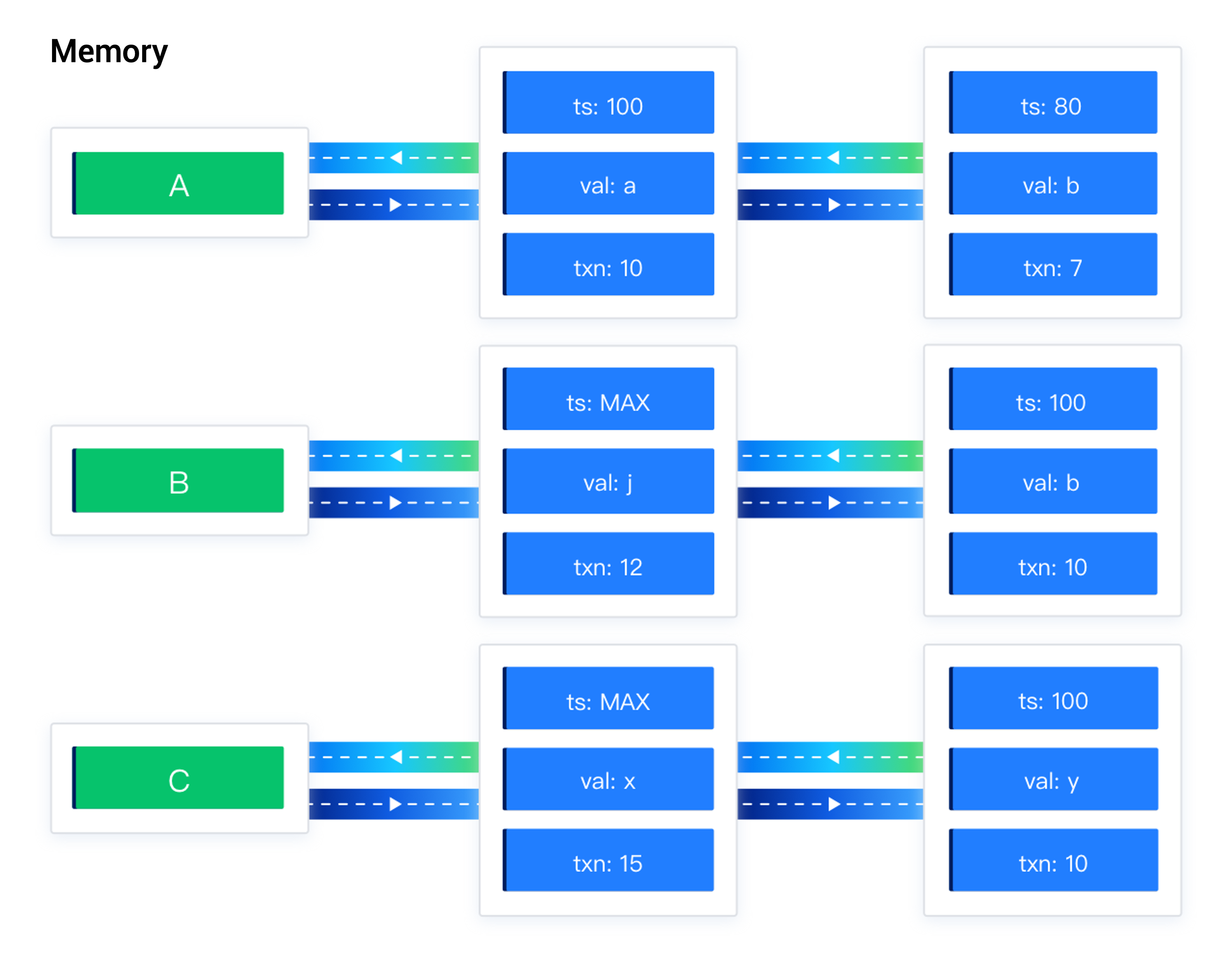
As shown in the left part of the figure, data A contains 100 versions of committed data a, corresponding to transaction 10, and committed data b, corresponding to transaction 7. Data B contains uncommitted data j, corresponding to transaction 12, and committed data b, corresponding to transaction 10. Data C contains uncommitted data x, corresponding to transaction 15, and committed data y, corresponding to transaction 10.
Implementation
Transaction table

The transaction table is an in-memory table that represents the set of active transactions on the current replica. During transaction execution, the system decides whether to read the corresponding data based on different transaction states. The data states include committed (COMMIT), running (RUNNING), and aborted (ABORT). For running (RUNNING) transactions, a local commit version (prepare version) may exist. For committed transactions, a global commit version (commit version) exists. The global commit version represents the final version of the transaction and is the key factor in determining the consistency point.
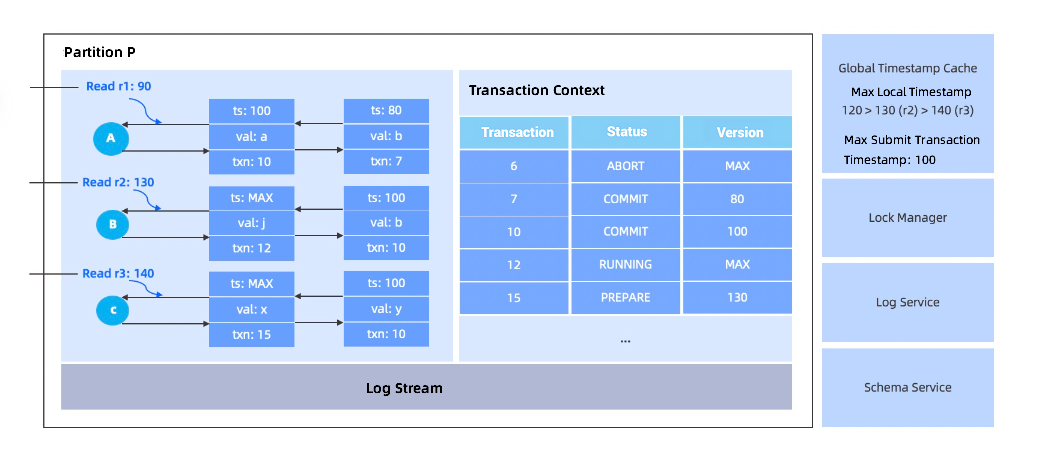
As shown in the right part of the figure, transaction 6 is in the aborted state. Transaction 7 is in the committed state, with a global commit version of 80. Transaction 12 is in the running state and does not have a local commit version. Transaction 15 is in the running state with a local commit version of 130.
Read request processing
When reading data, we use the read version number to read the corresponding data.
Let's analyze the scenarios separately. When reading data from committed or aborted transactions, we can easily determine whether to read the data based on the global commit timestamp and the transaction state. As shown in the following figure, read request r1 uses 90 as the read version number. According to the snapshot read strategy, it selects data with a version number of 80 and data b for reading.
When reading data from a running transaction, we can safely skip this data. As shown in the following figure, read request r2 uses 130 as the read version number. It can safely skip transaction 12, which has not entered the two-phase commit process, and read data with a version number of 100 and data b.
When reading data from a prepare transaction, we cannot determine whether the transaction will be committed. Therefore, we wait for the transaction to decide the relationship between the global commit timestamp and the read timestamp 140. As shown in the following figure, read request r3 uses 140 as the read version number and waits for the transaction with a local commit timestamp of 130 in the two-phase commit state to decide the relationship between the global commit timestamp and the read timestamp 140.