







Locality is introduced to describe the types and distribution strategies of multiple replicas of data. The current version of OceanBase Database supports only tenant-level locality, and no longer supports table-level, database-level, or table group-level locality.
Replicas refer to the data itself, while locality refers to the container that holds the data. This means that the distribution strategies and types of containers described by locality apply to the data they contain.
In OceanBase Database V4.2.x, you can set locality configurations at the tenant level only. In OceanBase Database V3.x, locality configuration was available for tenants, tables, databases, and table groups.
Syntax
The syntax of locality is as follows:
replicas{count}@location
The following table describes elements in the syntax.
Element |
Description |
|---|---|
| replicas | The type of the replica. The value of this element is the name of the replica type. Both full names and abbreviations are supported. You can view the supported replica type names in the name column of the table in Overview of replicas. |
| location | The location of the replica. It contains a collection of values that are known to the system. The value of this element is the names of zones. You can query for the names of zones in a cluster or tenant from the oceanbase.DBA_OB_ZONES view. For more information about the oceanbase.DBA_OB_ZONES view, see oceanbase.DBA_OB_ZONES. |
| count | The number of replicas. The value is fixed to 1, indicating only one replica. You can leave this element unspecified. |
You can query for the locality of a tenant from the LOCALITY column in the oceanbase.DBA_OB_TENANTS view of the sys tenant. Here is an example:
obclient> SELECT * FROM oceanbase.DBA_OB_TENANTS limit 10;
+-----------+-------------+-------------+----------------------------+----------------------------+--------------+---------------+-------------------+--------------------+--------+---------------+--------+-------------+-------------------+------------------+---------------------+---------------------+---------------------+---------------------+--------------+----------------------------+
| TENANT_ID | TENANT_NAME | TENANT_TYPE | CREATE_TIME                | MODIFY_TIME                | PRIMARY_ZONE | LOCALITY      | PREVIOUS_LOCALITY | COMPATIBILITY_MODE | STATUS | IN_RECYCLEBIN | LOCKED | TENANT_ROLE | SWITCHOVER_STATUS | SWITCHOVER_EPOCH | SYNC_SCN            | REPLAYABLE_SCN      | READABLE_SCN        | RECOVERY_UNTIL_SCN  | LOG_MODE     | ARBITRATION_SERVICE_STATUS |
+-----------+-------------+-------------+----------------------------+----------------------------+--------------+---------------+-------------------+--------------------+--------+---------------+--------+-------------+-------------------+------------------+---------------------+---------------------+---------------------+---------------------+--------------+----------------------------+
|         1 | sys         | SYS         | 2023-05-17 18:10:19.940353 | 2023-05-17 18:10:19.940353 | RANDOM       | FULL{1}@zone1 | NULL              | MYSQL              | NORMAL | NO            | NO     | PRIMARY     | NORMAL            |                0 |                NULL |                NULL |                NULL |                NULL | NOARCHIVELOG | DISABLED                   |
|      1001 | META$1002   | META        | 2023-05-17 18:15:21.455549 | 2023-05-17 18:15:36.639479 | zone1        | FULL{1}@zone1 | NULL              | MYSQL              | NORMAL | NO            | NO     | PRIMARY     | NORMAL            |                0 |                NULL |                NULL |                NULL |                NULL | NOARCHIVELOG | DISABLED                   |
|      1002 | mysql001    | USER        | 2023-05-17 18:15:21.461276 | 2023-05-17 18:15:36.669988 | zone1        | FULL{1}@zone1 | NULL              | MYSQL              | NORMAL | NO            | NO     | PRIMARY     | NORMAL            |                0 | 1684398681521302749 | 1684398681521302749 | 1684398681345969089 | 4611686018427387903 | NOARCHIVELOG | DISABLED                   |
|      1003 | META$1004   | META        | 2023-05-17 18:18:19.927859 | 2023-05-17 18:18:36.443233 | zone1        | FULL{1}@zone1 | NULL              | MYSQL              | NORMAL | NO            | NO     | PRIMARY     | NORMAL            |                0 |                NULL |                NULL |                NULL |                NULL | NOARCHIVELOG | DISABLED                   |
|      1004 | oracle001   | USER        | 2023-05-17 18:18:19.928914 | 2023-05-17 18:18:36.471606 | zone1        | FULL{1}@zone1 | NULL              | ORACLE             | NORMAL | NO            | NO     | PRIMARY     | NORMAL            |                0 | 1684398681335427475 | 1684398681335427475 | 1684398681144712832 | 4611686018427387903 | NOARCHIVELOG | DISABLED                   |
|      1005 | META$1006   | META        | 2023-05-18 15:48:57.441320 | 2023-05-18 15:49:12.820051 | zone1        | FULL{1}@zone1 | NULL              | MYSQL              | NORMAL | NO            | NO     | PRIMARY     | NORMAL            |                0 |                NULL |                NULL |                NULL |                NULL | NOARCHIVELOG | DISABLED                   |
|      1006 | mq_t1       | USER        | 2023-05-18 15:48:57.447657 | 2023-05-18 15:49:12.857944 | zone1        | FULL{1}@zone1 | NULL              | MYSQL              | NORMAL | NO            | NO     | PRIMARY     | NORMAL            |                0 | 1684398680916392609 | 1684398680916392609 | 1684398680742451346 | 4611686018427387903 | NOARCHIVELOG | DISABLED                   |
+-----------+-------------+-------------+----------------------------+----------------------------+--------------+---------------+-------------------+--------------------+--------+---------------+--------+-------------+-------------------+------------------+---------------------+---------------------+---------------------+---------------------+--------------+----------------------------+
7 rows in set
Example
The following example shows the locality of different tenants in a cluster that has five zones. The five zones are z1 to z5.
Locality of the sys tenant:
F@z1,F@z2,F@z3,F@z4,F@z5.This locality indicates that the sys tenant has a full-featured replica in z1, z2, z3, z4, and z5, respectively.
Locality of tenant 1:
F@z1,F@z2,F@z3.This locality indicates that tenant1 has a full-featured replica in z1, z2, and z3, respectively.
Locality of tenant 2:
F@z3,F@z4,F@z5.This locality indicates that tenant2 has a full-featured replica in z3, z4, and z5, respectively.
The following figure shows an example.
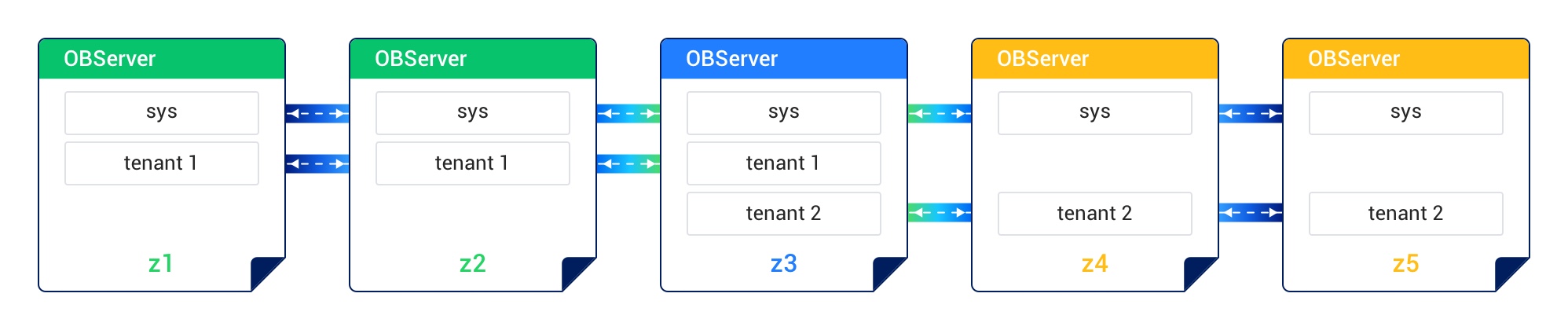
Locality and high-availability architecture
The multi-replica architecture is one of the strengths that distinguish OceanBase Database from conventional databases. The multi-replica architecture lays a foundation for multi-level lossless disaster recovery capabilities of OceanBase Database, including standalone lossless disaster recovery, lossless disaster recovery for IDCs, and region-wide lossless disaster recovery. OceanBase Database allows you to flexibly adjust the cluster deployment architecture to adapt to the technical evolution of business scenarios.
The flexible deployment architecture of OceanBase Database relies on the locality settings. Locality describes the replica types and the distribution strategies for replicas across zones. The region attribute of a zone describes the region to which the zone belongs. You can query for the region to which a zone belongs from the REGION column in the oceanbase.DBA_OB_ZONES view. You can adjust the distribution of multiple replicas of a tenant across zones in different regions to flexibly adjust the deployment mode.
OceanBase Database supports three typical deployment modes: three IDCs in the same region, five IDCs across two regions, and five IDCs across three regions. The following table describes the locality settings in different deployment modes.
Deployment mode |
Locality |
Zone distribution |
|---|---|---|
| Three IDCs in the same region | F@z1,F@z2,F@z3 |
Zones z1, z2, and z3 belong to IDC 1, IDC 2, and IDC 3 in Region R1, respectively. |
| Five IDCs across two regions | F@z1,F@z2,F@z3,F@z4,F@z5 |
Zones z1 and z2 belong to IDC 1 in Region R1. Zones z3 and z4 belong to IDC 2 in Region R1. Zone z5 belongs to Region R2. |
| Five IDCs across three regions | F@z1,F@z2,F@z3,F@z4,F@z5 |
Zones z1 and z2 belong to IDC 1 and IDC 2 in Region R1. Zones z3 and z4 belong to IDC 3 and IDC 4 in Region R2. Zone z5 belongs to Region R3. |