







With the development of online transactions and the e-commerce industry, hotspot concurrency poses increasing challenges to business systems. For example, the balances of hot accounts are frequently updated within a short time, or sellers launch flash sell events for popular products during massive online promotions. The hot row update is a process when some fields, such as the balance and inventory, of the same data row in the database are modified with high concurrency within a short time. However, to maintain transaction consistency in a relational database, the update of a data row must go through the process of locking, update, write log commit, and lock release, which is a serial process. Therefore, the hot row update capability is a performance bottleneck of a database.
The key to improving the hot row update capability lies in reducing the lock time of a transaction. Although the early lock release (ELR) technique has long been proposed in the academic world, it lacks mature industrial implementations due to its complex exception handling scenarios. In view of this, OceanBase has carried out continuous exploration and proposed an implementation of ELR based on a distributed architecture to improve the database capability of concurrent single-row updates in similar business scenarios. This implementation, the ELR feature of OceanBase Database, has become a key capability of OceanBase Database in scalable online transaction processing (OLTP).
This topic describes how to use the ELR feature of OceanBase Database in the case of concurrent single-row updates and analyzes the results. The ELR feature must be verified in scenarios with high concurrency stress. Therefore, we recommend that you use at least the same server configurations as those in the following example to achieve better results. The design and principle of the ELR feature are complex and not discussed in detail in this topic.
In the following example, OceanBase Database is deployed on a server with 16 CPU cores and 128 GB of memory by using OceanBase Deployer (OBD). For more information about the deployment procedure, see Quick Start. To use the ELR feature of OceanBase Database, perform the following steps:
1. Create a test table and insert the test data
Execute the following statement to create a table in the test database and insert the test data.
CREATE TABLE `sbtest1` (
  `id` int(11) NOT NULL AUTO_INCREMENT,
  `k` int(11) NOT NULL DEFAULT '0',
  `c` char(120) NOT NULL DEFAULT '',
  `pad` char(60) NOT NULL DEFAULT '',
  PRIMARY KEY (`id`)
);

insert into sbtest1 values(1,0,'aa','aa');
In this example, a statement similar to update sbtest1 set k=k+1 where id=1 is used to initiate a query that uses the primary key to concurrently update the k column. You can also insert more data for testing, which does not make much difference in the result because this stress test is specific to a single row.
2. Construct a concurrent update scenario
In this example, concurrent updates are simulated by using multithreading in Python. 50 threads are simultaneously started. These threads run concurrently and each of them increments the value of the k field in the same row (id=1) by 1. You can also use the following ob_elr.py script for testing in your own environment. Remember to modify the database connection information in the script before you use it.
#!/usr/bin/env python3

from concurrent.futures import ThreadPoolExecutor
import pymysql
import time
import threading

# database connection info
config = {
    'user': 'root@test',
    'password': '******',
    'host': '10.10.10.1',
    'port': 2881,
    'database': 'test'
}

# parallel thread and updates in each thread
parallel = 50
batch_num = 2000

# update query
def update_elr():
    update_hot_row = ("update sbtest1 set k=k+1 where id=1")
    cnx = pymysql.connect(**config)
    cursor = cnx.cursor()

    for i in range(0,batch_num):
        cursor.execute(update_hot_row)
    cursor.close()
    cnx.close()

start=time.time()

with ThreadPoolExecutor(max_workers=parallel) as pool:
    for i in range(parallel):
        pool.submit(update_elr)

end = time.time()
elapse_time = round((end-start),2)

print('Parallel Degree:',parallel)
print('Total Updates:',parallel*batch_num)
print('Elapse Time:',elapse_time,'s')
print('TPS on Hot Row:' ,round(parallel*batch_num/elapse_time,2),'/s')
3. Run the test with default configurations
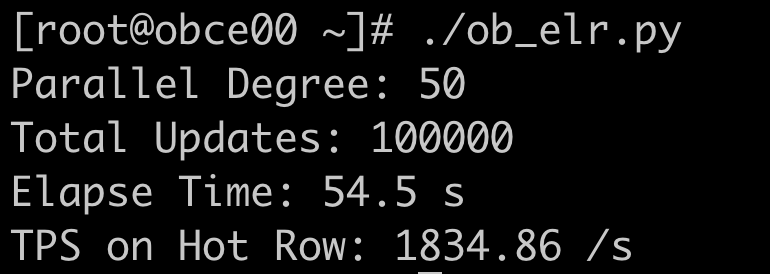
Run the ob_elr.py script on the test server without enabling the ELR feature.
In this example, 50 threads run concurrently to perform a total of 100,000 updates.
./ob_elr.py
Check the execution time and TPS in the result of the script:
[root@obce00 ~]# ./ob_elr.py
Parallel Degree: 50
Total Updates: 100000
Elapse Time: 54.5 s
TPS on Hot Row: 1834.86 /s
Results
In the default configurations with the ELR feature disabled, the TPS for concurrent single-row updates in the test environment is 1834.86/s.
4. Enable the ELR feature of OceanBase Database
First, log on to the OceanBase database as the administrator of the sys tenant.
[root@obce00 ~]# obclient -h127.0.0.1 -P2881 -uroot@sys -Doceanbase -A -p -c
Then, set the following two parameters. You can set the effective scope of the enable_early_lock_release parameter to a specific tenant or all tenants.
alter system set _max_elr_dependent_trx_count = 1000;
alter system set enable_early_lock_release=true tenant= test;
5. Run the test with the ELR feature enabled
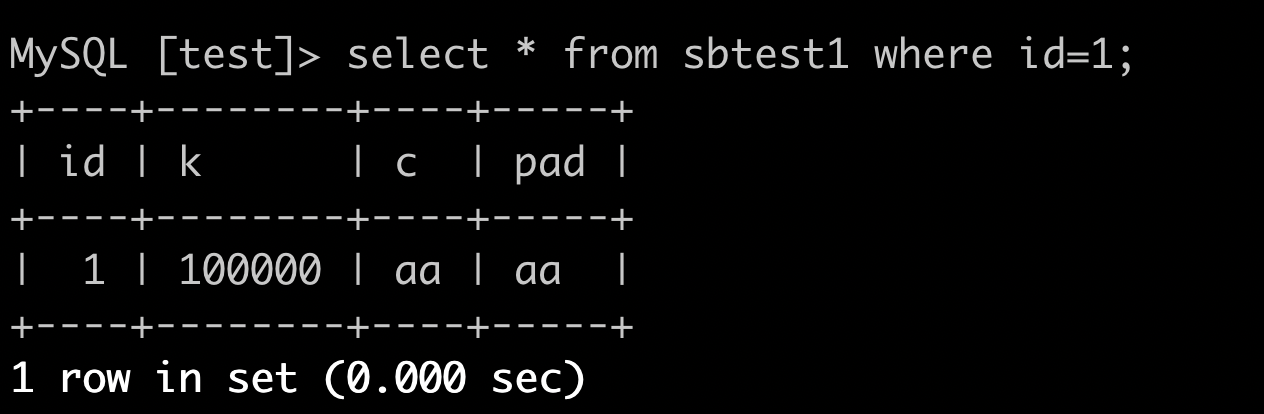
After the ELR feature is enabled, run the test script again. Before you run the script, query the record with an ID of 1 in the sbtest table. The value of field k is 100,000. This is because 100,000 updates were performed with the default configurations.
select * from sbtest1 where id=1;
Then, run the ob_elr.py script on the test server again. Run 50 threads concurrently to perform a total of 100,000 updates.
./ob_elr.py
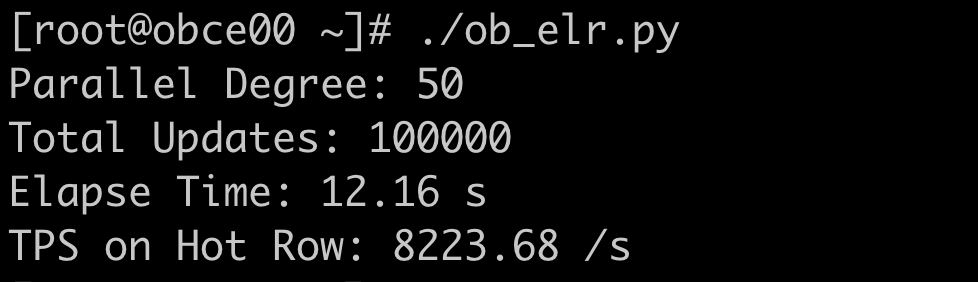
Check the execution time and TPS in the result of the script:
[root@obce00 ~]# ./ob_elr.py
Parallel Degree: 50
Total Updates: 100000
Elapse Time: 12.16 s
TPS on Hot Row: 8223.68 /s
Results
After the ELR feature of OceanBase Database is enabled, the TPS for concurrent single-row updates reaches 8223.68/s, which is about 4.5 times the result achieved with the default configurations.
The value of the k field in the sbtest1 table changes to 200,000, which indicates that this test also performed 100,000 updates.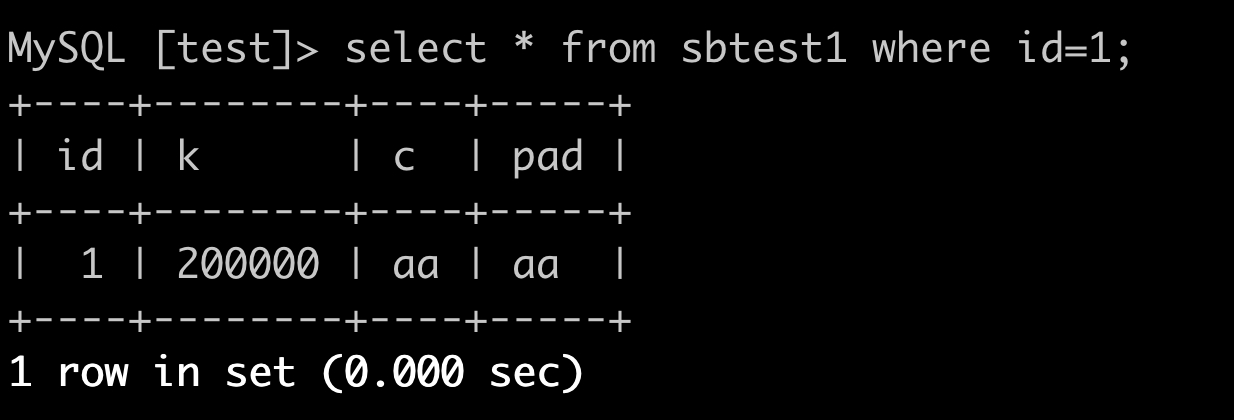
This example describes only concurrent single-row updates. The ELR feature of OceanBase Database also supports concurrent updates for multi-statement transactions. The ELR feature significantly improves the database performance in concurrent updates regardless of the number of statements and the differences in scenarios.
The ELR feature of OceanBase Database also applies to multi-region deployment scenarios with high network latency. For example, the execution of a single transaction requires 30ms in the default scenario. If you enable the ELR feature and concurrent execution, the TPS can increase by about 100 times.
The log protocol of OceanBase Database is based on multi-Paxos, with the optimized two-phase commit (2PC) process. Therefore, after the ELR feature is enabled, transaction consistency can still be ensured in the case of server restart or leader switchover. You can try these tests to experience the ELR feature.