







An OceanBase cluster supports two tenant roles: PRIMARY and STANDBY. This topic describes how to use OceanBase Deployer (obd) to dynamically switch the roles of tenants and to decouple a standby tenant from the primary tenant.
Concepts
An OceanBase cluster supports two tenant roles: PRIMARY and STANDBY. Generally, a tenant created in normal cases is a primary tenant and a tenant created in the Physical Standby Database solution is a standby tenant.
obd supports dynamically switching the roles of tenants by using commands.
Switchover
A switchover operation changes the role of a tenant as scheduled. After the switchover operation, the roles of the primary tenant and the standby tenant are exchanged. The entire process is completed within seconds, with a recovery point objective (RPO) of 0, indicating no data loss.
Failover
A failover operation is usually performed when a primary tenant is unable to recover from a failure. After the failover operation, the role of the standby tenant changes to PRIMARY. If the standby tenant has been synchronizing with the primary tenant before the failure, there will generally be data loss of hundreds of milliseconds, and the entire failover process is generally completed within seconds.
Decoupling
A decoupling operation is performed to change the role of a standby tenant as scheduled. After the decoupling operation, the standby tenant is decoupled from the primary tenant, and the role of the standby tenant changes to PRIMARY.
Switchover
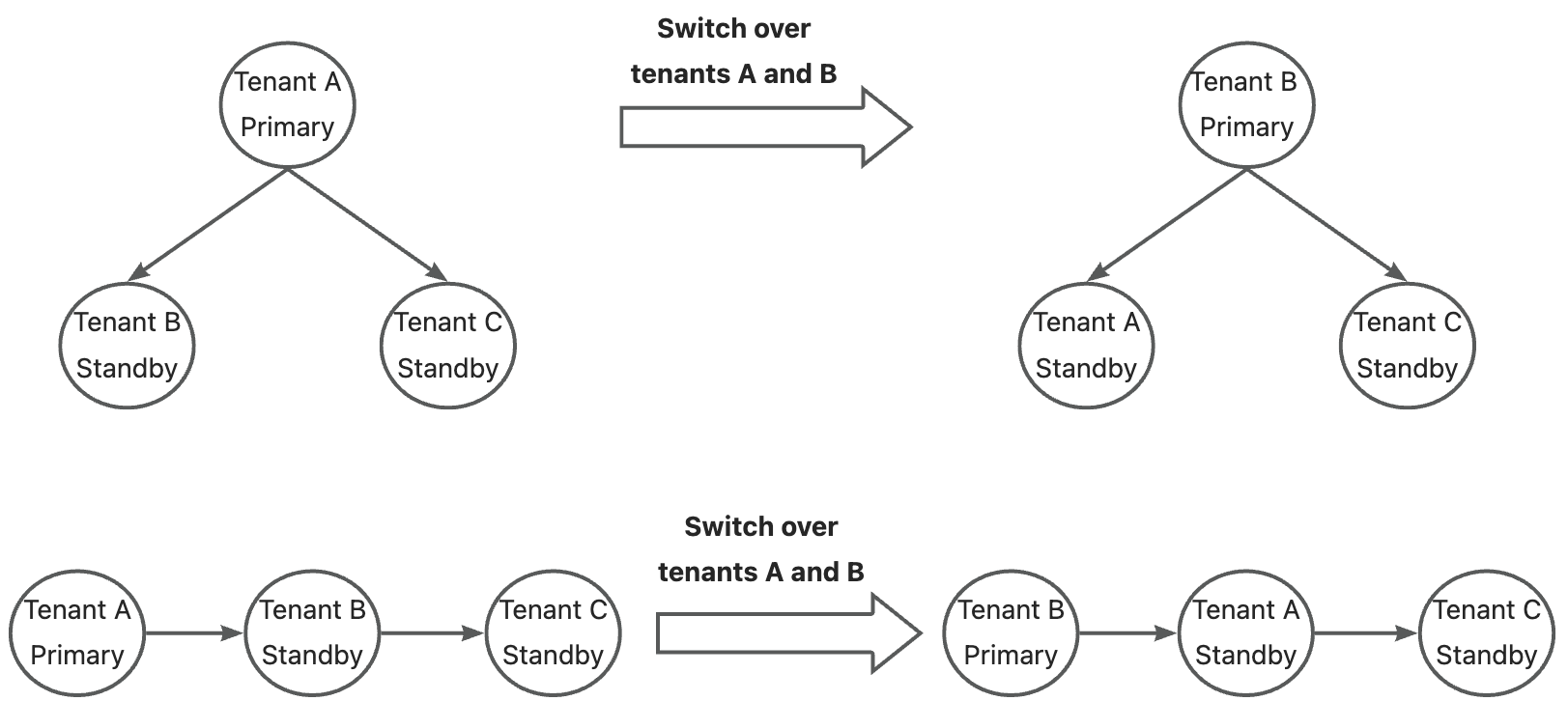
After a switchover, to maintain the same topology, the other standby tenants under the original primary tenant switch to the new primary tenant, and the other standby tenants under the new primary tenant switch to the new standby tenant. In other words, only the primary and standby tenants involved in the switchover operation are exchanged, while the positions of other tenants remain unchanged. The following figure shows an example.
Prerequisites
The OceanBase Database version is V4.2.0.0 or later.
The clusters where the primary and standby tenants respectively reside are online.
The primary and standby tenants are in the NORMAL state and the log transmission status (
sync_status) of the standby tenant is NORMAL.The replicas of all log streams of the standby tenant are online.
The tenant role (
tenant_role) of the primary tenant is PRIMARY.
Procedure
View the primary/standby relationship of the standby tenant:
obd cluster tenant show clusterB -gThe returned results are as follows:
+-----------------------------------------------------------------------------------------------------------------------------------------------------------------------------------------+
|                                                                                     tenant base info                                                                                    |
+-------------+-------------+--------------------+--------------+---------+---------+-------------+---------------------+---------------------+---------------+-------------+-------------+
| tenant_name | tenant_type | compatibility_mode | primary_zone | max_cpu | min_cpu | memory_size | max_iops            | min_iops            | log_disk_size | iops_weight | tenant_role |
+-------------+-------------+--------------------+--------------+---------+---------+-------------+---------------------+---------------------+---------------+-------------+-------------+
| sys         | SYS         | MYSQL              | RANDOM       | 1.0     | 1.0     | 2.0G        | 9223372036854775807 | 9223372036854775807 | 2.0G          | 1           | PRIMARY     |
| B_a         | USER        | MYSQL              | RANDOM       | 2.0     | 2.0     | 4.0G        | 10000               | 10000               | 5.0G          | 2           | STANDBY     |
+-------------+-------------+--------------------+--------------+---------+---------+-------------+---------------------+---------------------+---------------+-------------+-------------+
+-----------------------------------------------------------------------------------------------------------------------------------------------------------------+
|                                                                   standby tenant standby info                                                                   |
+---------------------+---------------+-------------+----------------------------+----------+---------------+-------------------+------------------+--------------+
| standby_tenant_name | tenant_status | sync_status | sync_scn_timestamp         | err_code | error_comment | switchover_status | switchover_epoch | log_mode     |
+---------------------+---------------+-------------+----------------------------+----------+---------------+-------------------+------------------+--------------+
| B_a                 | NORMAL        | NORMAL      | 2023-09-14 09:43:00.199589 | 0        |               | NORMAL            | 0                | NOARCHIVELOG |
+---------------------+---------------+-------------+----------------------------+----------+---------------+-------------------+------------------+--------------+
+---------------------------------------------------------------------------------------------------------------------------------------------------------------------------------------------------+
|                                                                                         standby tenant's primary info                                                                             |
+---------------------+-----------------------------------------------------------------------------------------------------------------------------------------------------------------------------+
| standby_tenant_name | primary_tenant_info                                                                                                                                                         |
+---------------------+-----------------------------------------------------------------------------------------------------------------------------------------------------------------------------+
| B_a                 | IP_LIST=10.10.10.1:2881;10.10.10.2:2881;10.10.10.3:2881,USER=standbyro@A_a,PASSWORD=******,TENANT_ID=1002,CLUSTER_ID=1694680744,COMPATIBILITY_MODE=MYSQL,IS_ENCRYPTED=false |
+---------------------+-----------------------------------------------------------------------------------------------------------------------------------------------------------------------------+
query primary-standby relation ok

primary-standby relation topology graph

clusterA:A_a
└── clusterB:B_a
Run the
switchovercommand for the standby tenant:obd cluster tenant switchover clusterB B_a --tenant-root-password=******View the primary/standby relationship of the original standby tenant again:
obd cluster tenant show clusterB -gThe returned results are as follows:
+-----------------------------------------------------------------------------------------------------------------------------------------------------------------------------------------+
|                                                                                     tenant base info                                                                                    |
+-------------+-------------+--------------------+--------------+---------+---------+-------------+---------------------+---------------------+---------------+-------------+-------------+
| tenant_name | tenant_type | compatibility_mode | primary_zone | max_cpu | min_cpu | memory_size | max_iops            | min_iops            | log_disk_size | iops_weight | tenant_role |
+-------------+-------------+--------------------+--------------+---------+---------+-------------+---------------------+---------------------+---------------+-------------+-------------+
| sys         | SYS         | MYSQL              | RANDOM       | 1.0     | 1.0     | 2.0G        | 9223372036854775807 | 9223372036854775807 | 2.0G          | 1           | PRIMARY     |
| B_a         | USER        | MYSQL              | RANDOM       | 2.0     | 2.0     | 4.0G        | 10000               | 10000               | 5.0G          | 2           | PRIMARY     |
+-------------+-------------+--------------------+--------------+---------+---------+-------------+---------------------+---------------------+---------------+-------------+-------------+
query primary-standby relation ok

primary-standby relation topology graph

clusterB:B_a
└── clusterA:A_a
As show in the returned results, the
tenant_rolevalue of the original standby tenant changes toPRIMARYand the primary/standby relationship topology is updated.
Failover
If the primary tenant becomes unavailable, the failover operation is performed to switch a standby tenant to the primary role in order to continue providing services. The failover operation only modifies log files and does not modify data files.
Each OceanBase Database tenant has multiple log streams, and the failover operation needs to achieve data consistency. Therefore, the system selects a timestamp with the smallest system change number (SCN) from the synchronization timestamps of all log streams as the failover timestamp. After the failover, all log streams of the tenant are rolled back to this timestamp.
Notice
If one primary tenant maps to multiple standby tenants, after the role of one standby tenant changes to the new primary tenant, the other standby tenants cannot directly switch to the new primary tenant. In this case, you need to choose between decoupling the other standby tenants from the original primary tenant and performing a failover operation to generate a new primary tenant for the other standby tenants.
Prerequisites
The OceanBase Database version is V4.2.0.0 or later.
The cluster where the primary tenant resides is unavailable.
The cluster where the standby tenant resides is online and the tenant status (
tenant_status) of the standby tenant is NORMAL.The replicas of all log streams of the standby tenant are online.
Procedure
View the primary/standby relationship of the standby tenant:
obd cluster tenant show clusterB -gThe returned results are as follows:
+-----------------------------------------------------------------------------------------------------------------------------------------------------------------------------------------+
|                                                                                     tenant base info                                                                                    |
+-------------+-------------+--------------------+--------------+---------+---------+-------------+---------------------+---------------------+---------------+-------------+-------------+
| tenant_name | tenant_type | compatibility_mode | primary_zone | max_cpu | min_cpu | memory_size | max_iops            | min_iops            | log_disk_size | iops_weight | tenant_role |
+-------------+-------------+--------------------+--------------+---------+---------+-------------+---------------------+---------------------+---------------+-------------+-------------+
| sys         | SYS         | MYSQL              | RANDOM       | 1.0     | 1.0     | 2.0G        | 9223372036854775807 | 9223372036854775807 | 2.0G          | 1           | PRIMARY     |
| B_a         | USER        | MYSQL              | RANDOM       | 2.0     | 2.0     | 4.0G        | 10000               | 10000               | 5.0G          | 2           | STANDBY     |
+-------------+-------------+--------------------+--------------+---------+---------+-------------+---------------------+---------------------+---------------+-------------+-------------+
+-----------------------------------------------------------------------------------------------------------------------------------------------------------------+
|                                                                   standby tenant standby info                                                                   |
+---------------------+---------------+-------------+----------------------------+----------+---------------+-------------------+------------------+--------------+
| standby_tenant_name | tenant_status | sync_status | sync_scn_timestamp         | err_code | error_comment | switchover_status | switchover_epoch | log_mode     |
+---------------------+---------------+-------------+----------------------------+----------+---------------+-------------------+------------------+--------------+
| B_a                 | NORMAL        | NORMAL      | 2023-09-14 10:44:04.755016 | 0        |               | NORMAL            | 0                | NOARCHIVELOG |
+---------------------+---------------+-------------+----------------------------+----------+---------------+-------------------+------------------+--------------+
+---------------------------------------------------------------------------------------------------------------------------------------------------------------------------------------------------+
|                                                                                         standby tenant's primary info                                                                             |
+---------------------+-----------------------------------------------------------------------------------------------------------------------------------------------------------------------------+
| standby_tenant_name | primary_tenant_info                                                                                                                                                         |
+---------------------+-----------------------------------------------------------------------------------------------------------------------------------------------------------------------------+
| B_a                 | IP_LIST=10.10.10.1:2881;10.10.10.2:2881;10.10.10.3:2881,USER=standbyro@A_a,PASSWORD=******,TENANT_ID=1002,CLUSTER_ID=1694680744,COMPATIBILITY_MODE=MYSQL,IS_ENCRYPTED=false |
+---------------------+-----------------------------------------------------------------------------------------------------------------------------------------------------------------------------+
query primary-standby relation ok

primary-standby relation topology graph

clusterA:A_a
└── clusterB:B_a
Run the
failovercommand for the standby tenant:obd cluster tenant failover clusterB B_a --tenant-root-password=******View the primary/standby relationship of the original standby tenant again:
obd cluster tenant show clusterB -gAs shown in the returned results, the
tenant_rolevalue of theB_atenant changes toPRIMARY.+-----------------------------------------------------------------------------------------------------------------------------------------------------------------------------------------+ | tenant base info | +-------------+-------------+--------------------+--------------+---------+---------+-------------+---------------------+---------------------+---------------+-------------+-------------+ | tenant_name | tenant_type | compatibility_mode | primary_zone | max_cpu | min_cpu | memory_size | max_iops | min_iops | log_disk_size | iops_weight | tenant_role | +-------------+-------------+--------------------+--------------+---------+---------+-------------+---------------------+---------------------+---------------+-------------+-------------+ | sys | SYS | MYSQL | RANDOM | 1.0 | 1.0 | 2.0G | 9223372036854775807 | 9223372036854775807 | 2.0G | 1 | PRIMARY | | B_a | USER | MYSQL | RANDOM | 2.0 | 2.0 | 4.0G | 10000 | 10000 | 5.0G | 2 | PRIMARY | +-------------+-------------+--------------------+--------------+---------+---------+-------------+---------------------+---------------------+---------------+-------------+-------------+ query primary-standby relation ok
Decouple a standby tenant from the primary tenant
You can run the decouple command to decouple a standby tenant from the primary tenant, making it an independent regular tenant. This section describes how to decouple a standby tenant from the primary tenant.
Prerequisites
The OceanBase Database version is V4.2.0.0 or later.
The cluster where the standby tenant resides is online and the tenant status (
tenant_status) of the standby tenant is NORMAL.The replicas of all log streams of the standby tenant are online.
Procedure
View the primary/standby relationship of the standby tenant:
obd cluster tenant show clusterC -gThe returned results are as follows:
+-----------------------------------------------------------------------------------------------------------------------------------------------------------------------------------------+
|                                                                                     tenant base info                                                                                    |
+-------------+-------------+--------------------+--------------+---------+---------+-------------+---------------------+---------------------+---------------+-------------+-------------+
| tenant_name | tenant_type | compatibility_mode | primary_zone | max_cpu | min_cpu | memory_size | max_iops            | min_iops            | log_disk_size | iops_weight | tenant_role |
+-------------+-------------+--------------------+--------------+---------+---------+-------------+---------------------+---------------------+---------------+-------------+-------------+
| sys         | SYS         | MYSQL              | RANDOM       | 1.0     | 1.0     | 2.0G        | 9223372036854775807 | 9223372036854775807 | 2.0G          | 1           | PRIMARY     |
| C_a         | USER        | MYSQL              | RANDOM       | 2.0     | 2.0     | 4.0G        | 10000               | 10000               | 5.0G          | 2           | STANDBY     |
+-------------+-------------+--------------------+--------------+---------+---------+-------------+---------------------+---------------------+---------------+-------------+-------------+
+-----------------------------------------------------------------------------------------------------------------------------------------------------------------+
|                                                                   standby tenant standby info                                                                   |
+---------------------+---------------+-------------+----------------------------+----------+---------------+-------------------+------------------+--------------+
| standby_tenant_name | tenant_status | sync_status | sync_scn_timestamp         | err_code | error_comment | switchover_status | switchover_epoch | log_mode     |
+---------------------+---------------+-------------+----------------------------+----------+---------------+-------------------+------------------+--------------+
| C_a                 | NORMAL        | NORMAL      | 2023-09-14 09:39:32.423752 | 0        |               | NORMAL            | 0                | NOARCHIVELOG |
+---------------------+---------------+-------------+----------------------------+----------+---------------+-------------------+------------------+--------------+
+---------------------------------------------------------------------------------------------------------------------------------------------------------------------------------------------------+
|                                                                                         standby tenant's primary info                                                                             |
+---------------------+-----------------------------------------------------------------------------------------------------------------------------------------------------------------------------+
| standby_tenant_name | primary_tenant_info                                                                                                                                                         |
+---------------------+-----------------------------------------------------------------------------------------------------------------------------------------------------------------------------+
| C_a                 | IP_LIST=10.10.10.1:3881;10.10.10.2:3881;10.10.10.3:3881,USER=standbyro@B_a,PASSWORD=******,TENANT_ID=1002,CLUSTER_ID=1694681525,COMPATIBILITY_MODE=MYSQL,IS_ENCRYPTED=false |
+---------------------+-----------------------------------------------------------------------------------------------------------------------------------------------------------------------------+
query primary-standby relation ok

primary-standby relation topology graph

clusterA:A_a
└── clusterB:B_a
    └── clusterC:C_a
Run the
decouplecommand for the standby tenant:obd cluster tenant decouple clusterC C_a --tenant-root-password=******View the primary/standby relationship of the original standby tenant again:
obd cluster tenant show clusterC -gAs shown in the returned results, the
tenant_rolevalue of theC_atenant changes toPRIMARY.+-----------------------------------------------------------------------------------------------------------------------------------------------------------------------------------------+ | tenant base info | +-------------+-------------+--------------------+--------------+---------+---------+-------------+---------------------+---------------------+---------------+-------------+-------------+ | tenant_name | tenant_type | compatibility_mode | primary_zone | max_cpu | min_cpu | memory_size | max_iops | min_iops | log_disk_size | iops_weight | tenant_role | +-------------+-------------+--------------------+--------------+---------+---------+-------------+---------------------+---------------------+---------------+-------------+-------------+ | sys | SYS | MYSQL | RANDOM | 1.0 | 1.0 | 2.0G | 9223372036854775807 | 9223372036854775807 | 2.0G | 1 | PRIMARY | | C_a | USER | MYSQL | RANDOM | 2.0 | 2.0 | 4.0G | 10000 | 10000 | 5.0G | 2 | PRIMARY | +-------------+-------------+--------------------+--------------+---------+---------+-------------+---------------------+---------------------+---------------+-------------+-------------+ query primary-standby relation ok