

OceanBase logo

OceanBase

A unified distributed database ready for your transactional, analytical, and AI workloads.

DEPLOY YOUR WAY

OceanBase Cloud

The best way to deploy and scale OceanBase

OceanBase Enterprise

Run and manage OceanBase on your infra

TRY OPEN SOURCE

OceanBase Community Edition

The free, open-source distributed database

OceanBase seekdb

Open source AI native search database

Customer Stories

Real-world success stories from enterprises across diverse industries.

View All
BY USE CASES

Mission-Critical Transactions

Global & Multicloud Application

Elastic Scaling for Peak Traffic

Real-time Analytics

Active Geo-redundancy

Database Consolidation

Resources

Comprehensive knowledge hub for OceanBase.

Blog

Live Demos

Training & Certification

Documentation

Official technical guides, tutorials, API references, and manuals for all OceanBase products.

View All
PRODUCTS

OceanBase Cloud

OceanBase Database

Tools

Connectors and Middleware

QUICK START

OceanBase Cloud

OceanBase Database

BEST PRACTICES

Practical guides for utilizing OceanBase more effectively and conveniently

Company

Learn more about OceanBase – our company, partnerships, and trust and security initiatives.

About OceanBase

Partner

Trust Center

Contact Us

International - English
中国站 - 简体中文
日本 - 日本語
Sign In
Start on Cloud

A unified distributed database ready for your transactional, analytical, and AI workloads.

DEPLOY YOUR WAY

OceanBase Cloud

The best way to deploy and scale OceanBase

OceanBase Enterprise

Run and manage OceanBase on your infra

TRY OPEN SOURCE

OceanBase Community Edition

The free, open-source distributed database

OceanBase seekdb

Open source AI native search database

Customer Stories

Real-world success stories from enterprises across diverse industries.

View All
BY USE CASES

Mission-Critical Transactions

Global & Multicloud Application

Elastic Scaling for Peak Traffic

Real-time Analytics

Active Geo-redundancy

Database Consolidation

Comprehensive knowledge hub for OceanBase.

Blog

Live Demos

Training & Certification

Documentation

Official technical guides, tutorials, API references, and manuals for all OceanBase products.

View All
PRODUCTS
OceanBase CloudOceanBase Database
ToolsConnectors and Middleware
QUICK START
OceanBase CloudOceanBase Database
BEST PRACTICES

Practical guides for utilizing OceanBase more effectively and conveniently

Learn more about OceanBase – our company, partnerships, and trust and security initiatives.

About OceanBase

Partner

Trust Center

Contact Us

Start on Cloud
编组
All Products
    • Databases
    • iconOceanBase Database
    • iconOceanBase Cloud
    • iconOceanBase Tugraph
    • iconInteractive Tutorials
    • iconOceanBase Best Practices
    • Tools
    • iconOceanBase Cloud Platform
    • iconOceanBase Migration Service
    • iconOceanBase Developer Center
    • iconOceanBase Migration Assessment
    • iconOceanBase Admin Tool
    • iconOceanBase Loader and Dumper
    • iconOceanBase Deployer
    • iconKubernetes operator for OceanBase
    • iconOceanBase Diagnostic Tool
    • iconOceanBase Binlog Service
    • Connectors and Middleware
    • iconOceanBase Database Proxy
    • iconEmbedded SQL in C for OceanBase
    • iconOceanBase Call Interface
    • iconOceanBase Connector/C
    • iconOceanBase Connector/J
    • iconOceanBase Connector/ODBC
    • iconOceanBase Connector/NET
icon

OceanBase Database Proxy

V4.2.2

  • What is ODP?
  • Installation and deployment
    • Overview
    • Use OBD to deploy ODP
    • Deploy ODP by using OCP
    • Deploy ODP by using the CLI
    • Deployment modes
  • Basic operations
  • Configuration parameter
    • View and modify parameters
    • Parameter summary
    • Parameters that take effect dynamically
      • binlog_service_ip
      • cache_cleaner_clean_interval
      • check_tenant_locality_change
      • client_max_connections
      • client_max_memory_size
      • client_sock_option_flag_out
      • client_tcp_keepcnt
      • client_tcp_keepidle
      • client_tcp_keepintvl
      • client_tcp_user_timeout
      • cluster_count_high_water_mark
      • cluster_expire_time
      • config_server_refresh_interval
      • congestion_fail_window
      • congestion_failure_threshold
      • congestion_retry_interval
      • connection_diagnosis_option
      • connect_observer_max_retries
      • current_local_config_version
      • default_buffer_water_mark
      • default_inactivity_timeout
      • delay_exit_time
      • delay_update_entry_interval
      • detect_server_timeout
      • digest_sql_length
      • enable_abort_conn_info
      • enable_async_log
      • enable_async_pull_location_cache
      • enable_bad_route_reject
      • enable_binlog_service
      • enable_cached_server
      • enable_causal_order_read
      • enable_client_connection_lru_disconnect
      • enable_client_ip_checkout
      • enable_client_ssl
      • enable_cloud_full_username
      • enable_cluster_checkout
      • enable_compression_protocol
      • enable_congestion
      • enable_connection_diagnosis
      • enable_extra_prometheus_metric
      • enable_flow_control
      • enable_full_username
      • enable_get_rslist_remote
      • enable_index_route
      • enable_monitor_stat
      • enable_ob_protocol_v2
      • enable_ob_protocol_v2_with_client
      • enable_partition_table_route
      • enable_performance_mode
      • enable_pl_route
      • enable_primary_zone
      • enable_prometheus
      • enable_proxy_scramble
      • enable_qa_mode
      • enable_qos
      • enable_read_write_split
      • enable_report_session_stats
      • enable_reroute
      • enable_sequence_prefetch
      • enable_server_ssl
      • enable_sharding
      • enable_standby
      • enable_stat
      • enable_strict_stat_time
      • enable_sync_all_stats
      • enable_syslog_file_compress
      • enable_trace
      • enable_trace_stats
      • enable_trans_detail_stats
      • enable_transaction_internal_routing
      • enable_transaction_split
      • enable_weak_reroute
      • enable_xa_route
      • fetch_proxy_bin_random_time
      • fetch_proxy_bin_timeout
      • flow_consumer_reenable_threshold
      • flow_event_queue_threshold
      • flow_high_water_mark
      • flow_low_water_mark
      • hot_upgrade_exit_timeout
      • hot_upgrade_failure_retries
      • hot_upgrade_rollback_timeout
      • idc_list_refresh_interval
      • ignore_local_config
      • internal_cmd_mem_limited
      • ldg_info_refresh_interval
      • log_cleanup_interval
      • log_dir_size_threshold
      • log_file_percentage
      • long_async_task_timeout
      • max_log_file_size
      • max_syslog_file_count
      • max_syslog_file_time
      • metadb_server_state_refresh_interval
      • min_congested_connect_timeout
      • min_keep_congestion_interval
      • monitor_cost_ms_unit
      • monitor_item_limit
      • monitor_item_max_idle_period
      • monitor_log_level
      • monitor_stat_dump_interval
      • monitor_stat_high_threshold
      • monitor_stat_low_threshold
      • monitor_stat_middle_threshold
      • mysql_version
      • need_convert_vip_to_tname
      • net_config_poll_timeout
      • normal_pl_update_threshold
      • ob_max_read_stale_time
      • obproxy_force_parallel_query_dop
      • obproxy_read_consistency
      • obproxy_read_only
      • obproxy_sys_password
      • observer_query_timeout_delta
      • observer_sys_password
      • observer_sys_password1
      • partition_location_expire_relative_time
      • prometheus_sync_interval
      • proxy_hot_upgrade_check_interval
      • proxy_idc_name
      • proxy_info_check_interval
      • proxy_local_cmd
      • proxy_mem_limited
      • proxy_primary_zone_name
      • proxy_route_policy
      • proxy_tenant_name
      • qa_mode_mock_public_cloud_slb_addr
      • qos_stat_clean_interval
      • qos_stat_item_limit
      • query_digest_time_threshold
      • read_stale_retry_interval
      • refresh_idc_list
      • refresh_json_config
      • refresh_rslist
      • request_buffer_length
      • route_diagnosis_level
      • routing_cache_mem_limited
      • sequence_entry_expire_time
      • sequence_fail_retry_count
      • sequence_prefetch_threshold
      • server_detect_fail_threshold
      • server_detect_mode
      • server_detect_refresh_interval
      • server_routing_mode
      • server_state_refresh_interval
      • server_tcp_init_cwnd
      • server_tcp_keepcnt
      • server_tcp_keepidle
      • server_tcp_keepintvl
      • server_tcp_user_timeout
      • short_async_task_timeout
      • skip_proxy_sys_private_check
      • skip_proxyro_check
      • slow_proxy_process_time_threshold
      • slow_query_time_threshold
      • slow_transaction_time_threshold
      • sock_option_flag_out
      • sock_packet_mark_out
      • sock_packet_tos_out
      • sock_recv_buffer_size_out
      • sock_send_buffer_size_out
      • sql_table_cache_expire_relative_time
      • sql_table_cache_mem_limited
      • sqlaudit_mem_limited
      • ssl_attributes
      • stat_dump_interval
      • stat_table_sync_interval
      • syslog_level
      • target_db_server
      • tenant_location_valid_time
      • tunnel_request_size_threshold
      • username_separator
      • xflush_log_level
    • Parameters that take effect after a restart
      • automatic_match_work_thread
      • block_thread_num
      • enable_cpu_isolate
      • enable_cpu_topology
      • enable_global_ps_cache
      • enable_strict_kernel_release
      • grpc_client_num
      • grpc_thread_num
      • ip_listen_mode
      • listen_port
      • local_bound_ip
      • local_bound_ipv6_ip
      • net_accept_threads
      • obproxy_config_server_url
      • prometheus_cost_ms_unit
      • prometheus_listen_port
      • rootservice_cluster_name
      • rootservice_list
      • shard_scan_thread_num
      • stack_size
      • task_thread_num
      • work_thread_num
  • Connection management
    • Principles
    • Session status synchronization
    • Client session
    • Server session
    • Connection diagnostics
  • Data routing
    • Factors affecting data routing
    • ODP routing
    • Intra-tenant routing
      • Overview
      • IP address-based routing
      • Partitioned table-based routing for strong-consistency reads
      • Global index table-based routing for strong-consistency reads
      • Replication table-based routing for strong-consistency reads
      • Primary zone-based routing for strong-consistency reads
      • Strategy-based routing
      • Distributed transaction routing
      • Rerouting
      • Forcible routing
    • Read/Write separation
    • Follower latency threshold
  • High availability mechanism
    • Overview
    • High availability of ODP services
    • High availability of OceanBase Database
    • High availability testing
  • Security and protocols
  • Operation and maintenance
    • Troubleshooting
      • Troubleshooting logic
      • Monitoring logs
    • Performance analysis
    • Show Trace
    • Routing diagnostics
      • Overview
      • Obtain diagnostic information
      • Diagnostic point troubleshooting
        • Overview
        • SQL_PARSE
        • ROUTE_INFO
        • LOCATION_CACHE_LOOKUP
        • ROUTINE_ENTRY_LOOKUP_DONE
        • FETCH_TABLE_RELATED_DATA
        • TABLE_ENTRY_LOOKUP_DONE
        • EXPR_PARSE
        • CALC_ROWID
        • RESOLVE_TOKEN
        • RESOLVE_EXPR
        • CALC_PARTITION_ID
        • PARTITION_ID_CALC_DONE
        • PARTITION_ENTRY_LOOKUP_DONE
        • ROUTE_POLICY
        • CONGESTION_CONTROL
        • RETRY
        • HANDLE_RESPONSE
      • Examples
  • Release Notes
    • Versioning rules
    • Enterprise Edition
      • V4.2
        • ODP Enterprise Edition V4.2.2
        • ODP Enterprise Edition V4.2.1
      • V4.1
        • ODP Enterprise Edition V4.1.0
      • V4.0
        • ODP Enterprise Edition V4.0.0
      • V3.2
        • ODP V3.2.11
        • ODP Enterprise Edition V3.2.3.5
    • Community Edition
      • V4.2
        • ODP Community Edition V4.2.1
        • ODP Community Edition V4.2.0
      • V4.1
        • ODP Community Edition V4.1.0
      • V4.0
        • ODP Community Edition V4.0.0

Download PDF

What is ODP? Overview Use OBD to deploy ODP Deploy ODP by using OCP Deploy ODP by using the CLI Deployment modes Basic operations View and modify parameters Parameter summary binlog_service_ip cache_cleaner_clean_interval check_tenant_locality_change client_max_connections client_max_memory_size client_sock_option_flag_out client_tcp_keepcnt client_tcp_keepidle client_tcp_keepintvl client_tcp_user_timeout cluster_count_high_water_mark cluster_expire_time config_server_refresh_interval congestion_fail_window congestion_failure_threshold congestion_retry_interval connection_diagnosis_option connect_observer_max_retries current_local_config_version default_buffer_water_mark default_inactivity_timeout delay_exit_time delay_update_entry_interval detect_server_timeout digest_sql_length enable_abort_conn_info enable_async_log enable_async_pull_location_cache enable_bad_route_reject enable_binlog_service enable_cached_server enable_causal_order_read enable_client_connection_lru_disconnect enable_client_ip_checkout enable_client_ssl enable_cloud_full_username enable_cluster_checkout enable_compression_protocol enable_congestion enable_connection_diagnosis enable_extra_prometheus_metric enable_flow_control enable_full_username enable_get_rslist_remote enable_index_route enable_monitor_stat enable_ob_protocol_v2 enable_ob_protocol_v2_with_client enable_partition_table_route enable_performance_mode enable_pl_route enable_primary_zone enable_prometheus enable_proxy_scramble enable_qa_mode enable_qos enable_read_write_split enable_report_session_stats enable_reroute enable_sequence_prefetch enable_server_ssl enable_sharding enable_standby enable_stat enable_strict_stat_time enable_sync_all_stats enable_syslog_file_compress enable_trace enable_trace_stats enable_trans_detail_stats enable_transaction_internal_routing enable_transaction_split enable_weak_reroute enable_xa_route fetch_proxy_bin_random_time fetch_proxy_bin_timeout flow_consumer_reenable_threshold flow_event_queue_threshold flow_high_water_mark flow_low_water_mark hot_upgrade_exit_timeout hot_upgrade_failure_retries hot_upgrade_rollback_timeout idc_list_refresh_interval ignore_local_config internal_cmd_mem_limited ldg_info_refresh_interval log_cleanup_interval log_dir_size_threshold log_file_percentage long_async_task_timeout
OceanBase logo

The Unified Distributed Database for the Al Era.

Follow Us
Products
OceanBase CloudOceanBase EnterpriseOceanBase Community EditionOceanBase seekdb
Resources
DocsBlogLive DemosTraining & Certification
Company
About OceanBaseTrust CenterLegalPartnerContact Us
Follow Us

© OceanBase 2026. All rights reserved

Cloud Service AgreementPrivacy PolicySecurity
Contact Us
Document Feedback
  1. Documentation Center
  2. OceanBase Database Proxy
  3. V4.2.2
iconOceanBase Database Proxy
V 4.2.2
  • V 4.3.4
  • V 4.3.3
  • V 4.3.2
  • V 4.3.1
  • V 4.3.0
  • V 4.2.3
  • V 4.2.2
  • V 4.2.0 and earlier

High availability of OceanBase Database

Last Updated:2024-10-31 05:51:29  Updated
share
What is on this page
Fault detection and blacklist mechanism
Fault detection
Blacklist mechanism
SQL retries
Retries before forwarding
Retries after forwarding
Correlation with the high availability of OceanBase Database

folded

share

In addition to the high availability of ODP services, ODP also helps OceanBase Database achieve high availability. ODP is an important part of the high availability system of OceanBase Database. When an issue occurs in OceanBase Database, the database system must be able to recover services in a timely manner. On the other hand, ODP is need to perceive OBServer failures and service changes.

ODP adopts fault detection, the blacklist mechanism, and SQL retries to implement the preceding features. Fault detection identifies faulty nodes. The blacklist mechanism influences ODP routing. SQL retries ensure that SQL statements are successfully executed as much as possible.

Fault detection and blacklist mechanism

Fault detection

ODP faults can be divided into the following two categories:

  • Server and process failures, including server hardware issues and process issues such as server breakdowns, network failures, and process core dumps.

  • Business logic issues, including service unavailability caused by logic issues of OceanBase Database, for example, leader service interruption caused by Paxos election failures.

Failures caused by business logic are closely related to the database implementation, and therefore are difficult to define and solve. For example, service unavailability caused dead loop of business logic cannot be solved by using ODP.

Therefore, in addition to OBServer and process failures, ODP deals with some business logic issues according to some known symptoms, for example, specific error codes returned by an OBServer (such as those indicating insufficient machine memory), and no response from an OBServer for a long time.

In a distributed system, fault detection results can be success, failure, or timeout. Among them, timeout is the trickiest one. For example, if an SQL statement has been executed for 100s and no result is returned, it is difficult to determine whether the OBServer executing the SQL statement is normal. The OBServer may execute SQL statements slowly, or the OBServer may be faulty.

On the other hand, detection tasks are generally periodically scheduled. If the status of an OBServer changes during the detection interval, ODP cannot detect the change in real time and may have to make routing choices based on expired information. This may cause slow SQL execution or SQL execution failures.

Fault detection is based on node status definitions. For example, two states are defined: healthy and faulty. However, OBServer status is more complex, because more refined status definition helps achieve more high availability features and offer better user experience. ODP defines the following eight OBServer states:

  • ACTIVE: The OBServer node is normal and can provide services.

  • INACTIVE: The OBServer node is abnormal and cannot provide services.

  • UPGRADE: The OBServer node is in the progress of database version upgrade.

  • REPLAY: The OBServer node is in the progress of database log playback.

  • DELETING: The OBServer node is being deleted. In this case, operations such as data migration may be in progress.

  • DELETED: The node has been deleted and no longer belongs to the cluster.

  • DETECT_ALIVE: ODP detects the OBServer node and considers the OBServer node normal.

  • DETECT_DEAD: ODP fails to detect the OBServer node and considers the OBServer node abnormal.

Through OBServers have many states, these states essentially reflect the corresponding faults or operations. For example, INACTIVE indicates a core dump, DELETING or DELETED indicates that a node is being deleted or has been deleted, REPLAY indicates that a node is added, UPGRADE indicates a version upgrade, and DETECT_DEAD indicates that the process is hanging.

ODP can get the first six states by accessing an OBServer view. ODP periodically obtains server status information of the cluster from the DBA_OB_SERVERS and DBA_OB_ZONES views at an interval of 20s. ODP determines the OBServer status based on the status, start_service_time, and stop_time fields in the query result. ODP obtains the DETECT_ALIVE and DETECT_DEAD states by using the detection mechanism.

The query result is as follows:

MySQL [oceanbase]> select * from DBA_OB_SERVERS\G
*************************** 1. row ***************************
               SVR_IP: 10.10.10.2
             SVR_PORT: 2882
                   ID: 1
                 ZONE: zone1
             SQL_PORT: 2881
      WITH_ROOTSERVER: YES
               STATUS: ACTIVE
   START_SERVICE_TIME: 2022-10-31 11:48:38.677315
            STOP_TIME: NULL
BLOCK_MIGRATE_IN_TIME: NULL
          CREATE_TIME: 2022-10-31 11:48:24.684250
          MODIFY_TIME: 2022-10-31 11:48:39.682642
        BUILD_VERSION: 4.0.0.0_100000252022102910-df01cef074936b9c9f177697500fad1dc304056f(Oct 29 2022 10:27:50)

MySQL [oceanbase]> select * from DBA_OB_ZONES\G
*************************** 1. row ***************************
       ZONE: zone1
CREATE_TIME: 2022-10-31 11:48:29.040552
MODIFY_TIME: 2022-10-31 11:48:29.041609
     STATUS: ACTIVE
        IDC:
     REGION: default_region
       TYPE: ReadWrite

Blacklist mechanism

After the status of an OBServer changes, ODP triggers the logic related to high availability based on the status change result. High availability is closely related to the blacklist mechanism.

Specifically, after ODP detects the status of an OBServer, ODP modifies the blacklist and then adds the node to or removes the node from the blacklist. Based on the detection mechanisms, ODP implements three blacklists: status blacklist, detection blacklist, and alive-but-unavailable blacklist.

Status blacklist

The status blacklist depends on the status changes of OBServers. Due to historical reasons, the DETECT_ALIVE and DETECT_DEAD states are not related to the status blacklist. The changes of other states can be obtained from views of OBServers.

When ODP obtains the latest status of an OBServer by using a scheduled task, ODP performs the corresponding operation based on the status of the OBServer.

  • ACTIVE: ODP removes the OBServer from the status blacklist.

  • INACTIVE/REPLAY: ODP adds the OBServer to the status blacklist.

  • DELETED/DELETING: ODP updates the OBServer list in the memory and no longer forwards SQL requests to this OBServer.

  • UPGRADE: ODP neither adds the OBServer to the status blacklist nor forwards SQL requests to the OBServer. This is equivalent to adding the OBServer to the status blacklist.

Detection blacklist

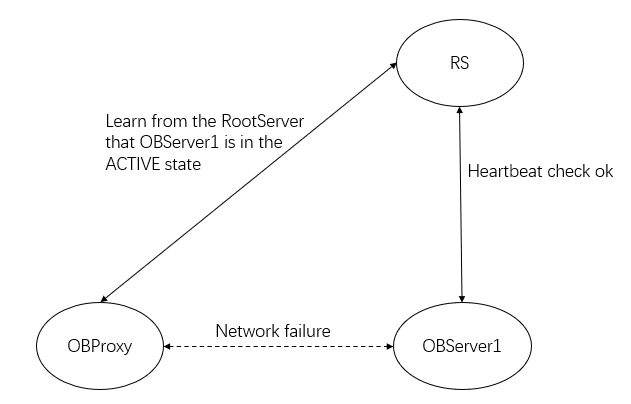
For the status blacklist, ODP obtains information from the RootServer of OceanBase Database. Such information sometimes may be unable to reflect the conditions between ODP and OBServers. As shown in the following figure, ODP learns from the RootServer that OBServer1 is in the ACTIVE state, but the network between ODP and OBServer1 is disconnected.
Example

Therefore, ODP implements the detection blacklist based on the status blacklist. ODP sends a detection SQL statement to an OBServer to determine its status. ODP sends a detection SQL statement select 'detect server alive' from dual to the sys tenant of the OBServer and set the timeout period to 5s. If no result is returned within the timeout period, ODP sends a detection statement again. If the detection fails for three consecutive times, ODP sets the status of this OBServer to DETECT_DEAD. If a result is returned, ODP clears the number of detection failures and sets the status of this OBServer to DETECT_ALIVE. After ODP detects a status change, ODP performs the corresponding operation.

  • DETECT_ALIVE: ODP removes the OBServer from the detection blacklist.

  • DETECT_DEAD: ODP adds the OBServer to the detection blacklist and closes all connections to this OBServer.

Note

If ODP adds an OBServer to the detection blacklist but does not close the connections to the OBServer, the connections are always occupied and no new SQL requests can be sent. The performance data shows that the transactions per second (TPS) of this OBServer is 0 during this period. After the connections to the OBServer are closed, ODP will route subsequent requests based on the blacklist and will not forward requests to this OBServer. Then, the TPS can resume.

Alive-but-unavailable blacklist

ODP can properly handle server and process faults based on the status blacklist and detection blacklist. However, ODP wants to further perceive the cause of each failed SQL statement execution so as to handle complex situations. The alive-but-unavailable blacklist is implemented for this purpose.

In the alive-but-unavailable mechanism, ODP defines the status of an OBServer based on the execution results of business SQL statements and adds the OBServer to or removes it from the blacklist based on the status. ODP is more cautious about adding an OBServer to or removing an OBServer from the alive-but-unavailable blacklist than with the status blacklist and the detection blacklist. This aims to avoid misjudgments that are made based on a single SQL execution result. The operation performed by ODP on an OBServer vary with the actual situation:

  • ODP will record a failure event in any of the following cases:

    • ODP sends a detection SQL statement to the OBServer and does not receive any response after the timeout period specified by the ob_query_timeout parameter expires.

    • The OBServer returns the OB_SERVER_IS_INIT, OB_SERVER_IS_STOPPING, OB_PACKET_CHECKSUM_ERROR, or OB_ALLOCATE_MEMORY_FAILED error code.

    • ODP fails to connect to the OBServer, parse packets, or transmit data.

  • If the OBServer has five alive-but-unavailable records within 120s, ODP will add it to the alive-but-unavailable blacklist.

  • ODP will attempt to resend a detection SQL statement to the OBServer 20s later after it adds the OBServer to the alive-but-unavailable blacklist.

  • If the detection SQL statement is successfully executed, ODP will remove the OBServer from the blacklist.

Note

  • You can run the show proxycongestion [all] [clustername] command to view the blacklists in a cluster. The dead_congested and alive_congested fields respectively indicate the status blacklist and the alive-but-unavailable blacklist.

  • After an OBServer is added to the alive-but-unavailable blacklist, no requests will be forwarded to this OBServer within the period specified by congestion_retry_interval. A detection statement will be sent to this OBServer again after the period specified by retry_interval. The OBServer cannot be removed from the blacklist within the period specified by min_keep_congestion_interval.

These three blacklists can help resolve issues from different dimensions. Exceptions may fail to be handled with the absence of any of these blacklists. These blacklists have no precedence over one another. An OBServer in any blacklist cannot receive requests. In other words, an OBServer can receive requests only if it is not in any blacklist.

Proxies such as HAProxy only implement a detection mechanism to check the health status of backend servers. This type of detection can resolve only simple issues. ODP provides various features based on the features of OceanBase Database, such as perception of version upgrades, log replay, and SQL execution errors. This far exceeds regular proxies.

SQL retries

The SQL retry feature can be implemented based on blacklists. SQL retries aim to ensure the execution of SQL statements instead of simply throwing an error to the client.

The prerequisite for retrying an SQL statement is that unexpected behavior must not happen. For example, if the OBServer does not respond a long time after you execute the insert into t1 values (c1 + 1, 1) statement, you cannot send this statement to another OBServer. Otherwise, c1 may change to c1 + 2. An incorrect retry is more harmful.

ODP may perform a retry before or after forwarding to the OBServer.

Retries before forwarding

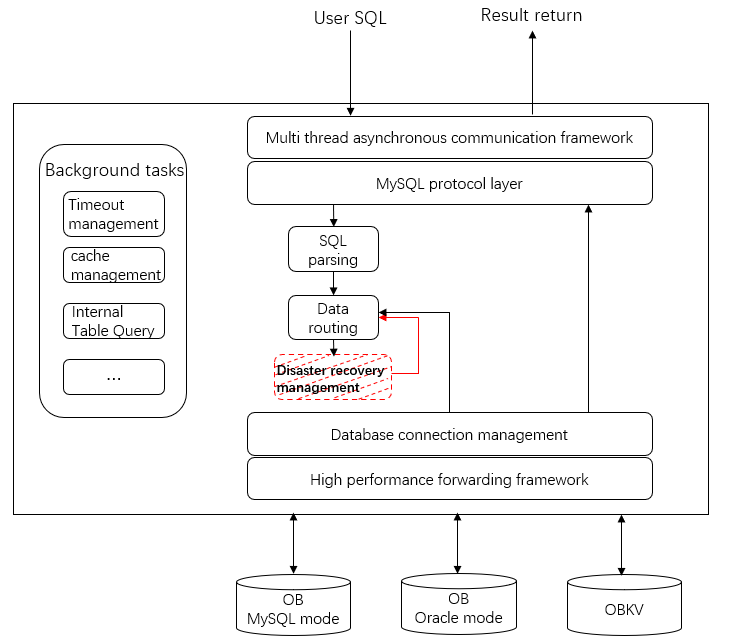
This section describes retries before forwarding based on the ODP architecture diagram. In the following figure, the part marked red indicates the position where a retry before forwarding occurs.
Retry before forwarding

In the following example, a regular SQL statement select * from t is used to describe the logic of a retry before forwarding.

Assume that t is a partitioned table and the leader is located on OBServer1. After RootService detects a core dump in the observer process of OBServer1, RootService sets the status of OBServer1 to INACTIVE.

ODP selects OBServer1 in the data routing phase, and then performs a disaster recovery check and finds that OBServer1 is in the status blocklist. In this case, a retry is required. ODP uses intra-tenant routing to select another OBServer node in the server list of the tenant and then performs a disaster recovery check. If the selected OBServer node passes the check, ODP forwards the request to the node.

Earlier detection of an issue facilitate faster rectification of the issue. A retry before forwarding occurs only within the ODP. Therefore, rapidly rectified issues are imperceptible to business systems.

Retries after forwarding

A retry before forwarding is efficient but depends on the accuracy of blacklists. In a distributed system, an ODP cannot perceive the server status in real time. Therefore, the ODP may not know that an OBServer is faulty before the ODP performs forwarding. In this case, a retry can be performed based on the forwarding result.

Two forwarding results are commonly seen:

  • The TCP connection fails because the OBServer is faulty.

    In this case, ODP can select another OBServer if no special restrictions, such as transaction routing, are involved.

  • The OBServer encounters an execution failure and returns an error code.

    For more information about error codes, see the open-source code ObMysqlTransact::handle_oceanbase_server_resp_error of ODP. For example, if the OBServer returns the error code REQUEST_SERVER_INIT_ERROR, the OBServer initialization fails. In this case, reforwarding can be performed and the logic is similar to the logic of a retry before forwarding.

With retries before forwarding and retries after forwarding, ODP can handle most OBServer issues. The entire process is transparent to users and users may not perceive the faults. A retry before forwarding is efficient but depends on the blacklist mechanism. A retry after forwarding is a supplement to the retry before forwarding and aims to shield backend exceptions as much as possible.

In short, fault detection, blacklists, and SQL retries are three important features to ensure high availability for ODP. They are also mutually related. Both the retry after forwarding and the alive-but-unavailable blacklist depend on the feedback from OBServers. Retries before forwarding depend on the blacklist mechanism.

With these three features, ODP can handle most OBServer exceptions such as network failures, observer process exceptions, and server breakdowns. Moreover, ODP can identify logic exceptions in OceanBase Database such as version upgrade and log replay, to improve the performance of OBServers.

Correlation with the high availability of OceanBase Database

Unlike ODP, OceanBase Database uses the Paxos algorithm to ensure high availability. When the majority of nodes in OceanBase Database are normal, services can still be provided properly and exceptions of a minority of nodes can be tolerated. However, the high availability feature of OceanBase Database may cause the leader role to be switched from Node A to Node B. Therefore, ODP must find the normal service nodes more efficiently and accurately. In this way, the high availability feature of ODP and that of OceanBase Database work together to provide stable services.

Previous topic

High availability of ODP services
Last

Next topic

High availability testing
Next
What is on this page
Fault detection and blacklist mechanism
Fault detection
Blacklist mechanism
SQL retries
Retries before forwarding
Retries after forwarding
Correlation with the high availability of OceanBase Database