OceanBase logo

OceanBase

A unified distributed database ready for your transactional, analytical, and AI workloads.

DEPLOY YOUR WAY

OceanBase Cloud

The best way to deploy and scale OceanBase

OceanBase Enterprise

Run and manage OceanBase on your infra

TRY OPEN SOURCE

OceanBase Community Edition

The free, open-source distributed database

OceanBase seekdb

Open source AI native search database

Customer Stories

Real-world success stories from enterprises across diverse industries.

View All
BY USE CASES

Mission-Critical Transactions

Global & Multicloud Application

Elastic Scaling for Peak Traffic

Real-time Analytics

Active Geo-redundancy

Database Consolidation

Resources

Comprehensive knowledge hub for OceanBase.

Blog

Live Demos

Training & Certification

Documentation

Official technical guides, tutorials, API references, and manuals for all OceanBase products.

View All
PRODUCTS

OceanBase Cloud

OceanBase Database

Tools

Connectors and Middleware

QUICK START

OceanBase Cloud

OceanBase Database

BEST PRACTICES

Practical guides for utilizing OceanBase more effectively and conveniently

Company

Learn more about OceanBase – our company, partnerships, and trust and security initiatives.

About OceanBase

Partner

Trust Center

Contact Us

International - English
中国站 - 简体中文
日本 - 日本語
Sign In
Start on Cloud

A unified distributed database ready for your transactional, analytical, and AI workloads.

DEPLOY YOUR WAY

OceanBase Cloud

The best way to deploy and scale OceanBase

OceanBase Enterprise

Run and manage OceanBase on your infra

TRY OPEN SOURCE

OceanBase Community Edition

The free, open-source distributed database

OceanBase seekdb

Open source AI native search database

Customer Stories

Real-world success stories from enterprises across diverse industries.

View All
BY USE CASES

Mission-Critical Transactions

Global & Multicloud Application

Elastic Scaling for Peak Traffic

Real-time Analytics

Active Geo-redundancy

Database Consolidation

Comprehensive knowledge hub for OceanBase.

Blog

Live Demos

Training & Certification

Documentation

Official technical guides, tutorials, API references, and manuals for all OceanBase products.

View All
PRODUCTS
OceanBase CloudOceanBase Database
ToolsConnectors and Middleware
QUICK START
OceanBase CloudOceanBase Database
BEST PRACTICES

Practical guides for utilizing OceanBase more effectively and conveniently

Learn more about OceanBase – our company, partnerships, and trust and security initiatives.

About OceanBase

Partner

Trust Center

Contact Us

Start on Cloud
编组
All Products
    • Databases
    • iconOceanBase Database
    • iconOceanBase Cloud
    • iconOceanBase Tugraph
    • iconInteractive Tutorials
    • iconOceanBase Best Practices
    • Tools
    • iconOceanBase Cloud Platform
    • iconOceanBase Migration Service
    • iconOceanBase Developer Center
    • iconOceanBase Migration Assessment
    • iconOceanBase Admin Tool
    • iconOceanBase Loader and Dumper
    • iconOceanBase Deployer
    • iconKubernetes operator for OceanBase
    • iconOceanBase Diagnostic Tool
    • iconOceanBase Binlog Service
    • Connectors and Middleware
    • iconOceanBase Database Proxy
    • iconEmbedded SQL in C for OceanBase
    • iconOceanBase Call Interface
    • iconOceanBase Connector/C
    • iconOceanBase Connector/J
    • iconOceanBase Connector/ODBC
    • iconOceanBase Connector/NET
icon

OceanBase Developer Center

V4.3.1

  • Overview
    • What is ODC?
    • Features
    • Architecture
    • Limitations
    • ODC console
  • Quick Start
    • Client ODC
      • Overview
      • Install Client ODC
      • Use Client ODC
    • Web ODC
      • Overview
      • Deploy Web ODC
      • Use Web ODC
  • Data Source Management
    • Create a data source
    • Data sources and project collaboration
    • Database O&M
      • Session management
      • Global variable management
      • Recycle bin management
  • SQL Development
    • SQL editing and execution
    • Perform PL compilation and debugging
    • Use the command-line window
    • Edit and export the result set of an SQL statement
    • Execution analysis
    • Generate test data
    • Database objects
      • Table objects
        • Overview
        • Create a table
        • Manage tables
      • View objects
        • Overview
        • Create a view
        • Manage views
      • Function objects
        • Overview
        • Create a function
        • Manage functions
      • Stored procedure objects
        • Overview
        • Create a stored procedure
        • Manage stored procedures
      • Sequence objects
        • Overview
        • Create a sequence
        • Manage sequences
      • Package objects
        • Overview
        • Create a program package
        • Manage program packages
      • Trigger objects
        • Overview
        • Create a trigger
        • Manage triggers
      • Type objects
        • Overview
        • Create a type
        • Manage types
      • Synonym objects
        • Overview
        • Create a synonym
        • Manage synonyms
  • Import and Export
    • Import schemas and data
    • Export schemas and data
  • Database Change Management
    • User Permission Management
      • Users and roles
      • Automatic authorization
    • Project collaboration management
    • Risk levels, risk identification rules, and approval processes
    • SQL check specifications
    • SQL window specification
    • Database change management
    • Logical database change management
    • Batch database change management
    • Lock-free schema changes
    • Synchronize shadow tables
    • Schema comparison
  • Data Lifecycle Management
    • Archive data
    • Clean up data
    • Partitioning Plan Management
      • Manage partitioning plans
      • Set partitioning strategies
      • Examples
    • SQL plan task
  • Data Desensitization and Auditing
    • Desensitize data
    • Operation records
  • Notification Management
    • Overview
    • View notification records
    • Manage Notification Channel
      • Create a notification channel
      • View, edit, and delete a notification channel
      • Configure a custom channel
    • Manage notification rules
  • System Integration
    • Login integration
    • Approval integration
    • SQL approval integration
  • Deployment Guide
    • Deployment overview
    • Preparations before deployment
    • Load and run an ODC image
    • Deploy ODC in high-availability mode
    • Deployment verification
  • Upgrade Guide
    • Upgrade Overview
    • Preparations before upgrade
    • Update single-node ODC
    • Update high-avaliability ODC
    • Upgrade verification
    • Rollback after upgrade failed
  • Troubleshooting
    • ODC troubleshooting process
    • Collect Message
      • View the runtime environment and version information
      • View web ODC logs
      • View client ODC logs
      • View end-to-end ODC-related logs
      • View ODC MetaDB data
      • Query the index status in OceanBase Database V4.x
      • Query the index status in OceanBase Database V1.4.x to V3.2.x
      • Collect JVM runtime information
      • Use tcpdump to capture packets
    • Common Troubleshooting
      • Deployment Upgrade
        • Web ODC cannot be accessed after startup
      • Database Connection
        • Access denied in a connection trial or test
        • Connection is refused in a connection trial or test
        • Connection times out
        • `Connection reset` is reported for a time-consuming statement
        • `socket write error` or `closed by server` is reported for a connection
      • SQL Execution
        • Disconnection during SQL execution
        • `Over tenant memory limits` is reported during SQL execution
        • `Unknown thread id` is returned during SQL execution
        • `timeout` errors returned during SQL execution
        • `OutOfMemoryError` is returned during SQL execution
        • Incomplete result columns for the SELECT statement
        • Garbled Chinese characters in the SQL execution result set
        • Garbled Chinese data is returned for query of data in GBK encoding
      • PL Object
        • Debugging is not supported for invalid PL objects
        • `JSONException` is reported during PL debugging
        • Garbled variable values in debugging
        • Failed to view PL objects or garbled characters are returned
        • PL objects cannot be executed or an execution error is returned
        • ODC issues during PL debugging
        • PL anonymous block cannot be debugged
        • Alert information of a PL object is unavailable
      • Import and Export
        • Garbled Chinese characters in an imported file in GBK encoding
        • Invalid ZIP package reported during file import
        • Time-type data exported from an Oracle tenant cannot be imported
        • Mismatched columns reported during the import of a single-table CSV file
        • Failed to export a result set in ODC to an Excel file
        • Incorrect display in Excel for a result set exported in CSV format
        • Incomplete data in batch export of multiple tables
        • `javax.crypto.BadPaddingException: Given final block not properly padded` is returned for a data import or export failure
      • Client ODC Problems
        • Client ODC startup failure / H2 Database corruption: Chuck not found
        • Garbled Chinese characters in the command-line window of ODC
        • Failed to install client ODC
        • Client ODC startup failure or no response
        • `Not a valid secret key` is returned for connection creation in client ODC
        • `User does not exist` returned for connection creation in client ODC
        • High memory usage of client ODC
        • Client ODC fails to be installed or start due to a port conflict
      • Front Page Exception
        • JavaScript exception is thrown on the ODC page
        • No response in browser after opening ODC
        • White screen in ODC
      • Account Password Problem
        • Forgot the admin account password in ODC V3.2.0 or later
        • Forgot an account password in ODC V2.4.1 to V3.1.3
        • Forgot an account password in ODC V2.4.0 or earlier
    • FAQ
      • Installation of client ODC
      • Web ODC deployment and startup
      • FAQ
      • Command-line window
      • DDL statement display
  • Release Note
    • V4.3
      • ODC V4.3.2
      • ODC V4.3.1
      • ODC V4.3.0
    • V4.2
      • ODC V4.2.4
      • ODC V4.2.3
      • ODC V4.2.2
      • ODC V4.2.1
      • ODC V4.2.0
    • V4.1
      • ODC V4.1.3
      • ODC V4.1.2
      • ODC V4.1.1
      • ODC V4.1.0
    • V4.0
      • ODC V4.0.2
      • ODC V4.0.0
    • V3.4
      • ODC V3.4.0
    • V3.3
      • ODC V3.3.3
      • ODC V3.3.2
      • ODC V3.3.1
      • ODC V3.3.0
    • V3.2
      • ODC V3.2.3
      • ODC V3.2.2
      • ODC V3.2.1
      • ODC V3.2.0

Download PDF

What is ODC? Features Architecture Limitations ODC console Overview Install Client ODC Use Client ODC Overview Deploy Web ODC Use Web ODC Create a data source Data sources and project collaboration Session management Global variable management Recycle bin management SQL editing and execution Perform PL compilation and debugging Use the command-line window Edit and export the result set of an SQL statement Execution analysis Generate test data Import schemas and data Export schemas and data Users and roles Automatic authorization Project collaboration management Risk levels, risk identification rules, and approval processes SQL check specifications SQL window specification Database change management Logical database change management Batch database change management Lock-free schema changes Synchronize shadow tables Schema comparison Archive data Clean up data Manage partitioning plans Set partitioning strategies Examples SQL plan task Desensitize data Operation records Overview View notification records Create a notification channel View, edit, and delete a notification channel Configure a custom channel Manage notification rules Login integration Approval integration SQL approval integrationDeployment overview Preparations before deployment Load and run an ODC image Deploy ODC in high-availability modeDeployment verification Upgrade OverviewPreparations before upgrade Update single-node ODC Update high-avaliability ODCUpgrade verification Rollback after upgrade failed ODC troubleshooting process View the runtime environment and version information View web ODC logsView client ODC logsView end-to-end ODC-related logsView ODC MetaDB dataQuery the index status in OceanBase Database V4.xQuery the index status in OceanBase Database V1.4.x to V3.2.xCollect JVM runtime informationUse tcpdump to capture packetsInstallation of client ODCWeb ODC deployment and startupFAQCommand-line windowDDL statement display ODC V4.3.2 ODC V4.3.1 ODC V4.3.0 ODC V4.2.4 ODC V4.2.3 ODC V4.2.2 ODC V4.2.1 ODC V4.2.0 ODC V4.1.3 ODC V4.1.2 ODC V4.1.1 ODC V4.1.0 ODC V4.0.2 ODC V4.0.0ODC V3.4.0ODC V3.3.3 ODC V3.3.2 ODC V3.3.1 ODC V3.3.0 ODC V3.2.3 ODC V3.2.2
OceanBase logo

The Unified Distributed Database for the AI Era.

Follow Us
Products
OceanBase CloudOceanBase EnterpriseOceanBase Community EditionOceanBase seekdb
Resources
DocsBlogLive DemosTraining & Certification
Company
About OceanBaseTrust CenterLegalPartnerContact Us
Follow Us

© OceanBase 2026. All rights reserved

Cloud Service AgreementPrivacy PolicySecurity
Contact Us
Document Feedback
  1. Documentation Center
  2. OceanBase Developer Center
  3. V4.3.1
iconOceanBase Developer Center
V 4.3.1
  • V 4.4.2
  • V 4.4.1
  • V 4.4.0
  • V 4.3.4
  • V 4.3.3
  • V 4.3.2
  • V 4.3.1
  • V 4.3.0
  • V 4.2.4
  • V 4.2.3
  • V 4.2.2
  • V 4.2.1
  • V 4.2.0
  • V 4.1.3 and earlier

Create a trigger

Last Updated:2024-08-09 02:52:24  Updated
share
What is on this page
Specify the basic information
Configure the advanced settings
Verify the SQL statement

folded

share

Log on to OceanBase Developer Center (ODC) and click the name of the target connection to go to the corresponding connection management page. You can click Trigger in the left-side navigation pane to get a list of triggers. To create a trigger, click + in the upper-right corner of the trigger list or click Create in the navigation bar on the top of the page

To create a trigger, perform the following three steps:

  1. Specify the basic information.

  2. Configure the advanced settings.

  3. Verify the SQL statement.

Image 548

Specify the basic information

This is Step 1. The Basic Inf ormation section contains the following parameters:

  • Trigger Name : specifies the name of the trigger.

  • Base Object Mode : specifies the schema where the object that the trigger works on is located.

  • Base Object Type : specifies the type of the object that the trigger works on. The current version supports only TABLE objects.

  • Base Object Name : specifies the name of the object that the trigger works on.

  • Trigger Status : specifies the state of the trigger. Valid value: On or Disable.

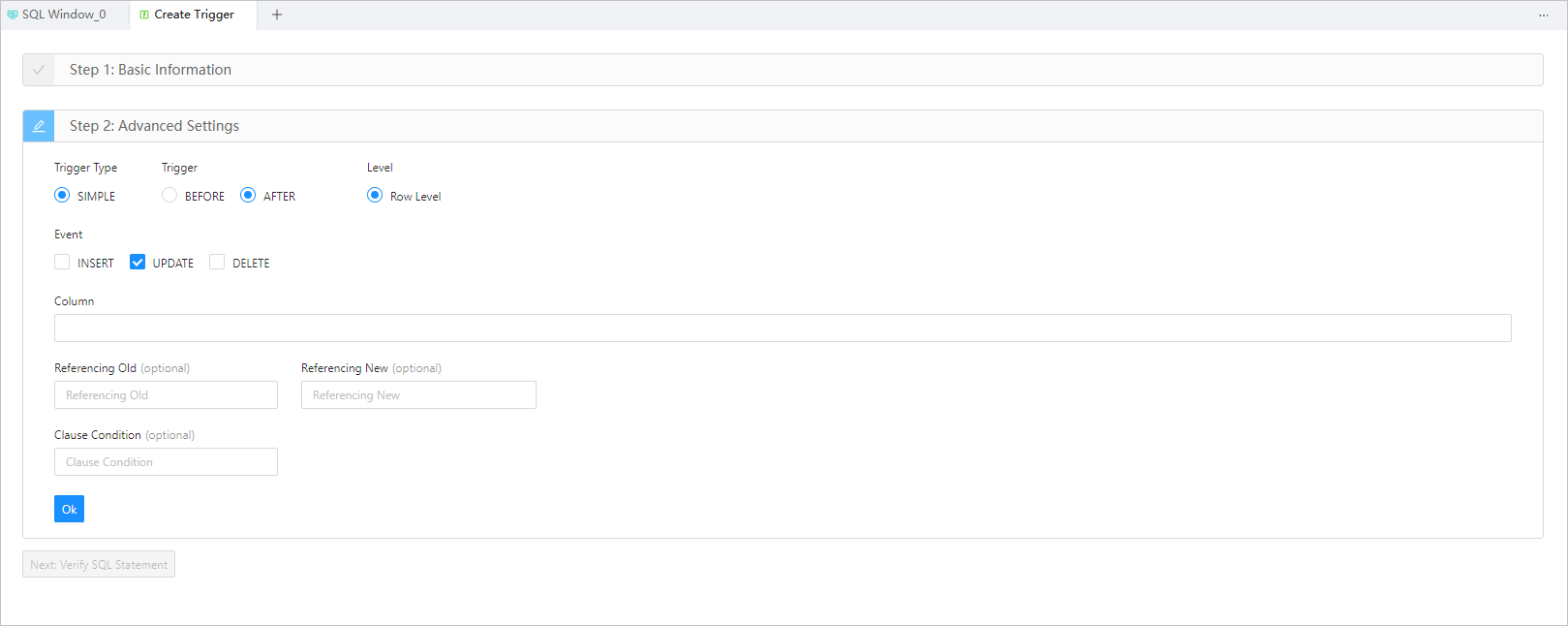
Configure the advanced settings

This is Step 2. The Advanced Settings section contains the following parameters:

  • Trigger Type: specifies the type of the trigger. The current version supports only SIMPLE triggers.

  • Trigger: specifies whether the trigger is activated before or after the triggering event. Valid value: BEFORE or AFTER.

  • Level: specifies the level of the trigger. The current version supports only row-level triggers.

  • Event: specifies the type of operation that activates the trigger. Valid value: INSERT , UPDATE , or DELETE .

  • Column (Optional): specifies the range that the event specified in Event applies to. This parameter is displayed when you set Event to UPDATE . The current version allows you to create only row-level triggers in a table. Therefore, the range here is the columns that the event applies to.

  • Referencing Old (Optional): specifies an alias for the referenced object that corresponds to the value specified for REFERENCEING OLD in the trigger creation statement.

  • Referencing New (Optional): specifies an alias for the referenced object that corresponds to the value specified for REFERENCEING NEW in the trigger creation statement.

  • Clause Condition (Optional): specifies a logical expression for the trigger. After you specify a clause condition, the action specified by the trigger is executed only if the value of the expression is True.

Verify the SQL statement

After you specify all the information in the Basic Info and Advanced Settings sections, click Next: Verify SQL Statement to go to the statement editing page.

The trigger definition statement is generated on the statement editing page based on the information that you specified in the Basic Info and Advanced Settings sections. You only need to complete the trigger body, which specifies the action to be executed. After you complete the trigger body, click the Create button in the upper-right corner of the page to complete the creation of the trigger.

In addition, the toolbar on the editing page provides the following buttons:

Button Description
Format Click this button to apply formatting, such as indentation, line break, and keyword highlighting, to the selected SQL statements or all the SQL statements in the current SQL window.
Find and Replace You can specify search criteria in the search box to find specific content in the script and enter other content in the replacement box to replace the content found.
Undo Click this button to undo the last operation.
Redo Click this button to reverse an Undo operation.
Case Sensitivity The system supports three configurations: All Caps , All Lowercase , and Capitalize the first letter . Click this button to convert the selected statements in the script to the corresponding capitalization format.
Indent The Add Indents and Delete Indent options are provided, to allow you to add indents to or delete indents from the selected statements in the script.
Comment The Add Comments and Delete Comment options are provided, which respectively allow you to convert the selected statements in the script to comments and convert comments to SQL statements.
Previous Click this button to go back to the Create Trigger page, where you can continue to edit or modify the parameters in the Basic Information and Advanced Settings sections.

Previous topic

Overview
Last

Next topic

Manage triggers
Next
What is on this page
Specify the basic information
Configure the advanced settings
Verify the SQL statement