OceanBase logo

OceanBase

A unified distributed database ready for your transactional, analytical, and AI workloads.

DEPLOY YOUR WAY

OceanBase Cloud

The best way to deploy and scale OceanBase

OceanBase Enterprise

Run and manage OceanBase on your infra

TRY OPEN SOURCE

OceanBase Community Edition

The free, open-source distributed database

OceanBase seekdb

Open source AI native search database

Customer Stories

Real-world success stories from enterprises across diverse industries.

View All
BY USE CASES

Mission-Critical Transactions

Global & Multicloud Application

Elastic Scaling for Peak Traffic

Real-time Analytics

Active Geo-redundancy

Database Consolidation

Resources

Comprehensive knowledge hub for OceanBase.

Blog

Live Demos

Training & Certification

Documentation

Official technical guides, tutorials, API references, and manuals for all OceanBase products.

View All
PRODUCTS

OceanBase Cloud

OceanBase Database

Tools

Connectors and Middleware

QUICK START

OceanBase Cloud

OceanBase Database

BEST PRACTICES

Practical guides for utilizing OceanBase more effectively and conveniently

Company

Learn more about OceanBase – our company, partnerships, and trust and security initiatives.

About OceanBase

Partner

Trust Center

Contact Us

International - English
中国站 - 简体中文
日本 - 日本語
Sign In
Start on Cloud

A unified distributed database ready for your transactional, analytical, and AI workloads.

DEPLOY YOUR WAY

OceanBase Cloud

The best way to deploy and scale OceanBase

OceanBase Enterprise

Run and manage OceanBase on your infra

TRY OPEN SOURCE

OceanBase Community Edition

The free, open-source distributed database

OceanBase seekdb

Open source AI native search database

Customer Stories

Real-world success stories from enterprises across diverse industries.

View All
BY USE CASES

Mission-Critical Transactions

Global & Multicloud Application

Elastic Scaling for Peak Traffic

Real-time Analytics

Active Geo-redundancy

Database Consolidation

Comprehensive knowledge hub for OceanBase.

Blog

Live Demos

Training & Certification

Documentation

Official technical guides, tutorials, API references, and manuals for all OceanBase products.

View All
PRODUCTS
OceanBase CloudOceanBase Database
ToolsConnectors and Middleware
QUICK START
OceanBase CloudOceanBase Database
BEST PRACTICES

Practical guides for utilizing OceanBase more effectively and conveniently

Learn more about OceanBase – our company, partnerships, and trust and security initiatives.

About OceanBase

Partner

Trust Center

Contact Us

Start on Cloud
编组
All Products
    • Databases
    • iconOceanBase Database
    • iconOceanBase Cloud
    • iconOceanBase Tugraph
    • iconInteractive Tutorials
    • iconOceanBase Best Practices
    • Tools
    • iconOceanBase Cloud Platform
    • iconOceanBase Migration Service
    • iconOceanBase Developer Center
    • iconOceanBase Migration Assessment
    • iconOceanBase Admin Tool
    • iconOceanBase Loader and Dumper
    • iconOceanBase Deployer
    • iconKubernetes operator for OceanBase
    • iconOceanBase Diagnostic Tool
    • iconOceanBase Binlog Service
    • Connectors and Middleware
    • iconOceanBase Database Proxy
    • iconEmbedded SQL in C for OceanBase
    • iconOceanBase Call Interface
    • iconOceanBase Connector/C
    • iconOceanBase Connector/J
    • iconOceanBase Connector/ODBC
    • iconOceanBase Connector/NET
icon

OceanBase Developer Center

V4.2.0

  • Overview
    • What is ODC?
    • Features
    • Architecture
    • Limitations
    • User interface
  • Quick Start
    • Client ODC
      • Overview
      • Install Client ODC
      • Use Client ODC
    • Web ODC
      • Overview
      • Deploy Web ODC
      • Use Web ODC
  • Data Source Management
    • Create a data source
    • Data source and project collaboration
    • Database O&M
      • Session management
      • Global variable management
      • Recycle bin management
  • SQL Development
    • Edit and execute SQL statements
    • Compile and debug PL objects
    • Command-line window
    • Edit and export results
    • Analyze SQL statements
    • Data mocking
    • 700.database-objects
      • Table objects
        • Overview
        • Create a table
        • Table list
        • Manage table attributes
        • Manage table data
      • View objects
        • Overview
        • Create a view
        • Manage views
      • Function objects
        • Overview
        • Create a function
        • Manage functions
      • Stored procedure objects
        • Overview
        • Create a stored procedure
        • Manage stored procedures
      • Sequence objects
        • Overview
        • Create a sequence
        • Manage sequences
      • Package objects
        • Overview
        • Create a program package
        • Manage program packages
      • Trigger objects
        • Overview
        • Create a trigger
        • Manage triggers
      • Type objects
        • Overview
        • Create a type
        • Manage types
      • Synonym objects
        • Overview
        • Create a synonym
        • Manage synonyms
  • Import and Export
    • Import schema and data
    • Export schema and data
  • Database Change Management
    • User Permission Management
      • Users and roles
      • Automatic authorization
    • Collaborative project management
    • Risk levels, risk identification rules, and approval processes
    • SQL check specifications
    • Manage database changes
    • SQL window specification
    • Change lock-free structures
    • Synchronize shadow tables
  • Data Lifecycle Management
    • Archive data
    • Data cleanup
    • Manage partitions
    • SQL plan task
  • Data Desensitization and Auditing
    • Data desensitization
    • Operation audit
  • System Integration
    • SSO integration
    • Approval integration
    • SQL approval integration
  • Deployment Guide
    • Deployment overview
    • Preparations before deployment
    • Deploy a single ODC node
      • Deployment process
      • Load and run an ODC image
    • Deploy ODC in high availability mode
      • Deployment process
      • Load and run an ODC image
      • Deploy SSL certificate
      • Deploy the NGINX proxy
      • Configure certificate trust
    • Deployment verification
  • Upgrade Guide
    • Overview
    • Preparations before upgrade
    • Upgrade single-node ODC
      • Upgrade process
      • Stop ODC of the earlier version
      • Load and run an ODC image
    • Upgrade high-availability
      • Upgrade process
      • Stop ODC of the earlier version
      • Load and run an ODC image
      • Upgrade NGINX image
    • Upgrade verification
    • Rollback after upgrade failed
  • Troubleshooting
    • ODC troubleshooting process
    • Collect Message
      • View the runtime environment and version information
      • View web ODC logs
      • View client ODC logs
      • View end-to-end ODC-related logs
      • View ODC MetaDB data
      • Query the index status in OceanBase Database V4.x
      • Query the index status in OceanBase Database V1.4.x to V3.2.x
      • Collect JVM runtime information
      • Use tcpdump to capture packets
    • Common Troubleshooting
      • Deployment Upgrade
        • Web ODC cannot be accessed after startup
      • Database Connection
        • Access denied in a connection trial or test
        • Connection is refused in a connection trial or test
        • Connection times out
        • `Connection reset` is reported for a time-consuming statement
        • `socket write error` or `closed by server` is reported for a connection
      • SQL Execution
        • Disconnection during SQL execution
        • `Over tenant memory limits` is reported during SQL execution
        • `Unknown thread id` is returned during SQL execution
        • `timeout` errors returned during SQL execution
        • `OutOfMemoryError` is returned during SQL execution
        • Incomplete result columns for the SELECT statement
        • Garbled Chinese characters in the SQL execution result set
        • Garbled Chinese data is returned for query of data in GBK encoding
      • PL Object
        • Debugging is not supported for invalid PL objects
        • `JSONException` is reported during PL debugging
        • Garbled variable values in debugging
        • Failed to view PL objects or garbled characters are returned
        • PL objects cannot be executed or an execution error is returned
        • ODC issues during PL debugging
        • PL anonymous block cannot be debugged
        • Alert information of a PL object is unavailable
      • Import and Export
        • Garbled Chinese characters in an imported file in GBK encoding
        • Invalid ZIP package reported during file import
        • Time-type data exported from an Oracle tenant cannot be imported
        • Mismatched columns reported during the import of a single-table CSV file
        • Failed to export a result set in ODC to an Excel file
        • Incorrect display in Excel for a result set exported in CSV format
        • Incomplete data in batch export of multiple tables
        • `javax.crypto.BadPaddingException: Given final block not properly padded` is returned for a data import or export failure
      • Client ODC Problems
        • Client ODC startup failure / H2 Database corruption: Chuck not found
        • Garbled Chinese characters in the command-line window of ODC
        • Failed to install client ODC
        • Client ODC startup failure or no response
        • `Not a valid secret key` is returned for connection creation in client ODC
        • `User does not exist` returned for connection creation in client ODC
        • High memory usage of client ODC
        • Client ODC fails to be installed or start due to a port conflict
      • Front-end Page Exception
        • JavaScript exception is thrown on the ODC page
        • No response in browser after opening ODC
        • White screen in ODC
      • Account Password Problem
        • Forgot the admin account password in ODC V3.2.0 or later
        • Forgot an account password in ODC V2.4.1 to V3.1.3
        • Forgot an account password in ODC V2.4.0 or earlier
    • FAQ
      • Installation of client ODC
      • Web ODC deployment and startup
      • Connection information
      • Command-line window
      • DDL statement display
  • Release Note
    • 90.odc-rn-4.2
      • ODC V4.2.0
    • V4.1
      • ODC V4.1.2
      • ODC V4.1.1
      • ODC V4.1.0
    • V4.0
      • ODC V4.0.2
      • ODC V4.0.0
    • V3.4
      • ODC V3.4.0
    • V3.3
      • ODC V3.3.3
      • ODC V3.3.2
      • ODC V3.3.1
      • ODC V3.3.0
    • V3.2
      • ODC V3.2.3
      • ODC V3.2.2
      • ODC V3.2.1
      • ODC V3.2.0

Download PDF

What is ODC? Features Architecture Limitations User interface Overview Install Client ODC Use Client ODC Overview Deploy Web ODC Use Web ODC Create a data source Data source and project collaboration Session management Global variable management Recycle bin management Edit and execute SQL statements Compile and debug PL objects Command-line window Edit and export results Analyze SQL statements Data mocking Import schema and data Export schema and data Users and roles Automatic authorization Collaborative project management Risk levels, risk identification rules, and approval processes SQL check specifications Manage database changes SQL window specification Change lock-free structures Synchronize shadow tables Archive data Data cleanup Manage partitions SQL plan task Data desensitization Operation audit SSO integration Approval integration SQL approval integrationDeployment overview Preparations before deployment Deployment process Load and run an ODC image Deployment process Load and run an ODC image Deploy SSL certificate Deploy the NGINX proxy Configure certificate trust Deployment verificationOverview Preparations before upgrade Upgrade process Stop ODC of the earlier version Load and run an ODC image Upgrade process Stop ODC of the earlier version Load and run an ODC image Upgrade NGINX image Upgrade verification Rollback after upgrade failed ODC troubleshooting process View the runtime environment and version information View web ODC logsView client ODC logsView end-to-end ODC-related logsView ODC MetaDB dataQuery the index status in OceanBase Database V4.xQuery the index status in OceanBase Database V1.4.x to V3.2.xCollect JVM runtime informationUse tcpdump to capture packetsInstallation of client ODCWeb ODC deployment and startupConnection informationCommand-line windowDDL statement display ODC V4.2.0 ODC V4.1.2 ODC V4.1.1 ODC V4.1.0 ODC V4.0.2 ODC V4.0.0ODC V3.4.0ODC V3.3.3 ODC V3.3.2 ODC V3.3.1 ODC V3.3.0 ODC V3.2.3 ODC V3.2.2 ODC V3.2.1 ODC V3.2.0
OceanBase logo

The Unified Distributed Database for the AI Era.

Follow Us
Products
OceanBase CloudOceanBase EnterpriseOceanBase Community EditionOceanBase seekdb
Resources
DocsBlogLive DemosTraining & Certification
Company
About OceanBaseTrust CenterLegalPartnerContact Us
Follow Us

© OceanBase 2026. All rights reserved

Cloud Service AgreementPrivacy PolicySecurity
Contact Us
Document Feedback
  1. Documentation Center
  2. OceanBase Developer Center
  3. V4.2.0
iconOceanBase Developer Center
V 4.2.0
  • V 4.4.2
  • V 4.4.1
  • V 4.4.0
  • V 4.3.4
  • V 4.3.3
  • V 4.3.2
  • V 4.3.1
  • V 4.3.0
  • V 4.2.4
  • V 4.2.3
  • V 4.2.2
  • V 4.2.1
  • V 4.2.0
  • V 4.1.3 and earlier

SSO integration

Last Updated:2026-04-13 06:20:38  Updated
share
What is on this page
Background information
Concepts
Principle
OAuth2
OIDC
Prerequisites
Create an SSO integration configuration
Configure OAUTH2-based SSO
Configure the OIDC type
Manage SSO integration
References

folded

share

Background information

Single sign-on (SSO) is an authentication method that allows a user to use only a set of credentials to get securely authenticated for logging on to OceanBase Developer Center (ODC).

You can configure OAuth2- or OIDC-based SSO for ODC.

Concepts

  • Open Authorization (OAuth) is an open standard authorization protocol that allows users to authorize third-party applications to access their protected information stored on resource services without providing the username or password to the third-party applications. This decouples authentication from authorization. OAuth is a widely recognized and used international standard. OAuth 2.0 is an extension to OAuth 1.0. It is more secure and easier to implement. However, it is incompatible with OAuth 1.0. In other words, OAuth 2.0 deprecates OAuth 1.0. OAuth defines a secure, open, and simple standard for the authorization of user resources. It allows third-party application systems to obtain user authorization information without getting the user account and password.

    • OAuth 2.0 is a delegated authorization framework used for REST/APIs.

    • OAuth 2.0 is a token-based authorization protocol that grants applications limited access to user data without disclosing the user password.

    • OAuth 2.0 decouples authentication from authorization.

  • OpenID Connect (OIDC) is an authentication protocol that allows third-party applications to connect to an identity provider to obtain user information and returns the information to third-party applications in a secure and reliable manner. OIDC extends the OAuth 2.0 framework to provide basic user identity information by using extended ID token fields. OIDC uses JSON web tokens (JWTs) to encapsulate ID tokens, providing a self-contained and tamper-proof mechanism. This mechanism secures the transmission of user identity information to third-party applications for verification.

Principle

OAuth2

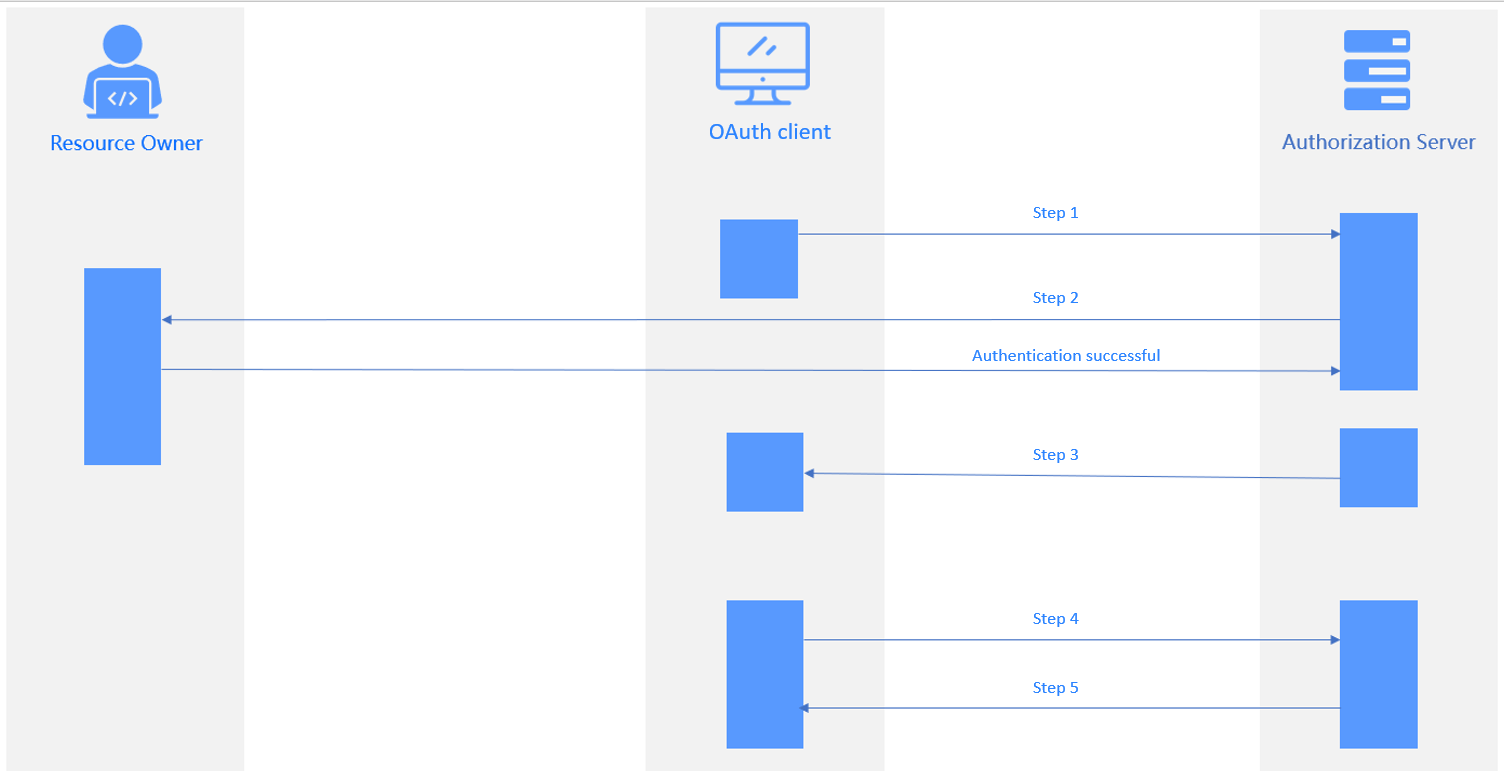
ODC is compatible with the standard OAuth2 authentication protocol. Currently, ODC supports only the authorization-code mode, in which an application uses an authorization code to apply for or update an access token from the authorization server.
1

As shown in the figure, the authorization process involves the following steps:

  1. The user sends a logon request to the application system. The request is redirected to the authentication server. The user receives a 302 status code and returns to the logon authentication page.
  2. The user enters the account and password for authentication. The authentication server verifies the information and returns an authorization code to the application system.
  3. The application system exchanges the authorization code with the authentication server for an access token. The authentication server verifies information such as the client ID and authorization code and sends the access token to the application system.
  4. The application system queries the user logon information by using the access token. The authentication server returns the user information, such as the user name.
  5. The application system verifies the correctness of the username, creates a session, and redirects to the redirect URL.

The following table describes the parameters in the preceding process.

Step Parameter description
Step 1 Authorization Request
  • response_type: Required. The value is fixed to code.
  • client_id: Required. The third-party application ID.
  • state: Recommended. A string provided by the client. The server will return the exact string to the client.
  • redirect_uri: Required. The redirect URL used upon successful authorization.

    Note

    This parameter specifies the redirect URL used by the authorization server to call back the ODC service. If an SSO callback allowlist is configured, add the redirect URL to the allowlist.

  • scope: Optional. The authorization scope.
Step 2 Verify the parameters passed in step 1.
Display the login page for the user to authenticate.
The user grants authorization for resources to the client.
Step 3 Authorization Response
The server redirects to the redirect URL specified in Step 1 and returns:
  • code: The authorization code.
  • state: The exact state string provided by the client in Step 1.
Step 4 Access Token Request
  • grant_type: Required. The value is fixed to authorization_code.
  • code: Required. The code returned in Authorization Response.
  • redirect_uri: Required. It must be the same as the redirect URL provided in Authorization Request.
  • client_id: Required. It must be the same as the client ID provided in Authorization Request.
Step 5 Access Token Response
  • access_token: The access token.
  • Refresh_token: The refresh token.
  • Expires_in: The time when the token expires.

OIDC

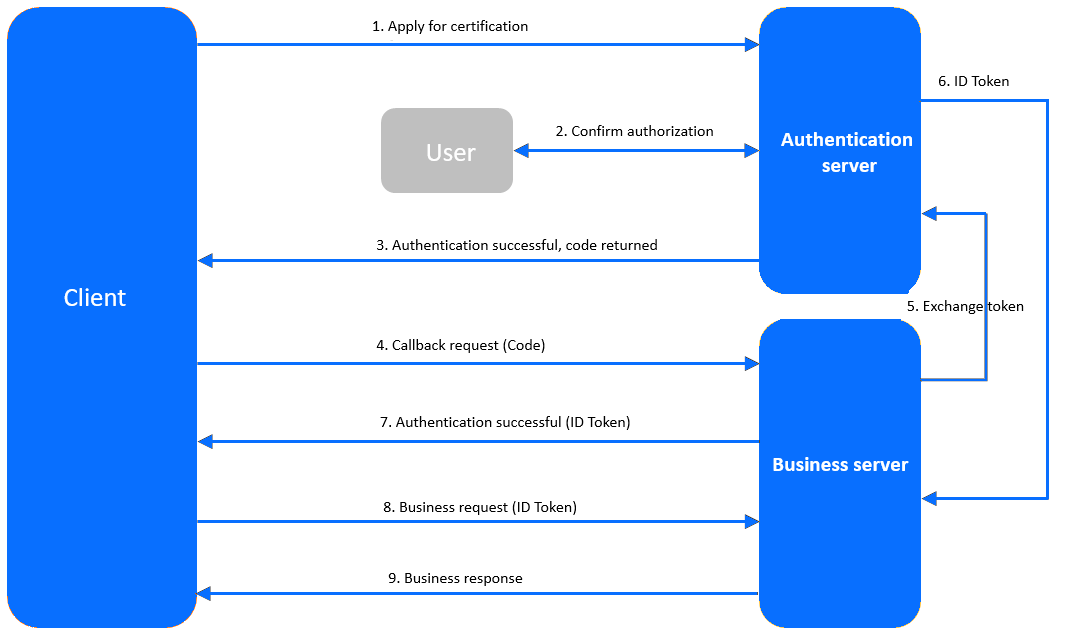
2

  1. The client sends an authentication request to the authentication server.

  2. The user consents to grant the authorization on the authentication page by logging in with the user name and password.

  3. The authentication server verifies the authentication request and returns an authorization code to the client.

  4. The client requests the callback API from the business server. The request carries the code.

  5. The business server requests the authentication server to issue a token. The request contains the code, client ID, and client secret.

  6. The authentication server verifies the validity and returns the ID token.

  7. If the authentication succeeds, the business server returns an ID token to the client.

  8. The client sends a request to the business server. The request carries the ID token.

  9. The business service verifies whether the ID token is valid, and then returns a business response.

Prerequisites

  • You have the permissions to perform system integration operations.

  • You have deployed the authorization service.

Create an SSO integration configuration

Configure OAUTH2-based SSO

Configure SSO of the OAUTH type to integrate Apereo Central Authentication Service (CAS) into ODC to authorize access to ODC with a CAS account.

  1. Log on to web ODC. In the project collaboration window, choose External Integration > SSO Integration > Create SSO Integration.

  2. On the Create SSO Integration page, configure the gateway authentication parameters.

    The following table describes the parameters for the OAUTH type.

    Parameter Description
    Config Name The configuration name that will be applied to the custom login.
    Type Select OAUTH.
    Client ID The application identifier, which is consistent with the ID specified for the authorization server during registration.
    Auth URL The grant-code URL provided by the authorization server.
    User Info URL The user-info URL provided by the authorization server.
    Token URL The access-token URL provided by the authorization server.
    Redirect URL The ODC service URL to be called back by the authorization server.
    Note
    You must add the URL to the callback allowlist if any.
    User information data structure type Valid values: FLAT (flat structure) and NESTED (nested structure)
    Scope The application authorization scope. Separate multiple scopes with spaces. We recommend that you set this parameter to profile.
    Note
    When you configure OSS by using a third-party application, set Scope to openid.
    jwkSet URL Optional. The public key URL provided by the authorization server. The public key is used for authentication.
    userNameAttribute Optional. The username field.
    Client Authentication Method The method used by the authorization server to authenticate clients.
    Authorization Grant Type The authorization type of OAUTH2.
    User Info Authentication Method The authentication method used for sending the bearer access token in a resource request to the resource server.
    User information data structure type Valid values: FLAT (flat structure) and NESTED (nested structure)
  3. Click Test Connection to go to the CAS logon page.

    Note

    A CAS does not require a callback allowlist. If you need to configure an allowlist when you integrate other applications into ODC, follow the instructions on the page.

  4. Enter the CAS account and password, and click Allow on the Authorize page to authorize access to ODC.

    5

  5. After the connection test succeeds, the structure of the user information API is returned. Specify the parameters for user field mapping based on the returned information.

    Note

    • The structure returned by the user information API may vary with the third-party application. To map user information from a third-party application to ODC, you must fill in the user information mapping table. User field mapping identifies ODC accounts associated with OAuth2 login.
    • You can select the parameter names from the returned connection information and specify Username Field and Nickname Field.
    • You can also enter custom fields and customize field mapping rules.
    • The system administrator can configure custom field names on the Automatic Authorization page. When a user logs on to ODC by using a custom field, the user is automatically granted the role or permission.
  6. Click Save to create the SSO integration.

  7. In the SSO integration list, enable the created SSO integration.

    Note

    You can enable only one SSO integration.

  8. On the web ODC logon page, click Third-party Logon to go to the third-party logon page and use the third-party logon account to access ODC.

Configure the OIDC type

Use the OIDC type to integrate a third-party application into ODC to authorize access to ODC with a third-party account.

  1. Log on to web ODC. In the project collaboration window, choose External Integration > SSO Integration > Create SSO Integration.

  2. On the Create SSO Integration page, configure the gateway authentication parameters.

    The following table describes the parameters for the OIDC type.

    Parameter Description
    Config Name The configuration name that will be applied to the custom login.
    Type Select OIDC.
    Client ID The application identifier, which is consistent with the ID specified for the authorization server during registration.
    Client Secret The application key, which is consistent with the one configured for the authorization server during registration.
    Scope The application authorization scope. Separate multiple scopes with spaces. We recommend that you set this parameter to profile.
    Note
    When you configure OSS by using a third-party application, set Scope to openid.
    Issue URL The Issue URL of the authentication service.
    Redirect URL The ODC service URL to be called back by the authorization server.
    Note
    You must add the URL to the callback allowlist if any.
    User information data structure type Valid values: FLAT (flat structure) and NESTED (nested structure)
  3. A separate callback allowlist is required for connection tests. Manually add an allowlist as prompted and click Test Connection.

  4. Enter the third-party logon account and password.

  5. After the connection test succeeds, the structure of the user information API is returned. Specify the parameters for user field mapping based on the returned information.

    Note

    • The structure returned by the user information API may vary with the third-party application. To map user information from a third-party application to ODC, you must fill in the user information mapping table. User field mapping identifies ODC accounts that are associated with the OIDC login.
    • You can select the parameter names from the returned connection information and specify Username Field and Nickname Field.
    • You can also enter custom fields and customize field mapping rules.
    • The system administrator can configure custom field names on the Automatic Authorization page. When a user logs on to ODC by using a custom field, the user is automatically granted the role or permission.
  6. Click Save to create the SSO integration.

  7. In the SSO integration list, enable the created SSO integration.

    Note

    You can enable only one SSO integration.

  8. On the Web ODC logon page, click Third-party Logon to go to the third-party logon page and use the third-party logon account to access ODC.

Manage SSO integration

In the SSO integration list, you can enable, view, edit, and delete SSO integration settings.

References

  • Automatic authorization

  • Approval integration

  • SQL approval integration

  • Integration with the bastion host

Previous topic

Operation audit
Last

Next topic

Approval integration
Next
What is on this page
Background information
Concepts
Principle
OAuth2
OIDC
Prerequisites
Create an SSO integration configuration
Configure OAUTH2-based SSO
Configure the OIDC type
Manage SSO integration
References