







This topic describes how to take over OBProxies to an OBProxy cluster managed by the current OceanBase Cloud Platform (OCP) cluster. An OBProxy not in the current OCP cluster is a to-be-taken-over OBProxy, and the OBProxy cluster to which an OBProxy is to be taken over is the target OBProxy cluster. After an OBProxy is taken over to the target OBProxy cluster, you can operate and maintain the OBProxy and the OBProxy cluster in the current OCP cluster.
Note
An OBProxy will be restarted during the takeover, which will affect business connections. Proceed with caution.
Prerequisites
You have logged on to the OCP console and are assigned the OBPROXY_MANAGER role.
The to-be-taken-over OBProxy meets the following conditions:
Its version is V1.8.0 or later.
It is installed by using the RPM package.
The host where it resides has only one obproxy process.
It is accessible from the network where the OCP cluster resides.
The OBProxy host has been added to the OCP cluster. For more information, see Add a host.
An eligible target OBProxy cluster exists in the current OCP cluster.
The target OBProxy cluster meets the following conditions:
Its startup mode is the same as that of the to-be-taken-over OBProxy.
Specifically, if the target OBProxy cluster is started by using the ConfigUrl, the to-be-taken-over OBProxy must also be started by using the ConfigUrl.
The connectable OceanBase clusters of the to-be-taken-over OBProxy must be a subset of or the same as those of the target OBProxy cluster.
If the target OBProxy cluster is started by using the ConfigUrl, the connectable OceanBase clusters of the to-be-taken-over OBProxy must be a subset of connectable OceanBase clusters of the target OBProxy cluster.
If the target OBProxy cluster is started by using the RootService list, the connectable OceanBase clusters of the to-be-taken-over OBProxy must be the same as those of the target OBProxy cluster.
If the current OCP cluster has no eligible OBProxy cluster, create an eligible empty OBProxy cluster. For more information, see Create an OBProxy cluster.
If the version of the current OBProxy cluster is V4.0 or later, only an OBProxy of V4.0.0 or later can be taken over. If the version of the current OBProxy cluster is V3.x or earlier, only an OBProxy of a version later than V1.8 but earlier than V4.0.0 can be taken over.
Procedure
OCP provides two methods for you to take over an OBProxy:
- Method 1: On the OBProxy page, find an OBProxy cluster in the cluster list that can take over this OBProxy and click Take over OBProxy in the Actions column.
- Method 2: Click the name of an OBProxy cluster in the cluster list that can take over this OBProxy. On the Overview page of the OBProxy cluster, click Take over OBProxy in the upper-right corner.
The following procedure takes Method 2 as an example.
Log on to the OCP console.
In the left-side navigation pane, click OBProxy.
In the OBProxy cluster list, click the name of an OBProxy cluster that can take over this OBProxy to go to the Overview page of the cluster.
Click Take over OBProxy to go to the Take over OBProxy page.

On the Take over OBProxy page that appears, select the host where the to-be-taken-over OBProxy is deployed.
ParameterDescriptionroot@proxysys Password (Optional) Enter the password of the administrator account of the OBProxy. If you have not changed the password of the root@proxysys account of the to-be-taken-over OBProxy, you do not need to specify this parameter. Note
If multiple OBProxies are to be taken over and the root@proxysys passwords of these OBProxies are inconsistent, we recommend that you take over OBProxies that have the same root@proxysys password in a batch.
IDC Select the IDC to which the OBProxy belongs. An OBProxy can belong to only one IDC. Host Type Optional. If you select a host type, the host list is filtered based on the host type. Host Select the host where the OBProxy resides. SQL Port Number Select the SQL port of the host where the OBProxy resides. Manage Load Balancer Optional. You can manually enter or import the configuration information, as shown in the following figure. - Click OBLB to manually enter the information about the OBLB service. For information about the parameters, see Manage load balancing.
- Click Import in the upper-right corner of the section to upload the load balancer data file exported when you migrate the OBProxy cluster. OCP automatically populates the load balancing information from the file. For more information, see Migrate an OBProxy cluster.
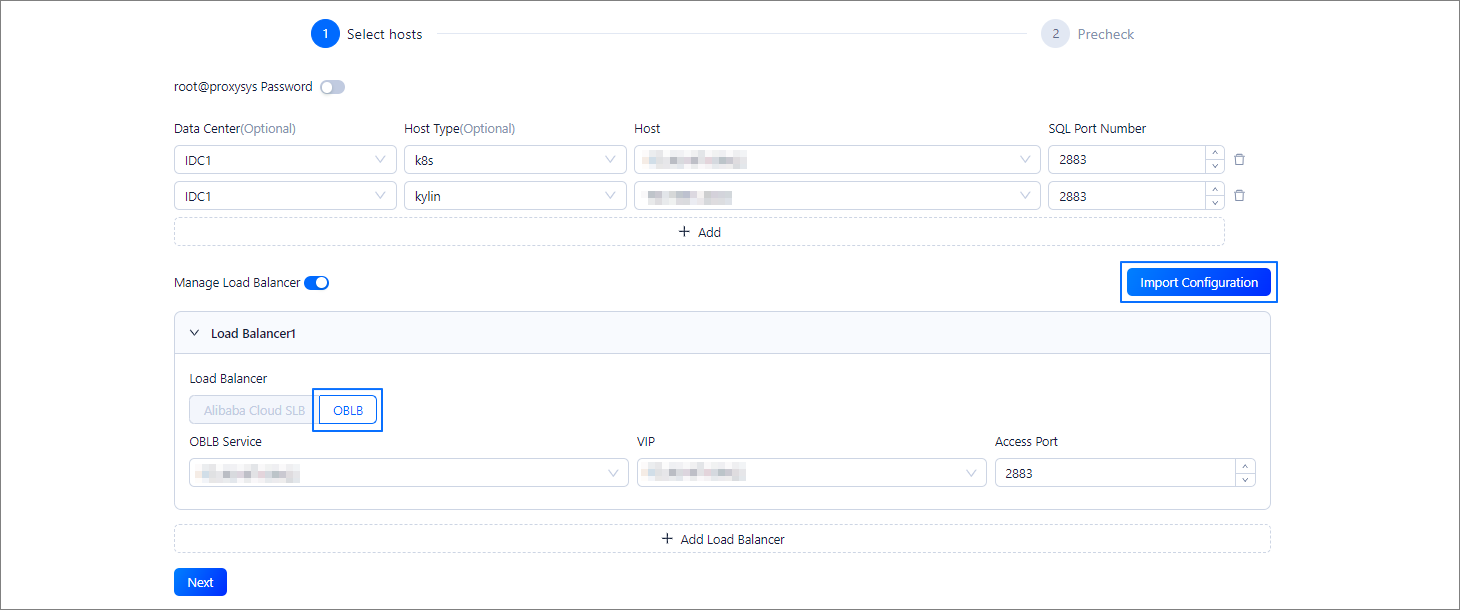
Click Next. The system performs a precheck on the to-be-taken-over OBProxies and displays the check result on the precheck page.
If the precheck fails, the takeover cannot proceed. In this case, perform the following steps:
Remove the OBProxies that fail the precheck based on the actual situation and take over only an OBProxy that passes the precheck.
Hover the pointer over Cause of Failure in the Check Result column to view the cause of the precheck failure. After you fix the problem, click Recheck.

When all OBProxies in the list pass the precheck, proceed to Step 7.

Click Take over All. In the Confirm Takeover panel that appears, confirm the information.
If the to-be-taken-over OBProxy has a connectable OceanBase cluster, the connectable OceanBase cluster will be added to the target OBProxy cluster during takeover.
If some parameter values of the OBProxy on the host are inconsistent with those of the target OBProxy cluster, the OBProxy cannot be taken over. In this case, you must agree to modify the relevant parameters of the OBProxy. After you click Modify, the values of the relevant parameters of the OBProxy are changed to the same as those of the OBProxy cluster.
In the takeover dialog box, enter confirm and click Confirm Takeover to submit a takeover task.
Wait for the takeover task to complete.
Note
After an OBProxy is taken over, its root@proxysys password is changed to the same as the root@proxysys password of the target OBProxy cluster to facilitate management.