OceanBase logo

OceanBase

A unified distributed database ready for your transactional, analytical, and AI workloads.

Product Overview
DEPLOY YOUR WAY

OceanBase Cloud

The best way to deploy and scale OceanBase

OceanBase Enterprise

Run and manage OceanBase on your infra

TRY OPEN SOURCE

OceanBase Community Edition

The free, open-source distributed database

OceanBase seekdb

Open source AI native search database

Customer Stories

Real-world success stories from enterprises across diverse industries.

View All
BY USE CASES

Mission-Critical Transactions

Global & Multicloud Application

Elastic Scaling for Peak Traffic

Real-time Analytics

Active Geo-redundancy

Database Consolidation

Resources

Comprehensive knowledge hub for OceanBase.

Blog

Live Demos

Training & Certification

Documentation

Official technical guides, tutorials, API references, and manuals for all OceanBase products.

View All
PRODUCTS

OceanBase Cloud

OceanBase Database

Tools

Connectors and Middleware

QUICK START

OceanBase Cloud

OceanBase Database

BEST PRACTICES

Practical guides for utilizing OceanBase more effectively and conveniently

Company

Learn more about OceanBase – our company, partnerships, and trust and security initiatives.

About OceanBase

Partner

Trust Center

Contact Us

International - English
中国站 - 简体中文
日本 - 日本語
Sign In
Start on Cloud

OceanBase

A unified distributed database ready for your transactional, analytical, and AI workloads.

Product Overview
DEPLOY YOUR WAY

OceanBase Cloud

The best way to deploy and scale OceanBase

OceanBase Enterprise

Run and manage OceanBase on your infra

TRY OPEN SOURCE

OceanBase Community Edition

The free, open-source distributed database

OceanBase seekdb

Open source AI native search database

Customer Stories

Real-world success stories from enterprises across diverse industries.

View All
BY USE CASES

Mission-Critical Transactions

Global & Multicloud Application

Elastic Scaling for Peak Traffic

Real-time Analytics

Active Geo-redundancy

Database Consolidation

Comprehensive knowledge hub for OceanBase.

Blog

Live Demos

Training & Certification

Documentation

Official technical guides, tutorials, API references, and manuals for all OceanBase products.

View All
PRODUCTS
OceanBase CloudOceanBase Database
ToolsConnectors and Middleware
QUICK START
OceanBase CloudOceanBase Database
BEST PRACTICES

Practical guides for utilizing OceanBase more effectively and conveniently

Learn more about OceanBase – our company, partnerships, and trust and security initiatives.

About OceanBase

Partner

Trust Center

Contact Us

Start on Cloud
编组
All Products
    • Databases
    • iconOceanBase Database
    • iconOceanBase Cloud
    • iconOceanBase Tugraph
    • iconInteractive Tutorials
    • iconOceanBase Best Practices
    • Tools
    • iconOceanBase Cloud Platform
    • iconOceanBase Migration Service
    • iconOceanBase Developer Center
    • iconOceanBase Migration Assessment
    • iconOceanBase Admin Tool
    • iconOceanBase Loader and Dumper
    • iconOceanBase Deployer
    • iconKubernetes operator for OceanBase
    • iconOceanBase Diagnostic Tool
    • iconOceanBase Binlog Service
    • Connectors and Middleware
    • iconOceanBase Database Proxy
    • iconEmbedded SQL in C for OceanBase
    • iconOceanBase Call Interface
    • iconOceanBase Connector/C
    • iconOceanBase Connector/J
    • iconOceanBase Connector/ODBC
    • iconOceanBase Connector/NET
icon

OceanBase Database

SQL - V4.4.2

    Download PDF

    OceanBase logo

    The Unified Distributed Database for the AI Era.

    Follow Us
    Products
    OceanBase CloudOceanBase EnterpriseOceanBase Community EditionOceanBase seekdb
    Resources
    DocsBlogLive DemosTraining & CertificationTicket
    Company
    About OceanBaseTrust CenterLegalPartnerContact Us
    Follow Us

    © OceanBase 2026. All rights reserved

    Cloud Service AgreementPrivacy PolicySecurity
    Contact Us
    Document Feedback
    1. Documentation Center
    2. OceanBase Database
    3. SQL
    4. V4.4.2
    iconOceanBase Database
    SQL - V 4.4.2
    Databases
    • OceanBase Database
    • OceanBase Cloud
    • OceanBase Tugraph
    • Interactive Tutorials
    • OceanBase Best Practices
    Tools
    • OceanBase Cloud Platform
    • OceanBase Migration Service
    • OceanBase Developer Center
    • OceanBase Migration Assessment
    • OceanBase Admin Tool
    • OceanBase Loader and Dumper
    • OceanBase Deployer
    • Kubernetes operator for OceanBase
    • OceanBase Diagnostic Tool
    • OceanBase Binlog Service
    Connectors and Middleware
    • OceanBase Database Proxy
    • Embedded SQL in C for OceanBase
    • OceanBase Call Interface
    • OceanBase Connector/C
    • OceanBase Connector/J
    • OceanBase Connector/ODBC
    • OceanBase Connector/NET
    SQL
    KV
    • V 4.6.0
    • V 4.4.2
    • V 4.3.5
    • V 4.3.3
    • V 4.3.1
    • V 4.3.0
    • V 4.2.5
    • V 4.2.2
    • V 4.2.1
    • V 4.2.0
    • V 4.1.0
    • V 4.0.0
    • V 3.1.4 and earlier

    n8n

    Last Updated:2026-06-05 08:59:01  Updated
    Share
    What is on this page
    Prerequisites
    Step 1: Get database connection details
    Step 2: Create a test table and insert data
    Step 3: Deploy the tools
    Deploy n8n (self-hosted)
    Deploy the Qwen3 model with Ollama
    Step 4: Build the AI Agent workflow
    Workflow overview

    folded

    Share

    n8n is a workflow automation platform with built-in AI capabilities. It gives technical teams the flexibility of code and the speed of no-code tooling. With more than 400 integrations, native AI features, and a fair-code license, n8n lets you build powerful automations while keeping full control of your data and deployment.

    This topic shows how to use n8n to build a Chat-to-OceanBase workflow: a template that lets users query your OceanBase database through natural language.

    Prerequisites

    • You have deployed OceanBase Database and created a MySQL-compatible tenant. For details, see Create a tenant.

    • This integration is demonstrated in a Docker environment. Ensure you have Docker installed and running.

    Step 1: Get database connection details

    Obtain the database connection string from your OceanBase deployment team or administrator. For example:

    obclient -h$host -P$port -u$user_name -p$password -D$database_name
    

    Parameters:

    • $host: The IP address for connecting to OceanBase. When using OceanBase Database Proxy (ODP), use the ODP address. For direct connection, use the IP of an OBServer node.

    • $port: The connection port. ODP uses 2883 by default (configurable at ODP deployment). Direct connection uses 2881 by default (configurable at OceanBase deployment).

    • $database_name: The name of the database you want to use.

      Notice

      The user that connects to the tenant must have CREATE, INSERT, DROP, and SELECT privileges on that database. For more on user privileges, see Privilege types in MySQL-compatible mode.

    • $user_name: The tenant account. For ODP: username@tenant#cluster or cluster:tenant:username. For direct connection: username@tenant.

    • $password: The account password.

    For more on connection strings, see Connect to an OceanBase tenant by using OBClient.

    Step 2: Create a test table and insert data

    Before building the workflow, create an example table in OceanBase to store book data and insert sample rows.

    CREATE TABLE books (
        id VARCHAR(255) PRIMARY KEY,
        isbn13 VARCHAR(255),
        author TEXT,
        title VARCHAR(255),
        publisher VARCHAR(255),
        category TEXT,
        pages INT,
        price DECIMAL(10,2),
        format VARCHAR(50),
        rating DECIMAL(3,1),
        release_year YEAR
    );
    
    INSERT INTO books (
        id, isbn13, author, title, publisher, category, pages, price, format, rating, release_year
    ) VALUES (
        'database-internals',
        '978-1492040347',
        '"Alexander Petrov"',
        'Database Internals: A deep-dive into how distributed data systems work',
        'O\'Reilly',
        '["databases","information systems"]',
        350,
        47.28,
        'paperback',
        4.5,
        2019
    );
    
    INSERT INTO books (
        id, isbn13, author, title, publisher, category, pages, price, format, rating, release_year
    ) VALUES (
        'designing-data-intensive-applications',
        '978-1449373320',
        '"Martin Kleppmann"',
        'Designing Data-Intensive Applications: The Big Ideas Behind Reliable, Scalable, and Maintainable Systems',
        'O\'Reilly',
        '["databases"]',
        590,
        31.06,
        'paperback',
        4.4,
        2017
    );
    
    INSERT INTO books (
        id, isbn13, author, title, publisher, category, pages, price, format, rating, release_year
    ) VALUES (
        'kafka-the-definitive-guide',
        '978-1491936160',
        '["Neha Narkhede", "Gwen Shapira", "Todd Palino"]',
        'Kafka: The Definitive Guide: Real-time data and stream processing at scale',
        'O\'Reilly',
        '["databases"]',
        297,
        37.31,
        'paperback',
        3.9,
        2017
    );
    
    INSERT INTO books (
        id, isbn13, author, title, publisher, category, pages, price, format, rating, release_year
    ) VALUES (
        'effective-java',
        '978-1491936160',
        '"Joshua Block"',
        'Effective Java',
        'Addison-Wesley',
        '["programming languages", "java"]',
        412,
        27.91,
        'paperback',
        4.2,
        2017
    );
    
    INSERT INTO books (
        id, isbn13, author, title, publisher, category, pages, price, format, rating, release_year
    ) VALUES (
        'daemon',
        '978-1847249616',
        '"Daniel Suarez"',
        'Daemon',
        'Quercus',
        '["dystopia","novel"]',
        448,
        12.03,
        'paperback',
        4.0,
        2011
    );
    
    INSERT INTO books (
        id, isbn13, author, title, publisher, category, pages, price, format, rating, release_year
    ) VALUES (
        'cryptonomicon',
        '978-1847249616',
        '"Neal Stephenson"',
        'Cryptonomicon',
        'Avon',
        '["thriller", "novel"]',
        1152,
        6.99,
        'paperback',
        4.0,
        2002
    );
    
    INSERT INTO books (
        id, isbn13, author, title, publisher, category, pages, price, format, rating, release_year
    ) VALUES (
        'garbage-collection-handbook',
        '978-1420082791',
        '["Richard Jones", "Antony Hosking", "Eliot Moss"]',
        'The Garbage Collection Handbook: The Art of Automatic Memory Management',
        'Taylor & Francis',
        '["programming algorithms"]',
        511,
        87.85,
        'paperback',
        5.0,
        2011
    );
    
    INSERT INTO books (
        id, isbn13, author, title, publisher, category, pages, price, format, rating, release_year
    ) VALUES (
        'radical-candor',
        '978-1250258403',
        '"Kim Scott"',
        'Radical Candor: Be a Kick-Ass Boss Without Losing Your Humanity',
        'Macmillan',
        '["human resources","management", "new work"]',
        404,
        7.29,
        'paperback',
        4.0,
        2018
    );
    

    Step 3: Deploy the tools

    Deploy n8n (self-hosted)

    n8n is a Node.js-based workflow automation platform with many integrations and extensibility. Self-hosting n8n gives you control over the runtime and keeps your data on your own infrastructure. To run n8n in Docker:

    sudo docker run -d   --name n8n   -p 5678:5678   -e N8N_SECURE_COOKIE=false   n8nio/n8n
    

    Deploy the Qwen3 model with Ollama

    Ollama is an open-source AI model server that supports multiple models. Using Ollama, you can run the Qwen3 model locally to power your AI agent. To run Ollama in Docker and pull Qwen3:

    # Run Ollama in Docker
    sudo docker run -d  -p 11434:11434 --name ollama ollama/ollama
    # Pull and run the Qwen3 model
    sudo docker exec -it ollama sh -c 'ollama run qwen3:latest'
    

    Step 4: Build the AI Agent workflow

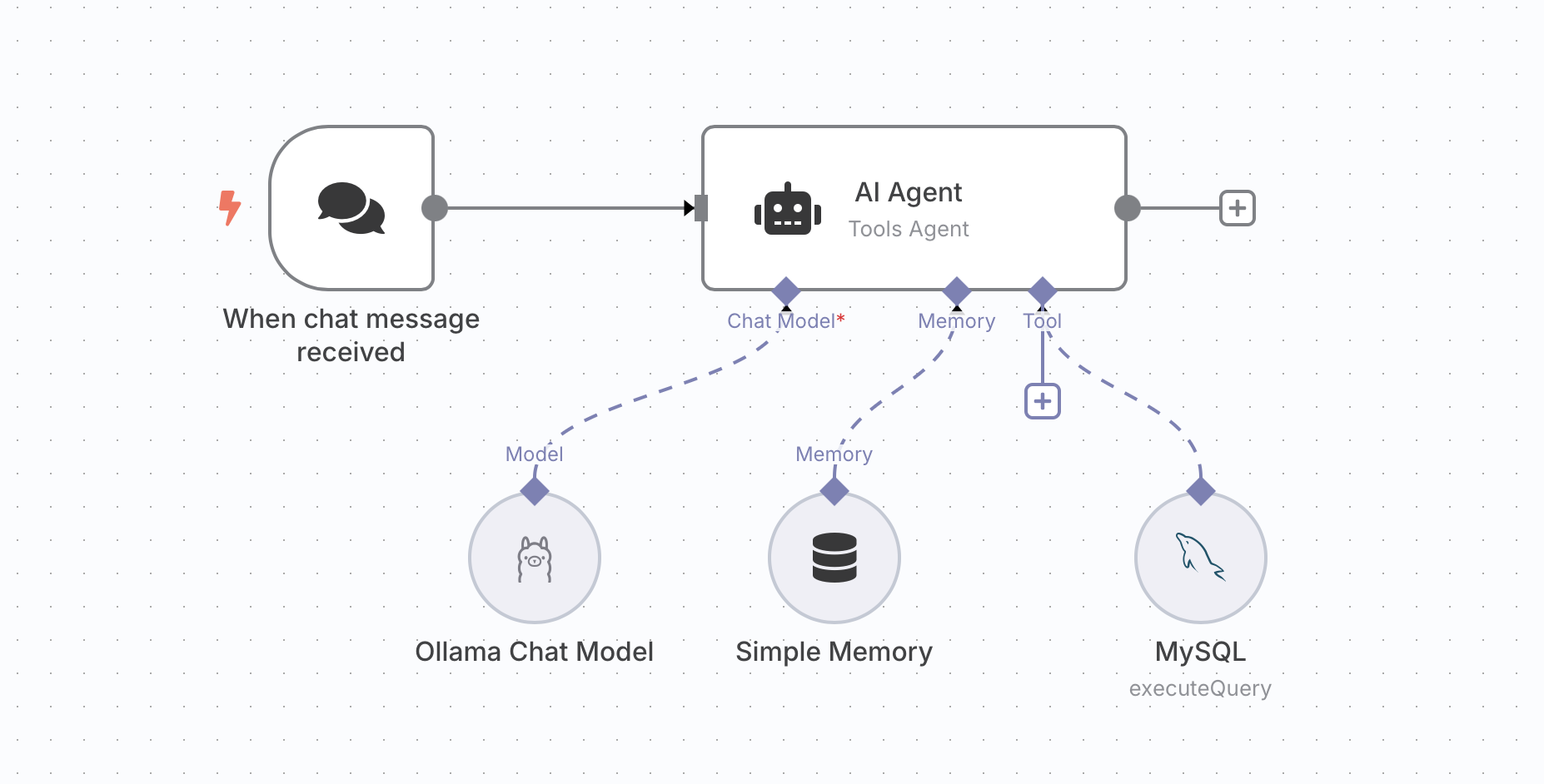
    n8n provides nodes that you can combine into an AI Agent workflow. This section walks through building a Chat-to-OceanBase template by adding five nodes.

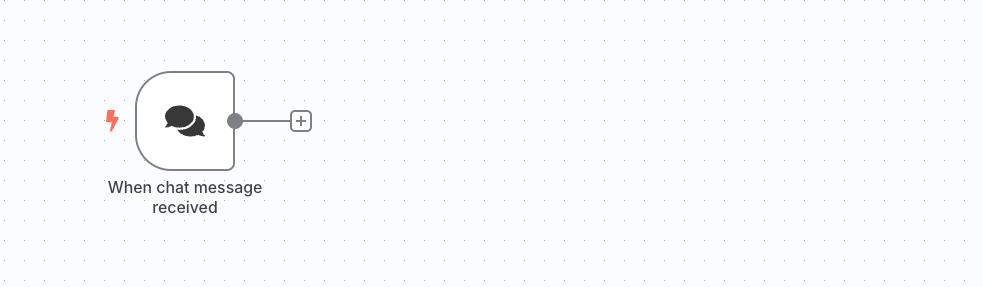
    1. Add a trigger.

      Add an HTTP Request trigger node to receive incoming HTTP requests.
      4-1

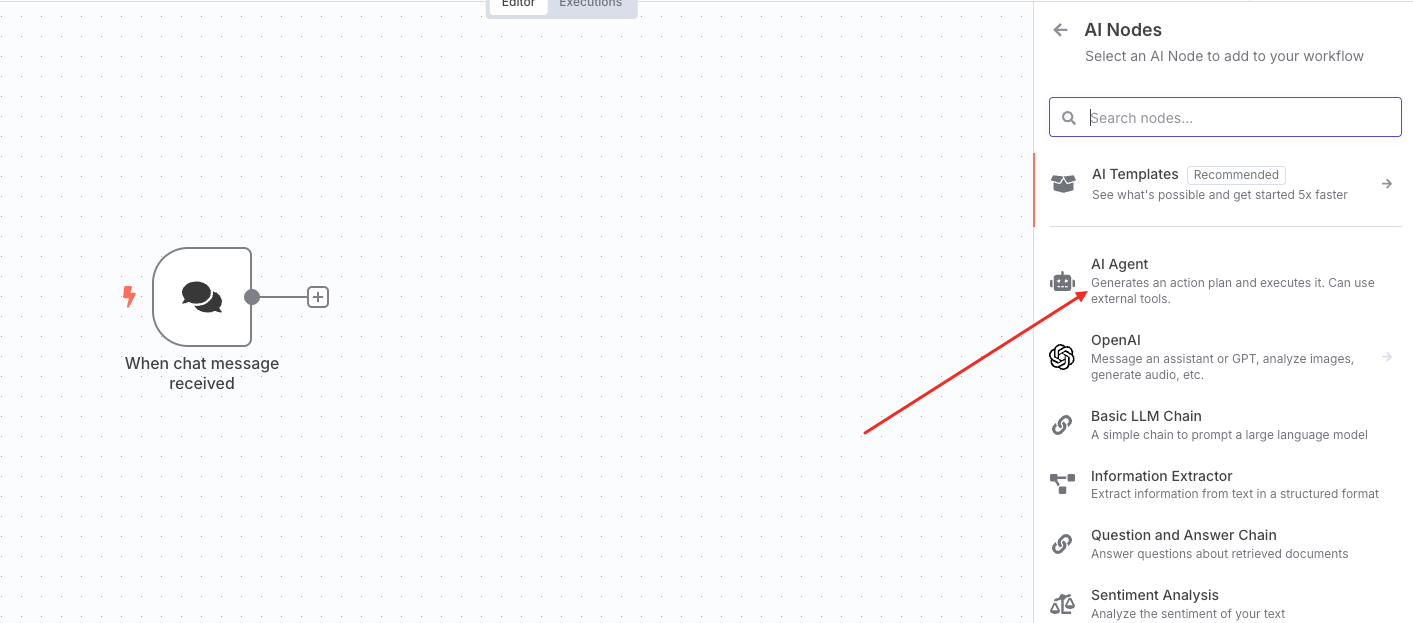
    2. Add an AI Agent node.

      Add an AI Agent node to handle the agent logic.
      4-2

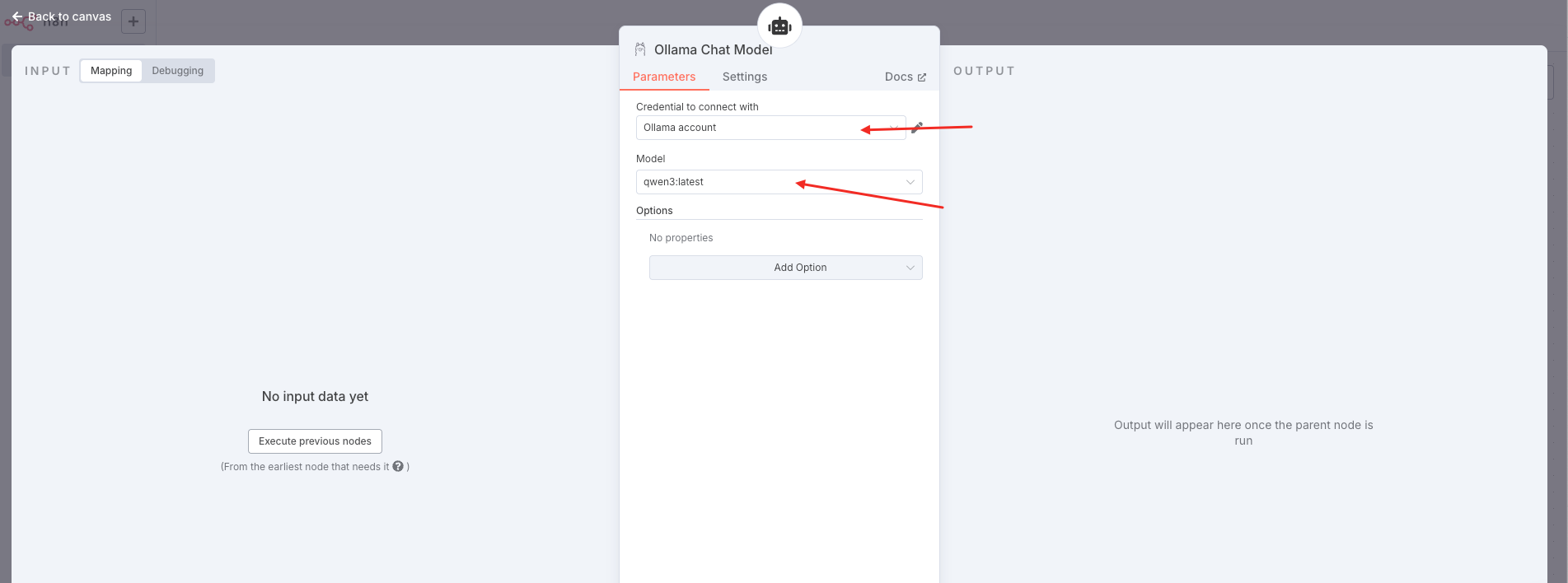
    3. Add an Ollama Chat Model node.

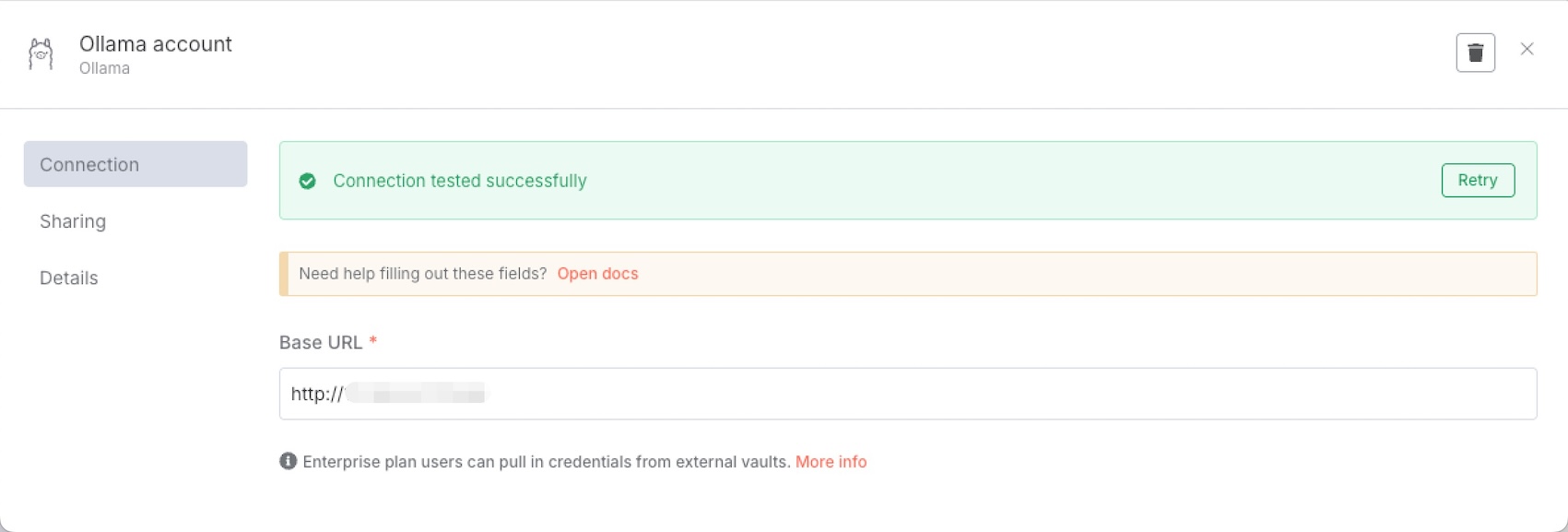
      You can choose from several free models. This example uses Qwen3. After selecting the model, configure the Ollama account.
      4-3

      4-4

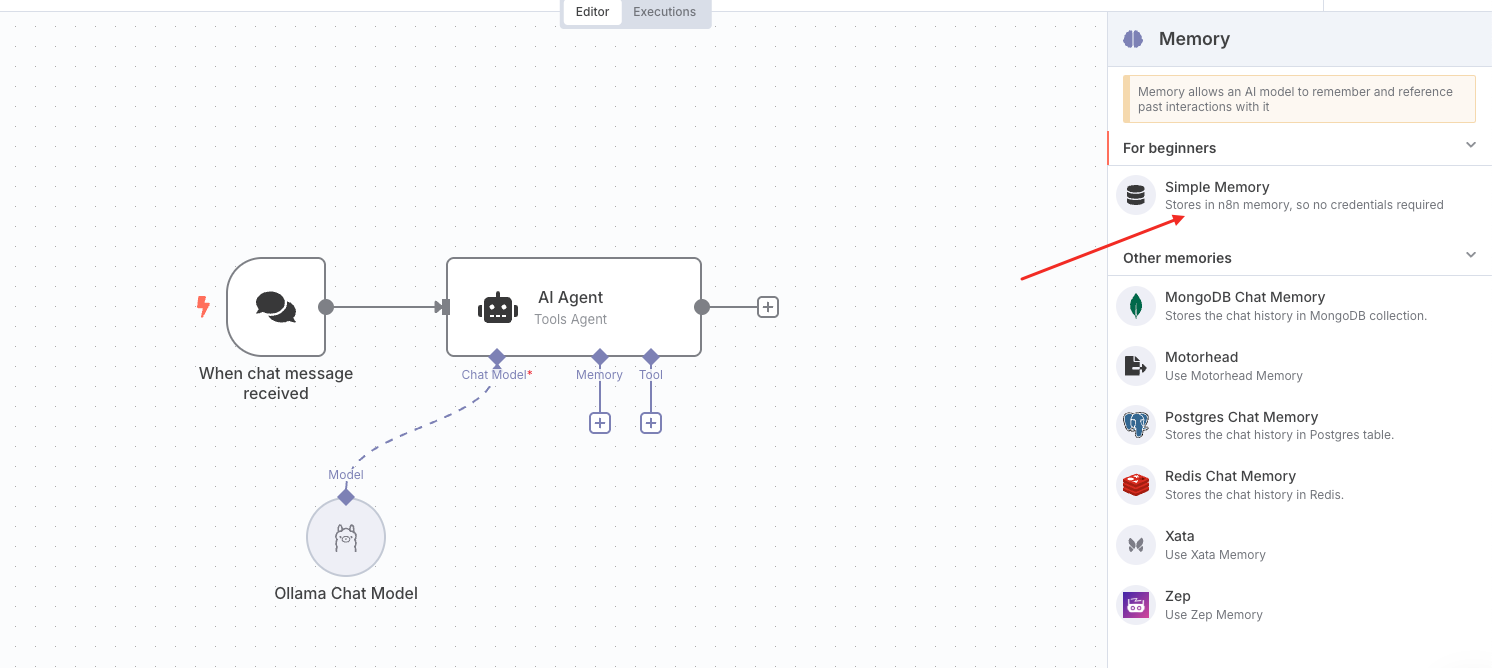
    4. Add a Simple Memory node.

      The Simple Memory node provides short-term context: it keeps the last five exchanges in the conversation.
      4-5

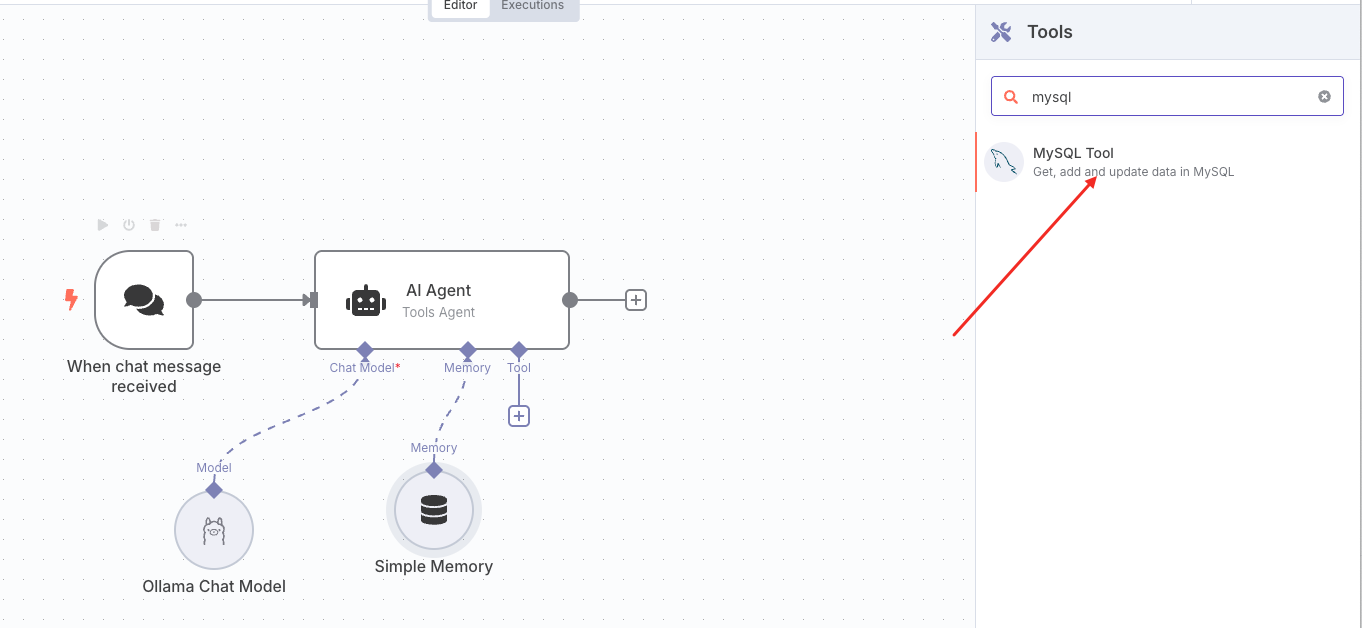
    5. Add a Tool node.

      The Tool node runs database operations against OceanBase. Under AI agent-tool, add a MySQL tool.
      4-6

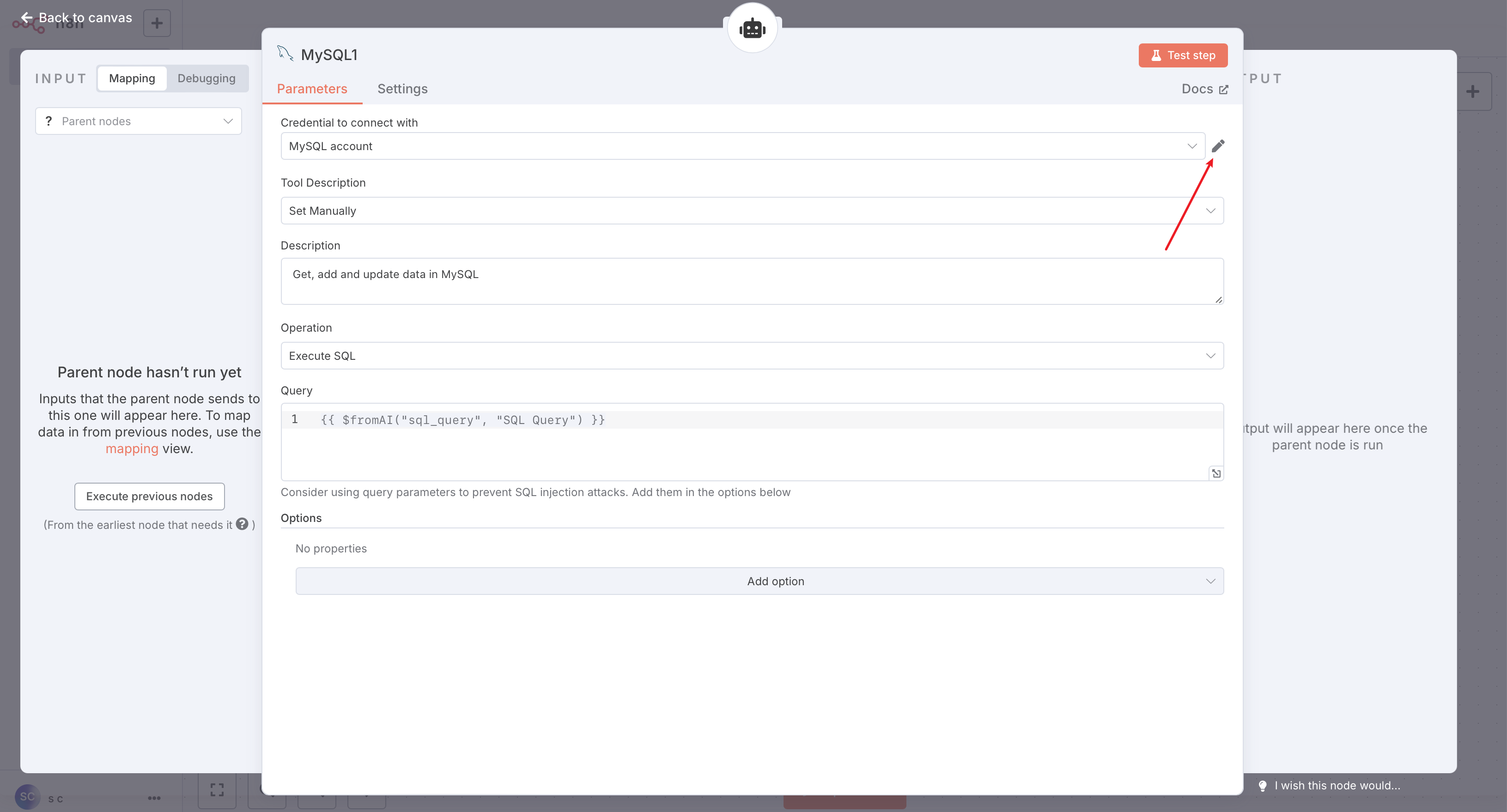
      Configure the MySQL tool as follows:

      4-7

      Click the Edit icon shown above and enter your MySQL (OceanBase) connection details.

      4-8

      After saving, you can click Test step in the top-right of the configuration panel to run a simple SQL test, or click Back to canvas to return to the workflow.

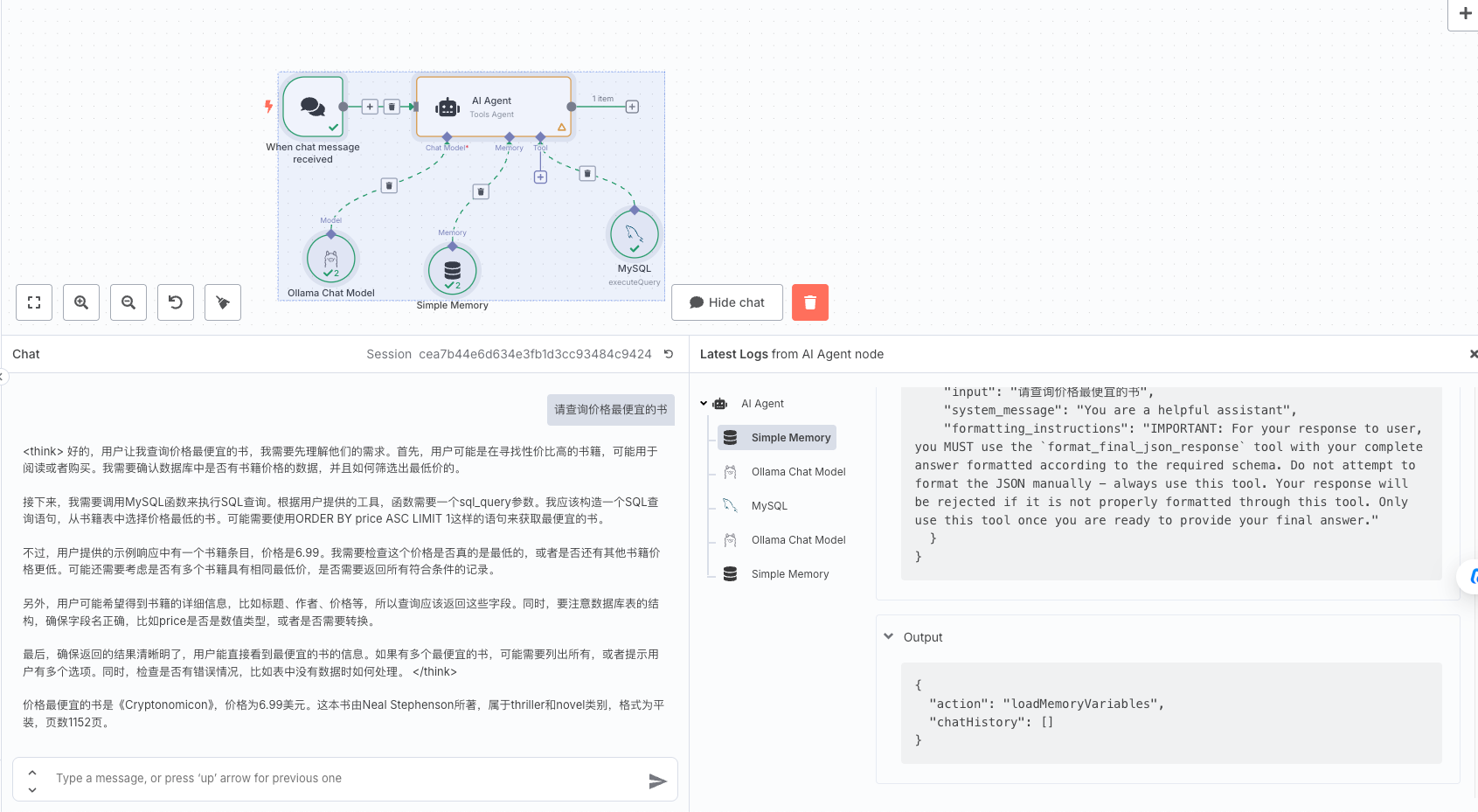
    6. Save the workflow.

      Once all five nodes are configured, save the workflow. You can then test it.
      4-9

    Workflow overview

    The completed workflow looks like this:
    0

    Previous topic

    Dify
    Last

    Next topic

    Trae
    Next
    What is on this page
    Prerequisites
    Step 1: Get database connection details
    Step 2: Create a test table and insert data
    Step 3: Deploy the tools
    Deploy n8n (self-hosted)
    Deploy the Qwen3 model with Ollama
    Step 4: Build the AI Agent workflow
    Workflow overview