







In addition to manually collecting statistics, OceanBase Database's optimizer automatically collects statistics on a daily basis using the MAINTENANCE WINDOW feature to ensure that statistics can be iteratively updated. Similar to native Oracle, OceanBase Database's optimizer defines seven automatic statistics collection tasks for each day from Monday to Sunday. By default, these tasks start at 22:00 and have a maximum collection duration of 4 hours, as shown in the table below.
Maintenance window |
Start time/Frequency |
Maximum collection duration |
|---|---|---|
| MONDAY_WINDOW | 22:00/per week | 4 hours |
| TUESDAY_WINDOW | 22:00/per week | 4 hours |
| WEDNESDAY_WINDOW | 22:00/per week | 4 hours |
| THURSDAY_WINDOW | 22:00/per week | 4 hours |
| FRIDAY_WINDOW | 22:00/per week | 4 hours |
| SATURDAY_WINDOW | 22:00/per week | 4 hours |
| SUNDAY_WINDOW | 22:00/per week | 4 hours |
Note
- Starting from V4.3.5 BP1 of OceanBase Database V4.3.5, the default start time and maximum collection duration for tasks in the
SATURDAY_WINDOWandSUNDAY_WINDOWmaintenance windows have changed from 6:00 and 20 hours to 22:00 and 4 hours, respectively. - Starting from V4.2.5 BP2 of OceanBase Database V4.2.5, the default start time and maximum collection duration for tasks in the
SATURDAY_WINDOWandSUNDAY_WINDOWmaintenance windows have changed from 6:00 and 20 hours to 22:00 and 4 hours, respectively.
Check the execution status of automatic statistics collection
OceanBase Database provides the following views to check the execution status of automatic statistics collection.
Mode |
View name |
Description |
|---|---|---|
| Oracle-compatible mode | DBA_SCHEDULER_JOBS |
Queries job information. |
| Oracle-compatible mode | ALL_SCHEDULER_WINDOWS and DBA_SCHEDULER_WINDOWS |
Queries maintenance window execution information. |
| MySQL-compatible mode | OCEANBASE.DBA_SCHEDULER_JOBS |
Queries job information. |
| MySQL-compatible mode | OCEANBASE.DBA_SCHEDULER_WINDOWS |
Queries maintenance window execution information. |
For the DBA_SCHEDULER_JOBS view, focus on the following fields:
JOB_NAME: the name of the maintenance window task.LAST_START_DATE: the time when the maintenance window task was last executed.NEXT_RUN_DATE: the time when the maintenance window task will next be executed.ENABLED: indicates whether the maintenance window task is enabled.FAILURE_COUNT: the number of failures of the maintenance window task. If this value is not 0, contact OceanBase Technical Support for troubleshooting.MAX_RUN_DURATION: the maximum duration of the maintenance window task. The default unit is seconds.
Modify the properties of automatic statistics collection
Considering that users may need to modify the start time and duration of automatic statistics collection based on their business requirements, OceanBase Database's optimizer provides the following methods:
Disable automatic statistics collection tasks.
OceanBase Database uses the system package DBMS_SCHEDULER.DISABLE to disable automatic statistics collection tasks.
Examples:
MySQL-compatible modeOracle-compatible modeDisable automatic statistics collection on Monday.
CALL DBMS_SCHEDULER.DISABLE('MONDAY_WINDOW');Disable automatic statistics collection on Tuesday.
CALL DBMS_SCHEDULER.DISABLE('TUESDAY_WINDOW');Disable automatic statistics collection on Wednesday.
CALL DBMS_SCHEDULER.DISABLE('WEDNESDAY_WINDOW');Disable automatic statistics collection on Thursday.
CALL DBMS_SCHEDULER.DISABLE('THURSDAY_WINDOW');Disable automatic statistics collection on Friday.
CALL DBMS_SCHEDULER.DISABLE('FRIDAY_WINDOW');Disable automatic statistics collection on Saturday.
CALL DBMS_SCHEDULER.DISABLE('SATURDAY_WINDOW');Disable automatic statistics collection on Sunday.
CALL DBMS_SCHEDULER.DISABLE('SUNDAY_WINDOW');
Notice
When executing the following statements in an Oracle-compatible tenant, you need to use the corresponding sys user.
Disable automatic statistics collection on Monday.
CALL DBMS_SCHEDULER.DISABLE('MONDAY_WINDOW');Disable automatic statistics collection on Tuesday.
CALL DBMS_SCHEDULER.DISABLE('TUESDAY_WINDOW');Disable automatic statistics collection on Wednesday.
CALL DBMS_SCHEDULER.DISABLE('WEDNESDAY_WINDOW');Disable automatic statistics collection on Thursday.
CALL DBMS_SCHEDULER.DISABLE('THURSDAY_WINDOW');Disable automatic statistics collection on Friday.
CALL DBMS_SCHEDULER.DISABLE('FRIDAY_WINDOW');Disable automatic statistics collection on Saturday.
CALL DBMS_SCHEDULER.DISABLE('SATURDAY_WINDOW');Disable automatic statistics collection on Sunday.
CALL DBMS_SCHEDULER.DISABLE('SUNDAY_WINDOW');
Enable automatic statistics collection tasks.
OceanBase Database uses the system package DBMS_SCHEDULER.ENABLE to enable automatic statistics collection tasks.
Examples:
MySQL-compatible modeOracle-compatible modeEnable automatic statistics collection on Monday.
CALL DBMS_SCHEDULER.ENABLE('MONDAY_WINDOW');Enable automatic statistics collection on Tuesday.
CALL DBMS_SCHEDULER.ENABLE('TUESDAY_WINDOW');Enable automatic statistics collection on Wednesday.
CALL DBMS_SCHEDULER.ENABLE('WEDNESDAY_WINDOW');Enable automatic statistics collection on Thursday.
CALL DBMS_SCHEDULER.ENABLE('THURSDAY_WINDOW');Enable automatic statistics collection on Friday.
CALL DBMS_SCHEDULER.ENABLE('FRIDAY_WINDOW');Enable automatic statistics collection on Saturday.
CALL DBMS_SCHEDULER.ENABLE('SATURDAY_WINDOW');Enable automatic statistics collection on Sunday.
CALL DBMS_SCHEDULER.ENABLE('SUNDAY_WINDOW');
Notice
When executing the following statements in an Oracle-compatible mode user tenant, you need to use the corresponding sys user.
Enable automatic statistics collection on Monday.
CALL DBMS_SCHEDULER.ENABLE('MONDAY_WINDOW');Enable automatic statistics collection on Tuesday.
CALL DBMS_SCHEDULER.ENABLE('TUESDAY_WINDOW');Enable automatic statistics collection on Wednesday.
CALL DBMS_SCHEDULER.ENABLE('WEDNESDAY_WINDOW');Enable automatic statistics collection on Thursday.
CALL DBMS_SCHEDULER.ENABLE('THURSDAY_WINDOW');Enable automatic statistics collection on Friday.
CALL DBMS_SCHEDULER.ENABLE('FRIDAY_WINDOW');Enable automatic statistics collection on Saturday.
CALL DBMS_SCHEDULER.ENABLE('SATURDAY_WINDOW');Enable automatic statistics collection on Sunday.
CALL DBMS_SCHEDULER.ENABLE('SUNDAY_WINDOW');
Adjust the scheduling time of automatic statistics collection.
OceanBase Database automatic collection tasks are implemented based on
DBMS_SCHEDULER. You can use DBMS_SCHEDULER.SET_ATTRIBUTE to adjust the scheduling time of automatic statistics collection.Notice
The next execution time of the window must be set according to the actual day of the week.
Examples:
MySQL-compatible modeOracle-compatible modeAssume the current time is 2024-03-07, Thursday 11:00. To adjust automatic statistics collection to start at 02:00 from Friday:
CALL DBMS_SCHEDULER.SET_ATTRIBUTE('MONDAY_WINDOW', 'NEXT_DATE', '2024-03-11 02:00:00'); CALL DBMS_SCHEDULER.SET_ATTRIBUTE('TUESDAY_WINDOW', 'NEXT_DATE', '2024-03-12 02:00:00'); CALL DBMS_SCHEDULER.SET_ATTRIBUTE('WEDNESDAY_WINDOW', 'NEXT_DATE', '2024-03-13 02:00:00'); CALL DBMS_SCHEDULER.SET_ATTRIBUTE('THURSDAY_WINDOW', 'NEXT_DATE', '2024-03-14 02:00:00'); CALL DBMS_SCHEDULER.SET_ATTRIBUTE('FRIDAY_WINDOW', 'NEXT_DATE', '2024-03-08 02:00:00'); CALL DBMS_SCHEDULER.SET_ATTRIBUTE('SATURDAY_WINDOW', 'NEXT_DATE', '2024-03-09 02:00:00'); CALL DBMS_SCHEDULER.SET_ATTRIBUTE('SUNDAY_WINDOW', 'NEXT_DATE', '2024-03-10 02:00:00');Notice
When executing the following statements in an Oracle-compatible mode user tenant, you need to use the corresponding sys user.
Set the date format.
SET NLS_DATE_FORMAT='YYYY-MM-DD HH24:MI:SS';Set the timestamp format.
SET NLS_TIMESTAMP_FORMAT='YYYY-MM-DD HH24:MI:SS.FF';Set the timestamp format with time zone.
SET NLS_TIMESTAMP_TZ_FORMAT='YYYY-MM-DD HH24:MI:SS.FF TZR TZD';Assume the current time is 2024-03-07, Thursday 11:00. To adjust automatic statistics collection to start at 02:00 from Friday:
CALL DBMS_SCHEDULER.SET_ATTRIBUTE('MONDAY_WINDOW', 'NEXT_DATE', '2024-03-11 02:00:00'); CALL DBMS_SCHEDULER.SET_ATTRIBUTE('TUESDAY_WINDOW', 'NEXT_DATE', '2024-03-12 02:00:00'); CALL DBMS_SCHEDULER.SET_ATTRIBUTE('WEDNESDAY_WINDOW', 'NEXT_DATE', '2024-03-13 02:00:00'); CALL DBMS_SCHEDULER.SET_ATTRIBUTE('THURSDAY_WINDOW', 'NEXT_DATE', '2024-03-14 02:00:00'); CALL DBMS_SCHEDULER.SET_ATTRIBUTE('FRIDAY_WINDOW', 'NEXT_DATE', '2024-03-08 02:00:00'); CALL DBMS_SCHEDULER.SET_ATTRIBUTE('SATURDAY_WINDOW', 'NEXT_DATE', '2024-03-09 02:00:00'); CALL DBMS_SCHEDULER.SET_ATTRIBUTE('SUNDAY_WINDOW', 'NEXT_DATE', '2024-03-10 02:00:00');
How automatic statistics collection works
The previous section introduced the MAINTENANCE WINDOW related to automatic statistics collection. But what happens after an automatic statistics collection task starts? The diagram below illustrates the workflow of automatic statistics collection.
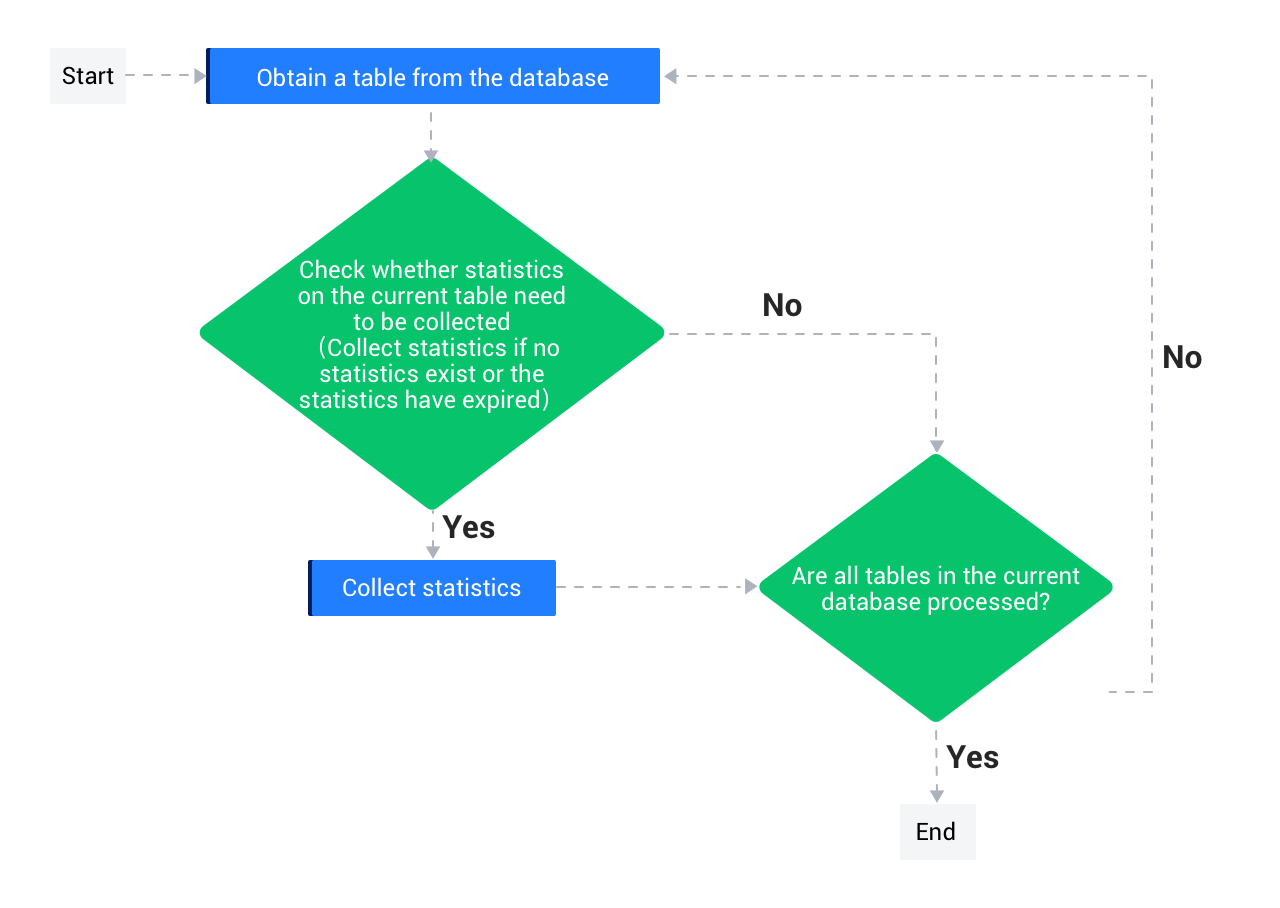
When automatic statistics collection is performed, the system determines whether a table’s statistics are outdated based on the proportion of inserts, deletes, and updates from the last collection to the current collection. The default threshold is 10%. Note that this change proportion is evaluated at the partition level. For example, if the proportion of inserts, deletes, or updates in certain partitions of a partitioned table exceeds 10%, statistics for those partitions will be recollected. The default change proportion is configurable. You can adjust it through perfs based on your business needs. For more information, see Configure the statistics collection strategy. In addition, OceanBase Database's optimizer provides views for querying the number of inserts, deletes, and updates on a table. These views are described in the following table:
Mode |
View name |
Description |
|---|---|---|
| Oracle-compatible mode | ALL_TAB_MODIFICATIONS |
Queries all DML stats of the table. |
| Oracle-compatible mode | DBA_TAB_MODIFICATIONS |
Queries all DML stats of the table. |
| Oracle-compatible mode | USER_TAB_MODIFICATIONS |
Queries all DML stats of the table. |
| MySQL-compatible mode | OCEANBASE.DBA_TAB_MODIFICATIONS |
Queries all DML stats of the table. |