







For businesses highly sensitive to latency, it's crucial to limit load balancing operations on nodes hosting log stream leaders during scaling in or out. These operations include transfer tasks, log stream replica migration, and leader switching. By leveraging heterogeneous zones, you can avoid leader switching and replica migration during peak hours, ensuring a smoother scaling process.
Considerations
Generally, only zones where the UNIT_NUM changes will experience replica migration during scaling or rollback operations. Other zones will not undergo log stream migration, but may have local transfers. However, if the tenant is not balanced before scaling—for example, if partition balancing is ongoing or a new scaling task is started before the previous one completes—the system cannot guarantee that log streams in other zones will not be migrated.
Scenario 1: Scaling by adding or removing zones
If a tenant's PRIMARY_ZONE is distributed across multiple zones and cannot be concentrated in a single zone, you need to use the locality change method to scale in or out. This involves first adding or removing zones, then using locality changes to add replicas to the new zones, ensuring a balanced distribution.
Let's take scaling out as an example.
Scenario
Assume the current tenant is tenant1, with locality F@zone1, F@zone2, A and PRIMARY_ZONE set to zone1, zone2. The tenant has a resource pool named pool distributed across zone1 and zone2, with UNIT_NUM set to 2 (configured as 2:2). The distribution of user log streams is shown below:
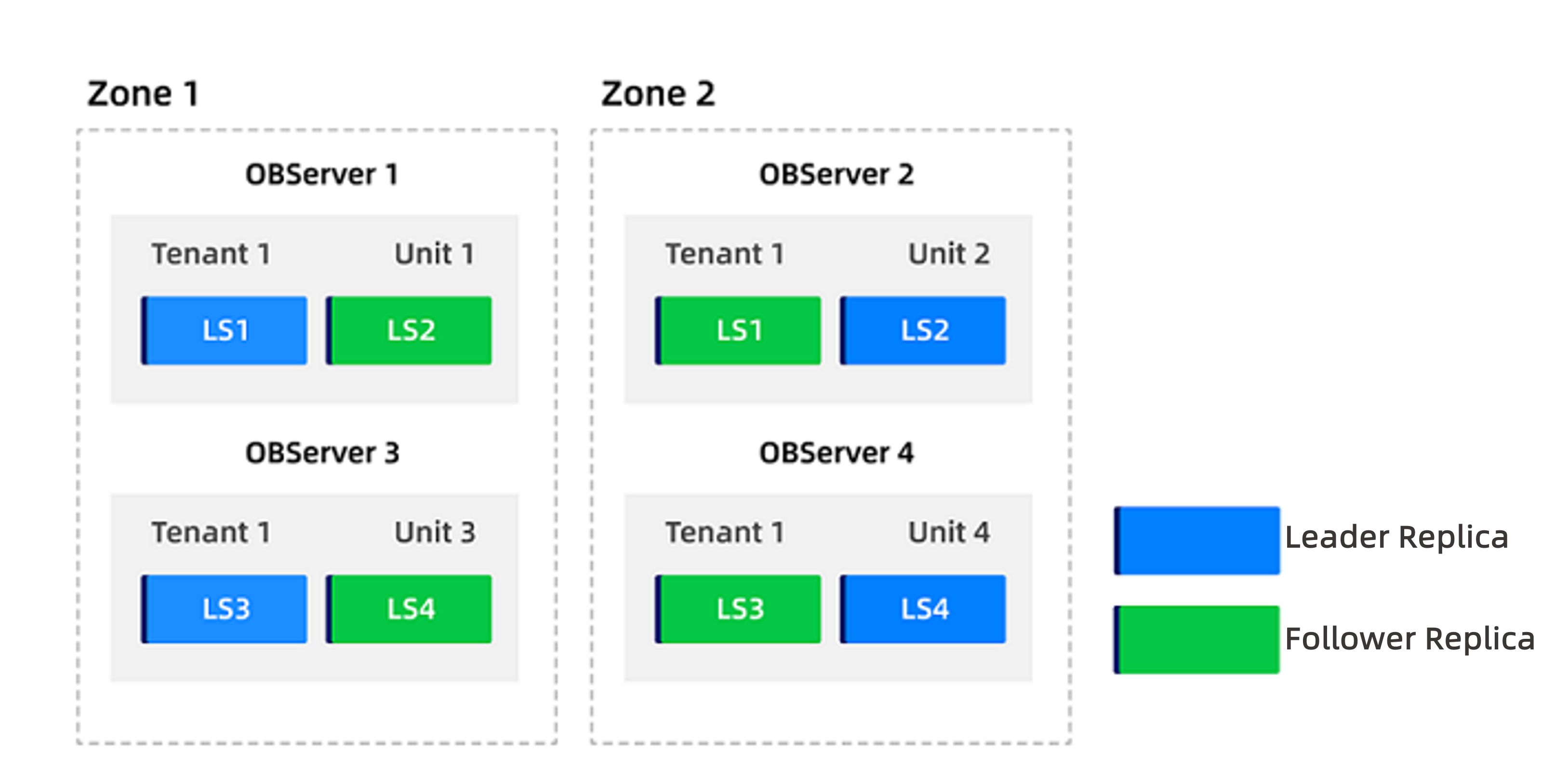
Now, the tenant's resource pool UNIT_NUM needs to be expanded to 4:4.
Procedure
Log in to the cluster's
systenant as therootuser.Disable the
enable_ls_leader_balanceparameter.The tenant-level parameter enable_ls_leader_balance controls log stream leader balancing. When the global load balancing switch
enable_rebalanceis enabled, this parameter can independently control automatic balancing of log stream leaders. The default value isTrue, meaning automatic leader balancing is enabled by default.obclient(root@sys)[(none)]> ALTER SYSTEM SET enable_ls_leader_balance = False TENANT = 'tenant1';Add two zones with four nodes each and allocate resources to the tenant in these new zones.
Add
zone3andzone4to the cluster. See Add a zone for details.Add four nodes to each of the new zones. See Add a node.
Create a resource pool named
pool2inzone3andzone4with the same unit specifications as the original, and setUNIT_NUMto 4.obclient(root@sys)[(none)]> CREATE RESOURCE POOL pool2 UNIT='unit_name', UNIT_NUM = 4, ZONE_LIST=('zone3','zone4');Replace
unit_namewith the actual unit name.Update the tenant's resource pool to include the new resource pool
pool2.obclient(root@sys)[(none)]> ALTER TENANT tenant1 RESOURCE_POOL_LIST =('pool','pool2');After this operation, the tenant will have 2 units in
zone1, 2 units inzone2, 4 units inzone3, and 4 units inzone4.
Update the tenant's locality to include
zone3andzone4.Change the locality from
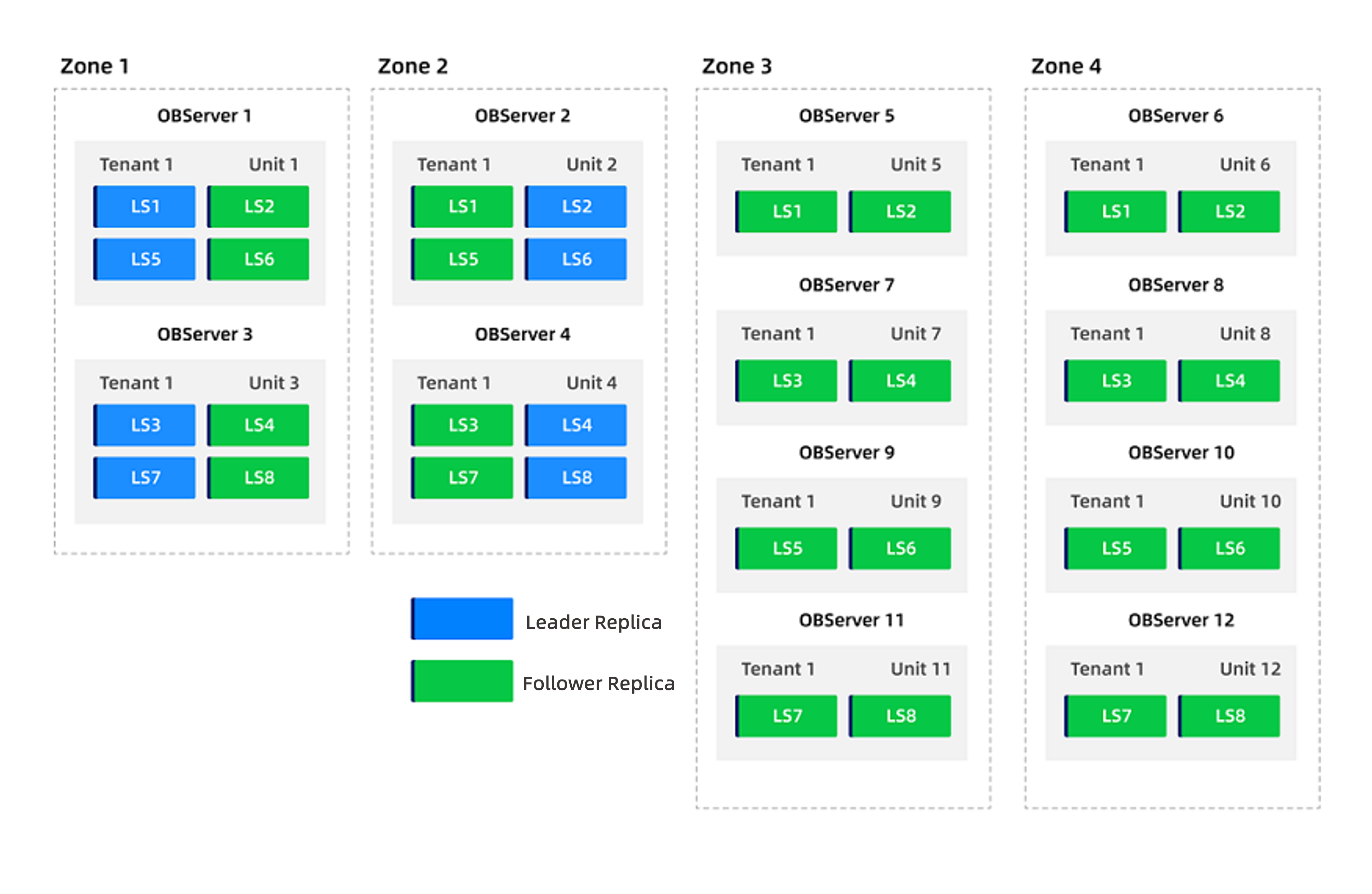
F@zone1, F@zone2, AtoF@zone1, F@zone2, F@zone3, F@zone4, A:obclient(root@sys)[(none)]> ALTER TENANT tenant1 LOCALITY="F@zone1,F@zone2,F@zone3,F@zone4,A";After executing this command, the system will automatically supplement log stream replicas in the new units and distribute them evenly. Only follower replicas are added, so no leader switching occurs.
The distribution of user log streams after adding zones is shown below.
Set the tenant's
PRIMARY_ZONEtozone3andzone4, and re-enable theenable_ls_leader_balanceparameter.Change the
PRIMARY_ZONEfromzone1, zone2tozone3, zone4:obclient(root@sys)[(none)]> ALTER TENANT tenant1 PRIMARY_ZONE='zone3,zone4';Re-enable
enable_ls_leader_balance:obclient> ALTER SYSTEM SET enable_ls_leader_balance = True TENANT = 'tenant1';After these commands are executed, leader replicas will automatically switch to
zone3andzone4. Changing only thePRIMARY_ZONEis fast and the impact is limited.Update the tenant's locality again to remove
zone1andzone2.Change the locality from
F@zone1, F@zone2, F@zone3, F@zone4, AtoF@zone3, F@zone4, A:obclient(root@sys)[(none)]> ALTER TENANT tenant1 locality="F@zone3,F@zone4,A";After executing this command, log stream replicas in
zone1andzone2will be deleted;zone3andzone4are unaffected.Update the tenant's resource pool to remove the original pool
pool, leaving onlypool2.obclient(root@sys)[(none)]> ALTER TENANT tenant1 RESOURCE_POOL_LIST =('pool2');After removing the original resource pool, the two-node
zone1andzone2can also be deleted.Once completed, only
zone3andzone4(each with 4 nodes) remain under the tenant, and the scaling out is complete.
Scenario 2: In-place scaling
For tenants with a concentrated PRIMARY_ZONE, in-place scaling can be performed. This ensures that only follower replicas are affected.
Let's use scaling out as an example.
Scenario
Assume tenant1 has locality F@zone1, F@zone2, A and PRIMARY_ZONE set to zone1. The tenant has a resource pool named pool distributed across zone1 and zone2, with UNIT_NUM set to 2 (configured as 2:2). The distribution of user log streams is shown below.
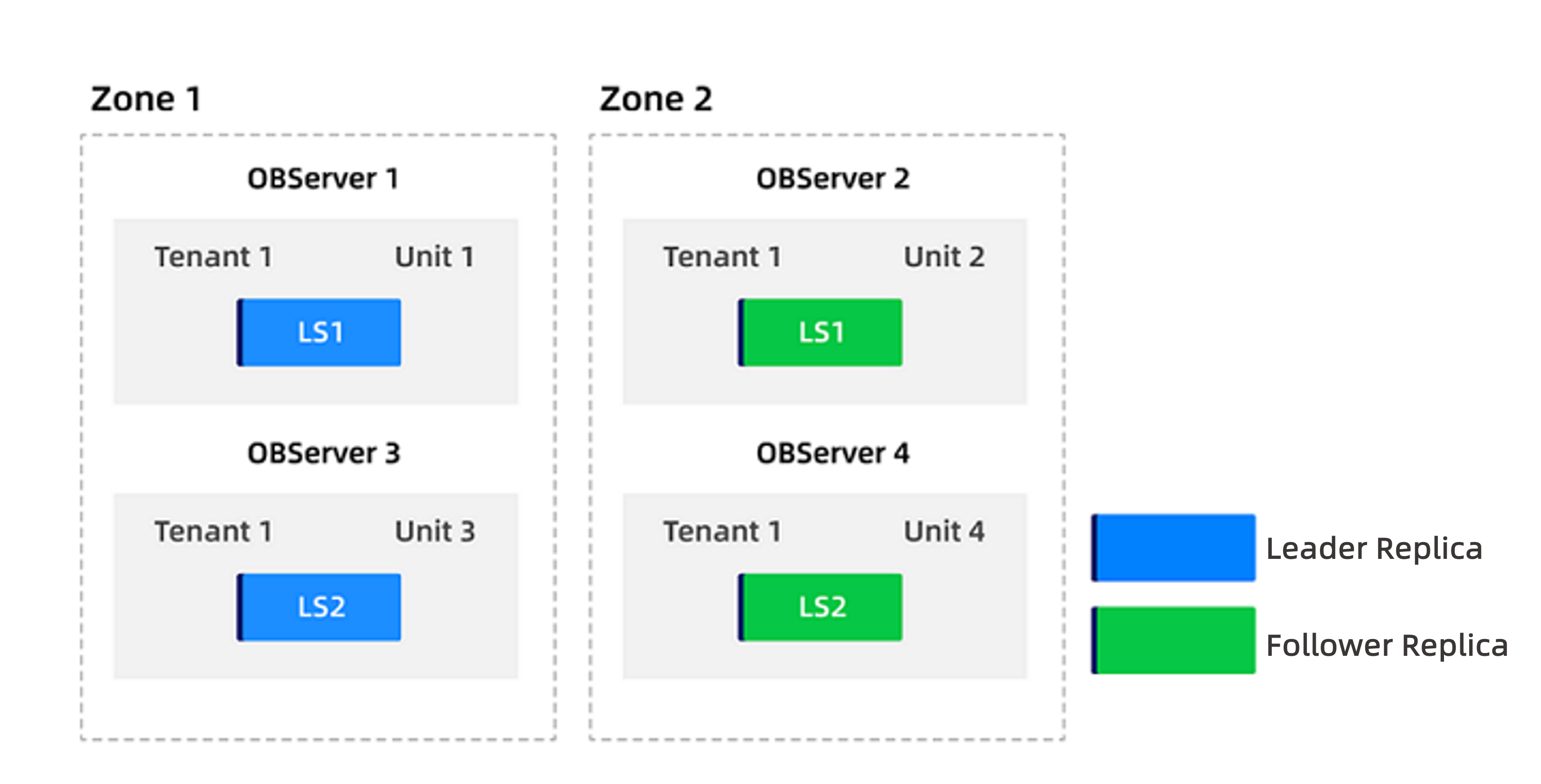
Now, the tenant's resource pool UNIT_NUM needs to be scaled out to 4:4.
Procedure
Log in to the cluster's
systenant as therootuser.Split the tenant's resource pool into
pool1forzone1andpool2forzone2.obclient(root@sys)[(none)]> ALTER RESOURCE POOL pool SPLIT INTO ('pool1','pool2') ON ('zone1','zone2');For more information, see Merge and split resource pools.
Change the
UNIT_NUMofpool2to 4.obclient(root@sys)[(none)]> ALTER RESOURCE POOL pool2 UNIT_NUM = 4;After executing this command, log streams will automatically split and be distributed across 4 units in
zone2. The distribution is shown below.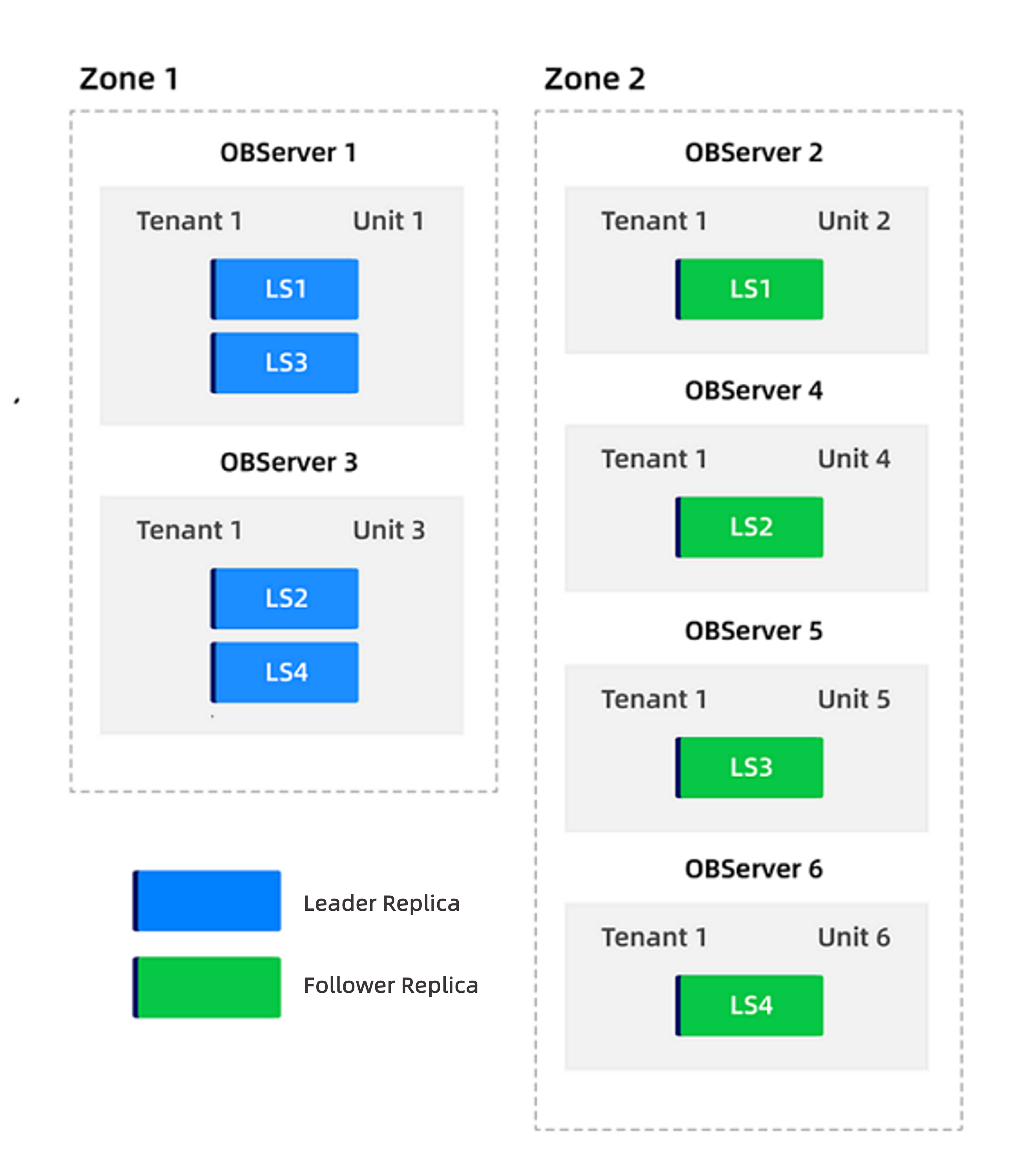
Change the tenant's
PRIMARY_ZONEtozone2.obclient(root@sys)[(none)]> ALTER TENANT tenant1 PRIMARY_ZONE='zone2';Change the
UNIT_NUMofpool1to 4.obclient(root@sys)[(none)]> ALTER RESOURCE POOL pool1 UNIT_NUM = 4;After this command, the system will start balancing. Once balancing completes, scaling out is finished. The final distribution is shown below.
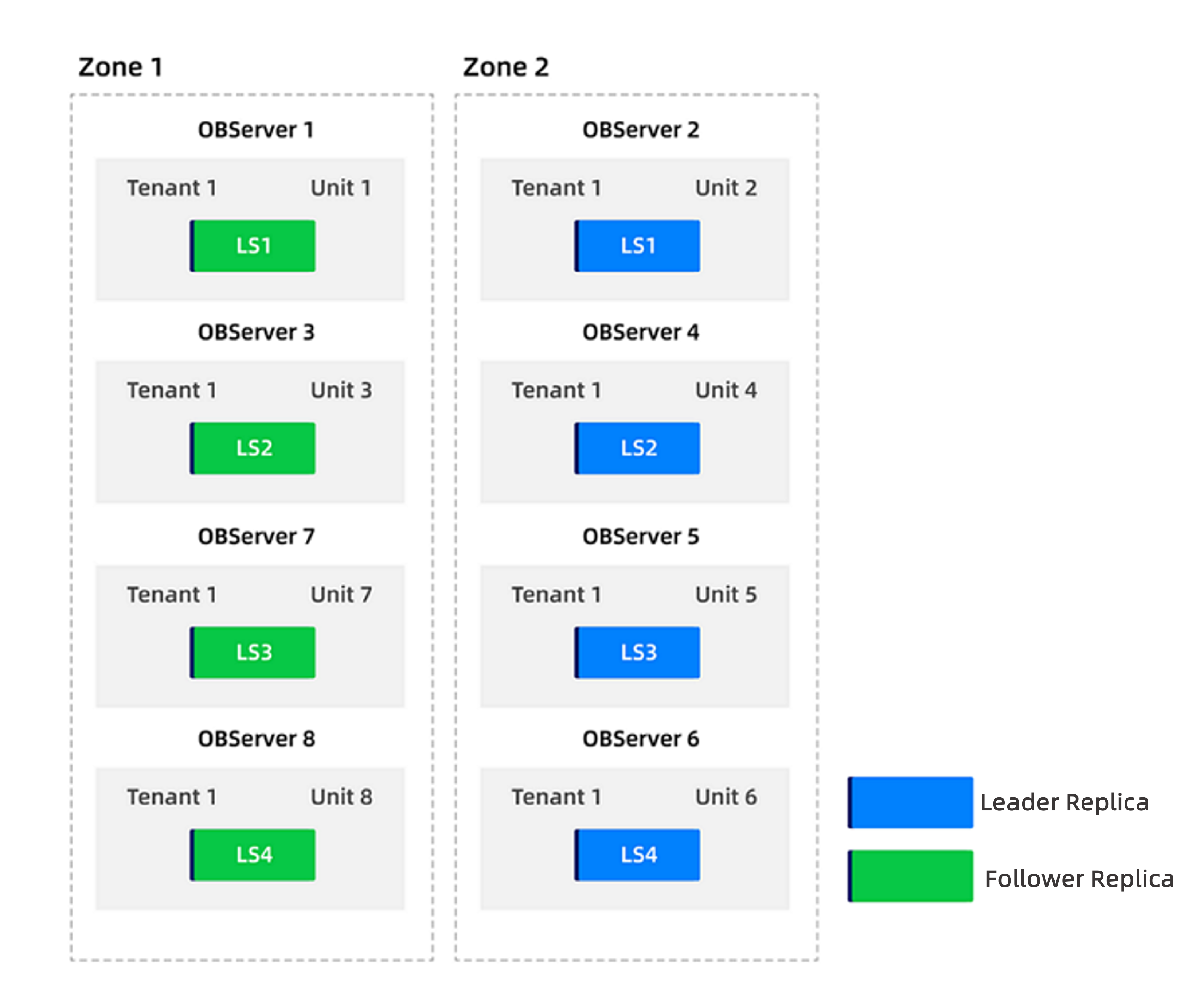
(Optional) If you want leader replicas to remain concentrated in
zone1, you can change the tenant'sPRIMARY_ZONEback tozone1.obclient(root@sys)[(none)]> ALTER TENANT tenant1 PRIMARY_ZONE='zone1';