







The physical standby database uses the log transmission service to synchronize Redo logs in real time between the primary tenant and the standby tenant. Specifically, the primary tenant does not push logs to the standby tenant; only the standby tenant pulls logs from the primary tenant.
The log transmission service automatically resolves where logs are located and handles high availability issues such as log lag and node failures in the cluster where the primary tenant resides. The standby tenant can obtain logs either from the primary tenant's log archiving or by connecting over the network directly to the cluster where the primary tenant resides.
The log transmission service supports two usage modes, which correspond to two physical standby deployment models: log archiving-based and network-based.
Log archiving-based physical standby database
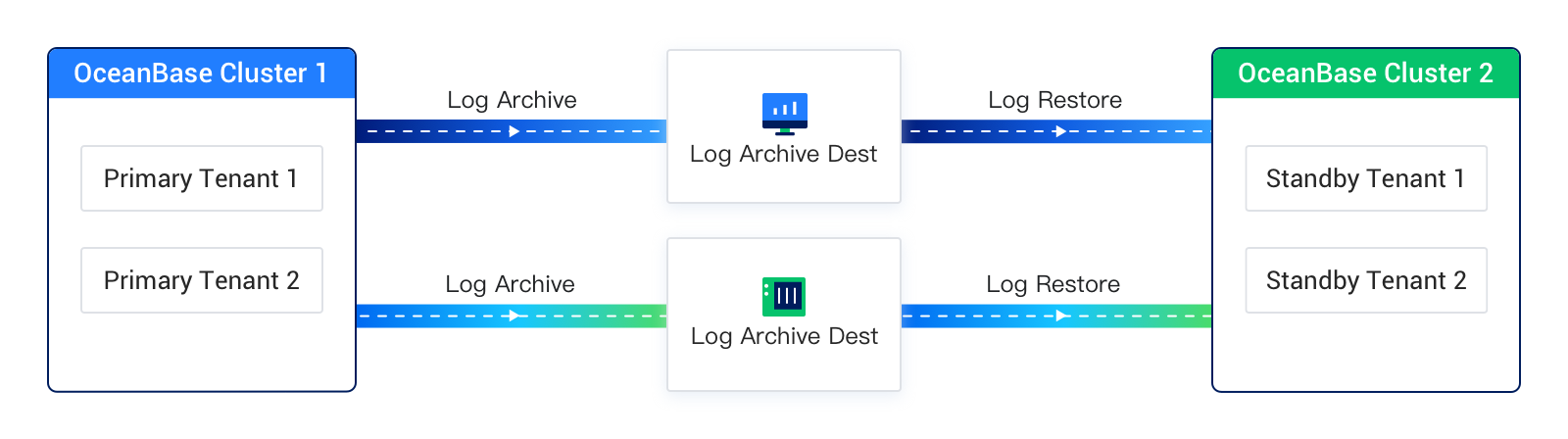
In a log archiving-based physical standby deployment, the standby tenant's Redo logs come from log archiving of the primary tenant or of another standby tenant, similar to Oracle Far Sync. The standby tenant interacts only with log archiving and has no other interaction with the upstream primary or standby tenant.
In this deployment mode, the standby tenant and the upstream tenant do not need network connectivity, but synchronization performance and availability depend on the log archiving medium.
The following figure shows the deployment architecture for this mode. In the figure, Log Archive (log archiving), Log Archive Dest (log archiving destination), and Log Restore (log recovery) together make up the log transmission service for this deployment.
Network-based physical standby database
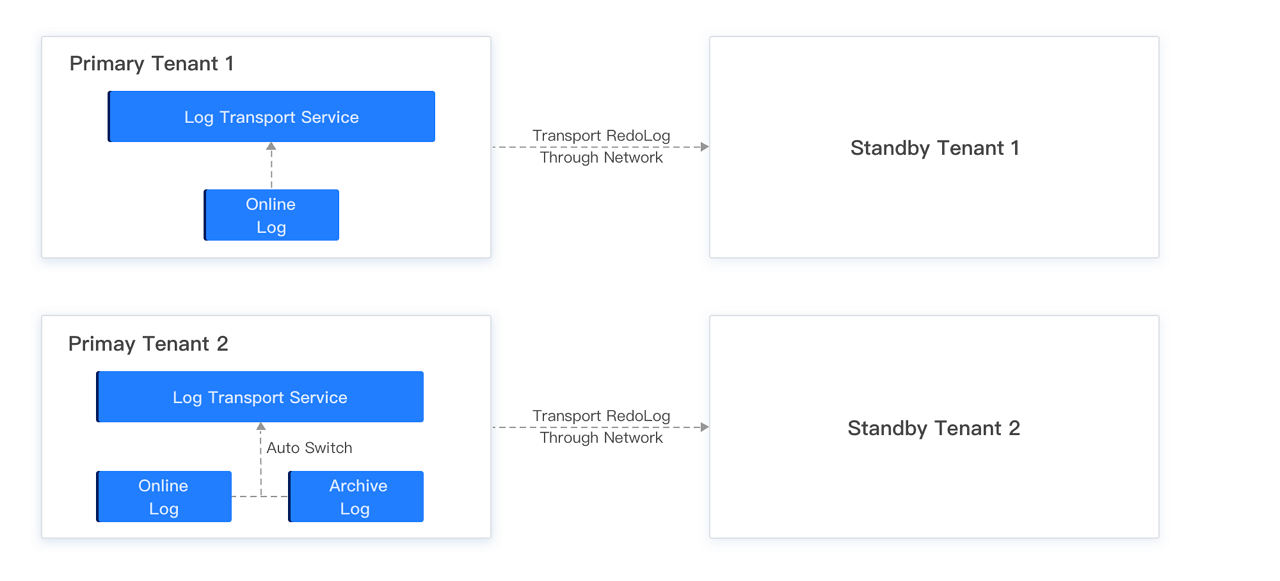
In a network-based physical standby deployment, the standby tenant reads logs over the network directly from the primary tenant or from another standby tenant, similar to replication in MySQL.
In this deployment mode, the standby tenant and the primary tenant must be able to reach each other over the network. The standby tenant sends RPC requests to read Redo logs from the primary tenant's cluster. To support standby high availability when the primary tenant loses nodes or logs are recycled, the standby tenant also needs limited query privileges on a small set of system views on the primary tenant.
In this mode, the standby tenant continuously requests logs from the primary tenant's log transmission service. Responses may be the primary tenant's online Redo logs or its archived logs (when log archiving is enabled on the primary); the two sources can switch automatically, which is transparent to the standby tenant and to application users.
The following figure shows the deployment architecture for this mode. In the figure, Primary Tenant1 does not have log archiving enabled, so Standby Tenant1 can synchronize only Primary Tenant1's online logs through the log transmission service; Primary Tenant2 has log archiving enabled, so Standby Tenant2 can synchronize Primary Tenant2's online logs through the log transmission service, and after online logs are recycled the log transmission service automatically switches the log source to archived logs so Standby Tenant2 can keep synchronizing Primary Tenant2's archived logs through the log transmission service, minimizing the chance of log synchronization interruption.
Comparison between the two deployment modes
The log archiving-based and network-based physical standby models differ in how some features are used, as summarized in the following table.
Feature |
Log archiving-based physical standby |
Network-based physical standby |
|---|---|---|
| Switchover | Supported | Supported |
| Failover | Supported | Supported |
| One primary tenant connecting to multiple standby tenants | Supported | Supported |
| Cascading standby tenants | Supported | Supported |
| Asynchronous mode | Yes | Yes |
| Maximum availability or maximum protection mode | Not supported | Supported
NoteFor V4.4.2, this feature is supported starting from V4.4.2 BP1. |
| Standby tenant bandwidth limiting | Not supported | Supported, cluster-level limiting |
| Data source for standby tenant | Archived logs | Online logs or archived logs of primary tenant, supports automatic switching |
| Enabling log archiving for primary tenant | Required | Not strictly required
NoteFor a network-based physical standby deployment, we recommend enabling log archiving on the primary tenant. Otherwise, the standby tenant may experience log synchronization interruption. For example:
|
| Enabling log archiving for standby tenant | Required; otherwise Switchover cannot be performed | Not required |
| Real-time performance | Seconds to minutes | Seconds |
| Storage medium supported by log archiving | OSS/NFS | N/A |