







After you generate an Active Session History (ASH) report, you can review the report to identify the possible causes of transient performance issues.
ASH report content
The ASH Report section of the ASH report records statistical information about the ASH report, including the system version, operating system environment, information sampling period, analysis period, ASH and WR data sources, sampling count, event count, and average active session count. It also includes information from 18 modules such as Top Active Tenants, Top Node Load, Top Groups, Top Foreground DB Time, Top Background DB Time, Top Sessions, Top IO Bandwidth, Top Blocking Sessions, Top Latchs, Top DB Objects, Activity Over Time, Top Execution Phase, Top IO Events, Top SQL Statement Types, Top SQL with Top Events, Top SQL with Top Operator, Top PL/SQL Procedures, and Complete List of SQL Text And Status.
These modules primarily display the performance data collected by OBServer from two aspects: resource overhead and execution path overhead. Therefore, when analyzing specific performance issues, you can check the relevant modules to determine whether the issue is caused by resource bottlenecks or inefficient execution methods.
ASH Report
This section displays some information about the sampling time, analysis time, and general statistics in the ASH report.
- Cluster Name: the name of the database cluster.
- Observer Version: the version information of OceanBase Database, including the version number and detailed build version.
- Operation System Info: the operating system information, including the kernel version and architecture.
- User Input Begin Time: the time when sampling starts, indicating the time when session activities start to be recorded.
- User Input End Time: the time when sampling ends, indicating the time when session activities stop being recorded.
- Analysis Begin Time: the time when analysis starts, indicating the start time of analyzing the sampled data.
- Analysis End Time: the time when analysis ends, indicating the end time of analyzing the sampled data.
- Ash Data Source: the ASH data source. This column does not exist if ASH is not used.
- Wr Data Source: the WR data source. This column does not exist if WR is not used.
- Elapsed Time: the total number of seconds of all sampling times.
- Ash Num of Sample: the number of ASH samples, indicating the number of session activities recorded.
- Wr Num of Sample: the number of WR samples, indicating the number of performance snapshots generated within the analysis time range.
- Average Active Sessions: the average number of active sessions, indicating the average number of active sessions during the sampling period.
These data can help you understand the activity status, number of sessions and events, and system activity level during the sampling period.
ASH Report
Cluster Name: test425
Observer Version: OceanBase 4.2.5.3 (203000012025022717-866087xxxxxxxxxxxxxxxxxxxxxxxxxxxxxxx)
Operation System Info: Linux(3.10.0-327.ali2019.alios7.x86_64)_x86_64
User Input Begin Time: 2024-09-22 10:26:47
User Input End Time: 2025-06-22 20:27:07
Ash Analysis Begin Time: 2025-03-05 12:59:50
Ash Analysis End Time: 2025-03-05 15:47:12
Wr Analysis Begin Time: 2025-02-28 09:43:43
Wr Analysis End Time: 2025-03-05 12:59:35
Ash Data Source: oceanbase.GV$ACTIVE_SESSION_HISTORY
Wr Data Source: oceanbase.DBA_WR_ACTIVE_SESSION_HISTORY
Elapsed Time: 453793
Ash Num of Sample: 11019
Wr Num of Sample: 475940
Average Active Sessions: 1.07
Top Active Tenants
This section divides the resource overhead into foreground user requests and background tasks, allowing you to view the overall resource overhead of the tenant.
- Tenant Name: the name of the tenant, which identifies the specific tenant.
- Session Type: the session type. Valid values: BACKGROUND and FOREGROUND, which indicate background processes and foreground processes, respectively.
- Total Samples: the total number of records, indicating the total number of samples in the analysis time range of the ASH report.
- Wait Event Count: the number of waiting events, indicating the number of samples where the session was waiting for an event.
- On CPU Samples: the number of samples on the CPU, indicating the number of samples where the session was executing on the CPU.
- Avg Active Sessions: the average number of active sessions, indicating the average number of active database sessions during the sampling period, regardless of whether they were on the CPU or waiting for an event.
- % Activity: the activity percentage of the event, indicating the percentage of activity (CPU + waiting) of the specified tenant during the specified time range.
- Equivalent Client Load: the number of active connections between the client and the database during the analysis time range of the ASH report.
This information provides details about tenant activities, revealing different aspects of database performance and tenant resource usage.
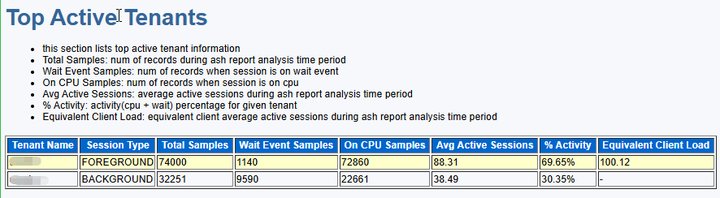
In the Top Active Tenants module, performance issues may originate from within the database or from the interaction chain between the database and the business application. First, you need to confirm the performance metrics Equivalent Client Load and Avg Active Sessions. These two metrics are used to evaluate the impact of the database and the link on performance. The higher the ratio (Avg Active Sessions/Equivalent Client Load), the greater the impact of internal database overhead on performance; the lower the ratio, the greater the impact of the network link or client on performance.
For example, if the ratio is 88%, as shown in the report, it indicates that the performance issue is primarily caused by database load. After confirming that the database load is problematic, you should further analyze the overhead of internal database resources. In the Top Active Tenants module, foreground user requests consume 69.65% of the database resources, while background tasks account for about 30%. Therefore, the performance bottleneck mainly occurs in the execution chain of user requests. Additionally, foreground tasks collectively consume 1140 seconds of database time, while CPU execution consumes 72860 seconds. This suggests that the business model is not significantly affected by resource limitations such as disk I/O or network bandwidth, and the main overhead is concentrated on CPU execution. Since the business is running normally in the current version, it can be inferred that the cluster has sufficient CPU resources, and the performance slowdown may be related to a decline in the efficiency of a specific link in the SQL execution chain after the upgrade.
Top Node Load
This section displays the performance metrics of the top nodes based on the DB time metric.
IP: the IP address of the server.
Port: the port number of the server.
Session Type: the session type. Valid values: BACKGROUND and FOREGROUND, which indicate background processes and foreground processes, respectively.
Total Samples: the total number of records, indicating the total number of samples in the analysis time range of the ASH report.
Wait Event Samples: the number of waiting events, indicating the number of samples where the session was waiting for an event.
On CPU Samples: the number of samples on the CPU, indicating the number of samples where the session was executing on the CPU.
Avg Active Sessions: the average number of active sessions, indicating the average number of active database sessions during the sampling period, regardless of whether they were on the CPU or waiting for an event.
% Activity: the activity percentage of the event, indicating the percentage of activity (CPU + waiting) of the specified tenant during the specified time range.
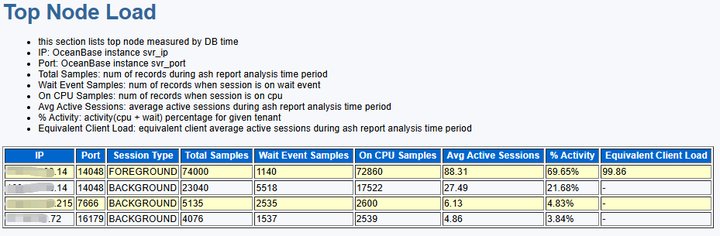
Equivalent Client Load: the number of active connections between the client and the database. The higher the ratio (Avg Active Sessions/Equivalent Client Load), the greater the impact of internal database overhead on performance; the lower the ratio, the greater the impact of the network link or client on performance.
This information provides the performance metrics related to the load of each node in the database cluster.
This section displays the performance metrics of the top nodes based on the DB time metric.
Top Groups
This section displays the top Resource Consumer Groups based on resource consumption.
Node: The node address.
Group Name: The name of the resource group.
Group Samples: The number of session activity records sampled in the current resource group.
% Activity: The activity percentage of the event, indicating the percentage of activity (CPU + wait) for the specified tenant during the specified time period.
Program: The process name corresponding to the background session.
% Program: The percentage of the background session process in the resource group (such as CPU and threads).
Module: The name of the functional module in the program.
% Module: The percentage of the module in the active sessions of the program, used to locate hot operations within the program.
Action: The specific operation in the module.
% Action: The percentage of the operation in the active sessions of the module, further refining the granularity of performance analysis.
Avg Active Sessions: The average number of active sessions, indicating how many database sessions were active on average during the sampling period (regardless of whether they were on the CPU or waiting for an event).
Slot Begin Time: The start time of the session activity period, formatted as
YYYY-MM-DD HH:MM:SS(+ offset seconds), indicating the start of the statistical period.Slot Count: The total number of samples in the current time period. ASH samples the active session status every second by default, so the Slot Count value is equal to the length of the time period in seconds.
Action Key: The type of operation that triggered the active session, used to locate the resource usage of specific services or components. It typically contains the following information:
- Source node: such as
xx.xx.xx.xx:2882(IP and port). - Tenant and resource group: such as
tenant:1002/group:0. - Service type: such as
T1002_LogService-LogRestoreService-RemoteLogWriter(log restore service).
- Source node: such as
Action Samples: The number of active sessions sampled for the operation (Action Key) in the current time period. A higher value indicates that the operation consumes more database resources.
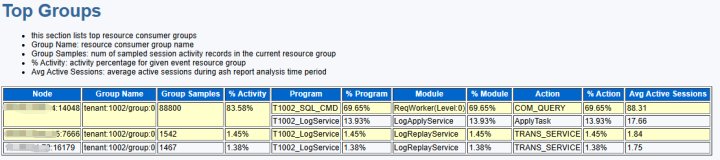
This information provides the top resource-consuming groups and their key performance metrics, including the main performance events they encountered, the frequency of these events, the activity percentage, and the average number of concurrent sessions.
Top Foreground DB Time
This section lists the main consumers of database foreground activity time by event type.
Node: The node address.
Event Name: The event that consumes the most DB time, including both wait events and events on the CPU.
Wait Class: The type of the wait event.
Event Samples: The number of session activity records sampled for each event.
Avg Active Sessions: The average number of active sessions, indicating how many database sessions were active on average during the sampling period (regardless of whether they were on the CPU or waiting for an event).
% Activity: The activity percentage of the event, indicating the percentage of activity (CPU + wait) for the specified tenant during the specified time period.
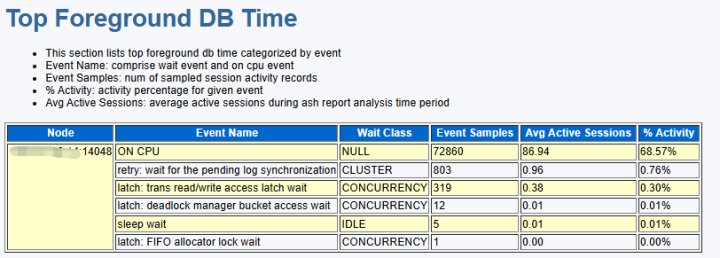
This information provides the top foreground sessions in terms of DB time consumption during the specified analysis period.
For example, in the Top Foreground DB Time data, it can be seen that lock conflicts caused by accessing transaction contexts do occur during business task execution. However, this overhead accounts for less than 1% of the total, and no wait events corresponding to transaction commit (tx committing wait) were found. Therefore, the two assumptions about performance issues in the Top Active Tenants can be ruled out.
In conclusion, the performance degradation is not caused by resource bottlenecks. Therefore, it is likely that the execution chain in the new version has regressed in performance.
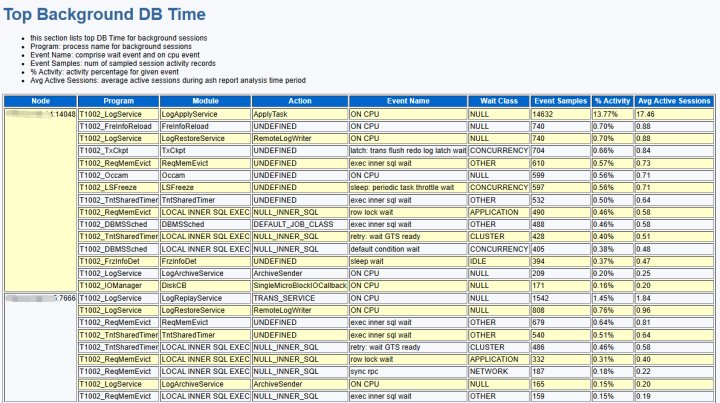
Top Background DB Time
This section displays the DB time generated by background sessions.
Node: The node address.
Program: The process name corresponding to the background session.
Module: The name of the functional module in the program.
Action: The specific operation in the module.
Event Name: The event that consumes the most DB time, including both wait events and events on the CPU.
Wait Class: The type of the wait event.
Event Samples: The number of session activity records sampled for each event.
% Activity: The activity percentage of the event, indicating the percentage of activity (CPU + wait) for the specified tenant during the specified time period.
Avg Active Sessions: The average number of active sessions, indicating how many database sessions were active on average during the sampling period (regardless of whether they were on the CPU or waiting for an event).
This information provides the most resource-consuming background processes, the main event types they encounter, their activity frequency, their contribution to overall DB time, and the average number of concurrent active sessions.
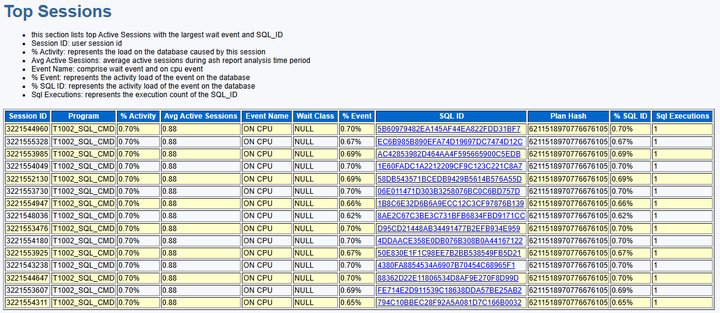
Top Sessions
This section displays information about the top sessions (Top Sessions).
Session ID: The ID of the sampled session.
Program: The process name corresponding to the background session.
% Activity: The activity percentage of the event, indicating the percentage of activity (CPU + wait) for the specified tenant during the specified time period.
Avg Active Sessions: The average number of active sessions, indicating how many database sessions were active on average during the sampling period (regardless of whether they were on the CPU or waiting for an event).
Event Name: The event that consumes the most DB time, including both wait events and events on the CPU.
Wait Class: The type of the wait event.
% Event: The percentage of the event in the total database activity. A high percentage may indicate that the event is a major bottleneck in system performance.
SQL ID: The unique identifier for the SQL query.
Plan Hash: The numerical value of the current SQL execution plan. The same plan will have the same hash value.
% SQL ID: The percentage of the SQL statement associated with the event in the total database activity. A high percentage indicates that the SQL is a major source of resource consumption.
Sql Executions: The number of times the SQL statement was executed during the analysis period. Frequent execution may lead to resource contention or lock conflicts.
This information provides statistics on active sessions sorted by session. By sampling session IDs, activity session percentages, events, number of events, event percentages, and comparing with the current user and sampled active status, potential issues can be identified.
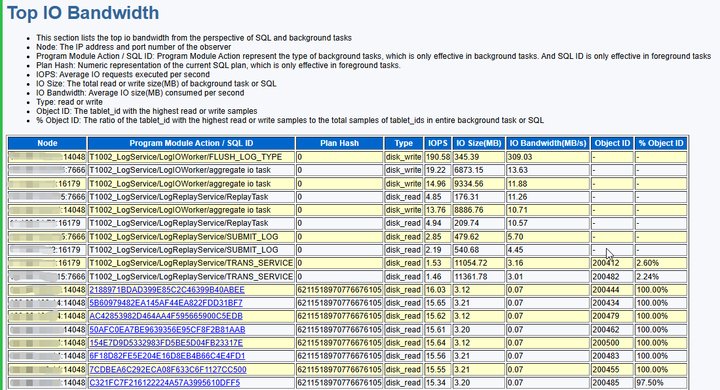
Top IO Bandwidth
This section lists the top I/O throughput from the perspectives of SQL and background tasks.
Node: The node address.
Program Module Action/SQL ID: The type of background task (such as log aggregation or transaction log writing) or the unique identifier of the SQL query, which tracks the resource consumption of specific SQL statements.
Plan Hash: The value of the current SQL execution plan. The same plan will have the same hash value.
Type: The type of I/O operation, distinguishing between read and write workloads.
IOPS: The number of I/O requests per second, reflecting the load pressure on the storage device. High IOPS may indicate frequent small data operations.
IO Size(MB): The total read and write data volume (in MB) for the task or SQL during the sampling period. Background tasks typically involve larger data volumes, such as bulk log writes.
IO Bandwidth(MB/s): The I/O throughput per second, measuring the actual utilization of the storage bandwidth. Low bandwidth may be caused by data dispersion or hardware limitations.
Object ID: The main data shard involved in the I/O operation. If no data is present, it indicates no data dispersion or no data was captured during the sampling period.
% Object ID: The I/O percentage of the dominant shard.
These details provide information on parameters such as Node, SQL ID, and IOPS, analyzing the I/O throughput of SQL and background tasks. Combined with read/write types, data volume, and distribution characteristics, they help identify performance bottlenecks.
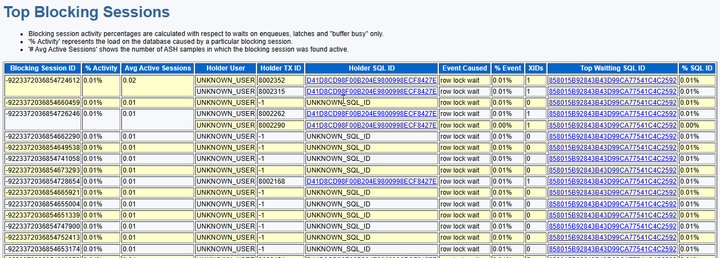
Top Blocking Sessions
This section displays blocking session issues in the database caused by locks (enqueues), latches, and buffer busy contention.
Blocking Session ID: The session identifier that blocks other sessions, used to locate the source of the issue.
% Activity: The percentage of events caused by the blocking session, indicating the main source of contention.
Avg Active Sessions: The average number of active sessions during the sampling period, indicating the average number of active database sessions (whether on CPU or waiting for events) at that stage.
Holder User: The user holding the lock or resource.
Holder TX ID: The transaction ID holding the resource.
Holder SQL ID: The SQL statement identifier holding the resource, used to associate with specific operations.
Event Caused: The type of waiting event caused by the blocking session.
% Event: The percentage of this event among similar blocking events, helping identify high-frequency contention types.
XIDs: The associated transaction ID chain, used to trace dependencies between transactions.
Top Waiting SQL ID: The SQL statement identifier most affected by the blocking issue.
% SQL ID: The percentage of this SQL statement in total blocking waits, used to prioritize optimization of high-impact queries.
These details provide fields like Blocking Session ID and Holder TX ID to precisely locate the blocking source. Combined with the quantified contention impact from % Activity and % Event, they associate SQL-level root causes using Holder SQL ID and Top Waiting SQL ID. XIDs enable transaction chain tracing, offering end-to-end diagnostic capabilities from sessions, transactions to SQL statements for database performance bottlenecks.
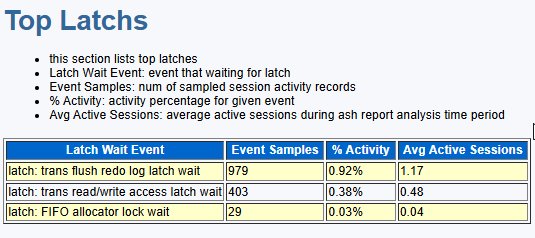
Top Latchs
This section displays the most contended latches in the database.
Latch Wait Event: The name of the latch waiting event.
Event Samples: The number of session activity records sampled for each event.
% Activity: The activity percentage of the event, indicating the percentage of activity (CPU + waiting) for the specified tenant during the specified period.
Avg Active Sessions: The average number of active sessions, indicating the average number of active database sessions (whether on CPU or waiting for events) during the sampling period.
These details provide the latches causing the highest waiting, their waiting event counts, activity percentages, and average active sessions, directly pointing to the key bottlenecks in concurrency control within the database. These details are crucial for diagnosing and resolving latch contention issues, reducing waiting times, improving system response speed, and enhancing overall performance.
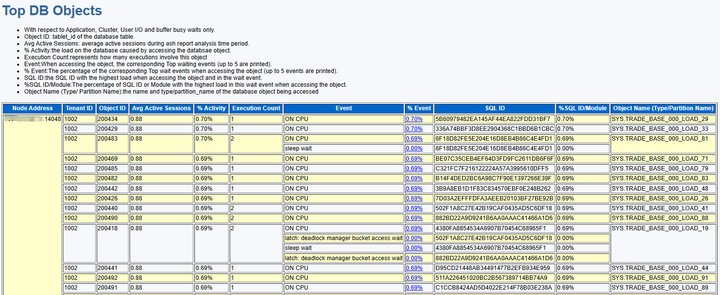
Top DB Objects
This section quantifies the access load and associated SQL statements for database objects (such as tables and partitions) by analyzing four key waiting events: Application, Cluster, User I/O, and buffer busy, to identify high-contention hotspots.
Node Address: The node address (in the format IP:Port) used to identify the physical node location in a distributed environment.
Tenant ID: The tenant ID, a unique identifier for the tenant.
Object ID: The tablet_id of the database table, used for metadata association.
Avg Active Sessions: The average number of active sessions, indicating the average number of active database sessions (whether on CPU or waiting for events) during the sampling period.
% Activity: The activity percentage of the event, indicating the percentage of activity (CPU + waiting) for the specified tenant during the specified period.
Execution Count: The total number of SQL executions for the object. Frequent access may lead to resource contention.
Event: The corresponding top waiting event (up to 5 events are printed).
% Event: The percentage of the corresponding top waiting event (up to 5 events are printed).
SQL ID: The SQL ID with high load in the waiting event.
% SQL ID/Module: The percentage of the SQL ID or module with high load in the waiting event, used to prioritize optimization of high-impact queries.
Object Name (Type/Partition Name): The name, type, and partition information of the database object being accessed.
These details quantify the access load, associated SQL statements, and waiting events for database objects (such as tables and partitions), identifying hotspots causing high resource contention. They provide direct evidence for optimizing table structures, index designs, and SQL performance.
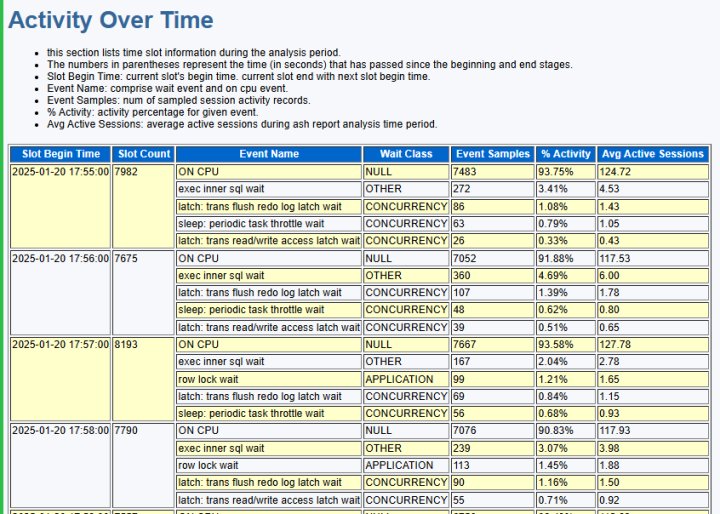
Activity Over Time
This section displays the dynamic changes in database activity during the analysis period through time interval information.
Slot Begin Time: The start time of the current time slot. Each time slot ends when the next time slot begins.
Slot Count: The total number of samples in the current time period. ASH samples active session states every second by default, so the Slot Count value equals the length of the time period in seconds.
Event Name: The event that consumes the most DB Time, including both waiting events and events occurring on the CPU.
Wait Class: The type of the waiting event.
Event Samples: The number of session activity records sampled for each event.
% Activity: The activity percentage of the event, indicating the percentage of activity (CPU + waiting) for the specified tenant during the specified period.
Avg Active Sessions: The average number of active sessions, indicating the average number of active database sessions (whether on CPU or waiting for events) during the sampling period.
These details provide a time-series view, detailing the dynamic changes in database activity during the analysis period, including the distribution of key events, activity intensity, and the evolution of resource contention over time. This is valuable for identifying performance trends, managing peak periods, and developing performance optimization strategies based on time dimensions.
Top Execution Phase
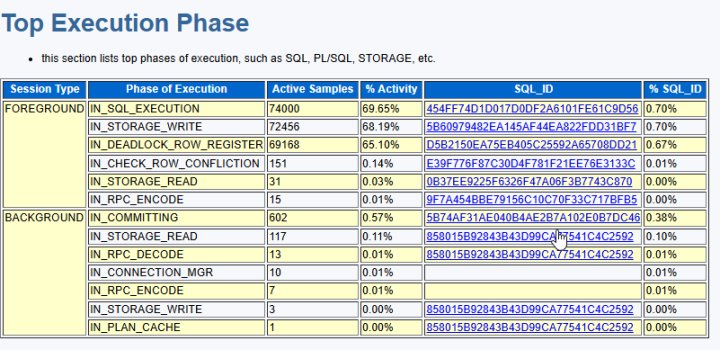
This section displays the execution phases with the highest activity, categorized by session type, covering various aspects such as SQL execution, PL/SQL processing, and storage read/write operations.
Session Type: The type of session, with possible values including BACKGROUND and FOREGROUND, representing background and foreground processes, respectively.
Phase of Execution: The name of the execution phase, such as IN_SQL_EXECUTION (SQL execution), IN_COMMITTING (commit process), and IN_PLSQL_EXECUTION (PL/SQL execution).
Active Samples: The number of occurrences or records for each execution phase.
% Activity: The activity percentage of the event, indicating the percentage of activity (CPU + wait) for the specified tenant during the specified period.
SQL ID: The SQL ID with the highest load in the wait event.
% SQL ID/Module: The percentage of the SQL ID or module with the highest load in the wait event, used to prioritize the optimization of high-impact queries.
Since performance issues in the base path typically affect all requests in the database, the Top Execution Phase provides a clear summary of the impact on the base path.
For example, the content of the Top Execution Phase module can provide the following information:
IN_SQL_EXECUTION accounts for 69.65% of the overhead, representing the total overhead from when SQL retrieves a plan to when it enters execution. In the execution phases defined in OceanBase Database, IN_SQL_EXECUTION includes IN_STORAGE_WRITE, IN_STORAGE_READ, and IN_RPC_ENCODE. This metric indicates that the main overhead of SQL is in the execution (EXECUTION) phase, not in the parsing (PARSER) or plan cache (PLAN CACHE) phase.
IN_STORAGE_WRITE is a sub-phase of IN_SQL_EXECUTION, accounting for 68.19% of the overhead. This indicates that the main performance overhead occurs during data writing to the memtable.
IN_DEADLOCK_ROW_REGISTER is a sub-phase of IN_STORAGE_WRITE, accounting for 65.10% of the overhead. This indicates that most of the overhead in this scenario occurs during this phase.
The above three metrics typically do not exceed 30% in benchmark testing for import tasks. This is because, in import tasks, the entire system's memtable dump, clog synchronization, and disk write background tasks occupy a portion of the CPU resources, and stages such as SQL parsing and expression calculation also consume a portion of the CPU resources. In this task, the overhead of the IN_STORAGE_WRITE phase is close to 70%, significantly higher than the benchmark reference value, indicating that the performance issue in this business scenario mainly occurs during this phase. Additionally, the IN_DEADLOCK_ROW_REGISTER phase primarily focuses on registering the row lock information held by the written data to the Deadlock Manager, facilitating the detection of active transactions for deadlocks by background tasks. Typically, this step only involves updating and maintaining a hashmap value, which is a very fast operation. In benchmark testing, the overhead of this phase typically does not exceed 3%. Obviously in this system, this overhead is far greater than the benchmark reference value.
Based on the above analysis, we can determine that the performance issue is primarily in the IN_DEADLOCK_ROW_REGISTER phase. This is a common path for memtable writing, and performance issues on this common path can affect either a specific SQL statement or the performance of all SQL statements accessing this path. Therefore, how can we determine the scope of affected SQL statements in this scenario?
In addition to listing the overhead percentages of each predefined phase in OceanBase Database, the Top Execution Phase section also displays the SQL statements with the highest overhead in each phase and their specific percentages. From the report data, we can determine that the SQL statement with the highest overhead in the IN_DEADLOCK_ROW_REGISTER phase is D5B2150EA75EB405C25592A65708DD21. According to the text information provided in the report, this SQL statement is an INSERT statement:
INSERT INTO TRADE_BASE_000_LOAD_42
SELECT TRADE_NO, TRADE_NO
FROM TRADE_BASE_000_LOAD PARTITION(p42)
WHERE ROWNUM <= 50000000;
The overhead of this SQL statement in the IN_DEADLOCK_ROW_REGISTER phase is 0.67%, which is significantly different from the total overhead of the phase. This indicates that the total overhead of the IN_DEADLOCK_ROW_REGISTER phase is not concentrated on a single SQL statement but is distributed across many SQL statements.
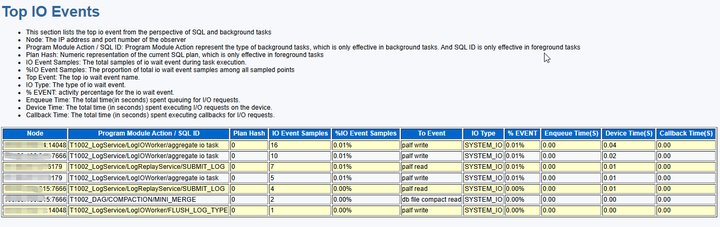
Top IO Events
This section statistically analyzes the I/O wait events of SQL statements and background tasks, identifying the sources of disk I/O bottlenecks, including high-load SQL statements, types of background tasks, and specific device performance metrics.
Node: The node address.
Program Module Action/SQL ID: The type of background task (e.g., log aggregation, transaction log writing) or the unique identifier of the SQL query, tracking the resource consumption of specific SQL statements.
Plan Hash: The numerical value of the current SQL execution plan. The same plan will have the same hash value.
IO Event Samples: The total number of I/O wait event samples during task execution.
%IO Event Samples: The proportion of the total number of I/O wait event samples among all sampled points, reflecting the frequency of I/O requests.
Top Event: The name of the main I/O wait event.
IO Type: The type of I/O wait event (read/write/asynchronous), used to distinguish the operation mode.
% EVENT: The activity percentage of the I/O wait event.
Enqueue Time(S): The total time spent waiting in the queue for I/O requests, in seconds, reflecting the congestion level of the device.
Device Time(S): The total time spent executing I/O requests on the device, in seconds, measuring the disk performance.
Callback Time(S): The total time spent on the callback for I/O requests, in seconds.
By quantifying the I/O wait events of SQL statements and background tasks and combining them with the enqueue time (Enqueue Time) and execution time (Device Time), this section identifies high-load SQL statements (through SQL ID and Plan Hash) and disk performance bottlenecks, providing a basis for optimizing I/O-intensive operations.
Top SQL Statement Types
This section summarizes the execution of various statement types during the analysis period of the ASH report, helping to identify the types of statements where business performance issues occur.
SQL Statement Type: Lists the most frequently executed SQL statement types, such as SELECT, UPDATE, INSERT, or DELETE.
Total Samples: The total number of executions of the specified SQL statement type during the entire ASH report analysis period.
% Activity: The activity percentage of the event, indicating the percentage of activity (CPU + wait) for the specified tenant during the specified period.
Sampled Executions: The number of sampled executions of this type of SQL statement (multiple executions may be independently counted based on different parameters).
Node: The node address.
% Node: The activity percentage of this type of SQL statement on the node, used to evaluate the load balancing of the node.
% On CPU: The percentage of time this type of SQL statement spends running on the CPU. A high value indicates a CPU-intensive operation, such as complex aggregation.
% Event: The percentage of this event in the total activity of the database. A high percentage may indicate that this event is a major bottleneck for system performance.
This information provides a categorized statistical overview of SQL statement executions, revealing the impact of different operations (such as queries and updates) on database resource consumption and system activity. These data are valuable for identifying high-load SQL statement types, optimizing query strategies, balancing resource allocation, and performing targeted performance tuning.

Top SQL with Top Events
This section displays the SQL statements most closely associated with specific top events.
SQL ID: The SQL ID with the highest load in the wait event.
Plan Hash: The numerical value of the current SQL execution plan. The same plan has the same hash value.
Active Samples: The number of occurrences or records for each execution phase.
% Activity: The activity percentage of the event, representing the percentage of activity (CPU + wait) for the specified tenant during the given period.
Sampled Executions: The number of sampled executions for this type of SQL (executions may be independently counted due to different parameters).
Top Event: The name of the main I/O wait event.
% Event: The proportion of this event in the total database activity. A high percentage may indicate that this event is a major bottleneck for system performance.
Top Operator/ExecPhase: The operation with the longest duration in the current SQL execution plan.
% Operator/ExecPhase: The percentage of this operation/phase in the total SQL duration, used to identify execution plan bottlenecks.
SQL Text: The text of the SQL query.
This information provides the specific events causing the highest activity percentage in SQL statement execution, directly pointing to the core of performance bottlenecks. By identifying these "bottleneck" events and related SQL statements, database administrators can optimize SQL statements, adjust execution plans, or improve system configurations to reduce wait times and enhance resource utilization.
The Top SQL with Top Events module displays specific SQL statements that take more than 1% of the total time, while this section is empty, indicating that the performance issue is not specific to certain SQL statements but rather a general slowdown in overall SQL execution. Based on the report, we can conclude that the performance issue is related to deadlock detection (IN_DEADLOCK_ROW_REGISTER) and is a common performance problem.
Top SQL with Top Events:
- This Section lists the SQL statements that accounted for the highest percentages event.
- Plan Hash: Numeric representation of the current SQL plan
- Active Samples: num of samples for top current SQL
- % Activity: activity percentage for given SQL ID
- Sampled Executions: represents the number of times the current SQL execution has been sampled
- Top Event: top event name for current SQL plan
- % Event: activity percentage for current SQL plan
- Top Operator/ExecPhase: top operator name or execution phase for current event
- % Operator/ExecPhase: activity percentage for given operator
+----------------------------------------+--------------------+--------------------+--------------+--------------------+----------------------------------------------------------------+--------------+--------------------------------------------------------------------------------------------------------------------------------+------------------------+----------------------------------------------------------------+
| SQL ID| Plan Hash| Active Samples| % Activity| Sampled Executions| Top Event| % Event| Top Operator/ExecPhase| % Operator/ExecPhase| SQL Text|
+----------------------------------------+--------------------+--------------------+--------------+--------------------+----------------------------------------------------------------+--------------+--------------------------------------------------------------------------------------------------------------------------------+------------------------+----------------------------------------------------------------+
+----------------------------------------+--------------------+--------------------+--------------+--------------------+----------------------------------------------------------------+--------------+--------------------------------------------------------------------------------------------------------------------------------+------------------------+----------------------------------------------------------------+
Top SQL with Top Operator
This section displays the SQL statements that use specific operators and account for a high proportion of sampled session activity in the execution plan.
SQL ID: The SQL ID with the highest load in the wait event.
Plan Hash: The hash value of the current SQL execution plan, used to uniquely identify the SQL execution plan.
Active Samples: The number of occurrences or records for each execution phase.
% Activity: The activity percentage of the event, representing the percentage of activity (CPU + wait) for the specified tenant during the given period.
Sampled Executions: The number of sampled executions for this type of SQL (executions may be independently counted due to different parameters).
Top Operator: The operation with the longest duration in the current SQL execution plan.
% Operator: The percentage of this phase in the total SQL duration, used to identify execution plan bottlenecks.
Top Event: The name of the main I/O wait event.
% Event: The proportion of this event in the total database activity. A high percentage may indicate that this event is a major bottleneck for system performance.
SQL Text: The text of the SQL query.
This information provides the SQL operators associated with the highest activity percentage, offering precise guidance for database administrators and developers to optimize SQL execution paths.
Top SQL with Top Operator:
- This Section lists the SQL statements that accounted for the highest percentages of sampled session activity with sql operator
- Plan Hash: Numeric representation of the current SQL plan
- Active Samples: num of samples for top current SQL
- % Activity: activity percentage for given SQL ID
- Sampled Executions: represents the number of times the current SQL execution has been sampled
- Top Operator: top operator name for current SQL plan
- % Operator: activity percentage for given operator
- Top Event: top event name for current operator
- % Event: activity percentage for given event
+----------------------------------------+--------------------+--------------+--------------+--------------------+--------------------------------------------------------------------------------------------------------------------------------+--------------+----------------------------------------------------------------+--------------+----------------------------------------------------------------+
| SQL ID| Plan Hash|Active Samples| % Activity| Sampled Executions| Top Operator| % Operator| Top Event| % Event| SQL Text|
+----------------------------------------+--------------------+--------------+--------------+--------------------+--------------------------------------------------------------------------------------------------------------------------------+--------------+----------------------------------------------------------------+--------------+----------------------------------------------------------------+
+----------------------------------------+--------------------+--------------+--------------+--------------------+--------------------------------------------------------------------------------------------------------------------------------+--------------+----------------------------------------------------------------+--------------+----------------------------------------------------------------+
Top PL/SQL Procedures
This section displays information about the top PL/SQL stored procedures.
PLSQL Entry Subprogram: Displays the top-level PL/SQL entry subprogram of the application, which can be a procedure, function, trigger, or package initialization.
% Activity: The activity percentage of the event, representing the percentage of activity (CPU + wait) for the specified tenant during the given period.
PLSQL Current Subprogram: Displays the PL/SQL subprogram currently being executed at the sampling point. If the value is
SQL, it indicates the percentage of time spent executing SQL within a specific PL/SQL entry subprogram; if the value is--, it means no specific subprogram is being executed.% Current: The percentage of time spent in the current subprogram (PL/SQL Current Subprogram) relative to the entry subprogram. If the current subprogram is SQL, it reflects the percentage of time spent executing SQL.
This information provides details about the execution of top PL/SQL stored procedures, including the top-level entry subprogram, the current executing subprogram, and the activity percentage.
Top PL/SQL Procedures:
- "PL/SQL Entry Subprogram" represents the application's top-level entry-point(procedure, function, trigger, package initialization) into PL/SQL.
- "PL/SQL Current Subprogram" is the pl/sql subprogram being executed at the point of sampling. If the value is "SQL", it represents the percentage of time spent executing SQL for the particular plsql entry subprogram.
- "PL/SQL Entry Subprogram" represents the application's top-level subprogram name
+------------------------------------------------------------+--------------------+------------------------------------------------------------+--------------------+
| PLSQL Entry Subprogram| % Activity| PLSQL Current Subprogram| % Current|
+------------------------------------------------------------+--------------------+------------------------------------------------------------+--------------------+
| oceanbase.dbms_workload_repository.ASH_REPORT| 0.00%| oceanbase.dbms_workload_repository.ASH_REPORT_TEXT| 0.00%|
+------------------------------------------------------------+--------------------+------------------------------------------------------------+--------------------+
Complete List of SQL Text And Status
This section displays a list of SQL statements and their execution statuses, including key metrics for performance analysis. Note that some of the most efficient SQL statements may not be displayed due to low resource consumption.
- First Load Time: The time when the execution plan was first loaded into the cache, i.e., the time when the plan was generated.
- Plan Cache Hit Rate: The percentage of times the execution plan was successfully retrieved from the cache instead of being regenerated.
- AVG RPC: The average number of remote procedure calls (RPCs) initiated each time the SQL statement is executed.
- AVG Partition: The average number of partitions accessed during each execution.
- Route Miss Rate: The percentage of requests that were incorrectly routed to a node that does not contain the target data.
- AVG Disk Reads: The average number of bytes read from the disk during each execution.
- Muti Query Rate: The percentage of multi-statement queries (requests containing multiple SQL statements).
- Muti Query Batch Rate: The percentage of requests executed in batch mode.
- AVG Error: The average number of errors occurring per request.
- Full Table Scan Rate: The percentage of execution plans containing full table scans.
- AVG Retry: The average number of retries during each execution due to various reasons (e.g., timeouts, conflicts).
- Executions: The total number of executions of the SQL statement within the statistical period.
- AVG Elapsed Time: The average execution time for each execution of the SQL statement.

This information provides a comprehensive view of SQL query execution efficiency, resource consumption, and stability, enabling quick identification of performance bottlenecks, optimization of query statements, and adjustment of database configurations.
Related wait events
You can query the Common wait events topic to obtain the meanings of wait events, which helps you quickly locate issues when analyzing reports.