







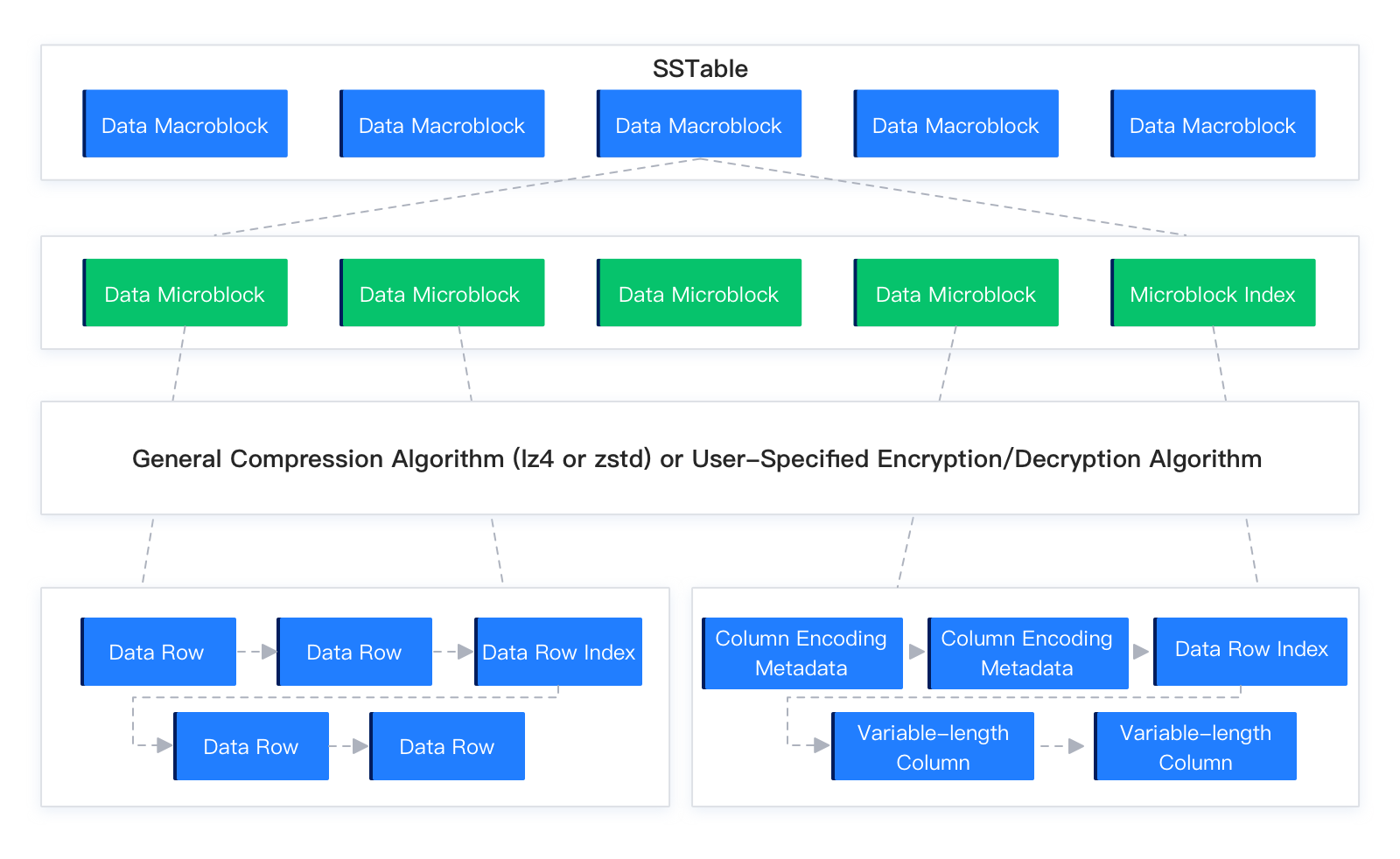
In OceanBase Database, an SSTable is the basic unit for managing data in each partition of a user table. When the MemTable reaches a certain size, OceanBase Database freezes the MemTable and dumps its data to disk. The structure after dump is called a Mini SSTable or a Minor SSTable. When a global merge occurs in the cluster, all Mini SSTables and Minor SSTables of each user table partition participate in Major Compaction based on the merge snapshot point, and a Major SSTable is generated. All SSTables are constructed in a similar way. Each SSTable consists of its metadata and a series of data macroblocks. Each data macroblock can be further divided into multiple microblocks. Based on the user table mode, microblocks can use either flat or encoding format to organize data rows.
Macroblock
OceanBase Database divides the disk into fixed-length data blocks of 2 MB, called macroblocks. A macroblock is the basic unit of write I/O for data files. Each SSTable consists of several macroblocks. The 2 MB fixed size of macroblocks cannot be changed. Dump, merge, macroblock reuse, and replication/migration all use macroblocks as the basic granularity.
Microblock
Data within a macroblock is organized into multiple variable-length data blocks of about 16 KB, called microblocks. A microblock contains several data rows and is the smallest unit of read I/O for data files. Each data microblock is compressed based on the user-specified compression algorithm during construction. Therefore, macroblocks store compressed data microblocks. When a data microblock is read from disk, it is decompressed in the background and the decompressed data is placed in the data block cache. You can specify the size of each data microblock when creating a table. The default is 16 KB. The microblock size cannot exceed the macroblock size. Example:
ALTER TABLE mytest SET block_size = 131072;Generally, a larger microblock length yields a higher data compression ratio but higher I/O read cost per operation. A smaller microblock length yields a lower compression ratio but lower random I/O read cost. Based on the user table mode, each microblock can be constructed in flat or encoding format. In the current version, only baseline data can use encoding format for microblocks. Dump data uses flat format by default for data organization.