







This topic introduces partitioning and partition types in OceanBase Database.
What is partitioning?
OceanBase Database divides table data into different partitions according to a specified strategy and stores the data physically in each partition. A table that is divided into partitions is a partitioned table, and each partition is a partition. A partitioned table can contain a maximum of 65,536 partitions in the Oracle-compatible mode of OceanBase Database.
The following figure shows a table that is divided into five partitions and distributed across two servers.
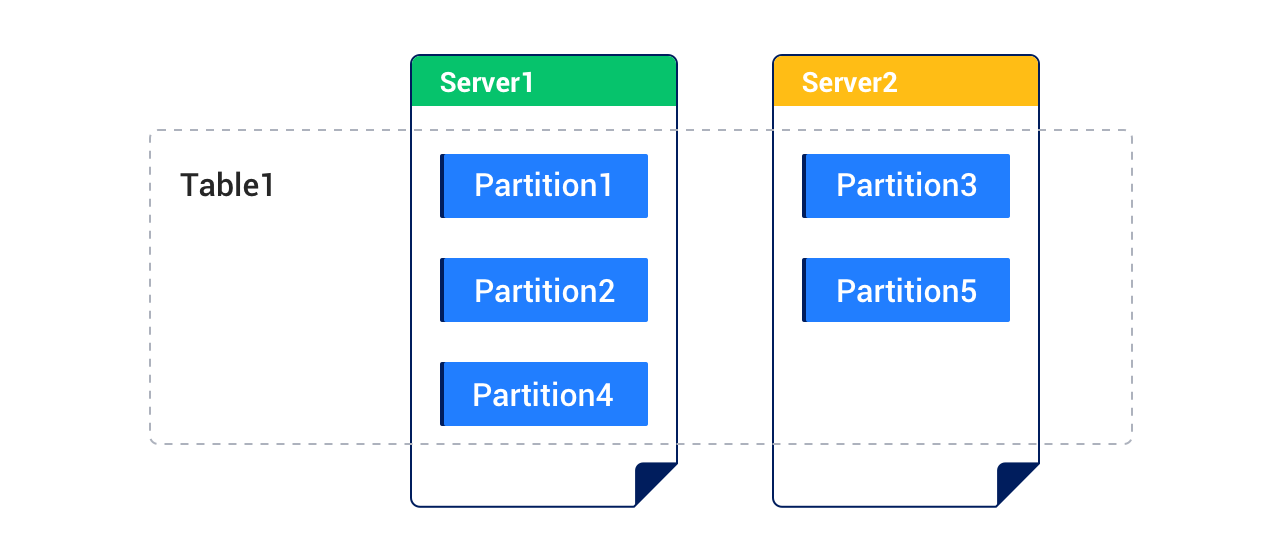
Each partition of the partitioned table shown in the preceding figure can also be divided into multiple subpartitions according to a specified strategy. A table divided into subpartitions is a subpartitioned table.
Partitioning key
The partitioning key specifies the columns that determine to which partition a row of data is mapped. To define a partitioning key for a partitioned table in the Oracle-compatible mode of OceanBase Database, you must follow these rules:
- If the table has a primary key, the partitioning key must be a subset of the primary key.
- If the table does not have a primary key, you can choose any combination of columns as the partitioning key.
Partitioning expression
The partitioning expression specifies the calculation logic that maps a row of data to a specific partition. It is based on the partitioning key.
Types of partitions
The Oracle-compatible mode of OceanBase Database supports the following partitioning types:
RANGE partitioning
- INTERVAL partitioning
LIST partitioning
HASH partitioning
Composite partitioning
RANGE partitioning
In RANGE partitioning, a table is divided into partitions based on the specified range of values for the partitioning key. You can use range partitioning to store data in which you need to query data based on range. For example, you can divide a table storing business logs by date, such as by day, week, or month.
In RANGE partitioning, the partitioning key must be a column, not an expression, and must have a data type in the following list: NUMBER, CHAR, VARCHAR2, DATE, TIMESTAMP (except TIMESTAMP WITH TIME ZONE and TIMESTAMP WITH LOCAL TIME ZONE), INTERVAL, or RAW. It cannot be BLOB or CLOB.
INTERVAL partitioning
INTERVAL partitioning is an extension of RANGE partitioning. When data exceeds the ranges of existing partitions, interval partitions are automatically created to store the new data.
INTERVAL partitioning has the following limitations:
An interval partition can only be used as a top-level partition. INTERVAL partitioning is not supported for subpartitions. In a subpartitioned table, only the top-level partition can use INTERVAL partitioning, and subpartitions must use other partitioning types.
Only the following data types are supported for the partitioning key in INTERVAL partitioning:
NUMBER,DATE,FLOAT, andTIMESTAMP.Notice
For the
NUMBERdata type, you cannot specify precision.To add partitions using
UPDATE, you must run theALTER TABLE table_name ENABLE ROW MOVEMENT;command.An interval partition cannot be rolled back in a transaction.
You cannot split or exchange partitions in a table with INTERVAL partitioning.
If you execute another DDL statement during partition auto-addition by using the
INSERTstatement, you might be prompted for a lock conflict.The maximum number of partitions in an interval partitioned table is 1,048,575.
At present, you cannot change the defined interval in an interval partitioned table.
LIST partitioning
With LIST partitioning, you can explicitly control how rows of data are mapped to partitions by specifying discrete values for the partitioning key of each partition. This is different from RANGE partitioning and HASH partitioning. LIST partitioning is suitable for partitioning a dataset of random or unsorted data.
In LIST partitioning, the partitioning key must be a column, not an expression, and must have a data type in the following list: NUMBER, CHAR, VARCHAR2, DATE, TIMESTAMP (except TIMESTAMP WITH TIME ZONE and TIMESTAMP WITH LOCAL TIME ZONE), INTERVAL, or RAW. It cannot be BLOB or CLOB.
HASH partitioning
HASH partitioning divides data by the hash value of the partitioning key. HASH partitioning is suitable for scenarios where range or LIST partitioning cannot be used. Use HASH partitioning for a table with data that has the following characteristics:
You cannot specify the partitioning keys by lists.
The sizes of data in different ranges are extremely different and manual adjustment is difficult.
Data is severely clustered after you use RANGE partitioning.
Parallel DML, partition pruning, and partition join are very important for the data.
In HASH partitioning, the partitioning key must be a column, not an expression, and must have a data type in the following list: NUMBER, CHAR, VARCHAR2, DATE, TIMESTAMP (except TIMESTAMP WITH TIME ZONE and TIMESTAMP WITH LOCAL TIME ZONE), INTERVAL, or RAW. It cannot be BLOB or CLOB.
Composite partitioning
Composite partitioning is usually used when you need to use two partitioning strategies in combination. Composite partitioning is suitable for tables with a large amount of data.
Partition names
In list and RANGE partitioning, partitions are named when tables are created. Therefore, each partition has the name that you specified when the table was created.
In HASH partitioning, if you do not specify names for partitions, the system automatically generates the names for the partitions. Each partition is named p0, p1, p2, and so on, in the order in which they are created.
The names of subpartitions in a partitioned table follow the following naming rule: ($part_name)s($subpart_name). The names of subpartitions in a partitioned table that is not in a template follow the naming rule you set.