







CREATE TYPE specifies the name and attributes of a type, as well as its methods and other properties.
Applicability
This topic applies only to OceanBase Database Enterprise Edition. OceanBase Database Community Edition provides only MySQL-compatible mode.
CREATE TYPE is used to create or replace the following type specifications:
Abstract data types (ADTs)
Independent varray types
Independent nested table types
Incomplete object types
Incomplete types are created by forward type definitions. They are called incomplete because they have names but no attributes or methods. They can be referenced by other types, enabling custom mutually referenced types. However, you must create a complete type before you can use it to define columns of tables, object columns, or nested table columns.
CREATE TYPE BODY is used to specify the code that implements the type.
Note
- If the type specification only declares attributes and not methods, you do not need to create a body.
- Using the CREATE TYPE statement, you can create nested tables and varray types, but you cannot create associative arrays. In PL blocks or packages, you can define three types of collection types.
Prerequisites
To create a type in the current schema, you must have the CREATE TYPE system privilege. To create a type in the schema of another user, you must have the CREATE ANY TYPE system privilege. You can obtain these privileges directly or through roles.
The owner of the type must be explicitly granted the EXECUTE object privilege on all other types referenced in the definition of the type, or the owner must be granted the EXECUTE ANY TYPE system privilege. These privileges cannot be obtained through roles.
If the type owner intends to grant access to other users, the owner must be granted the EXECUTE object privilege on the type with the GRANT OPTION clause, or the owner must be granted the EXECUTE ANY TYPE system privilege with the ADMIN OPTION clause. Otherwise, the type owner does not have sufficient privileges to grant access to other users.
In the current version of OceanBase Database, when you create a new table using the CREATE TABLE statement, you can define your own object types (also known as user-defined types - UDTs). However, these custom types cannot be used as the data types for columns in database tables. In other words, you cannot directly use these UDTs as part of the table structure, such as when creating a column and specifying its type as your custom object type.
However, even though you cannot use user-defined object types (UDTs) when creating tables, you can still use them to define variables, parameters, and return types for functions in PL/SQL programs.
Syntax
Note
This section only includes the syntax formats for some key nodes.
The syntax of
create_type_stmtis as follows:
The syntax of
plsql_type_spec_sourceis as follows:
The syntax of
object_type_defis as follows:
The syntax of
attr_and_element_specis as follows:
The syntax of
element_specis as follows:
The syntax of
el_element_spec_list_ccis as follows:
The syntax of
element_spec_longis as follows:
The syntax of
inheritance_final_instantiable_clauseis as follows: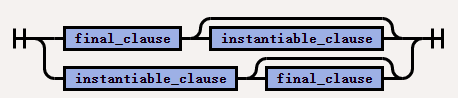
The syntax of
inheritance_overriding_instantiable_clauseis as follows: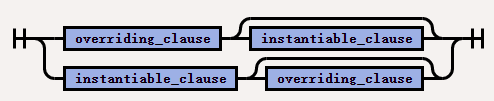
The syntax of
subprogram_specis as follows:
The syntax of
proc_or_func_specis as follows: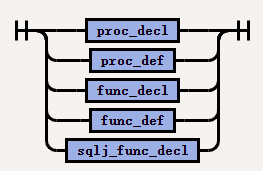
Semantics
Syntax |
Keyword or syntax node |
Description |
|---|---|---|
| create_type_stmt | OR REPLACE | Recreate the type (if it exists) and then recompile it. Users who were granted privileges before the type was redefined can still access the type without needing to regrant privileges. If any function-based indexes depend on this type, the database marks the indexes as DISABLED. |
| plsql_type_spec_source | pl_schema_name | The name of the schema containing the type. The default value is your schema. |
| plsql_type_spec_source | TYPE | The name of the ADT, nested table type, or VARRAY type. |
| plsql_type_spec_source | FORCE | If type_name exists and has type dependencies but no table dependencies, FORCE forces the statement to replace the type. (If type_name has table dependencies, the statement will fail regardless of whether FORCE is used.)
NoticeIf type |
| plsql_type_spec_source | varray_type_def | Create the type as an ordered collection of elements, where each element has the same data type. |
| plsql_type_spec_source | nested_table_type_def | Create a nested table of the specified type, named datatype. |
| object_type_def | object_type_def | Create an ADT. Variables that form the data structure are called attributes (Attributes). Member subprograms that define the behavior of the ADT are called methods (Methods). The keyword AS OBJECT is required when creating an ADT. |
| object_type_def | AS OBJECT | Create an ADT at the schema level. Such ADTs are sometimes referred to as root ADTs. |
| attr_and_element_spec | element_spec | Specify each attribute of the ADT. |
| subprogram_spec | subprogram_spec | Declares a subprogram. |
| subprogram_spec | member_or_static |
|
| subprogram_spec | proc_or_func_spec | Specifies the parameters and data types of a stored procedure or function. If the subprogram does not contain the definition of a stored procedure or function, you must define it by using the CREATE TYPE BODY command. If you are creating a subtype, the name of the stored procedure or function cannot be the same as the name of any attribute declared in the supertype chain (regardless of whether it is inherited). |
Examples
Create type examples
Example 1: Create an object type
Create an object type named person_typ with two attributes: name and age, and a member function get_age to return the age of the object.
CREATE TYPE person_typ AS OBJECT (
name VARCHAR2(50),
age NUMBER,
MEMBER FUNCTION get_age RETURN NUMBER);
Example 2: Create a VARRAY type
Create a VARRAY type named number_list that can store up to 10 numbers.
CREATE TYPE number_list AS VARRAY(10) OF NUMBER;
Example 3: Create a user-defined type (UDT)
Note
Starting from OceanBase Database V4.4.2 BP2, both OBJECT and VARRAY types of UDTs are supported as table columns (including complex nested types).
Create an OBJECT type named type_obj1.
CREATE TYPE type_obj1 AS OBJECT (a int,b int);
Complete usage example
We will use the creation of an object type to demonstrate a complete usage example.
Step 1: Create an object type
First, you need to define the object type and its member functions. Here, we assume that the member function get_age simply returns the age of the object.
CREATE OR REPLACE TYPE person_typ AS OBJECT (
name VARCHAR2(50),
age NUMBER,
MEMBER FUNCTION get_age RETURN NUMBER
);
/
CREATE OR REPLACE TYPE BODY person_typ AS
MEMBER FUNCTION get_age RETURN NUMBER IS
BEGIN
RETURN self.age;
END get_age;
END;
/
Step 2: Use the object type in PL/SQL
Create a table named
people.CREATE TABLE people (person_id NUMBER, person_name VARCHAR2(50), person_age NUMBER);In a PL/SQL program, you can declare variables of the
person_typtype to manipulate these data:DECLARE v_person person_typ := person_typ('Alice', 30); BEGIN -- Insert data into the people table. INSERT INTO people (person_id, person_name, person_age) VALUES (1, v_person.name, v_person.age); COMMIT; END; /