







This section introduces the application of table group weight balancing in daily business through several typical scenarios.
Scenario 1: Automatic aggregation when creating tables in the same database
Scenario description
You need to create a batch of user tables and manage them by database to avoid distributed read/write operations within the same database.
Procedure
First enable the automatic aggregation feature for user tables in the new database by setting the parameter enable_database_sharding_none to True, then create Database and table. The specific steps are as follows:
Connect to the MySQL-compatible tenant as the tenant administrator.
The following example shows how to connect to the database. Replace the actual values with those in your environment.
obclient -h10.xx.xx.xx -P2883 -uroot@mysql_tenant#obdemo -p***** -ASet the tenant-level parameter
enable_database_sharding_nonetoTrue.obclient(root@mysql001)[(none)]> ALTER SYSTEM SET enable_database_sharding_none = True;Create multiple databases as needed.
After each database is created, it will automatically bind to a new table group with
Sharding = 'NONE'.For more information about how to create a database, see Create a database.
Create user tables in batches by database. User tables in the same database will automatically be bound to the same log stream.
Scenario 2: Aggregating tables across multiple databases
Scenario description
You need to create a batch of user tables that are closely associated with user tables in Database A. Assume that Database A has been bound to a table group with Sharding = 'NONE'. You need to aggregate the newly created tables with the user tables in Database A to avoid distributed read and write operations across multiple databases.
Procedure
You can create a new database, Database B, and bind it to the same Sharding = 'NONE' table group as Database A. Then, create user tables in Database B. The specific steps are as follows:
Connect to the MySQL-compatible tenant as the tenant administrator.
Here is an example of the connection command. Please replace the actual environment parameters as needed.
obclient -h10.xx.xx.xx -P2883 -uroot@mysql_tenant#obdemo -p***** -AQuery the table group information to which Database A is bound.
obclient(root@mysql001)[(none)]> SELECT * FROM oceanbase.DBA_OB_DATABASES WHERE DATABASE_NAME = 'databse_name';Create a new database, Database B, and specify its table group as the same one to which Database A is bound.
CREATE DATABASE databae_name DEFAULT tablegroup = tablegroup_name;For more information about the
CREATE DATABASEstatement, see CREATE DATABASE.Create user tables in Database B. These tables will automatically be bound to the same log stream as the user tables in Database A.
Scenario 3: Re-aggregation of multiple databases
Scenario description
The user table has been created. Now, the user tables across multiple databases need to be re-aggregated to avoid distributed read and write operations across databases.
Procedure
Connect to the MySQL-compatible tenant as the tenant administrator.
Here is an example of the connection command. Please replace the parameters with those in your environment.
obclient -h10.xx.xx.xx -P2883 -uroot@mysql_tenant#obdemo -p***** -ACreate a table group with
Sharding = 'NONE'using the following statement.CREATE TABLEGROUP tablegroup_name Sharding = 'NONE';Bind the multiple databases to the newly created table group using the following statement.
ALTER DATABASE database_name tablegroup [=] tablegroup_name;For more information about the
ALTER DATABASEstatement, see ALTER DATABASE.Manually trigger partition balancing.
obclient(root@mysql001)[(none)]> CALL DBMS_BALANCE.TRIGGER_PARTITION_BALANCE();For more information about how to manually trigger partition balancing, see Manually trigger a partition balancing task.
Wait for the partition balancing task to complete. The user tables across multiple databases are then re-aggregated.
During partition balancing, you can view the progress of the balancing task by querying the following view:
obclient(root@mysql001)[(none)]> SELECT * FROM oceanbase.DBA_OB_BALANCE_JOBS WHERE JOB_TYPE = 'PARTITION_BALANCE';For more information about how to view the progress of a partition balancing task, see View the progress of a partition balancing task.
Scenario 4: Hot table group exclusivity
Scenario description
After you enable automatic aggregation of user tables for new databases (by setting the enable_database_sharding_none parameter to True), each new database automatically gets a default table group with Sharding = 'NONE' (default weight 1). For workload reasons, you want the hot table group to occupy a log stream exclusively.
Procedure
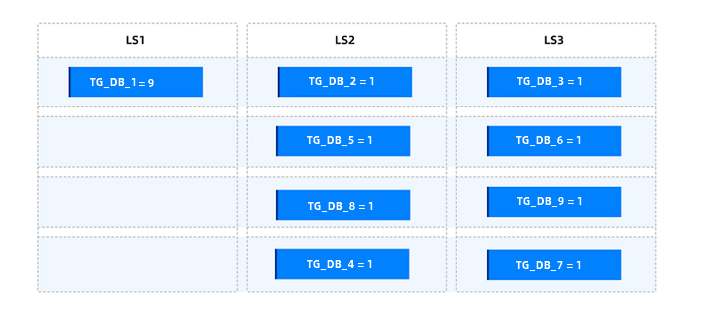
Assume the current tenant has 9 Sharding = 'NONE' table groups: TG_DB_1 to TG_DB_9. Among them, TG_DB_1 aggregates user tables from multiple databases and is identified as the hot table group. We want it to exclusively use a log stream.
Currently, the weight distribution of these table groups is as follows:
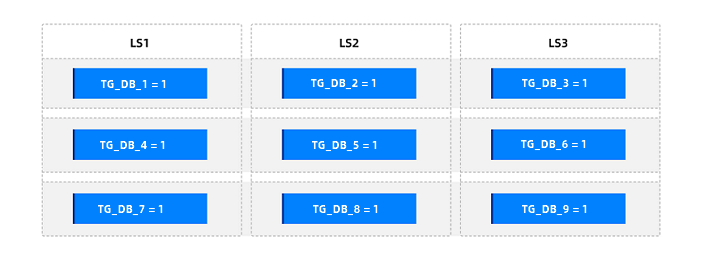
To make TG_DB_1 exclusive, we can set its weight to 100% of the total weight of all Sharding = 'NONE' table groups. Here's how to do it:
Connect to the database as the tenant administrator in MySQL-compatible mode.
Here's an example command. Please replace the parameters with those in your actual environment.
obclient -h10.xx.xx.xx -P2883 -uroot@mysql_tenant#obdemo -p***** -AVerify the total number of
Sharding = 'NONE'table groups with weights in the tenant.obclient(root@mysql001)[(none)]> SELECT * FROM oceanbase.DBA_OB_OBJECT_BALANCE_WEIGHT;Set the weight of the hot table group
TG_DB_1.Assuming the query result shows 9
Sharding = 'NONE'table groups with weights, the SQL statement to set the weight ofTG_DB_1is as follows:obclient(root@mysql001)[(none)]> CALL DBMS_BALANCE.SET_TABLEGROUP_BALANCE_WEIGHT(9,'TG_DB_1');Manually trigger partition balancing.
obclient(root@mysql001)[(none)]> CALL DBMS_BALANCE.TRIGGER_PARTITION_BALANCE();For more information about how to manually trigger partition balancing, see Manually trigger a partition balancing task.
Wait for the partition balancing task to complete. The user tables across multiple databases are then re-aggregated.
During partition balancing, you can view the progress of the balancing task by querying the following view:
obclient(root@mysql001)[(none)]> SELECT * FROM oceanbase.DBA_OB_BALANCE_JOBS WHERE JOB_TYPE = 'PARTITION_BALANCE';For more information about how to view the progress of a partition balancing task, see View the progress of a partition balancing task.
After partition balancing completes, the weight distribution of these table groups is as follows:
Scenario 5: Table groups distributed by weight
Scenario description
After you enable automatic aggregation of user tables for new databases (by setting the enable_database_sharding_none parameter to True), each new database automatically gets a table group with Sharding = 'NONE' (default weight 1). For workload reasons, you want to spread out table groups that have more user tables, larger data volume, or higher access traffic.
Procedure
Assume that the current tenant has 9 Sharding = 'NONE' table groups named TG_DB_1 to TG_DB_9. Among them, TG_DB_1, TG_DB_2, and TG_DB_4 have a large amount of data, but not enough to occupy a dedicated log stream.
Currently, the weight distribution of these table groups is as follows.
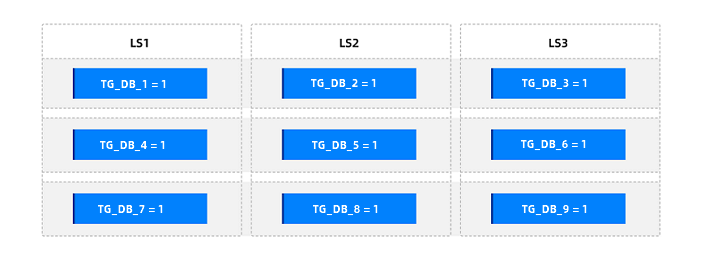
You can set the weights of TG_DB_1, TG_DB_2, and TG_DB_4 to the middle weight, which is 50% of the total number of Sharding = 'NONE' table groups. The specific steps are as follows:
Connect to the database as the tenant administrator of the MySQL-compatible tenant.
Here is an example of the connection command. Please replace the parameters with those in your environment.
obclient -h10.xx.xx.xx -P2883 -uroot@mysql_tenant#obdemo -p***** -AQuery the total number of
Sharding = 'NONE'table groups with weights.obclient(root@mysql001)[(none)]> SELECT * FROM oceanbase.DBA_OB_OBJECT_BALANCE_WEIGHT;Set the weights of
TG_DB_1,TG_DB_2, andTG_DB_4.Assuming that the total number of
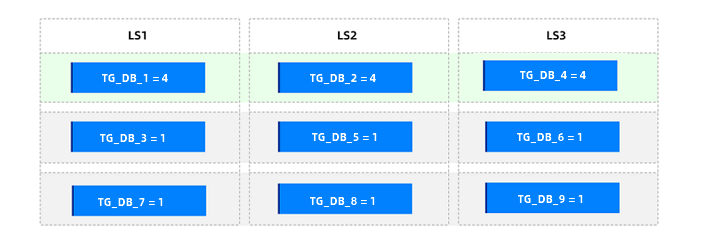
Sharding = 'NONE'table groups with weights is 9, the weights ofTG_DB_1,TG_DB_2, andTG_DB_4are set to 4 (the result of 50% * 9 rounded down). The statements are as follows:obclient(root@mysql001)[(none)]> CALL DBMS_BALANCE.SET_TABLEGROUP_BALANCE_WEIGHT(4,'TG_DB_1');obclient(root@mysql001)[(none)]> CALL DBMS_BALANCE.SET_TABLEGROUP_BALANCE_WEIGHT(4,'TG_DB_2');obclient(root@mysql001)[(none)]> CALL DBMS_BALANCE.SET_TABLEGROUP_BALANCE_WEIGHT(4,'TG_DB_4');Manually trigger partition balancing.
obclient(root@mysql001)[(none)]> CALL DBMS_BALANCE.TRIGGER_PARTITION_BALANCE();For more information about how to manually trigger partition balancing, see Manually trigger a partition balancing task.
Wait for the partition balancing task to complete. The user tables across multiple databases are then re-aggregated.
During partition balancing, you can view the progress of the balancing task by querying the following view:
obclient(root@mysql001)[(none)]> SELECT * FROM oceanbase.DBA_OB_BALANCE_JOBS WHERE JOB_TYPE = 'PARTITION_BALANCE';For more information about how to view the progress of a partition balancing task, see View the progress of a partition balancing task.
After balancing completes, the weight distribution of these table groups is as follows:
Scenario 6: Application of table group weights for SHARDING = 'NONE' and SCOPE = 'ZONE'
Scenario description
If your business requires a group of user tables to be aggregated in a specific zone to avoid distributed read/write operations across zones, you can add these user tables to a table group with SHARDING = NONE and SCOPE = ZONE. If you need to configure multiple SHARDING = NONE and SCOPE = ZONE table groups with significantly different access traffic, you can set table group weights.
Procedure
If you have already created user tables and need to modify table group properties or configure SHARDING = NONE and SCOPE = ZONE table groups, follow these steps:
Connect to the MySQL-compatible tenant as the tenant administrator.
The following example shows how to connect to the database. Replace the actual values with those in your environment.
obclient -h10.xx.xx.xx -P2883 -uroot@mysql_tenant#obdemo -p***** -ASet the tenant-level parameter
enable_transfertoFalseto disable the Transfer feature.obclient(root@mysql001)[(none)]> ALTER SYSTEM SET enable_transfer = False;For each group of user tables, create a table group with
SHARDING = 'NONE'andSCOPE = 'ZONE', and add the corresponding tables to the table group.Here are example statements for creating a table group and adding tables to it:
obclient(root@mysql001)[test]> CREATE TABLEGROUP TG_DB_1 SHARDING = 'NONE', SCOPE = 'ZONE';obclient(root@mysql001)[test]> ALTER TABLEGROUP TG_DB_1 ADD tbl1,tbl2;For detailed instructions on creating a table group and adding tables to it, see Create a table group and Add tables to a table group.
Set weights for the hot table group.
Here is an example statement:
obclient(root@mysql001)[test]> CALL DBMS_BALANCE.SET_TABLEGROUP_BALANCE_WEIGHT(10,'TG_DB_1');For detailed instructions on setting table group weights, see Set table group weights.
Select the zones for the hot table group and ensure that the table with the smallest
table_idin the hot table group is located in the target zone. You can manually execute the Transfer Partition operation to adjust the partition leader to the target zone. The selection criteria for the zones are as follows:Each hot table group selects a different zone to avoid hotspots aggregating in the same zone.
Most tables in the hot table group are already in the target zone to reduce the number of partitions that need to be transferred to align the partition leaders to the same zone.
(Optional) For other non-hot table groups, adjust the table with the smallest
table_idto be in the same zone as most of the tables in the table group.Set the tenant-level parameter
enable_transferback toTrueto re-enable the Transfer feature.obclient(root@mysql001)[(none)]> ALTER SYSTEM SET enable_transfer = True;Manually trigger a partition balancing task.
obclient(root@mysql001)[(none)]> CALL DBMS_BALANCE.TRIGGER_PARTITION_BALANCE();For detailed instructions on manually triggering a partition balancing task, see Manually trigger a partition balancing task.
After the task is executed successfully, partitions in each table group automatically align with the table that has the smallest
table_idfirst, and then weight, quantity, and disk balancing are performed across zones.