The physical standby database feature is an important part of OceanBase Database's high availability solutions. It provides high availability, data protection, disaster recovery, and other important capabilities for your key applications.
Physical standby database introduction
The Physical Standby Database solution provides a quasi-real-time hot backup for the production database of OceanBase Database. When the primary database becomes unavailable as scheduled or unexpectedly, for example, a majority of replicas fail, the standby database takes over services and provides lossless and lossy disaster recovery to minimize service downtime and reduce possible data loss. In lossless disaster recovery, the recovery point objective (RPO) is 0. In lossy disaster recovery, the RPO is greater than 0.
In OceanBase Database earlier than V4.1.0, the Physical Standby Database solution is provided in the form of primary/standby clusters. Two cluster roles exist: primary cluster and standby cluster. All user tenants in the primary cluster are primary tenants, and all user tenants in a standby cluster are standby tenants. The standby cluster automatically synchronizes the tenant change operations performed in the primary cluster.
Starting from OceanBase Database V4.1.0, the physical standby database is provided in the form of tenant-level primary/standby. The primary or standby role is attributed to tenants, which are classified as primary tenants and standby tenants. Clusters no longer have the concept of primary or standby roles and are only containers that host tenants. The primary tenant is a business tenant that supports complete database capabilities, including queries, data manipulation language (DML) operations, and data definition language (DDL) operations. A standby tenant only provides disaster recovery and read-only services. The tenant-level Physical Standby Database high availability solution comprises one primary tenant and multiple standby tenants.
Note
The Physical Standby Database solution of OceanBase Database is based on tenants. Therefore, in the product documentation of the current version of OceanBase Database, a primary database is equivalent to a primary tenant, and a standby database is equivalent to a standby tenant.
The physical standby database mainly uses the log transfer service and log storage service to transmit and store logs, and uses the log replay service to ensure data consistency between the primary and standby tenants. Specifically:
The log transfer service synchronizes redo logs between the primary and standby tenants in real time.
Currently, OceanBase Database physical standby database provides only asynchronous synchronization mode.
The log storage service provides highly available and reliable log storage and read/write capabilities.
Logs written by a standby tenant to the log storage service are applied by the log replay service to the MemStore in real time or with a delay. This ensures data consistency between the primary and standby tenants.
You can use the Physical Standby Database solution together with the multi-replica disaster recovery, arbitration-based disaster recovery, physical backup and recovery, and change data capture (CDC) features of OceanBase Database to meet your various data protection and availability requirements.
Physical standby database deployment plan
In a physical standby database deployment, you can have one primary tenant and one or more standby tenants. The primary tenant provides read and write services for your business. The standby tenant synchronizes business data written in the primary tenant from redo logs in real time.
You can deploy a primary tenant and its standby tenants in multiple OceanBase clusters that are close to each other or far apart, or in the same OceanBase cluster. In other words, an OceanBase cluster can contain only primary tenants or standby tenants, or both. Tenant names, resource specifications, configurations, and locality settings of the primary and standby tenants can be different.
In addition, the primary and standby tenants can be single-replica tenants, multi-replica tenants, or tenants with arbitration-based high availability. Different deployment modes provide different levels of replica-based disaster recovery for tenants.
The tenant-based Physical Standby Database solution is highly flexible. You can deploy the solution in the following typical modes:
A cluster contains only primary or standby tenants
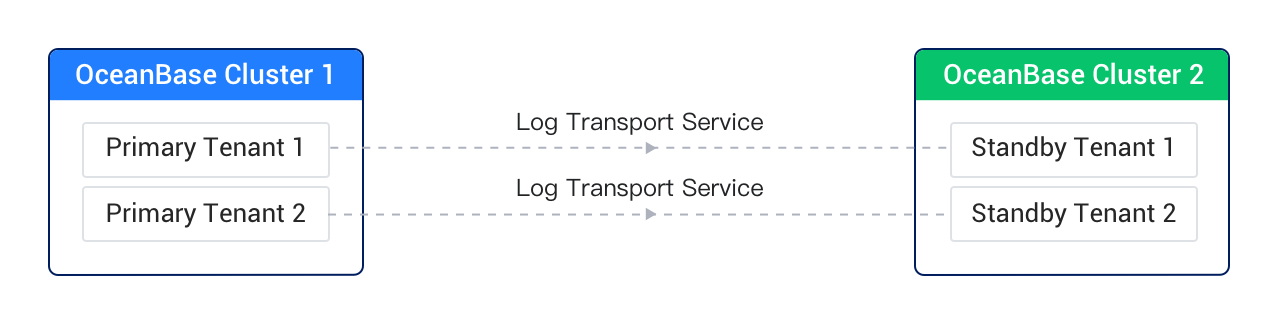
In this deployment mode, you have multiple OceanBase clusters, and each OceanBase cluster contains business tenants that are either all primary tenants or all standby tenants.
This deployment mode is the most typical one. You can use the physical standby database feature for geo-disaster recovery and other required scenarios.
The following figure shows the architecture of this deployment mode.
A cluster contains both primary and standby tenants
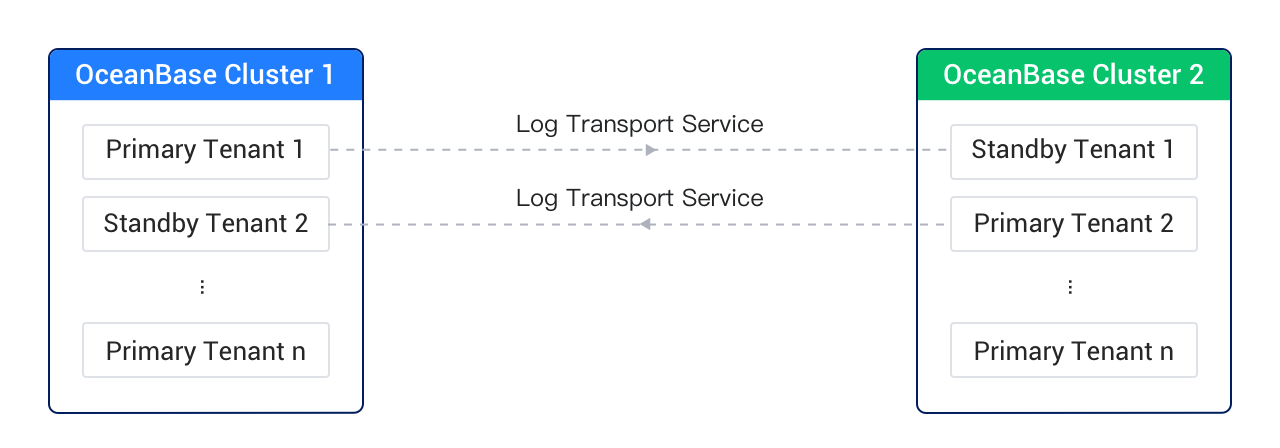
In this deployment mode, you deploy multiple OceanBase clusters, and each cluster contains both primary and standby tenants or only primary tenants.
The following typical scenario is taken as an example:
Your business requires read/write and geo-disaster recovery in two different regions. Therefore, you must deploy both primary and standby databases in each region. In other databases' primary/standby solutions, you must deploy two (or more) clusters in each of the two regions, and clusters across regions serve as primary and standby for each other.
In OceanBase Database's deployment, you only need to deploy one cluster in each of the two regions. Tenant-level primary/standby can meet your business requirements and greatly simplify the management complexity of database clusters. The following figure shows the architecture of this deployment mode.
Primary and standby tenants belong to one cluster
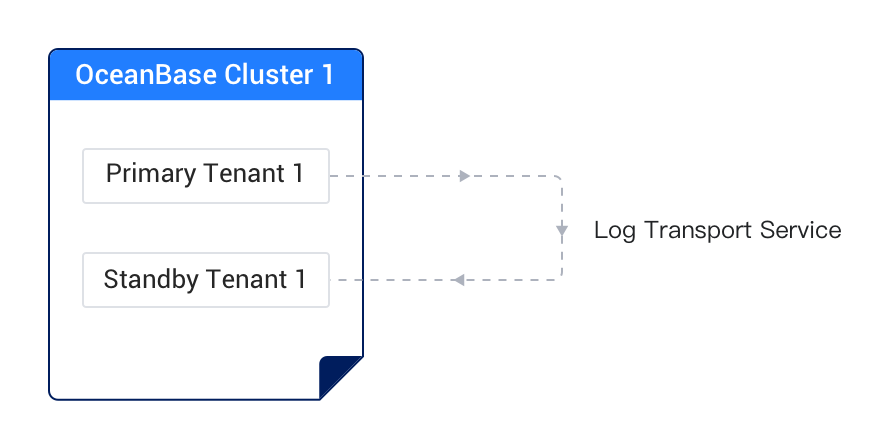
In this deployment mode, you deploy only one OceanBase cluster, and the primary tenant and one or more standby tenants belong to the same OceanBase cluster.
You can use this deployment mode in the following scenario:
Assume that you need to retain a database snapshot in a business tenant before a business upgrade. You can create a standby tenant for real-time synchronization in the same cluster of the business tenant and suspend the synchronization to the standby tenant before the business upgrade. Then, you can perform any read/write operations, for example, starting a business upgrade, in the primary tenant, without affecting the standby tenant. If the business upgrade fails, you can delete the primary tenant and set the standby tenant to a new primary tenant. You can change the name of the new primary tenant to that of the original primary tenant so that access to the proxy remains unchanged.
The following figure shows the architecture of this deployment mode.